
PenPower ePaper SignPad
4.2Editor score
One-click signature transfer
Timestamp and printed name
Multiple document format support
Digital signature pads for PC turn paper-based approvals into focused, computer-connected workflows. The strongest choices pair a comfortable signing surface with dependable stylus tracking, clear on-screen feedback, and compatibility with the software and documents your organization already uses. Models range from compact drawing tablets to dedicated signature-capture devices built for business counters.
This guide compares all ten products across signature capture, display quality, portability, connectivity, stylus behavior, supported document workflows, and practical business features. It includes compact general-purpose drawing tablets, dedicated Topaz and Wacom signature hardware, and the PenPower ePaper SignPad, with particular attention to how each option fits a PC-based signing process.
Each review identifies the product's strongest capabilities, meaningful limitations, and best-fit user, while the comparison table provides a faster way to scan the category. Ratings and availability can change over time, and current prices should always be checked on the product page before purchase.
4.2Editor score
4.9Editor score

4.8Editor score
As an Amazon Associate we earn from qualifying purchases.
The comparison below covers ten PC-compatible signing devices, from compact stylus tablets to dedicated LCD signature pads. The key differences are display type, signature-capture method, interface, portability, and the degree of built-in workflow support.


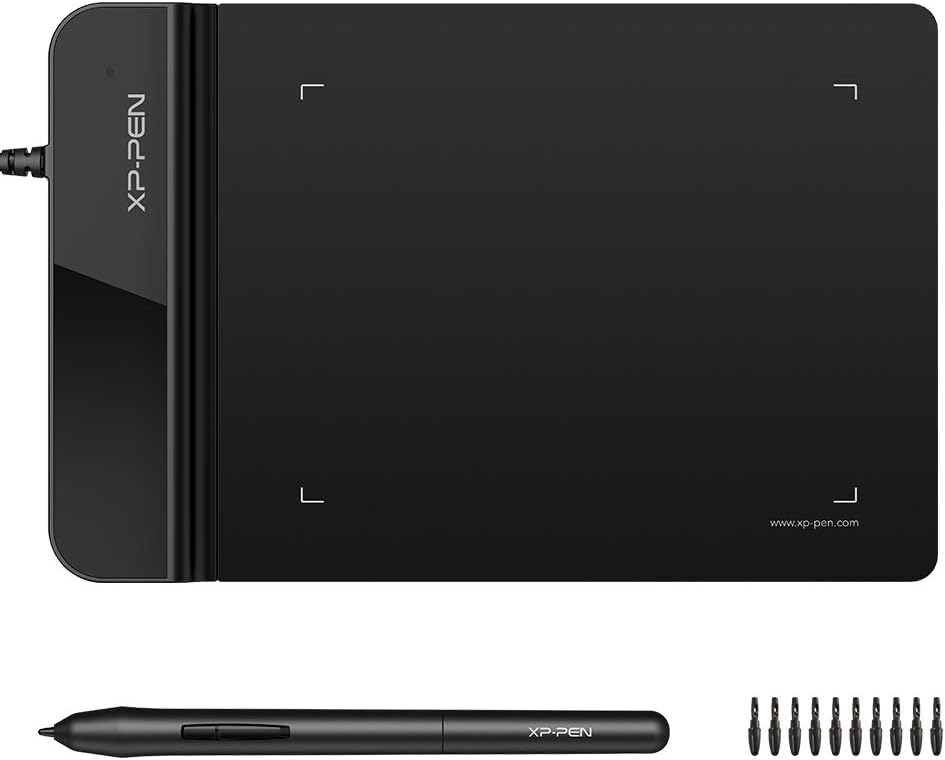


The XPPen StarG640 is a general-purpose drawing tablet with a 4.3 rating and enough capability to serve as a straightforward PC signature pad. Its 6 x 4-inch active area provides more signing room than the smallest drawing tablets, while the battery-free PN01 pen removes the inconvenience of charging or pairing a stylus. It is a sensible option for users who want one device for signatures, handwritten notes, diagrams, sketches, and ordinary pointer navigation.
We may earn a commission when you buy through this link, at no additional cost to you.
Its main advantage is flexibility. The StarG640 supports Mac, Windows, and Chromebook systems, making it useful for remote work, online teaching, and document review. It works with applications including Microsoft Word, PowerPoint, OneNote, Zoom, and Xsplit, allowing a user to sign or annotate documents without rebuilding an established software routine. The 2-millimeter profile also makes it easy to carry between a home office, classroom, or meeting space.
The important trade-off is that this is not a dedicated forensic signature-capture system. It has no built-in LCD for displaying prompts or a final signature preview, and its listed features do not mention biometric capture, encrypted storage, or integration with regulated signing platforms. Organizations that require a legally defensible audit trail, identity checks, or certified document workflows should choose a purpose-built device and confirm software compatibility before buying.
For individual users, educators, and small businesses that need occasional electronic signatures alongside annotation and drawing, the StarG640 offers a balanced combination of portability and usefulness. It is a particularly sensible choice when a separate graphics tablet would also be needed. For high-volume or compliance-led signing, however, a dedicated LCD model is the more appropriate route.
The StarG640 can replace a mouse for handwritten annotations, mind maps, diagrams, sketches, and teaching demonstrations. That broader use makes it a better long-term productivity accessory than a narrow signature-only peripheral when the same person also works with visual content.
At a stated thickness of 2 millimeters, the tablet is easy to place in a laptop bag. Its battery-free stylus also avoids one common source of interruption: a depleted pen during an important meeting or remote presentation.
We may earn a commission when you buy through this link, at no additional cost to you.
The PenPower ePaper SignPad has a 4.2 rating and focuses on reducing the steps between writing a signature and placing it into a computer document. A handwritten signature can be sent to the computer with one tap, while the resulting mark can be used with PDF, Word, Excel, JPG, PNG, and TIFF files. It is designed for quotes, contracts, insurance forms, internal approvals, memos, and collaborative sketching.
We may earn a commission when you buy through this link, at no additional cost to you.
The built-in timestamp and printed name add useful context to each signature. These details can improve traceability and lend a more credible appearance to a signed document, although the product description does not claim certified digital-signature cryptography. A major advantage is its broad platform support: the listed applications include Outlook Calendar, the desktop, WhatsApp, Messenger, Slack, Zoom, WeChat, Line, Viber, and KakaoTalk.
Organizations running enterprise, EMR, ERP, CRM, or specialized document-management systems need to read the integration note carefully. SDK and custom integration services are available upon request but are not included in the standard package. That means the standard purchase is best for individual workflows or existing common desktop applications, while specialized environments may require additional technical evaluation and services.
This is a compelling option for a small team that values simple signature insertion over dedicated forensic hardware. It suits users who sign in Word, PDF, or image files regularly and want timestamps and printed names without configuring a large signing platform. It is less appropriate where regulated electronic-signature validation or specialized back-end integration is mandatory.
Adding a timestamp and printed name to every signature makes the final document easier to interpret. These details help identify when a mark was created and connect it to a named signer, supporting better internal recordkeeping.
Compatibility with Zoom, Slack, WhatsApp, and other listed communication platforms makes the SignPad useful beyond formal contracts. Users can quickly share sketches, approvals, notes, or visual ideas without routing everything through a specialized document interface.
We may earn a commission when you buy through this link, at no additional cost to you.
The renewed Topaz T-LBK462-BSB-R SignatureGem is a dedicated business signature pad with a 4.0 rating. It offers virtual serial connectivity over USB, a customizable LCD, a rugged signing area, and high-quality biometric and forensic capture. Those characteristics distinguish it from general drawing tablets and make it more appropriate for organizations that need evidence-oriented signature capture.
We may earn a commission when you buy through this link, at no additional cost to you.
The LCD is one of the most important features for a dedicated device. Users can see the document, signer instructions, prompts, or signature area on the pad rather than relying entirely on a separate monitor. Its compact size and low weight also suit counters and temporary signing stations where a permanent desktop installation is unnecessary.
Because it is a renewed listing, buyers should examine the condition and included accessories carefully. The product information also does not specify a warranty term, so the two-year factory warranty associated with another Topaz model should not be assumed here. Software compatibility should be confirmed before purchase, particularly for an organization using a specialized document-management or compliance platform.
This model is a good choice for businesses that value forensic capture and a professional signing surface but do not need the top-tier status offered by newer SigLite hardware. It is less attractive to casual users who only need a quick signature in a word-processing document, because those tasks can be performed with simpler tablets.
The listed biometric and forensic capture capabilities give this pad a more formal role than a standard graphics tablet. That makes it relevant to workflows where the organization wants signature data captured with additional evidence and traceability.
The combination of a small body, low weight, LCD customization, and USB virtual serial connectivity makes the device suitable for recurring business use. It can be deployed where a signer's attention should remain on the visible prompt and signature area.
We may earn a commission when you buy through this link, at no additional cost to you.
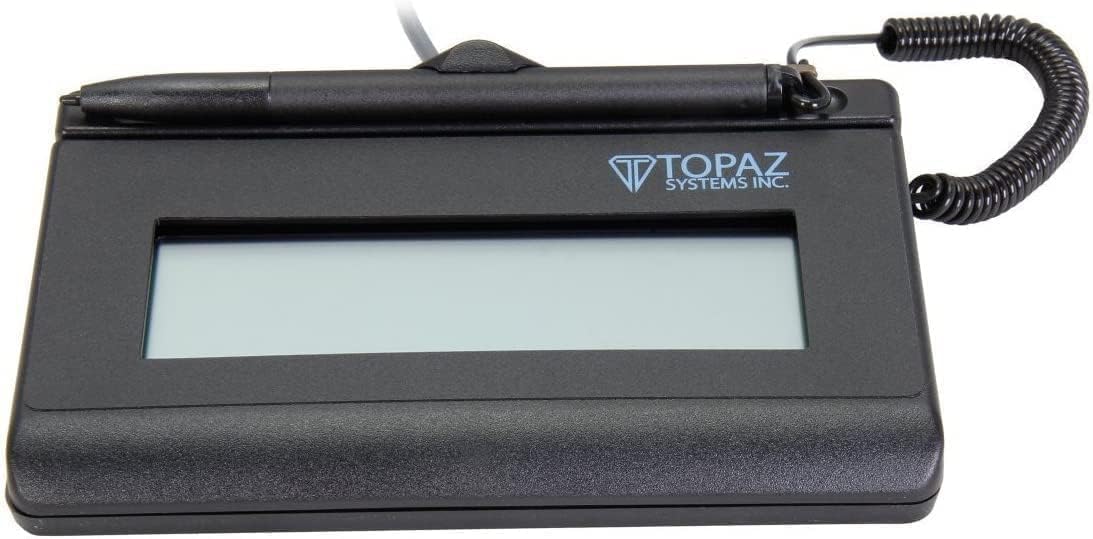
The Topaz T-S460-HSB-R earns a 4.4 rating and offers a balanced approach to dedicated electronic signing. It connects through USB, displays the signature on the computer screen, and uses high-quality capture techniques. Its non-backlit design is the principal compromise, but that limitation is easier to judge in context than the missing features of many general-purpose alternatives.
We may earn a commission when you buy through this link, at no additional cost to you.
This model is well suited to routine contracts, approvals, and customer-facing forms where a visible signature display is useful but sophisticated forensic features are not essential. The on-screen presentation helps the signer understand what is being captured and reduces the need to alternate between a document window and a separate application.
The non-backlit screen may be less convenient in dim environments, and the product listing does not explicitly identify biometric or forensic capture. It also provides fewer customization details than the SignatureGem family. Nevertheless, its straightforward USB interface and high rating indicate a dependable middle ground for organizations that do not need every specialized feature.
For a buyer who wants a dedicated PC signature pad without moving to a premium model, this is one of the most straightforward choices in the guide. It suits small offices, service counters, and regular internal approvals. Buyers should verify the dimensions, display content, and compatibility with their intended signing application before finalizing the purchase.
The T-S460-HSB-R shows the captured signature on the computer screen, giving the signer immediate visual confirmation. That feedback is valuable in a customer-facing process where clarity and a short interaction are priorities.
A USB interface keeps the physical connection uncomplicated. For PC-based workflows, this makes the pad easier to introduce than devices that require specialized docking or more involved connectivity arrangements.
We may earn a commission when you buy through this link, at no additional cost to you.
The XPPen G430S is a compact 4 x 3-inch drawing tablet with a 4.2 rating. It supports 8192 pressure levels, uses a battery-free PN01 stylus, and can handle signatures, teaching notes, sketching, painting, and ordinary computer navigation. Its 2-millimeter thickness and 266 RPS report rate make it a responsive option for users who prioritize portability.
We may earn a commission when you buy through this link, at no additional cost to you.
The included stylus works without charging, which is especially helpful for quick sessions, online teaching, and mobile work. Users can switch the tablet between right- and left-hand modes, and the package includes replacement nibs and a pen clipper. Compatibility with Windows and Mac supports many PC-based creative and office workflows.
Its most significant limitation is the 4 x 3-inch active area. That may be enough for a short signature, but it offers less room for handwritten notes or a large signature than the StarG640, PenPower, and dedicated 1×5-inch LCD pads. Mac users may also need an OTG adapter because the included interface is micro USB to USB-A, and compatibility with specialized EMR or signature systems should be verified before purchase.
The G430S is best for a compact, inexpensive secondary device used for brief signatures, annotations, remote instruction, or portable drawing. It is less suitable for legal documents with a large signature block or for an organization requiring a visible LCD. Buyers should confirm their computer's port and the target signing software before installation.
The 8192 pressure levels support finer variation in line weight, while the stated 266 RPS report rate helps lines flow smoothly. Those specifications make the tablet more useful for drawing and teaching than a basic mouse replacement.
The 4 x 3-inch active area and 2-millimeter body make the G430S highly portable. The tradeoff is limited writing room, so users who regularly sign long documents may prefer a larger or dedicated display model.
We may earn a commission when you buy through this link, at no additional cost to you.
The Wacom Signature Tablet STU-500 has a 3.2 rating, the lowest in this comparison, but it remains a purpose-built device with a distinctive transreflective monochrome display. The 5-inch screen uses reflective TFT technology and does not require backlighting, providing high contrast and easier viewing in bright business environments.
We may earn a commission when you buy through this link, at no additional cost to you.
At 640 x 480 resolution, the display can show text, images, soft keys, and menu buttons. Its 4.0 x 3.0-inch signing area provides enough room for a conventional handwritten signature. Wacom's EMR technology means the electronic pen does not require batteries, while the hardened glass surface is designed to resist scratches during frequent use.
The device is described as capturing legally binding electronic handwritten signatures, and optional data encryption is available. These features make it relevant to formal public-counter and business environments. However, the lower rating indicates that some buyers may find aspects of the experience or modern expectations less appealing than with the newest LCD alternatives.
The STU-500 is most compelling where bright ambient lighting is common, durability is a priority, and an established Wacom EMR workflow is already in use. A buyer considering it should compare its display, connection details, and required signing software with newer options, but its reflective screen and maintenance-free pen remain meaningful advantages.
The transreflective display remains easy to view in bright conditions because it does not depend on a backlight. That can make the STU-500 especially practical at public counters and other brightly lit service locations.
EMR removes the need to charge or maintain a battery-powered stylus, while hardened glass protects the signing area. Together, these details support repeated use in a professional signing environment.
We may earn a commission when you buy through this link, at no additional cost to you.
The Topaz SignatureGem T-LBK462-BSB-R is a dedicated 1×5-inch backlit LCD signature pad with a 4.0 rating. It provides a rugged signing area, customizable display, small size and weight, and high-quality biometric and forensic capture. Compared with a general graphics tablet, it offers a more formal and controlled signing experience.
We may earn a commission when you buy through this link, at no additional cost to you.
Backlighting is useful when the surrounding workspace is dim or lighting conditions vary. The LCD can be customized, allowing the business application to present relevant instructions, prompts, or visual information directly in front of the signer. A 1×5-inch display also gives users a clear, dedicated surface on which to sign.
The USB/virtual serial interface should be checked against the intended PC and signing application. While this is advantageous in many professional environments, an organization with a tightly controlled software stack will want confirmation before deploying several units. As with any dedicated signature device, software and workflow requirements matter as much as the physical hardware.
This model is best for recurring business signing where screen visibility, customization, and forensic capture are important. It is less appropriate for someone who only needs to paste a quick signature into an occasional Word document, but it offers a more professional interface for customer contracts, approvals, and structured forms.
The backlit LCD provides visible guidance in dimmer workspaces, an advantage over the non-backlit Topaz T-S460-HSB-R. It also makes on-screen prompts easier for signers to read without adjusting the brightness of a separate monitor.
A customizable display can help a signing program present context directly on the pad. The exact software capabilities available to an organization should be confirmed during compatibility planning.
We may earn a commission when you buy through this link, at no additional cost to you.
The Topaz T-S460-HSB-R three-pack is built for organizations that need more than one signing station. With a 4.3 rating, it includes three SigLite 1×5 signature pads, each designed for PC use through USB. The package is aimed at business deployment rather than a single home-office accessory.
We may earn a commission when you buy through this link, at no additional cost to you.
Buying three matching units can simplify rollout across a reception counter, support desk, or several employee stations. The modern styling and ambidextrous orientation are useful for diverse users, while a consistent hardware model reduces the complexity of managing separate device types. The 1×5 LCD provides a dedicated area for signatures and on-screen prompts.
The listing provides less detail about capture technology, display customization, and forensic functions than the individual Topaz listings. Buyers should therefore not automatically assume that every advanced feature associated with other SignatureGem or SigLite models is present here. Compatibility with the intended business software and document workflow remains the priority.
This pack is an efficient choice for a company standardizing on one PC signing setup across multiple users. A single signer may find it excessive, but a multi-station organization gets a coordinated group of devices from one purchase. It is especially practical for businesses that want dedicated signature hardware without researching a different model for each counter.
Three matching pads make it easier to standardize signing stations. A common form factor can simplify staff training, placement, and ongoing support compared with managing several unrelated devices.
The product is explicitly listed for business use, compatible with PCs, and connected through USB. That makes the package most relevant to offices and service environments with several connected workstations.
We may earn a commission when you buy through this link, at no additional cost to you.
The Topaz SigLite T-LBK460-HSB-R has the highest rating in the guide at 4.9, making it a strong choice for buyers who want a professional dedicated signature device. Its third-generation touch-screen signing surface, backlit 1×5 LCD, USB connection, and high-quality biometric and forensic capture create a focused alternative to general-purpose drawing tablets.
We may earn a commission when you buy through this link, at no additional cost to you.
The LCD is customizable, so a compatible business application can present prompts and signing context directly to the user. Backlighting improves visibility in variable lighting, and the larger 1×5 format provides more usable space than a compact 4 x 3-inch drawing tablet. High-quality forensic capture is especially relevant for organizations that need signature data to carry more weight than an inserted image.
This particular product is a renewed listing, so physical condition and included accessories should be checked. The listing does not state a warranty period, meaning the two-year coverage associated with the T-L460-HSB-R should not be assumed. As with all specialized devices, the target signing application and compliance requirements should be verified before deployment.
Despite the renewed status, the 4.9 rating and combination of screen, portability, and forensic functions make this the most balanced premium choice in the guide. It suits banks, offices, professional services, and counter-based organizations that need a dedicated PC signing experience. Individual users who only need an occasional mark can get more value from a compact graphics tablet.
A dedicated LCD puts the signature itself at the center of the interaction. That makes the device feel more purpose-built for approvals than a tablet used mainly as a pointer, while the backlit screen keeps the signing area visible.
The listed biometric and forensic capture features suit organizations that need a structured, defensible signature process. Confirming that the target software records and validates the relevant data correctly remains essential.
We may earn a commission when you buy through this link, at no additional cost to you.
The Topaz SIGLITE T-L460-HSB-R combines a 1×5-inch LCD electronic signature pad with HID USB connectivity, signing software, and a two-year factory warranty. Its 4.8 rating places it near the top of the group and makes it a strong premium option for businesses that want a complete signature hardware package rather than only a peripheral.
We may earn a commission when you buy through this link, at no additional cost to you.
HID USB is designed to offer straightforward connection to a PC, while the LCD provides a dedicated area on which the signer can see the document or signature interface. Including software can be valuable for a new deployment, reducing the need to assemble a separate signing application from the outset.
Premium does not mean universal compatibility. A company with an established EMR, CRM, ERP, or document-management platform should verify that the included software and device communication method fit the existing environment. In some cases, the PenPower's available custom integration route or another Topaz model's virtual serial interface may align better with the organization's requirements.
This is the best pick for a business that values warranty coverage and a bundled software solution in a dedicated LCD pad. It is particularly attractive for new office deployments and customer-facing counters. Buyers with complex specialized systems should obtain a compatibility review before purchasing, while casual users may find a general-purpose tablet more economical.
The stated two-year factory warranty is a meaningful advantage for a device intended for regular business use. It provides a clearer support framework than renewded or listings that do not state their coverage.
The inclusion of signing software makes this package more self-contained. New users can evaluate the combined setup immediately, while established organizations can determine whether the included tools complement or replace their current application.
We may earn a commission when you buy through this link, at no additional cost to you.
The right PC signature pad depends on how often you sign, what software you use, and how much evidence or document control the workflow requires. The following factors help separate simple convenience features from professional signing infrastructure.
A dedicated signature pad places a small LCD in front of the user, allowing prompts, document content, and the signature itself to remain visible. This is useful in customer-facing environments because the signer does not have to look back and forth between a separate monitor and the capture surface. A general drawing tablet is more flexible for notes, sketches, diagrams, and mouse replacement, but it usually does not provide a built-in display. Choose a dedicated LCD model when a guided signing experience is central to the workflow. Choose a drawing tablet when the device will serve multiple creative or annotation tasks and occasional signatures are the priority.
Basic signature insertion and forensic capture are different levels of functionality. A product that transfers a handwritten mark into a document may be sufficient for personal approvals, informal records, and routine small-business use. Products that advertise biometric and forensic capture are designed to collect signature data with additional traceability, which can matter in formal business processes. The phrase legally binding may also depend on the surrounding software, workflow, and legal context rather than the hardware alone. Buyers should ask what data is captured, how it is stored, and whether it can be exported to the organization's records system.
The active writing area determines how comfortably a person can sign. Compact 4 x 3-inch drawing tablets are portable but may feel cramped for long names or larger signature blocks. A 1×5-inch LCD offers a more conventional dedicated signing surface, while the Wacom STU-500 provides a 4.0 x 3.0-inch area within a larger 5-inch display. Consider the average signer's handwriting, whether the pad will be used in portrait or landscape orientation, and whether prompts must share the screen. A larger visible surface is generally more comfortable, but portability can be just as important for a signer who moves between locations.
USB is the common connection method across these products, but the underlying communication method can differ. HID USB, virtual serial USB, and a general tablet connection may behave differently within a managed PC environment. Compatibility with the operating system is only the first step; the intended document, CRM, ERP, EMR, or signing application must also support the device. XPPen models have explicit driver and port notes, while the PenPower SignPad offers separate integration services for specialized systems. Before buying, check the required operating system, USB port type, driver policy, and any approval workflow the device must support.
A backlit LCD provides bright, consistent visibility in dim rooms, while a non-backlit or reflective display can remain clear in strong ambient light. The Wacom STU-500 uses transreflective technology specifically to offer a high-contrast view without backlighting. The Topaz SignatureGem and SigLite models in this guide include backlit displays, while the T-S460-HSB-R is explicitly non-backlit. Consider where the pad will be used most often. A bright office, reception desk, medical counter, and home workspace each have different lighting needs, and the best choice is the one that keeps on-screen instructions and the signature area consistently visible.
Portability matters for mobile signers, traveling professionals, classroom instructors, and temporary service desks. Thin XPPen tablets are easy to carry, while dedicated Topaz and Wacom devices offer larger displays in more formal footprints. Organizations deploying several units should also consider consistency, support, physical security, and the availability of matching hardware. The three-pack Topaz option is designed for multiple PC stations, whereas single-pad products suit one user or one counter. A large organization may prefer standardization, while a mobile worker may prioritize weight, thickness, and battery-free stylus operation.
A battery-free stylus is convenient because it removes charging and pairing from the routine. Both XPPen products use battery-free pens, and the Wacom STU-500 uses maintenance-free EMR. Dedicated Topaz devices include an integrated electronic pen designed for a controlled signing surface. Pen tracking, pressure behavior, replacement nibs, and the signing surface all affect comfort. Users who write extensively may value pressure sensitivity, while everyday signers may prioritize a stable, direct writing experience. The surface should also be checked for durability, especially in high-volume counters where scratches or wear could affect usability.
A warranty can be especially important for a business peripheral that is used daily. The Topaz T-L460-HSB-R includes a stated two-year factory warranty and software, while renewed listings may have different terms or condition. PenPower includes broad support for common file types and communication applications, but specialized enterprise integrations are not part of the standard package and require separate discussion. The most capable hardware is not necessarily the most useful device if it cannot integrate with the organization's established process. Check what is in the box, what support is available, and whether the included software is sufficient before choosing a premium model.
Begin by confirming the PC operating system, USB port, and signing application before connecting the pad. Install the required driver or device utility, then open the target document and place the signature or approval area in the correct position. Test the device with a sample file before using it for a final document, and verify that the signer's name, timestamp, and any on-screen prompts appear where expected.
For a clean signing session, place the pad on a stable, level surface with the LCD angled toward the signer. Avoid placing loose objects on the active area, and keep the pen or stylus in its holder when it is not in use. On backlit models, check that the display is visible from the signer's position. On reflective models such as the Wacom STU-500, make sure bright ambient light does not create glare across the screen.
Clean the device according to the manufacturer's instructions, using a soft, dry or lightly dampened cloth and avoiding harsh liquid or abrasive cleaners. Protect the signing surface from sharp objects, and do not press excessively hard on the LCD. For general drawing tablets, keep the pen nib in good condition and confirm that the tablet's USB connection is secure before transporting it. Dedicated business units should also follow the software provider's recommended backup, audit, and data-retention procedures.
A dedicated signature pad is optimized for capturing a signature and presenting it through a business signing application. It often includes an LCD, structured prompts, and evidence-oriented capture features. A drawing tablet is a broader input device for drawing, annotating, sketching, teaching, and replacing a mouse. It can be a good choice for occasional signatures, but it usually does not provide the same guided on-screen workflow as dedicated signature hardware.
The XPPen StarG640 and G430S are the most explicitly portable choices because both are only 2 millimeters thick and use battery-free styluses. The StarG640 offers a larger 6 x 4-inch active area, while the G430S has a more compact 4 x 3-inch surface. If a built-in LCD is required, the small size and weight of the Topaz SignatureGem and SigLite devices make them more practical than bulkier desktop displays.
Not always, because reflective displays can remain clear in bright conditions. The Wacom STU-500 uses transreflective monochrome technology designed for easy viewing without backlighting. A backlit model is often more convenient in dim rooms, and it can make on-screen prompts easier to read. The best choice depends on the lighting where the pad will normally be used.
The PenPower ePaper SignPad explicitly supports Microsoft Word and can place a handwritten signature into supported documents. The XPPen StarG640 and G430S also support Microsoft Office applications such as Word, PowerPoint, and OneNote. Dedicated Topaz and Wacom devices require compatible signing software, so buyers should confirm the exact application and integration method before purchasing.
Forensic capture refers to recording a signature with additional data and characteristics intended to support verification and traceability. Several Topaz models in this guide advertise high-quality biometric and forensic capture. Legal enforceability also depends on the document, software, consent process, and applicable rules, so hardware alone should not be treated as a complete compliance solution.
A renewed pad can provide good value if the device is properly inspected, functional, and covered by acceptable support. This guide includes renewed Topaz models with strong customer ratings, but the condition and included accessories should be checked carefully. The warranty terms of a renewed listing may differ from those of a new unit, so buyers should review the listing and seller information before ordering.
HID USB is generally designed for straightforward PC peripheral use, while virtual serial can suit specialized business devices and managed integration environments. The deciding factor should be the signing software and IT requirements rather than the connector label alone. Confirm the operating system, driver policy, application support, and any deployment restrictions with the software provider or internal IT team.
They can, but compatibility depends on the device, application, and integration method. The PenPower SignPad states that SDK and custom integration services are available for enterprise, EMR, ERP, CRM, and document-management systems, but those services are not included in the standard package. A buyer should describe the target system and workflow to the vendor before purchasing to avoid choosing a pad that cannot feed data into the existing process.
The PenPower ePaper SignPad is the most accessible option for quick signatures, timestamps, printed names, and broad file-format support. The Topaz SigLite T-LBK460-HSB-R is the strongest dedicated choice, combining a backlit 1×5-inch LCD, forensic capture, compact construction, and the highest rating in the guide. For organizations seeking a premium package with HID USB, included software, and a two-year factory warranty, the Topaz SIGLITE T-L460-HSB-R stands out.
Prioritize the workflow rather than the specification sheet. Choose the XPPen StarG640 or G430S if the device will also support teaching, drawing, or annotation; choose the PenPower when convenient signature transfer and metadata are the main goals; and choose a dedicated Topaz or Wacom model for a guided LCD experience. If evidence capture, custom prompts, enterprise software, or multiple workstation deployment matters, verify those requirements before ordering.
Finally, check the current listing, package contents, warranty, driver requirements, and software compatibility at the time of purchase. Ratings and prices can change, and renewed products can differ in condition from unit to unit. A few minutes of compatibility planning can prevent a costly surprise and ensure the selected digital signature pad fits the PC workflow it is intended to support.