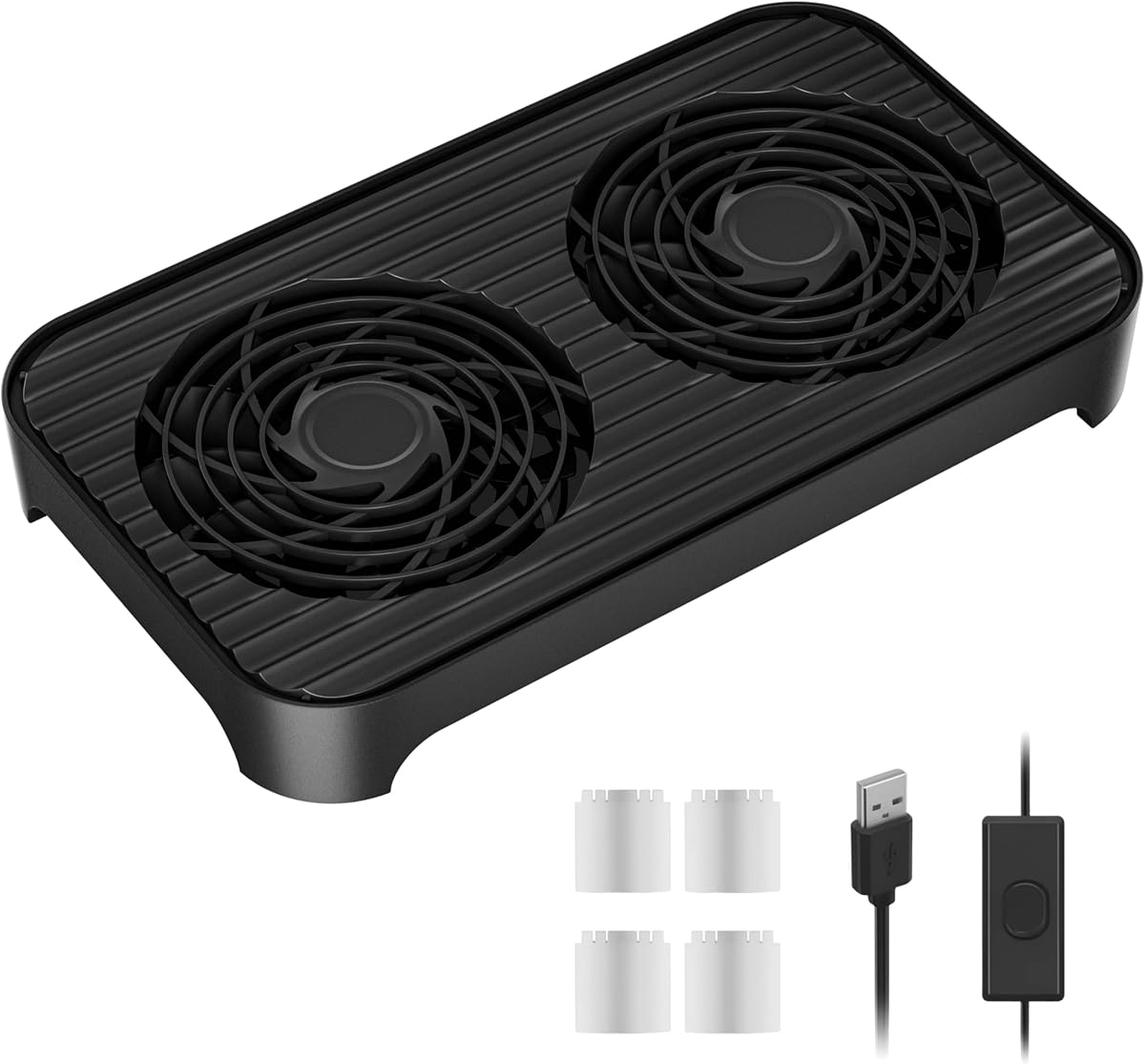
X4 Quiet USB Cooling Fan
4.1Editor score
Dual 140mm fan design
18dB claimed operation
Stackable USB construction
This guide compares 10 quiet GPU cooling solutions, including USB fans, CPU coolers, AIO liquid coolers, and a hybrid GPU water block.
Quiet GPU cooling is about controlling heat without adding distracting fan noise, rattling, or complicated installation. The right solution depends on whether you need more airflow around a console, a replacement graphics-card fan, a dedicated GPU water block, or broader system cooling that reduces the workload placed on a graphics card.
This guide compares ten options using their published specifications, compatibility, acoustic figures, cooling design, and intended use. It covers USB-powered auxiliary fans, tower and AIO CPU coolers, a replacement GPU fan, and a custom-loop GPU block, while clearly distinguishing products designed for different cooling tasks.
Each selection reveals what kind of quiet cooling it can deliver and where it fits best. Ratings and specifications reflect the supplied product information, and current prices can change, so compare recent listings, dimensions, connector types, and socket or card compatibility before buying.
4.1Editor score

4.8Editor score

3.5Editor score
The table below compares each product by cooling type, acoustic design, power or connection method, and best-fit hardware. Because the list includes dedicated GPU parts, CPU coolers, and universal USB fans, matching the device comes before comparing raw cooling specifications.


The Thermalright Peerless Assassin 120 Vision MAX pairs a dual-tower air cooler with two PWM fans and a magnetic 5-inch IPS display. Its 4.8 rating reflects a particularly strong overall feature set for builders who want substantial CPU cooling, system monitoring, and coordinated lighting without installing a liquid-cooling loop. It is not a GPU block, but stronger CPU cooling can help maintain a calmer overall system by keeping processor heat and associated case airflow demands under control.
We may earn a commission when you buy through this link, at no additional cost to you.
The cooling hardware is built around six 6mm copper heatpipes using AGHP Gen 5.0 technology, a nickel-plated micro-engraved copper base, and a dual-tower arrangement. The design is intended to preserve clearance for tall memory heat spreaders and graphics cards, while the 164mm height fits mainstream ATX cases. Two PWM fans move air through both towers, and the offset arrangement should appeal to compact builders who cannot accommodate a large footprint without considering neighboring components.
The display is the product's defining feature. It has a stated resolution of 480 by 854, supports real-time system-parameter monitoring, and works with TRCC software for static or dynamic backgrounds and video playback. A 5V 3-pin ARGB interface lets the lighting follow motherboard software, while display power and data use the motherboard's 9-pin USB header. This combination is polished, but it also makes the cooler more complex and dependent on correct software, cable, and header installation.
The cooler is best for a powerful gaming or workstation build in which the user values coordinated aesthetics, monitoring, and strong air cooling. Check the 164mm height against the case specification, confirm the available 9-pin USB header, and review RAM and GPU clearance. The stated AMD installation requirement to use the motherboard's original backplate is also important. For those constraints, the Vision MAX stands out as a feature-rich choice that can support a quiet, well-balanced system.
A full custom loop is unnecessary when this dual-tower design can provide robust CPU heat transfer, and the dual-fan arrangement gives the builder more airflow flexibility than a compact single-tower model. The screen adds useful information during troubleshooting, and the ARGB lighting can be synchronized with the rest of a gaming system. It is a strong all-around pick for a build that wants visual features without giving up a conventional air-cooled installation.
The dual-tower heatpipe layout is designed for meaningful processor cooling while the offset structure accounts for tall RAM and nearby graphics hardware. That balance makes it useful in systems where CPU heat could indirectly contribute to higher case and GPU temperatures.
The magnetic IPS display provides real-time monitoring and customizable backgrounds through TRCC. ARGB lighting uses a 5V 3-pin connection, so software support and header availability deserve confirmation before installation.
We may earn a commission when you buy through this link, at no additional cost to you.
The Thermalright Assassin X120 Refined SE is a single-tower CPU air cooler built around four 6mm heatpipes and a 120mm TL-C12C PWM fan. It carries a 4.7 rating, and its 148mm height, 66.17 CFM maximum airflow, and stated maximum noise level of 25.6dB(A) make it a practical option for a quiet desktop or compact gaming system where full-size liquid cooling would be excessive.
We may earn a commission when you buy through this link, at no additional cost to you.
AGHP heatpipe treatment is intended to reduce the effect of gravity on heatpipe performance in vertical or horizontal installations. The heatsink is made from aluminum and includes metal mounting hardware for supported Intel and AMD platforms. The supplied fan uses a four-pin PWM connection, allowing the motherboard to vary its speed according to temperature and load. A single tower also leaves more open space around the socket than a dual-tower design.
The main limitation is scope. This is a CPU cooler, not a graphics-card cooler, and it should not be presented as a direct replacement for a GPU fan or water block. Its relevance to quiet GPU cooling is indirect: efficient processor cooling can reduce the total heat load inside a compact chassis, and the open layout around a tower cooler can support the airflow path needed by a graphics card. Those benefits depend on the case and the location of the GPU.
Choose this cooler when you want a straightforward, low-maintenance way to control processor heat and keep fan noise modest. Verify the case supports a 148mm CPU cooler, confirm the socket, and plan the fan orientation so it draws cool air from the case intake and exhausts warm air through a rear or top vent. It is a balanced recommendation for builders who value straightforward installation and a compact footprint.
At 148mm tall, the Assassin X120 Refined SE is more manageable than many large dual-tower designs. The single 120mm fan and four-heatpipe tower offer a simple path to efficient processor cooling without a pump, radiator, or coolant.
The included TL-C12C fan reaches a stated maximum of 1550 RPM and no more than 25.6dB(A). PWM control allows the motherboard to reduce fan speed during lighter workloads, which can make the perceived noise lower than the maximum specification suggests.
We may earn a commission when you buy through this link, at no additional cost to you.
The be quiet! Pure Loop 3 360mm is a large all-in-one liquid cooler intended for demanding applications and slightly overclocked processors. It holds a 4.4 rating and combines a 360mm radiator, three Pure Wings 3 120mm PWM fans, and a pump designed for smooth, quiet operation. Within this guide, it represents a system-level cooling solution rather than a dedicated graphics-card block.
We may earn a commission when you buy through this link, at no additional cost to you.
The pump uses a six-pole, three-phase motor to maintain smooth movement at different speeds, helping reduce unwanted sound. The three radiator fans use a closed-loop motor function intended to keep their speed steady despite changing resistance. Their stated maximum noise is 30.9dB(A), while a funnel-shaped air outlet is designed to improve airflow across the radiator fins. Together, these features target powerful, sustained cooling without allowing fan control to become erratic.
Cable management is another strength. The daisy-chain function allows the three fans to connect in series, reducing the number of separate motherboard headers required. Flexible tubes simplify routing, and the accessible refill port makes topping up the cooler more convenient. These practical details can make a large AIO easier to integrate, although the radiator still demands a chassis with 360mm mounting support and adequate space for tubes and fittings.
This cooler is most appropriate for a high-performance system in a large case, particularly when the CPU is under sustained load and the builder wants a large radiator without assembling a custom loop. It can contribute to a quieter overall PC by removing CPU heat efficiently, but users should not mistake it for a direct GPU cooling upgrade. Verify socket compatibility, radiator placement, pump orientation, and available fan headers before purchasing.
The smooth three-phase pump motor and closed-loop radiator fans support stable operation under changing load. The result is designed for strong cooling with controlled sound, particularly when the CPU remains busy during demanding applications.
Daisy-chained fan connections reduce header requirements and cable clutter. Flexible tubing and an accessible refill port improve installation and maintenance compared with a conventional custom liquid loop.
We may earn a commission when you buy through this link, at no additional cost to you.
The Cooler Master 240 Core II is a 240mm all-in-one liquid CPU cooler with a dual-chamber pump and Infinity Mirror ARGB lighting. Its 4.6 rating and stated focus on Ryzen 7 and Ultra 7 processors make it a strong fit for modern gaming systems that want liquid cooling and coordinated visuals without moving to a full-size 360mm radiator.
We may earn a commission when you buy through this link, at no additional cost to you.
The dual-chamber design is intended to improve water flow toward the CPU hotspot, helping cooling performance on supported AMD and Intel platforms. A PWM fan adjustable from 650 to 1750 RPM lets the system balance airflow and acoustics, while the Infinity Mirror creates a lighting effect that can be customized through motherboard control. The included CryoFuze thermal paste has a stated operating range of -50°C to 250°C.
Installation is designed to be straightforward, with compatible mounting brackets for AM5, AM4, LGA1851, and LGA1700 platforms. A 240mm radiator is generally easier to position than a 360mm unit and can suit more mid-size cases, though the exact case layout still matters. The reflective lighting and liquid-cooling hardware also cost more than a basic tower cooler and require appropriate motherboard software and headers.
The Core II is a good option for a colorful gaming PC whose processor needs more cooling headroom than a compact air cooler offers. It can help keep overall case temperatures and fan speeds under control, though it does not cool a graphics card directly. Confirm radiator clearance, socket hardware, pump-radiator orientation, and ARGB software support before installation. For compatible systems, it offers an attractive balance of performance, dimensions, and visual design.
The dual-chamber pump is engineered to move coolant efficiently toward the CPU hotspot. This supports sustained processor performance while allowing the system to maintain a comparatively tidy 240mm AIO footprint.
The Infinity Mirror ARGB design adds a prominent visual element and can be controlled through compatible motherboard software. Builders who do not need extensive lighting customization may find that a plain tower cooler offers a more straightforward alternative.
We may earn a commission when you buy through this link, at no additional cost to you.
The PLD09220S12H is a replacement graphics-card fan for several EVGA GeForce RTX 3070, RTX 3080, RTX 3080 Ti, RTX 3090, and RTX 3090 Ti FTW3 models. It carries a 4.4 rating and is one of the few products in this guide designed specifically to sit inside a compatible GPU cooler. It is a service and repair option rather than a universal GPU-cooling upgrade.
We may earn a commission when you buy through this link, at no additional cost to you.
The fan measures approximately 87 by 87 by 22mm, runs on DC 12V, draws 0.55A, and uses a four-pin header. Those electrical details are important because a connector that looks similar may not match the card's physical layout, cable routing, or mounting points. The supplied compatibility list includes EVGA RTX 3070 FTW3 Ultra Gaming, RTX 3080 Ti FTW3 Ultra Gaming, RTX 3080 FTW3 Ultra Gaming, RTX 3090 FTW3 Ultra Gaming, and RTX 3090 Ti FTW3 Ultra Gaming.
Because no acoustic rating is supplied, quiet performance cannot be quantified from the available information. A replacement fan may restore airflow to a card that has accumulated dust, but the product page does not establish that it is quieter than the original equipment. Buyers should therefore treat the key advantages as correct model fit and replacement capability rather than a guaranteed noise reduction.
This is the sensible choice if a supported EVGA card's fan has failed or become noisy and you want to restore cooling. Confirm the exact GPU model, board revision, physical fan position, connector, and mounting arrangement before ordering. It is not suitable for arbitrary RTX cards, and a new card is a better option when the GPU's cooling assembly, heat pipes, or shroud are damaged. With careful model matching, however, it can return a selected card to service.
The fan's compatibility is narrow and card-specific. Verify the full graphics-card model rather than relying only on the RTX generation, because different EVGA coolers can use different fan sizes, mounting points, and connector arrangements.
Replacing a failed fan can restore airflow to a compatible card and potentially eliminate rattles or grinding caused by a damaged bearing. The product does not claim a specific noise level, so quieter operation should not be assumed without comparison.
We may earn a commission when you buy through this link, at no additional cost to you.
The X4 Quiet USB Cooling Fan is a portable auxiliary cooler made from two 140mm high-pressure fan assemblies. It holds a 4.1 rating and is intended for routers, laptops, receivers, amplifiers, DVRs, consoles, and computer cabinets. Its practical advantage is that it adds targeted airflow without requiring a case modification, making it relevant to quiet GPU cooling when a console or compact gaming system needs extra ventilation.
We may earn a commission when you buy through this link, at no additional cost to you.
The fans use an 11-blade design and upgraded hydraulic bearings. At a stated 850 RPM plus or minus 10, the product claims 65.8 CFM airflow and an 18dB operating level. It also states that device temperatures can fall by 30 percent in 30 seconds under the tested conditions. That figure should be understood as a specific product claim rather than a guarantee for every room, device, workload, or ambient temperature.
Four transparent raised foot pads provide a second stacking layer, allowing a phone, power bank, or modem to sit above the fan. Two USB interfaces let the unit draw power while leaving another port available, and the included 31.5-inch cable improves placement flexibility. A one-touch switch provides straightforward control. The ABS construction, shock-absorbing pads, stated support for 20 kilograms, and claimed 40,000-hour lifespan reinforce its positioning as a reusable desktop accessory.
This is the top budget choice for a user who wants quiet, directed airflow around a console, router, laptop, or compact PC without installing a dedicated GPU cooler. It cannot cool a GPU chip directly or control the speed of an internal graphics-card fan. Instead, it can move ambient air across vents or an intake area. Position it carefully, use a stable surface, and monitor the target device to ensure the airflow actually reaches its intake path.
The dual 140mm format can provide meaningful airflow around equipment that lacks an accessible fan control. Its USB power and compact design make it easy to reposition as the location of a console or router intake changes.
Raised feet create a usable upper layer for a phone, power bank, or modem. The arrangement can organize a small entertainment or networking setup while keeping the cooling fan's footprint relatively compact.
We may earn a commission when you buy through this link, at no additional cost to you.
The Thermalright TL-C12C X3 is a three-pack of 120mm PWM fans designed for cases, CPU coolers, and radiators. It has a 4.6 rating, a maximum speed of 1550 RPM, 66.17 CFM airflow, and a stated maximum noise level of 25.6dB(A). While it does not cool a GPU directly, a matched case-fan set can improve the pressure and circulation around a graphics card if it is installed in compatible intake and exhaust positions.
We may earn a commission when you buy through this link, at no additional cost to you.
The four-pin PWM interface allows the motherboard to adjust fan speed according to temperature, which can reduce noise during lighter workloads. Each fan uses an S-FDB bearing intended to limit blade vibration and maintain stable operation. Soft silicone corner pads further reduce vibration and contact noise. Together, these features are relevant to quiet builds because fans are often more noticeable as sources of tonal noise or cabinet rattle than from airflow alone.
The included fans measure 120 by 120 by 25mm, use 0.20A current, and provide 1.53mm H2O of static pressure. That pressure figure makes the set potentially suitable for moving air through a CPU heatsink or radiator as well as a conventional case position. The mounting and connector requirements still matter, and a builder should not connect more PWM devices than the motherboard or fan controller can support.
The X3 is best for a quiet PC build that already has compatible hardware but needs intake, rear, or radiator airflow. Install an intake fan near the graphics card and an exhaust fan where warm air can leave the chassis, then use PWM curves to keep noise low under moderate loads. It is less appropriate for a console or a system with no suitable mounting points, and it does not replace a direct GPU cooling solution.
Using the same fan model across intake and exhaust positions gives a builder a consistent acoustic profile. A tuned PWM curve can also keep the three fans at lower speeds when the graphics card and processor are not under heavy load.
S-FDB bearings and silicone corner pads address mechanical noise sources as well as airborne fan sound. These details can reduce rattles and vibration transferred into a case or desk.
We may earn a commission when you buy through this link, at no additional cost to you.
The Noctua NL-LC1-36 is a high-performance 360mm AIO CPU cooler with a 4.8 rating. It combines an Asetek Emma V2 closed-loop platform, three NF-A12x25 G2 PWM fans, and a pump designed for low noise and low vibration. Although it is a CPU cooler, efficient processor heat removal can contribute to a quieter system by reducing the need for aggressive case-fan speeds around a powerful graphics card.
We may earn a commission when you buy through this link, at no additional cost to you.
The pump's three-layer acoustic structure and tuned-mass damper effect are intended to suppress sound and vibration across the cooler. The three 120mm fans use a speed offset for acoustic optimization, meaning they do not necessarily all operate at exactly the same speed. A 360mm radiator also provides more heat-transfer surface than smaller AIO units, making the cooler appropriate for sustained workloads and processors that benefit from additional thermal headroom.
The SecuFirm2 mounting system supports several modern platforms and includes offset options for AMD AM5 and Intel LGA1851. The listed processor examples include Ryzen 9800X3D, 9900X3D, 9950X3D, and 9950X, along with Core Ultra 285K, 265K, and 245K. The package includes NT-H2 thermal paste and a paste guard for AM5, while an optional auxiliary fan is sold separately.
This cooler is best for a near-silent workstation or high-end gaming system with a roomy chassis and a focus on refined acoustics. Confirm 360mm radiator support, including the position of the pump, tubes, and memory, before ordering. It is not a graphics-card cooler, and the optional auxiliary fan would still need separate purchase. For a compatible build, the NL-LC1-36 offers a strong combination of cooling surface, mounting flexibility, and noise-focused design.
A three-layer acoustic structure and tuned-mass damper approach target the mechanical noise that liquid coolers can introduce. This focus is especially relevant in a quiet workspace where pump noise is easier to notice.
The SecuFirm2 system covers numerous sockets and offers offset mounting for AM5 and LGA1851. The included NT-H2 paste and AM5 paste guard simplify processor installation.
We may earn a commission when you buy through this link, at no additional cost to you.
The CORSAIR XG3 RGB Hybrid GPU Water Block is a purpose-built graphics-card cooling component for compatible RTX 5080, RTX 5070 Ti, and RTX 5070 GPUs. Its 3.5 rating is the lowest in this group, but its narrow category should be considered: it is the only listed product that directly adds a water block to a supported graphics card, and it requires a custom liquid-cooling system rather than a simple USB or case-fan installation.
We may earn a commission when you buy through this link, at no additional cost to you.
The hybrid approach directly cools the GPU and VRAM through the custom loop while a dedicated fan chills the graphics-card circuit board and VRM areas. This broader coverage is a meaningful distinction for builders who want the card integrated into a coordinated liquid-cooled system. A built-in temperature sensor supports precise monitoring, while 18 individually addressable RGB LEDs provide customizable lighting through CORSAIR iCUE.
The cooling design comes with significant integration requirements. The block needs compatible tubing, a pump, a reservoir arrangement, and a radiator; the iCUE LINK ecosystem also requires a System Hub, which is sold separately. Users must plan the loop carefully for tube routing, fittings, airflow, and leak prevention. While the product can produce a visually striking result, it is less accessible than replacing a failed GPU fan or adding an auxiliary USB cooler.
Choose the XG3 for an enthusiast custom-loop build with a supported graphics card and a willingness to manage the complete liquid system. Confirm the exact card variant, PCB and cooler layout, block fit, and available iCUE LINK ports before purchasing. Its direct cooling and integrated lighting make it a specialized premium solution rather than a general-purpose quiet cooler. For a simpler build, an auxiliary fan or matched case-airflow set is likely more appropriate.
The water block transfers heat from the GPU and nearby VRAM into the custom coolant loop. A separate fan extends cooling coverage to the circuit board and VRM region.
The integrated temperature sensor and iCUE control allow the cooling system to be managed with other supported components. A compatible iCUE LINK System Hub is required for the intended chained connection.
We may earn a commission when you buy through this link, at no additional cost to you.
The CORSAIR XG3 RGB Hybrid GPU Water Block is the premium dedicated GPU option in this guide, rated 3.5 and designed for RTX 5080, RTX 5070 Ti, and RTX 5070 graphics cards. It is intended for builders creating a custom liquid-cooled system and should not be confused with a plug-and-play cooler or a general case fan.
We may earn a commission when you buy through this link, at no additional cost to you.
Its hybrid cooling arrangement directly routes the GPU and VRAM through the custom loop and uses a dedicated fan to cool the graphics-card circuit board and VRM. This can create a more comprehensive cooling solution for a compatible card, particularly when it is integrated with a properly sized radiator. The built-in temperature sensor allows the system to monitor the cooling hardware through iCUE, while the 18 addressable LEDs add a coordinated visual element.
The trade-offs are installation complexity and ecosystem requirements. A custom block cannot operate without a pump, reservoir or compatible arrangement, radiator, tubing, and fittings. The iCUE LINK System Hub needed for the intended chained connectivity is also sold separately. Although its noise depends partly on the selected fans, pump, radiator, and loop configuration, the design gives an experienced builder more direct control over GPU cooling than a standard replacement fan.
This block is best for an enthusiast who has already chosen custom liquid cooling and wants the supported graphics card to become a central part of that build. Verify the exact GPU variant, mounting hardware, tubing orientation, and available headers before ordering. If the goal is simply to reduce noise from a console, router, or standard desktop GPU, a dedicated USB fan or improved case airflow will be far simpler. For the correct custom-loop builder, however, the XG3 offers a distinctive and comprehensive solution.
The block is designed specifically for listed RTX 50-series models, allowing the graphics card to participate in a custom coolant loop. This provides a more integrated approach than adding a separate auxiliary fan beside the card.
Eighteen individually addressable LEDs and iCUE LINK connectivity coordinate the block with a broader custom system. The required hub is separate, so full functionality should be planned before installation.
We may earn a commission when you buy through this link, at no additional cost to you.
The right choice depends on the hardware you actually want to cool, the space available, the level of maintenance you accept, and how much noise the installation can realistically avoid. Start with the device, then consider acoustics, power, dimensions, and control.
A dedicated GPU cooler, a CPU cooler, a case fan, and an auxiliary USB fan solve different problems. The CORSAIR XG3 directly cools a supported graphics card through a custom loop, while the PLD09220S12H replaces a fan in specified EVGA models. The ELUTENG and X4 products move ambient air around external or compact devices. CPU coolers such as the Assassin X120, TL-C12C X3, Pure Loop 3, Core II, Peerless Assassin Vision MAX, and NL-LC1-36 can improve overall chassis conditions but should never be mistaken for direct GPU blocks.
Exact model matching is essential. The replacement GPU fan is limited to the listed EVGA FTW3 variants, and the XG3 block is intended for specified RTX 5080, RTX 5070 Ti, and RTX 5070 models. For CPU coolers, confirm the socket, including whether an offset mounting option or the motherboard's original backplate is required. USB fans are broadly usable but still need an available power source and sufficient clearance around the target device.
Noise ratings are most useful when they describe the same operating condition. The TL-C12C and Assassin X120 fans are listed at up to 25.6dB(A), the X4 claims 18dB, and the Pure Loop 3 fans list 30.9dB(A) at maximum speed. These are not perfectly equivalent measurements, and actual noise depends on speed, airflow, mounting, vibration, and the rest of the PC. The replacement GPU fan and XG3 do not provide a comparable universal noise figure.
A larger radiator has more heat-transfer surface than a smaller unit, while a tower cooler's heatpipes move processor heat into the case airflow. The X4 uses two 140mm assemblies and claims 65.8 CFM, the ELUTENG uses two 80mm fans, and the TL-C12C set provides 66.17 CFM per listed fan. These airflow figures cover different fan sizes and arrangements and should not be treated as a direct performance ranking. A dedicated block can cool GPU and VRAM directly, which is a different mechanism from moving room air.
Case-fit details can be more important than small differences in advertised performance. The Thermalright Vision MAX stands 164mm tall, the Assassin X120 is 148mm tall, and the Noctua and be quiet! products need 360mm radiator space. Measure from the motherboard tray to the side panel, allow clearance for tubes and fittings, and check graphics-card length, power cables, memory height, and front intake positions. Auxiliary USB fans need enough space to stand securely and direct air toward an actual intake.
USB-powered fans offer simple placement and useful one-touch control, but they cannot automatically respond to internal GPU temperatures. Four-pin PWM case fans and CPU fans can follow motherboard temperature curves. AIO pumps and radiators may use several headers, while the Pure Loop 3's daisy-chain design reduces the number of fan connections required. The XG3 requires a complete custom loop and a separate iCUE LINK System Hub for its intended connectivity. Match available ports and software before purchasing.
Air coolers and case fans require the least maintenance. USB auxiliary fans need only a suitable power source and stable placement. AIO coolers add a pump and coolant system but avoid the complexity of assembling a custom loop. A GPU water block is the most involved option because it must be integrated with compatible tubing, fittings, a pump, a radiator, and software. Consider whether the visual result and direct GPU cooling justify that additional attention.
A quiet product can still be overwhelmed by noisy case fans, vibrating panels, or an aggressive fan curve. Use PWM control where available, isolate fan contact points, remove unnecessary cable pressure, and keep intake and exhaust paths clear. For a dedicated GPU, monitor the card's behavior after adding case airflow, since added coolers can change intake patterns. For external equipment, position the auxiliary fan to pull from the coolest available air and avoid partially blocking its intake.
Begin by identifying the exact target and comparing its dimensions, power needs, and mounting points with the product documentation. For a USB auxiliary fan, connect the appropriate USB power source, place the fan on a stable surface, and orient it so airflow reaches the device's intake without blocking vents. For a PWM case fan or CPU cooler, follow the mounting instructions, connect the four-pin cable, and avoid forcing plugs or fittings.
Configure software or fan controls after installation. On PWM-equipped systems, create a gradual motherboard fan curve that increases speed only as temperatures rise. Install iCUE, TRCC, or the relevant control utility for RGB, displays, sensors, and pump management. Test one function at a time, confirm that every header is assigned correctly, and check that the system remains stable under a sustained workload.
Routine care includes cleaning dust from fan blades, radiator fins, heat sinks, and unobstructed intake paths. Power down and disconnect the system before opening a PC or handling a GPU fan. Check cables for wear, confirm that vibration pads remain secure, and make sure the cooling equipment has not collected debris that could unbalance its fans. Custom-loop users should also inspect fittings and tubing for signs of moisture while following the coolant and maintenance guidance supplied with the loop.
A quiet USB auxiliary fan is usually the simplest option because it can be aimed at the console's intake without opening the device. The X4 offers a large dual-fan format and a claimed 18dB operating level, while the ELUTENG provides a smaller dual-row design with three speed settings. Neither model cools a console internally, so position one to improve airflow around the intake and monitor the console for fan-speed changes or shutdown warnings.
No. CPU coolers remove heat from the processor and do not attach to a GPU processor or its heat pipes. They can indirectly help the overall system by reducing case heat and maintaining useful airflow around the graphics card, but direct GPU cooling requires a compatible GPU cooler, a card-specific replacement fan, or a supported water block.
The PLD09220S12H is the relevant product when the card is one of the listed EVGA FTW3 models and the problem is a failed or damaged cooling fan. Replacing a failed fan can restore airflow, but the supplied information does not include a noise rating or confirm that it is quieter than the original fan. If the card is still making a grinding noise, replacement is more likely to resolve the issue than an external auxiliary fan.
They can help move ambient air toward the card's intake or through the case, but they are not a substitute for the GPU's own cooler. Their effectiveness depends on placement, case airflow, and whether the intake is actually exposed. A matching case-fan set with PWM control generally provides more integrated control, while a dedicated GPU block offers the most direct cooling for supported graphics cards.
No. A larger radiator can handle more heat and permit lower fan speeds, but quiet results also depend on the fans, pump, mounting, case design, and fan curve. The 240mm Core II may be sufficient for many systems, while the 360mm Pure Loop 3 and NL-LC1-36 provide more surface area for demanding processors. Match the radiator to the case and thermal demand rather than size alone.
PWM control lets the motherboard vary a four-pin fan's speed according to temperature or another configured condition. During lighter workloads, the fan can run slowly or stop, reducing unnecessary sound. The Thermalright TL-C12C X3 and several included CPU-cooler fans support this method, but users should create a gradual curve and ensure the hardware has a way to restart the fan when temperatures rise.
It can be worthwhile for an enthusiast custom-loop build that includes a supported graphics card. The CORSAIR XG3 directly cools the GPU and VRAM, adds a dedicated fan for the circuit board and VRM, integrates temperature monitoring, and provides coordinated lighting. It also requires a complete custom loop, careful fitting, compatible software, and a separate iCUE LINK System Hub, so it is not the simplest upgrade for a standard PC.
Use fans with suitable bearings, mount them with vibration-isolating pads, and make sure each fan is firmly attached rather than rattling inside an opening. The Thermalright TL-C12C X3 includes S-FDB bearings and silicone corner pads, while the X4 uses shock-absorbing feet for a desktop accessory. Also check that cables are not pulling against a fan frame and that the case panel is not touching the fan housing.
The strongest general system choice is the Thermalright Peerless Assassin 120 Vision MAX because it combines dual-tower CPU cooling, dual PWM fans, ARGB, and an integrated monitoring display. The X4 Quiet USB Cooling Fan is the practical budget option for directed airflow around a console, router, or compact device, while the CORSAIR XG3 is the premium selection for a compatible graphics card integrated into a custom liquid loop.
Prioritize the mechanism that reaches your hardware. Use case fans for improved internal circulation, a compatible replacement fan for a failed EVGA cooler, USB fans for external or accessible equipment, and a dedicated GPU block when the goal is direct cooling of supported graphics hardware. Match dimensions, connectors, sockets, and device models before focusing on the largest airflow or lowest stated noise figure.
Finally, review current prices and recent product listings because costs and availability can change. A quieter result depends on the complete installation, including fan curves, mounting, vibration control, airflow paths, and compatible software, so use the published specifications as the starting point rather than the only deciding factor.