
Zalman i4 ATX Mid-Tower
4.4Editor score
Six preinstalled 120mm fans
Adjustable anti-sag support
Vertical PCI slot brackets
Tool-less component installation
Compare the best PC cases with vertical GPU mounts, including airflow, compatibility, cooling support, cable management, and build quality for modern gaming
PC cases with vertical GPU mounts turn the graphics card into a central display element while encouraging a clean, organized interior. A successful vertical layout depends on more than appearance: airflow, support, expansion-slot access, motherboard clearance, and cable routing all influence whether the arrangement works comfortably.
This guide compares ten cases and vertical GPU solutions based on their stated mounting features, supported hardware, cooling capacity, included fans, and installation considerations. It covers complete cases, convertible layouts, and add-on riser kits so buyers can choose an approach that suits their motherboard and graphics card.
Each numbered review explains the strongest reasons to consider the product, along with practical limitations to verify before buying. The top selections highlight a budget-focused complete case, a feature-rich mid-tower, and a premium showcase design. Product prices and availability can change, so confirm current details before purchasing.
4.4Editor score

4.8Editor score

4.7Editor score
The comparison below includes complete cases with dedicated vertical mounts, convertible dual-chamber designs, and PCIe riser kits for existing builds. Review the mounting system, hardware support, cooling provisions, and installation requirements before choosing.




The SSUPD Xhuttle Black ATX is a mid-tower gaming case designed to make a vertically mounted graphics card the visual centerpiece of the build. It carries a 4.7 rating and distinguishes itself with a dual-chamber layout, panoramic tempered-glass panels, an RGB strip, and three included 120mm ARGB reverse fans. The vertical arrangement is not merely cosmetic: the case is specifically organized to direct airflow around an upright graphics card while keeping cables hidden in a separate chamber.
We may earn a commission when you buy through this link, at no additional cost to you.
Its strongest selling point is flexibility. Builders can choose a vertical or horizontal GPU orientation, giving them the option to change the presentation of the system. The case supports ATX and hidden-connector motherboards, graphics cards up to 370mm, power supplies up to 190mm, and CPU coolers up to 170mm. Cooling capacity is also substantial, with room for as many as ten 120mm fans and two 360mm radiators. A dual-chamber design keeps power cables and storage wiring away from the main display area.
There are trade-offs, naturally. A case with many mounting options, lighting controls, fan positions, radiator locations, and chamber features takes more planning than a simple chassis. A 370mm GPU limit is generous, but it does not cover every oversized card, so buyers should check the exact dimensions of their hardware. The included fans and RGB strip also mean that a new build may not need immediate purchases for basic cooling and illumination, although additional fans or a stronger cooling solution could still be useful for demanding components.
The Xhuttle is a strong recommendation for builders who want a complete vertical-GPU package rather than a case that must be modified with a separate riser and bracket. It suits gamers and enthusiasts who value visible hardware, organized wiring, and substantial cooling flexibility. Buyers who prefer a minimalist case or need support for an unusually long graphics card should verify dimensions first, but for most ATX gaming systems, this is among the most balanced choices in the guide.
The ability to switch the graphics card between vertical and horizontal positions makes the Xhuttle unusually versatile. Vertical placement highlights the card and side panel, while horizontal placement may suit builds that prioritize component clearance, compact internal proportions, or a conventional motherboard layout.
Supporting up to ten 120mm fans and dual 360mm radiators provides considerable cooling headroom. Meanwhile, the dual-chamber structure separates cable management from the display area, helping the final build look organized even when the power supply and wiring require considerable space.
We may earn a commission when you buy through this link, at no additional cost to you.
The LIAN LI VG4v4 Black is an add-on solution for builders who already own a compatible ATX case and want to mount the graphics card vertically. It includes a 200mm PCIe 5.0 x16 riser cable, a mounting bracket, and an adjustable support arm for graphics cards weighing up to 10kg. Its 4.4 rating reflects a focused piece of hardware aimed at users who value precise positioning and modern expansion-bandwidth support.
We may earn a commission when you buy through this link, at no additional cost to you.
Positioning is the kit's most appealing feature. It offers three height levels at 10.16mm increments, together with forward, neutral, and backward tilt options. That range lets builders improve visibility, create more space around the CPU cooler or lower cooling hardware, and find a more practical orientation for a particular case layout. The PCIe 5.0 riser is stated to support up to 32Gbps and to remain compatible with PCIe 2.0 through 4.0 equipment.
Fitment requires the most attention. The bracket measures 168.63 by 147.5 by 234.86mm and moves the installed graphics card forward by 31mm. Vertical installation needs six accessible expansion slots, while angled installation needs seven. Graphics cards up to four slots thick are supported, but buttons, three full-size DisplayPort arrangements, and certain E-ATX motherboard accessories may interfere. It is a kit rather than a full chassis, so it does not solve the need for a case, fans, or cable management.
This VG4v4 is best for an experienced builder with a case that has ample expansion-slot clearance and enough room around the motherboard tray. It is less suitable for a first-time builder who has not yet selected a case or cannot easily verify internal clearance. For the right enclosure, however, the adjustable support and broad four-slot compatibility make it a flexible retrofit for a vertical GPU showcase.
Height and tilt controls make it easier to balance the graphics card against nearby components. Builders can move the card to improve viewing angles or avoid a tall CPU cooler, bottom-mounted fans, a radiator, or motherboard accessories without replacing the entire case.
A PCIe 5.0 x16 riser is useful for current and future graphics hardware, while backward compatibility broadens its relevance. Because the bracket shifts the card forward by 31mm, the clearance check is not optional; it is the central installation decision.
We may earn a commission when you buy through this link, at no additional cost to you.
The LIAN LI VG4v4 White offers the same functional proposition as the black version in a finish suited to light-colored builds. It is a vertical GPU kit rather than a complete case, and it includes a PCIe 5.0 x16 riser, a four-slot-compatible bracket, an adjustable support arm, and multiple positioning options. The product has a 4.4 rating.
We may earn a commission when you buy through this link, at no additional cost to you.
Its adjustment system is particularly useful in established systems. Three height positions spaced by 10.16mm can be combined with forward, neutral, and backward tilt. These choices help the graphics card clear a CPU cooler, bottom fan, radiator, or motherboard attachment while preserving an attractive view through a side panel. The support arm is rated for graphics cards up to 10kg, providing reassuring anti-sag support for substantial modern cards.
White components are not automatically easier to fit, however. The bracket still measures 168.63 by 147.5 by 234.86mm and shifts the installed card forward by 31mm. The case must provide six accessible expansion slots for standard vertical mounting or seven for angled mounting. The kit supports graphics cards up to four slots thick, but OC buttons, triple full-size DisplayPort layouts, and some E-ATX motherboard accessories can cause interference.
Choose the white VG4v4 when the case is already compatible and the build's visual theme calls for light-colored hardware. It is a strong retrofit option for a builder who wants PCIe 5.0 support and fine positioning control. It is not the right shortcut for someone who has not chosen a suitable case, and it should be purchased only after checking the rear slot opening, internal dimensions, and the graphics card's connector layout.
The white finish gives builders an alternative to the black version without changing the kit's adjustment range, riser specification, or support capacity. It is a simple but meaningful choice for systems using white cables, fans, coolers, and trim.
Rather than relying on a single fixed orientation, the bracket lets the installer respond to the geometry of the case. This makes the kit useful when a standard mounting position conflicts with cooling hardware, CPU-cooler clearance, or motherboard accessories.
We may earn a commission when you buy through this link, at no additional cost to you.
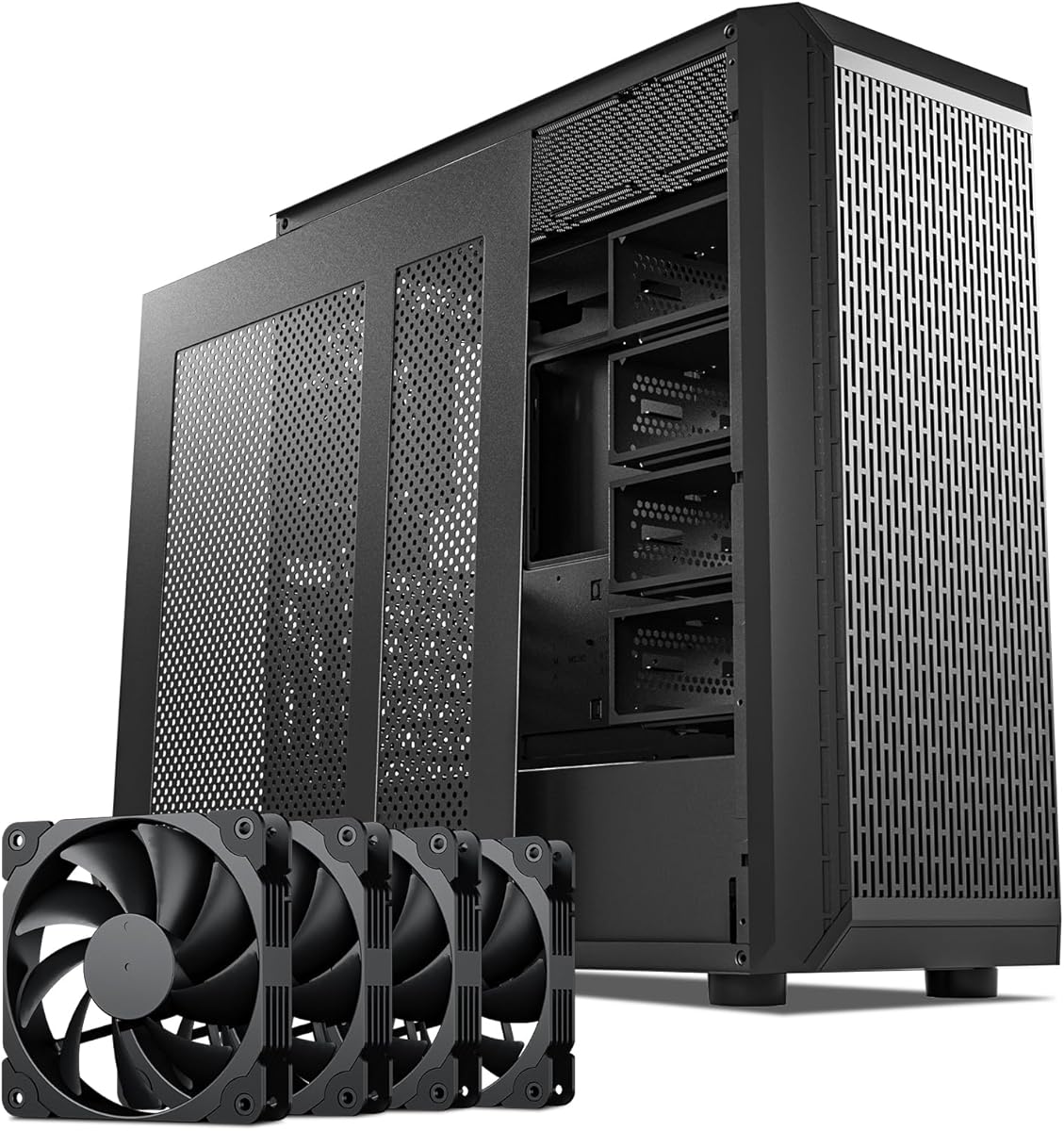
The Zalman i4 ATX Mid-Tower is a practical complete case for builders seeking a vertical GPU mount without assembling a separate riser system. It has a 4.4 rating and comes with six 120mm high-airflow fans, two vertical PCI slot brackets, a height-adjustable anti-sag support bracket, and a full-mesh exterior. Those included components make it an accessible route to a visually balanced gaming PC.
We may earn a commission when you buy through this link, at no additional cost to you.
The generous fan package is the case's most immediately useful feature. Six 120mm fans are already installed, reducing the number of extra purchases needed for basic airflow. Full-mesh panels complement that approach by permitting air to pass through the enclosure. For the graphics card itself, the vertical PCI slot brackets rotate the expansion-slot arrangement, while the adjustable support helps reduce the strain associated with a heavy card hanging in a vertical position.
Installation convenience is supported by a tool-less design, a top-mounted I/O panel, and straightforward access to USB 3.0, USB 2.0, and audio connections. The visual result is less explicitly display-oriented than a panoramic glass chassis, but it should appeal to buyers who value function, airflow, and included equipment. Since the product information does not state detailed radiator limits or exact motherboard-size support, those dimensions should be confirmed against the builder's chosen components.
The Zalman i4 is a strong recommendation for a new gaming build on a measured budget, especially if the buyer wants fans and mounting hardware already supplied. It is less ideal for a highly polished glass-and-RGB showcase, but its mesh design and full fan package provide a more tangible foundation for cooling. Verify expansion-slot access, radiator placement, and cable clearance before assembling the system.
Six included 120mm fans make the i4 more than an empty chassis. The vertical PCI brackets and adjustable graphics-card support complete the basic requirements for a vertical mount, allowing new builders to focus on the processor, memory, storage, and graphics card.
The full-mesh design supports the case's emphasis on cooling rather than a fully enclosed display style. It is a sensible foundation for gaming systems where sustained hardware performance and straightforward access to fans matter more than a minimalist panoramic view.
We may earn a commission when you buy through this link, at no additional cost to you.
The darkFlash C280 E-ATX is a dual-chamber gaming case aimed at builders who want extensive airflow and room for a large motherboard. It carries a 4.7 rating and supports E-ATX, ATX, and M-ATX boards. Its six-sided ventilation, vertical GPU capability, reverse-connector motherboard compatibility, and capacity for two 360mm radiators make it a compelling option for ambitious desktop configurations.
We may earn a commission when you buy through this link, at no additional cost to you.
Airflow is the defining theme. The case can accommodate radiators at both the top and front, while offset fan mounting and a lowered bottom-fan position are intended to preserve an unobstructed cooling channel. Four PWM fans are included, providing a starting point for that larger cooling plan. The raised and movable cable-cover panel, along with the extended PSU chamber, also supports the clean internal layout expected in a modern E-ATX system.
The main challenge is that a highly expandable chassis offers many placement choices, each of which affects the others. An adjustable hard-drive cage provides flexibility but must be positioned around the radiator, fans, graphics card, and power-supply area. The product information confirms vertical GPU support without listing a detailed maximum graphics-card dimension, so the installer should verify the card's length, thickness, and the support bracket's position before ordering.
The C280 is a good fit for an enthusiast who expects to use a large motherboard, considers a liquid-cooling loop, or wants a roomy dual-chamber structure. It may be more than necessary for a compact system, but for a full-size showcase build, its cooling positions and cable-management provisions are particularly useful. Confirm the vertical GPU clearance and arrange storage before finalizing the build.
Two 360mm radiator positions and offset fan mounting demonstrate that the C280 was designed around high airflow. The lowered bottom-fan arrangement and raised cable cover help maintain open channels around the main hardware.
E-ATX support and compatibility with back-connect motherboards make this case relevant to current high-end platforms. The extended PSU chamber and movable cable panel provide the physical organization needed to keep those larger systems visually clean.
We may earn a commission when you buy through this link, at no additional cost to you.
The Thermalright A70ATX Gaming Case offers one of the strongest combinations of visibility, vertical GPU support, and practical case features in this guide. Its 4.8 rating is the highest among the listed products. Three pillar-free tempered-glass sides create a 270-degree view, allowing the graphics card, motherboard, and internal RGB lighting to become a coordinated display rather than components hidden behind one narrow viewing panel.
We may earn a commission when you buy through this link, at no additional cost to you.
The vertical graphics-card system includes a removable, height-adjustable anti-sag bracket. The bracket accommodates graphics cards up to 420mm long and can be adjusted with screws behind the motherboard tray, which is useful for long cards that need careful support. Other notable features include a preinstalled front USB-C 3.0 port with data-transfer rates up to 10Gbps, a fixed 360mm radiator position, an independent hard-drive bay, and tool-free quick-release features.
Compatibility is broad for a mid-tower. The case supports ATX, M-ATX, and Mini-ITX motherboards, CPU coolers up to 168.4mm high, and ATX power supplies up to 200mm long. As with any vertically mounted card, though, the bracket position and the graphics card's connector arrangement must be considered. The removable design may make cable management easier, but the installer still needs to check the card's power plugs and physical thickness against the available space.
This case is an excellent recommendation for a builder who wants the vertical GPU to be the centerpiece without giving up modern connectivity or visible RGB lighting. The panoramic glass provides a stronger presentation than a conventional mesh or single-window chassis, while the included bracket reduces the need for a separate support purchase. Handle the glass carefully during installation and verify long-card clearance before committing to the layout.
Three pillar-free glass panels provide visibility from more angles than a traditional side window. This makes the A70ATX particularly effective when RGB lighting, a vertical graphics card, and a coordinated motherboard are central to the build's appearance.
The removable anti-sag bracket adjusts behind the motherboard tray, allowing the installer to align the support with the card's weight and the case's internal layout. Compatibility with graphics cards up to 420mm makes the design relevant to large modern models.
We may earn a commission when you buy through this link, at no additional cost to you.
The DARKROCK Classico Storage Master is an ATX case with a clear emphasis on data storage rather than conventional gaming aesthetics. It supports up to 13 hard drives, includes four 120mm fans, and offers a vertical GPU mount that both displays the card and helps prevent sagging. Its 4.4 rating makes it a distinctive choice for a network-attached storage build that still uses a discrete graphics card.
We may earn a commission when you buy through this link, at no additional cost to you.
The storage capacity is the primary attraction. Builders can install substantial numbers of hard drives for a home server, media archive, or backup system, while the vertical graphics-card mount keeps that card visible and supported. Mesh front and side panels allow air to move through the enclosure, and the case can accept a 360mm radiator for users who want more comprehensive cooling than the included fans provide.
A highly dense storage layout has consequences. Drives consume space, generate heat, and can restrict the pathways available to fans and radiators. The vertical mount must also be positioned so it does not interfere with drive cages, cable routing, or the graphics card's power connectors. Builders who intend to populate every bay should plan airflow and use the adjustable storage layout before fixing the GPU and cooling hardware in place.
The Classico Storage Master is best for someone whose primary requirement is a large hard-drive count alongside a visible vertical GPU. It can suit a compact workstation with storage needs, but it is less natural for a typical gaming PC where SSD storage and maximum gaming aesthetics are the priorities. Treat the stated 13-drive capacity as a maximum, then verify the exact arrangement and cooling path for the intended configuration.
Support for 13 hard drives creates a substantial foundation for a NAS or archival workstation. The vertical GPU mount preserves a recognizable gaming or workstation aesthetic without taking priority away from the case's main storage function.
Four included 120mm fans and 360mm radiator support provide options for moving heat through a densely packed enclosure. Because drive bays can interrupt air paths, the final fan and radiator arrangement should be planned around the number and location of populated bays.
We may earn a commission when you buy through this link, at no additional cost to you.
The darkFlash AIR NOVA Full Tower is the largest complete case in the guide, with support for E-ATX, ATX, and M-ATX motherboards. It has a 4.2 rating and is designed for builders who want maximum internal space, extensive cooling, and a pronounced vertical GPU display. Seven PWM ARGB fans are included, while the six-sided ventilated chassis can support two 360mm radiators.
We may earn a commission when you buy through this link, at no additional cost to you.
The dedicated vertical GPU mount includes a reinforced metal support bracket intended to prevent sag. The case also supports back-connect motherboards, and its movable raised cable cover, offset fan positions, and lowered bottom-fan design help maintain airflow around a densely equipped system. An adjustable hard-drive cage and extended power-supply chamber add flexibility for storage and cable routing.
The obvious trade-off is physical scale. A full tower can overwhelm a compact desk area and may be unnecessary for a single mainstream gaming system. The AIR NOVA's 4.2 rating is also the lowest listed among these ten products, so prospective buyers should interpret customer feedback carefully and verify that the features align with their priorities. Detailed graphics-card dimension limits are not provided in the supplied information, making vertical-clearance confirmation especially important.
This case is a compelling match for an enthusiast building a large E-ATX system with extensive cooling, multiple fans, and a prominent graphics card. Seven included ARGB fans reduce the need for immediate lighting and airflow purchases. It is best for users who genuinely need the full-tower format; anyone with limited desk space or a simple ATX build will likely find a mid-tower more manageable.
Two 360mm radiator positions and seven included ARGB fans create strong cooling potential. The full-tower format gives the installer more freedom to arrange these components around the motherboard, graphics card, storage, and power supply.
The white finish and ARGB fans create a bright visual scheme, while the reinforced vertical support pairs the presentation with a practical anti-sag solution. The result is aimed at builds where the graphics card is meant to be a central visual feature.
We may earn a commission when you buy through this link, at no additional cost to you.
The Cooler Master Gen5 Vertical Graphics Card Holder is a retrofit kit for builders who want to mount a graphics card vertically without replacing their case. It has a 4.2 rating, includes a 165mm PCIe 5.0 riser, and uses reinforced SGCC steel to help limit graphics-card flex or sag. The white finish also fits neatly into light-colored systems.
We may earn a commission when you buy through this link, at no additional cost to you.
The bracket supports E-ATX, ATX, and Micro-ATX cases and graphics cards of any length up to three slots wide. That length flexibility is useful because the support arm can be installed near the appropriate point rather than relying on a fixed full-length mounting rail. Tool-less adjustment moves the graphics card up to 65mm toward the front panel and 30mm toward the side panel, helping the installer find workable clearance.
Its limitations are precise but important. The system requires at least four PCI slots, and the graphics card must be no more than three slots wide. A thick card with a large power connector, cooler, or backplate can require more space than the stated width allowance implies. Builders should also confirm that the riser cable can reach between the motherboard's PCIe slot and the bracket without a sharp bend or interference from fans and radiators.
The Gen5 holder is a useful middle ground between a complete vertical case and a more complex riser kit. It is especially suitable for a builder who wants a white vertical upgrade and values tool-less positioning. Choose it when the existing case has the required slots and the graphics card is no more than three slots thick. For thicker cards, the LIAN LI four-slot kits offer a broader thickness allowance.
The holder retains the existing case while changing how the graphics card is presented. This makes it a practical option for owners whose case looks good but does not offer a satisfactory vertical mounting position.
Moving the card in two directions helps resolve conflicts with front fans, radiators, side panels, and internal cables. The adjustment is quick enough to make installation less finicky than working with a completely fixed support arrangement.
We may earn a commission when you buy through this link, at no additional cost to you.
The HYTE Y70 Modern Aesthetic is a premium ATX mid-tower created around panoramic presentation, a four-slot vertical graphics-card layout, and extensive dual-chamber organization. It carries a 4.7 rating and comes in a distinctive Taro purple finish. A three-piece panoramic glass panel, tool-less panels, reusable cable straps, floating storage sleds, and carefully labeled interior details give the case a distinctly finished appearance.
We may earn a commission when you buy through this link, at no additional cost to you.
Its defining feature is the included PCIe 4.0 x16 riser and substantial four-slot vertical GPU support. The riser includes a color-matched milky canopy intended to preserve an uninterrupted visual flow, allowing the upright graphics card to function as the centerpiece of the panoramic display. The case also provides an unusually broad cooling arrangement, including a side-mounted 360mm radiator position that accepts a radiator up to 125mm thick, plus an adjustable top position for a radiator up to 68mm thick.
The cold-floor area can hold three 120mm fans or two 140mm fans up to 32mm thick, but those thickness limits deserve attention. Some popular performance fans are deeper than 32mm, so builders should check dimensions before assuming every fan will fit. The overall ten-fan capacity creates ample possibilities, yet the listed 360mm radiator support remains more conservative than the dual 360mm configurations offered by some other cases here. The PCIe 4.0 riser is also not the newest generation.
The Y70 is a compelling premium recommendation for a builder who prioritizes aesthetics, detailed organization, and a high-impact vertical GPU. Its four-slot support is useful for substantial graphics cards, while the dual-chamber design keeps wiring away from the main view. It is best for someone willing to plan around the specified radiator thickness and comfortable using PCIe 4.0 rather than requiring a PCIe 5.0 riser.
The Y70 combines a polished panoramic enclosure with enough space for a large, four-slot graphics card. The color-matched riser treatment helps the vertical installation feel intentional rather than like a retrofit.
The rear chamber provides substantial cable-management space, while tool-less panels, labeled mounting points, reusable Velcro straps, and floating storage sleds simplify organization. These details make the case particularly appealing for builders who enjoy a clean final installation.
We may earn a commission when you buy through this link, at no additional cost to you.
The right vertical GPU case depends on graphics-card dimensions, motherboard layout, cooling plan, expansion-slot availability, and the degree of visual polish desired. Comparing the mechanical specifications before buying is more reliable than choosing from appearance alone.
Start with the exact dimensions of the graphics card rather than its general size classification. A case may support long cards while restricting their thickness, or provide vertical mounting without accommodating a protruding power connector or backplate. The Thermalright A70ATX supports cards up to 420mm long, while the HYTE Y70 is designed around a substantial four-slot layout. The LIAN LI and Cooler Master kits use slot width as a key limit, so compare the card, cooler, and connector assembly together.
Choose a case only after measuring the component that will be displayed. Allow room for the support bracket, power cables, and any side-mounted cooler, since these can consume space not reflected in the card's basic length.
Vertical placement can direct cooler intake air toward a graphics card, but the result depends on the enclosure's overall airflow path. Cases with mesh panels, six-sided ventilation, and several radiator positions generally provide more options than a sealed display chassis. The Zalman i4 includes six 120mm fans, while the darkFlash AIR NOVA includes seven ARGB fans and supports two 360mm radiators. Consider how cool air reaches the card and how warm air leaves the case.
Prioritize cases that offer deliberate intake and exhaust positions rather than relying on the vertical mount alone. Match the case's fan configuration to the radiator plan and leave enough open space for unobstructed flow.
Motherboard size and CPU-cooler height are critical because a vertical graphics card often occupies the same interior region as a tower cooler. The SSUPD Xhuttle supports ATX and hidden-connector motherboards with CPU coolers up to 170mm, while the Thermalright A70ATX supports ATX, M-ATX, and Mini-ITX boards with CPU coolers up to 168.4mm. The riser kits can also shift the graphics card forward by 31mm, making cooler clearance a separate calculation.
Check the case's motherboard support, CPU-cooler limit, riser position, and graphics-card support together. A compatible motherboard is not enough if the graphics card and cooler collide.
A vertical graphics card usually requires a riser so the card can connect to a motherboard slot even when its display outputs face the side panel. PCIe 5.0 risers appear in the LIAN LI VG4v4 and Cooler Master Gen5 kits, while the HYTE Y70 includes a PCIe 4.0 x16 riser. Review cable length, bend requirements, slot compatibility, and whether the cable can reach without crossing cooling equipment or obstructing service access.
Use the newest supported riser generation when future upgradeability matters, but do not confuse bandwidth labeling with a guarantee of fit. Cable routing and physical clearance remain the decisive installation factors.
A vertically mounted graphics card is supported at its far end, which can place long-term stress on the connector and PCB. Look for a properly positioned support bracket, especially with thick or heavy cards. The LIAN LI VG4v4 includes an adjustable arm stated to support GPUs up to 10kg, and the Thermalright A70ATX includes a removable bracket with screw adjustment behind the motherboard tray. A fixed bracket that does not meet the card may provide little practical benefit.
Confirm that the support makes contact in the correct location and can be adjusted without moving other components. Proper support protects both the graphics card and motherboard slot.
A vertical display looks best when power leads, SATA cables, and front-panel wiring are hidden from the primary viewing area. Dual-chamber designs are particularly effective because they separate the rear cable space from the component display area. The SSUPD Xhuttle and HYTE Y70 both use dual-chamber layouts, while the darkFlash C280 includes a raised and movable cable-cover panel. Check whether the case supports back-connect motherboards if that feature matters to the build.
Prioritize reachable front I/O, sufficient power-supply space, and routing paths large enough for the selected cables. Good cable management is not merely cosmetic; it also improves access during maintenance.
Full towers provide more room for radiators, storage, and cable management, but they demand substantially more desk space. The darkFlash AIR NOVA is the only full-tower option here, while the HYTE Y70 offers a more expansive dual-chamber experience in an ATX mid-tower. Mid-towers are easier to accommodate and still support vertical graphics cards, panoramic panels, multiple fans, and large radiators when properly designed.
Choose the smallest format that confidently fits every component. A larger case is useful only when the extra volume solves a real space, cooling, or cable-management problem.
Fans and lighting can materially improve the first impression of a build. The SSUPD Xhuttle includes three 120mm ARGB reverse fans and an RGB strip, the Thermalright A70ATX emphasizes panoramic visibility and Type-C connectivity, and the HYTE Y70 pairs a color-matched riser canopy with a purple finish. These extras are helpful, but compatible connectors, controller support, and software control should be checked before assuming every lighting effect will synchronize.
Treat included components as a useful starting point rather than a complete specification. Confirm fan size, radiator thickness, power headers, and lighting-control standards before finalizing the build.
Before installing the graphics card, identify the intended vertical position and check it against the case's expansion slots, CPU cooler, fans, radiators, drive cages, and power-supply chamber. Install the case's riser or vertical mounting hardware first, then connect and route cables while the interior remains accessible. This order makes it easier to route the PCIe and graphics-power connections without forcing them around a fully installed card.
Use the supplied or appropriate screws to secure the graphics card and fit the anti-sag support so that it contacts the card at the correct point without placing visible stress on the PCB. Keep expansion-slot covers installed wherever the graphics card does not occupy the slot, and check that the card's power connectors have enough bend radius. Recheck clearance after every major component change because a small fan or storage adjustment can alter the available space.
For routine care, dust the mesh panels, fan intakes, radiators, and filters regularly using short bursts of compressed air while the system is powered off. Keep the tempered-glass panels away from abrasive cleaners and use a soft microfiber cloth to remove fingerprints. Periodically check the graphics-card support, riser connection, and fastening screws, particularly if the system is moved or if the card has recently been replaced.
They can be, but mounting orientation alone does not determine cooling performance. A vertical card may sit directly in the path of cool intake air, yet the result still depends on the case's fan configuration, radiator placement, exhaust path, and cable arrangement. A ventilated case with a deliberate cooling plan is more important than whether the card is horizontal or vertical.
A properly supported vertical mount should not cause damage. The main risks are unsupported card weight, poor connector bending, and installation that forces the card against another component. Use the supplied anti-sag bracket, position it correctly, avoid tight power-cable bends, and make sure the expansion-slot connection is fully seated.
No. Builders must check length, width, power-connector orientation, cooler overhang, and support-bracket reach. Some cases support long but relatively thin cards, while others accommodate thick four-slot models but impose a shorter maximum length. Measure the assembled card rather than relying only on the manufacturer's bare-board dimensions.
Most vertical arrangements require a riser because the graphics card is moved away from the motherboard's normal slot position. Some complete cases include one, while other cases use vertical slot brackets without a riser. Check the product specifications and case layout before buying, as a vertical-looking mounting option may still require an additional riser cable.
It can be suitable when the card, motherboard, and application are compatible with PCIe 4.0. A PCIe 5.0 riser is a more forward-looking choice for newer systems, but fitment, cable routing, and physical clearance matter at least as much as the labeled generation. The HYTE Y70 includes a PCIe 4.0 x16 riser, while two LIAN LI kits and the Cooler Master holder provide PCIe 5.0 options.
Most ATX and E-ATX mid-towers can host a vertical graphics card if their mounting system and internal clearance are suitable. Full towers offer more room for radiators, storage, and cables, but they also occupy more desk space. Select the smallest case that holds the graphics card, CPU cooler, motherboard, cooling hardware, and storage without crowding.
The anti-sag arm or bracket should meet the card near its supported weight point without pushing upward against the PCB. It should be adjustable and positioned so the support cannot slide away over time. Check the contact after installation and inspect it periodically, especially following transport or any change to the internal layout.
They can be, because panels and vertical cards may restrict access to connectors and internal components. Look for tool-free or removable panels, a removable GPU bracket, and a dual-chamber cable layout. Complete the wiring and routine maintenance before replacing the glass, and handle large tempered-glass panels with two hands.
The SSUPD Xhuttle stands out as the most balanced all-around complete case, offering vertical or horizontal GPU positioning, dual-chamber organization, three ARGB fans, and generous radiator support. The Zalman i4 is the budget-focused alternative for builders who want six fans and essential vertical-mounting hardware included, while the Thermalright A70ATX delivers the strongest panoramic presentation and highest rating.
For a premium visual build, the HYTE Y70 offers a distinctive purple finish, color-matched riser canopy, four-slot vertical support, and a detailed dual-chamber interior. Existing-case owners can instead consider the LIAN LI VG4v4 or Cooler Master Gen5 holder. In every case, prioritize graphics-card dimensions, CPU-cooler clearance, cable routing, and the case's complete cooling plan before choosing based on appearance.
Ratings, included accessories, and product specifications can evolve, and prices and availability change over time. Confirm the current listing, dimensions, compatibility information, and included components with the manufacturer or retailer before purchasing. That final verification is especially important for a vertical GPU build, where a small clearance mismatch can affect the entire layout.