
HDMI Cable Tester & RJ45
5.0Editor score
Tests HDMI and RJ45 cables
Checks up to nineteen wires
Uses 9V or USB power
Identifies common pin faults
Our HDMI Cable and Port Tester guide compares ten tools for continuity, fault detection, signal testing, portability, and reliable troubleshooting.
An HDMI Cable and Port Tester helps reveal whether a cable, connector, or installation is responsible for missing images, color problems, or intermittent video. The right tool can quickly identify continuity failures, pin faults, crossover wiring, and unsupported signal conditions, making troubleshooting faster and more precise.
This guide compares ten testers based on supported HDMI standards, connector formats, diagnostic methods, display options, power requirements, portability, and intended level of technical expertise. It includes basic continuity boards, handheld testers, network-cable tools, signal generators, and a full-color display tester for professional installations.
Each review explains what the selected model is best at, where it fits in a troubleshooting setup, and which compromises may matter. Ratings reflect the supplied product data rather than hands-on testing, while current prices and availability can change at any time.
5.0Editor score

4.4Editor score

4.5Editor score
The comparison below highlights each product's main capabilities, supported connections, display style, and practical troubleshooting strengths. These testers range from inexpensive pin-level continuity tools to professional signal analyzers and full-color installation displays.



The HDMI Tester Portable is a compact continuity checker for users who need more than a basic go/no-go cable probe. With a 4.4 rating in the supplied data, it combines HDMI and RJ45 testing, supports HDMI Type A and Mini Type C connectors, and checks as many as 19 internal wires.
We may earn a commission when you buy through this link, at no additional cost to you.
Its main advantage is the detachable remote, which stores alongside the main body for easier carrying. Once connected at both ends of a cable, it can identify short circuits, open circuits, and conductors connected in the wrong order. The RJ45 side adds a practical network option, while power can come from an AAA battery or a phone USB charger.
This is a continuity tester rather than an active display tester. It tells you whether the expected conductors appear connected, but it does not show a picture or analyze a live 4K, HDR, or HDCP-protected signal. Connector coverage is also narrower than that of some dedicated boards, which support Micro HDMI as well.
Home users, installers, and IT technicians will appreciate the combination of HDMI and Ethernet diagnostics in one compact tool. It is a strong choice when the main objective is rapidly separating cable faults from other installation problems, particularly if a Type C cable is part of the setup.
The tester scans up to 19 HDMI wires and reports shorts, opens, and incorrect ordering. This makes it useful for checking loose or poorly crimped cables before spending time troubleshooting displays, source devices, or settings.
RJ45 support expands the tool beyond video work. Network technicians, smart-home installers, and users assembling wall runs can check both supported HDMI connectors and common Ethernet leads from the same main and remote unit.
We may earn a commission when you buy through this link, at no additional cost to you.
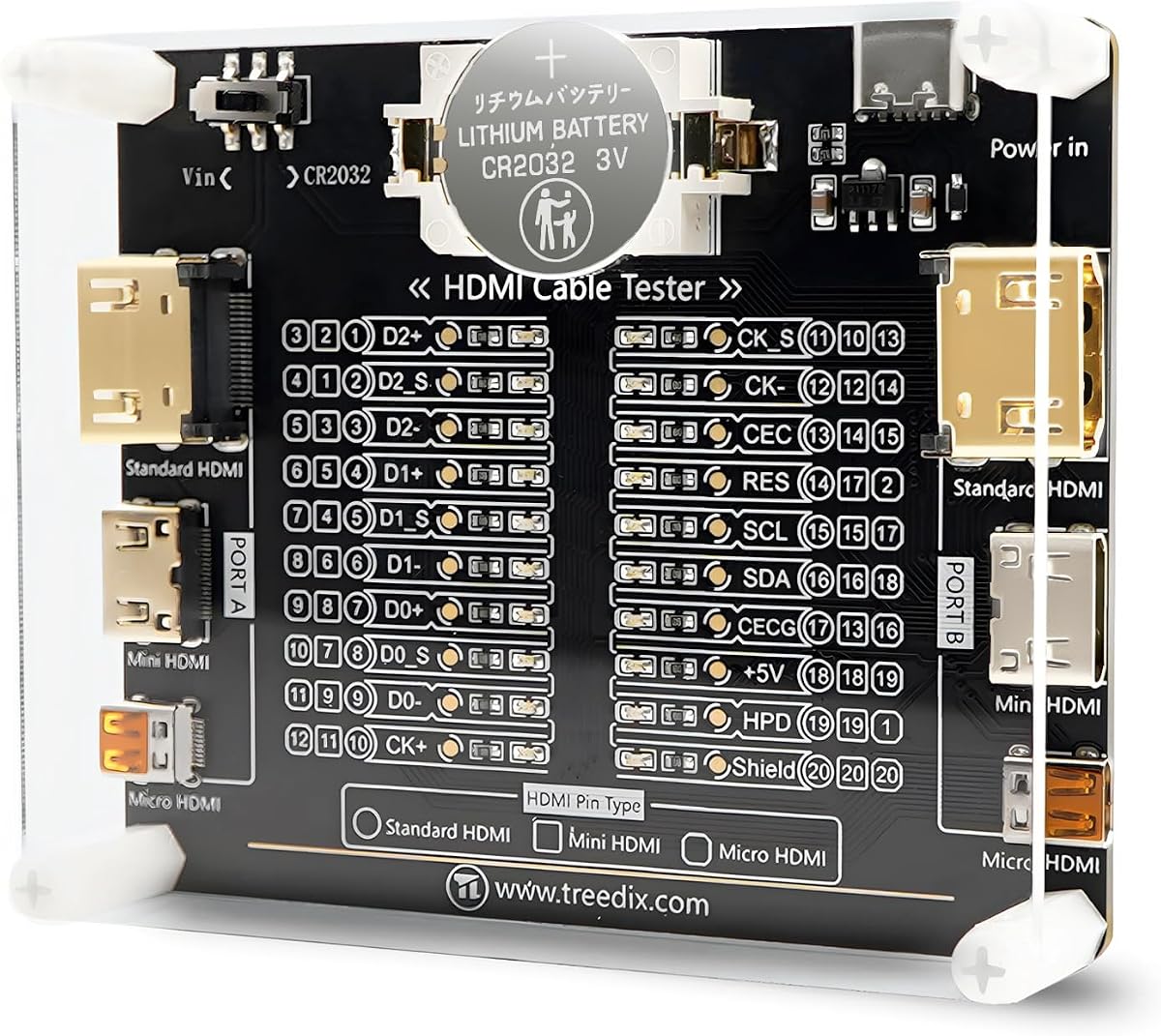
The Treedix Cable Tester Board is a pin-level diagnostic board with a 4.6 supplied rating and unusually broad connector support. It handles standard Type A, Mini Type C, and Micro Type D HDMI connections across HDMI versions from 1.0 through 2.1.
We may earn a commission when you buy through this link, at no additional cost to you.
Twenty LED indicators correspond to the individual pins, helping users understand continuity and pin-sequence results at a glance. The board is designed for detecting internal short or open circuits, while a multimeter can also be used to investigate HDMI line sequence during repair work. Its acrylic housing helps protect the tester during storage and transport.
Power flexibility is useful for bench and field environments. The board can run from a battery or an external 3–12V source through its Vin connection, which includes reverse-connection protection. Users must place the power switch in the correct position when using a Type-C supply.
This board is best for technicians who service multiple HDMI formats and want visible per-pin feedback without relying on a television. It is less appropriate for someone who needs to view a live image, but it is a strong, focused continuity-maintenance tool.
The combination of Type A, Mini Type C, and Micro Type D connectors makes this board useful across modern devices, adapters, and mixed equipment inventories. Broad version support also helps when testing older and newer cable designs.
Each indicator maps to a pin, making anomalies easier to investigate than a single pass-or-fail light. The board is therefore useful for cable builders, repair benches, and installers who want more diagnostic detail.
We may earn a commission when you buy through this link, at no additional cost to you.
The Jonard Tools HDMI-100 is the most balanced choice in this guide, earning a 4.4 supplied rating for its versatile diagnostics and practical remote design. It tests standard HDMI and Mini HDMI cables across 1.2V, 1.3V, 1.4V, and 2.0V specifications.
We may earn a commission when you buy through this link, at no additional cost to you.
The detachable remote is especially useful for installed or unusually long cables. Users can place the remote at the far end and check continuity without keeping the main unit and remote together. A scan mode shows individual connections as they are tested, while full display mode presents all tested connections at once.
The HDMI-100 can test cable lengths of up to 500 meters, expanding its usefulness in commercial installations, structured wiring environments, and large display projects. Its trade-off is that it remains a continuity and wire-pairing instrument rather than a live video preview, and a 9V battery is required for operation.
Professional installers, AV technicians, and serious home users should regard this as a dependable general-purpose choice. It combines connector flexibility, useful display modes, and a remote that solves a real problem without adding signal-generation complexity.
The removable remote is a meaningful advantage when a cable disappears into a wall, rack, or ceiling. It makes both ends of a long run independently accessible while preserving a compact, straightforward test procedure.
Scan mode supports step-by-step observation of each connection, while full display mode offers a broader overview. Together they help users move from identifying an anomaly to confirming the overall state of the cable.
We may earn a commission when you buy through this link, at no additional cost to you.
The Monoprice HDMI Signal Generator and Display Analyzer serves a different purpose from a wire-continuity tool. With a 4.0 supplied rating, it can operate as either an HDMI signal generator or a display emulator, allowing technicians to test source devices, cables, and displays as a signal path.
We may earn a commission when you buy through this link, at no additional cost to you.
A four-pin DIP switch controls video resolution and HDCP content. Supported outputs include 4K at 60Hz with 4:4:4 chroma, 4K at 60Hz with 4:2:0, 4K at 30Hz with 4:4:4, and 1080p at 60Hz. HDCP can be turned off or set to version 1.4 or 2.2, with four test patterns available for different HDCP versions.
This capability is much closer to professional signal troubleshooting than simple pin testing. It can help determine whether a source, cable, or display has trouble with a particular resolution or protected-content mode. However, it does not provide the same easy pin-by-pin continuity view offered by dedicated cable checkers.
The Monoprice is best for AV professionals, integrators, and technically experienced users investigating 4K or HDCP behavior. Buyers seeking an easy cable-condition checker would be better served by one of the remote-based continuity testers.
The DIP controls let technicians reproduce several common video modes without relying on a particular source device. This is valuable when the symptom appears only at a specific resolution or with protected content.
Using the unit as a generator or analyzer allows it to sit at different points in an HDMI chain. Technicians can isolate which section of a system is responsible for a failed or unstable image.
We may earn a commission when you buy through this link, at no additional cost to you.
The HDMI Tester Portable Checker is an approachable HDMI and RJ45 diagnostic tool with a 3.9 supplied rating. It supports HDMI versions 1.1, 1.2, 1.3, 1.4, and 2.0, while also testing network cables through an RJ45 connection.
We may earn a commission when you buy through this link, at no additional cost to you.
Its primary function is a scan of up to 19 wires to identify shorts, opens, and incorrect ordering. Users can select a fast scan mode or a full display mode, depending on whether they want speed or a more comprehensive visual summary. The design supports standard HDMI Type A connectors.
The automatic shutdown after ten minutes of inactivity is a practical feature for a portable electrical tool. It reduces unnecessary battery drain during a busy work session or when the tester is temporarily set aside. On the other hand, the tool does not offer Mini or Micro HDMI support, and its lower supplied rating suggests more mixed user feedback than the higher-ranked models.
This tester is a reasonable choice for homeowners, office support staff, and installers who primarily work with full-size HDMI and Ethernet cables. Its straightforward operation makes it approachable, while users needing wider connector support should look toward the Treedix board or a more specialized instrument.
The scan function focuses on the three fault patterns most likely to cause a cable to fail: a short, an open, or an incorrect wire sequence. That makes it suitable for quickly confirming whether replacement or repair is necessary.
Automatic shutdown after inactivity helps preserve power between tasks. The behavior is especially useful for mobile technicians who may keep the unit in a toolbox while moving between locations.
We may earn a commission when you buy through this link, at no additional cost to you.
The MFL. Detachable Professional Cable Tester is a broad installation diagnostic device with a 4.5 supplied rating. Rather than focusing only on HDMI, it includes XLR, HDMI, USB, RCA, BNC, 3.5mm and 6.35mm TRS jacks, Type-C, and RJ11 connections.
We may earn a commission when you buy through this link, at no additional cost to you.
A ten-way switch and LED indicators allow users to move between supported interfaces and examine connectivity and pin configuration status. The detachable design and separate operating modes support testing cable ends located in different places, which is valuable when troubleshooting equipment racks, stage systems, or installed cabling.
Its durable metal housing, clearly labeled ports, and multiple dedicated controls make it feel like a workshop instrument rather than a simple probe. The trade-off is complexity. Users whose needs are limited to checking a full-size HDMI lead may find the additional interfaces and switches unnecessary, and the device still does not create a visible picture.
AV installers, electricians, stage technicians, and repair professionals benefit most from this model. It is especially useful for someone who wants one bench instrument capable of handling HDMI alongside audio, network, USB, and other common connection types.
The wide port selection reduces the need to keep separate continuity tools for every media or network cable encountered. It is a particularly strong fit for technicians who service mixed analog, digital, and data connections.
LED indicators provide immediate visual status information, while labeled ports and switches make it easier to select the appropriate test mode. The metal case also suits repeated workshop and field use better than a fragile open board.
We may earn a commission when you buy through this link, at no additional cost to you.
The UT681 HDMI Cable Tester has the highest supplied rating in this roundup at 4.8. It supports standard Type A and Mini Type C HDMI connections across 1.2V, 1.3V, 1.4V, and 2.0V specifications, giving it a useful balance of capability and portability.
We may earn a commission when you buy through this link, at no additional cost to you.
Rapid analysis examines 19 conductors to identify disconnections, short circuits, and mis-sequencing. Indicator zones show abnormal points, while the full display mode synchronizes all 20 LED groups for an overall view of the cable's connection state. A separate transceiver supports the remote end of the test.
Power management is unusually thoughtful for a portable tester. A flashing blue light warns when battery voltage drops below 7.2V, and the unit automatically powers off after ten minutes without work. Its stated operating temperature range is minus 10 to 50 degrees Celsius, supporting use across many indoor and field environments.
The UT681 is a strong pick for users who want more diagnostic detail than a simple pass-or-fail cable tester. Cable builders and technicians will value the visible fault locations, while its dual connector support covers both standard and Mini HDMI leads. It remains a continuity tool rather than a display emulator.
The LED zones are designed to make abnormal conductor positions easier to locate. That level of detail helps users distinguish a general cable failure from a specific reversed, open, or short connection.
A low-voltage warning gives advance notice before work is interrupted, while automatic shutdown helps preserve the battery. These details make the tool more dependable during repeated calls or long diagnostic sessions.
We may earn a commission when you buy through this link, at no additional cost to you.
The Parts Express HDMI Cable Signal Tester is a compact diagnostic unit with a 4.3 supplied rating. It takes a different approach from a numbered-pin continuity board by displaying the status of individual HDMI signal components, helping users investigate color shift, sparkle, or a missing picture.
We may earn a commission when you buy through this link, at no additional cost to you.
Its DVI-F and HDMI-F connectors allow the appropriate cable to be connected directly. The tester can be positioned at either the source or the display end, which helps narrow down where a signal problem originates. Individual component status gives more diagnostic context than a simple illuminated pass indicator.
The primary limitation is its interface focus. The supplied specifications do not mention Mini HDMI, Micro HDMI, newer connector formats, or active 4K and HDCP signal analysis. It is therefore most attractive for conventional HDMI installations involving DVI-F connectivity or a standard full-size source arrangement.
The Parts Express is a good fit for repair technicians who want to understand which signal component is absent or abnormal. It is less suitable for modern mixed-connector inventories, but it remains a practical option for basic bench troubleshooting of traditional HDMI and DVI-F systems.
By reporting the status of each signal component, the tester can help explain symptoms such as color shift, sparkling, or missing imagery. That makes it more useful than a tester that only reports whether the entire cable passes.
Because the unit can be located at the source or display end, technicians can compare signal behavior at different points in the chain. The placement flexibility supports a methodical process of elimination.
We may earn a commission when you buy through this link, at no additional cost to you.
The HDMI Cable & RJ45 Tester combines the useful features of an inexpensive continuity checker with a perfect 5.0 supplied rating. It supports HDMI 1.2V, 1.3V, 1.4V, 2.0V, and 2.1V cables, as well as RJ45 network leads.
We may earn a commission when you buy through this link, at no additional cost to you.
The HDMI side scans up to 19 wires and identifies short circuits, open circuits, and incorrect ordering. For RJ45 cables, the LEDs flash in rotation when all conductors are properly connected, while the corresponding light stays inactive when a wire has a problem. The remote stores conveniently on the side of the main body, improving portability.
Power can come from a 9V battery or a phone USB charger, although neither the battery nor charger is included. Connector support is limited to HDMI Type A, so buyers working with Mini or Micro HDMI should plan for adapters or a different tester. It also does not display an active image.
Despite those limitations, this is the best budget choice for a homeowner, network installer, or general repair technician who wants a straightforward two-cable tool. The broad HDMI version range, useful fault detection, and flexible power sources make it an excellent addition to a basic toolkit.
Coverage through HDMI 2.1 makes the tool applicable to a broad mix of current and older cables. The pin scan focuses on the internal connections that determine whether the lead is intact and correctly sequenced.
RJ45 support is especially valuable for offices and smart-home installations where Ethernet faults can resemble network configuration problems. Users can verify basic wire continuity before investigating software or addressing.
We may earn a commission when you buy through this link, at no additional cost to you.
The STEREN Handheld HDMI Display Tester is the premium choice for installers who need to verify a video installation without relying on the television or display being configured. Its 4.5 supplied rating reflects a feature set centered on a 1080p full-color LCD, audio indication, and a 19-pin continuity check.
We may earn a commission when you buy through this link, at no additional cost to you.
The tester can show a set-top box's output directly, helping confirm that the source, cable, and installation are working together. It also allows a technician to check the channel lineup. Two HDMI input/output ports support cable continuity tests, while a third HDMI port connects to the set-top box.
Its physical design is built for field work. The display uses tempered glass described as resistant to scratches, shattering, dirt, water, and shock, while a hybrid silicone-rubber and plastic housing adds protection. A micro USB port charges the included 2300mAh battery, which provides approximately three to four hours of use.
The STEREN is ideal for professional set-top-box installation, service calls, and locations where bringing a separate display would be inconvenient. It is more specialized and costly than a basic continuity tester, but its full-color screen, audio verification, and rugged construction justify that approach for professional workflows.
The full-color LCD provides direct visual confirmation of the installation. This is particularly helpful during first-time setup, when the television may be unavailable, misconfigured, or impossible to reach easily.
The handheld form, rechargeable battery, protective housing, and resistant screen support repeated field use. The three-port arrangement also separates source connection from cable continuity testing in a practical way.
We may earn a commission when you buy through this link, at no additional cost to you.
Choose an HDMI tester according to the faults you need to diagnose, the connectors you use, and whether you need continuity testing, live video verification, or active signal generation. The more capable the installation, the more important it is to match the instrument to the signal path rather than judging only by the number of features.
A continuity tester checks whether the conductors inside a cable are open, shorted, or connected in the wrong order. It is useful for checking a suspect lead but generally cannot tell you whether a source is producing a valid image, whether HDCP is blocking content, or whether a display accepts a particular resolution. Active signal testers and display emulators are better when the cable has already passed continuity checks and the symptom concerns actual video behavior.
Choose continuity testing for damaged or newly installed cables, and choose signal or display testing for installation verification.
Full-size HDMI Type A is common, but Mini Type C and Micro Type D appear on cameras, compact computers, tablets, and other portable equipment. A tester that supports only Type A may need a physical adapter to reach the smaller connectors. Adapters can add another potential fault point, so direct support is preferable when your equipment regularly uses those formats.
Match every connector type in your equipment inventory rather than relying on the most common one.
HDMI version labels describe evolving capabilities, but a continuity checker often verifies conductors rather than confirming every high-bandwidth behavior associated with a version. For signal-level troubleshooting, look for explicit resolution and chroma support, such as 4K at 60Hz with 4:4:4, along with the HDCP modes relevant to your source and display. More version support is helpful, but connector coverage and readable diagnostics matter just as much.
For cable faults prioritize broad pin support; for live issues prioritize explicit signal modes.
A detached remote is a major convenience when a cable terminates inside a wall, rack, or ceiling. It lets the user connect the two test ends without dragging the entire instrument across a room or requiring access to both ends simultaneously. Some designs store the remote inside the main unit, which improves portability but may make the unit slightly bulkier than a fixed probe.
Choose a detachable remote whenever the cable is already installed or too long to handle comfortably.
A simple illuminated indicator tells you only that a cable passed or failed. Numbered or grouped LEDs can reveal which pins are open, shorted, or reversed, helping you decide whether the entire cable should be replaced or whether a particular area needs investigation. A live screen is even more informative because it displays the resulting image and can expose faults that simple continuity checks cannot detect.
Per-pin feedback is most useful for repair work, while a screen is most useful for installation confirmation.
Consider whether the tester will remain on a workbench or travel in a service bag. Battery-powered models are convenient, but you must account for the cost and availability of the required battery. USB power can reduce battery management when a charger is available. Low-battery warnings and automatic shutdown help prevent a depleted unit from interrupting a diagnostic session, while a rechargeable model is convenient for regular mobile work.
Match the power system to your work environment and carry the required power source.
A dedicated HDMI tester is streamlined, but it may be redundant if you regularly work with Ethernet, USB, analog audio, XLR, RCA, or BNC cables. Multi-interface testers can inspect several connection families from one device, making them efficient for installers and repair benches. The trade-off is additional switches, ports, and controls that may make the tool less convenient for occasional HDMI-only users.
Choose broad interfaces for mixed service work and dedicated HDMI tools for focused simplicity.
If you troubleshoot 4K video, chroma subsampling, or protected content, an active generator and analyzer can provide more relevant information than a continuity board. Resolution settings, HDCP off or version selection, and test patterns help isolate whether a problem appears only under a particular output mode. Remember that a continuity pass does not mean a cable or source will support every advertised high-bandwidth feature.
Use active signal controls when the complaint involves image format or content protection.
Begin by identifying the cable type, connector format, and suspected fault. For a continuity tester, disconnect both devices from the cable and inspect the connectors for bent pins, trapped debris, or visible jacket damage. Clean the contacts carefully, connect the main and remote units correctly, and avoid forcing a connector that does not seat easily.
Power on the tester and select the interface or cable mode that matches the connection under examination. For models with scan and full-display modes, use the faster scan to identify the conductor being checked and the full display to review the overall result. Interpret every open, short, cross-connected, or failed indicator as evidence of a possible cable fault, then confirm the result with a second known-good cable where practical.
For signal generators, analyzers, and display testers, connect the source, cable, and test instrument in the correct direction before selecting a resolution and HDCP mode. Compare the displayed test pattern or image with the expected result, and change only one setting at a time. After use, switch the tester off, remove the battery if the manual recommends it, coil cables without sharp bends, and keep the unit dry and away from excessive heat.
Most basic HDMI cable testers check the internal conductor connections for continuity, opens, shorts, and incorrect pin order. Some more advanced tools also provide individual signal status, generate test patterns, or display a live image. A basic pass confirms that the cable is wired correctly, but it does not necessarily prove that the cable supports every 4K, HDR, refresh-rate, or HDCP feature advertised by its manufacturer.
A simple continuity tester generally cannot certify high-bandwidth 4K performance because it checks electrical connections rather than signal integrity across every supported mode. For 4K compatibility, look for a signal generator or analyzer with explicit 4K output resolutions and chroma formats. Even then, the complete source, cable, and display chain must support the selected format for the picture to appear normally.
Loose connectors, dirt on the contacts, a partially seated plug, or an incompatible adapter can produce misleading results. Test the device with a short known-good cable and another compatible connector before condemning the original lead. Also confirm that the correct mode and supported connector type have been selected, as using a Type A-only tester with a Mini or Micro adapter may introduce a contact issue.
A detachable remote is very helpful for installed, routed, or long cables because each end of the cable must be connected during the test. It also makes permanent installations easier to check without stretching one long instrument across the space. For a short loose cable kept at a desk, a compact stored remote or simple tester may be sufficient.
HDMI testing checks the conductors and signals associated with a digital audiovisual connection, while RJ45 testing checks twisted-pair Ethernet wiring. A multi-function tester can perform both kinds of continuity checks, which is convenient for IT installers or smart-home technicians. An Ethernet pass does not validate network configuration, addressing, internet service, or cable performance under real traffic.
An LCD tester is valuable when you need to confirm the actual picture without connecting a television or display. It can also provide audio and video assurance during set-top-box installation. If your only task is checking whether a cable has a broken or misordered conductor, a numbered LED continuity tester will usually be simpler and less expensive.
It depends on the model. Some support only full-size Type A, while broader boards accept Type A, Mini Type C, and Micro Type D. The Monoprice and STEREN options focus on full-size HDMI, whereas the Treedix board and UT681 explicitly cover smaller formats. Check the connector list before purchasing, especially if your equipment uses anything other than standard HDMI.
Test a cable whenever video disappears, flickers, sparkles, shows color artifacts, or works only at a lower resolution. New installations, cables routed through construction areas, and frequently handled leads are also sensible candidates for periodic checks. Routine testing is particularly valuable before an event or service call because a damaged lead can otherwise consume considerable troubleshooting time.
The Jonard Tools HDMI-100 is the strongest all-around selection because it combines standard and Mini HDMI support, a detachable remote, two diagnostic views, and testing across very long cable runs. The HDMI Cable & RJ45 Tester stands out as the best budget option, while the STEREN display tester is the premium pick for professionals who need full-color installation verification without a separate television.
Prioritize the kind of fault you need to diagnose. Choose a simple continuity tool for open, short, and cross-connected wires; use a multi-interface tester for mixed AV and network work; and select a signal generator, analyzer, or display tester when the problem involves active video, 4K formats, HDCP, or installation confidence. Connector compatibility and access to both cable ends can matter more than the number of listed features.
Finally, check the current product listing, supported connectors, required power source, and present price before ordering. Product availability, ratings, and pricing can change, so the best HDMI Cable and Port Tester for one technician's setup may differ from the best choice for a homeowner or AV installer.