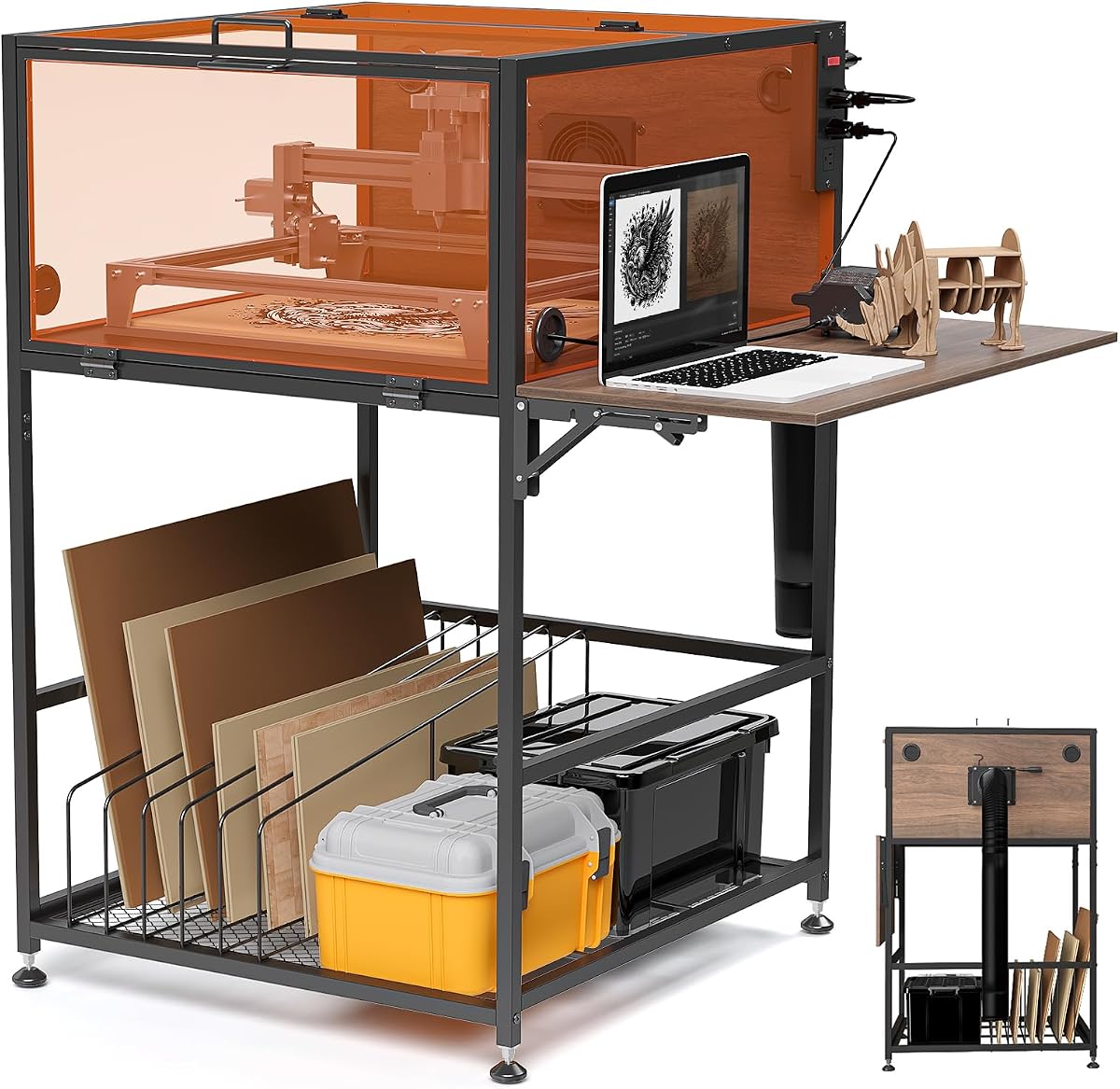
Crafit Laser Engraver Enclosure Cabinet
4.2Editor score
Heavy-duty cabinet construction
Integrated ventilation and outlets
Filtered panoramic viewing
Organized material storage
A laser engraver enclosure creates a more controlled workspace by containing smoke, dust, noise, and light while giving you a clear view of the job in progress. The best enclosure balances useful interior space, effective ventilation, filtered viewing panels, sturdy construction, and a footprint that suits your available work area.
This guide compares ten cabinet and tent-style laser engraver enclosures using the dimensions, materials, ventilation features, viewing options, compatibility claims, and customer ratings supplied for each product. It covers models from Creality, LONGER, VEVOR, Crafit, and other brands, including foldable covers and larger cabinet-style workstations.
Each review explains who the enclosure is best suited for, along with the compromises that may matter when buying. Measurements, features, and ratings can change over time, and current prices vary between sellers, so compare the listed specifications with your engraver and read the latest product details before placing an order.
4.2Editor score

4.5Editor score

4.4Editor score
As an Amazon Associate we earn from qualifying purchases.
The comparison below highlights the major differences among all ten enclosures, including their enclosure style, working dimensions, visibility features, and integrated ventilation.


The Crafit Laser Engraver Enclosure Cabinet is a cabinet-style workstation rated 4.2 stars by customers. Its defining advantage is the way it combines an enclosed laser workspace with integrated power management, filtered panoramic panels, ventilation, storage, and a folding side work surface rather than offering only a simple protective tent.
We may earn a commission when you buy through this link, at no additional cost to you.
The stated interior measures 24.8 inches wide by 27.1 inches deep and 12.6 inches high, so buyers should check those dimensions against their engraver and accessories. A 20W high-efficiency fan works with the included 2-meter flexible exhaust pipe to improve circulation and carry smoke, particles, and odors away from the working area. Thickened, light-filtering panels provide broad visibility while reducing some glare and blue light.
The cabinet is more ambitious than the lightweight covers in this guide. It includes a switch-controlled power strip with three AC outlets, a foldable side panel for a laptop or air-assist kit, a divided bottom storage rack, cable-management holes, magnetic doors, easy-grip handles, and adjustable feet for uneven floors. Those additions increase convenience, but they also make the unit larger and more involved to assemble than a tent-style cover.
This is the strongest choice for a serious hobbyist or small studio that wants the enclosure to function as an organized workstation, not merely as a cover. Its lower listed fan specification and relatively compact height may matter for larger machines or aggressive material jobs. Buyers should also note that the manufacturer explicitly states that the product is not professional laser safety equipment or a substitute for professional protective gear.
It is our premium recommendation because the hardware is integrated in a way most competitors do not attempt: power, storage, lighting visibility, exhaust, and workstation support appear in one cabinet. It is less suitable for users seeking a lightweight, instantly portable tent, but for a permanent setup it offers the most complete feature set.
The divided bottom rack keeps wood sheets upright while preserving room for blanks and other engraving materials. The folding side shelf and built-in power strip reduce the need to route several separate cables across the workspace, making this design particularly useful for a fixed craft corner.
Multi-sided translucent panels allow the operator to monitor the engraving from several angles. Wide magnetic doors improve access for loading material and cleaning, while the filtered material helps limit direct blue-light exposure without requiring a separate viewing arrangement.
We may earn a commission when you buy through this link, at no additional cost to you.
The Creality Laser Engraver Enclosure 2.0 is a 4.4-star tent cover that combines a compact footprint with a 4000 RPM fan, dual windows, and a foldable structure. It is a practical choice for users who want better smoke and odor handling without moving into a full cabinet-sized workstation.
We may earn a commission when you buy through this link, at no additional cost to you.
Its 28.3 by 28.3 by 15.7-inch space is claimed to fit the Creality Falcon series and 95% of laser engraving machines on the market. That universal positioning is convenient, although every machine has different dimensions, feet, lids, and accessory clearances, so the physical measurements remain more dependable than a general compatibility claim.
The dual-window design uses blue-light-blocking PVC material to make the engraving process easier to observe. A high-efficiency 4000 RPM fan circulates air and extracts smoke, particles, and odors, while the enclosed shape helps isolate operating noise. High-quality flame-retardant fabric and high-strength steel pipes form the shell, which should be kept away from hot surfaces and direct laser paths.
The best reason to buy this model is its balance of size, ventilation, visibility, and portability. It folds for storage, weighs less than a rigid cabinet, and offers a more complete setup than placing a simple sheet over a machine. The trade-off is that the flexible tent has fewer storage features, less rigid protection, and fewer ways to organize cables or accessories.
For most desktop users working in a home office or studio, this is the budget recommendation. It is especially appealing when the engraver and enclosure will need to be moved or stored between sessions. Confirm the machine dimensions and exhaust routing first, and follow the manufacturer’s own laser safety guidance for the materials being processed.
The 4000 RPM fan is the central feature for users who regularly engrave materials that produce visible smoke or odor. It works with the enclosed tent to move contaminated air toward the exhaust outlet, although room ventilation and a suitable outdoor discharge arrangement remain important.
Dual blue-light-filtering windows make it easier to watch the carriage and work area without opening the enclosure repeatedly. Opening it while smoke is present can release fumes into the room, so the filtered panels offer a more convenient way to monitor progress.
We may earn a commission when you buy through this link, at no additional cost to you.
This Integrated Enclosure with LED Light earns a 4.4-star rating and distinguishes itself through a built-in illumination strip. It also includes a 4000 RPM exhaust fan, a layered smoke pipe, thick viewing material, and a fully enclosed bottom, making it a useful choice for dark materials or detailed jobs.
We may earn a commission when you buy through this link, at no additional cost to you.
The sealed bottom is designed to collect more dust and debris and reduce smoke escaping beneath the cover. That creates a more controlled internal chamber, although the enclosure should be positioned with its exhaust connected appropriately and installed according to the instructions. The supported examples include xTool D1, xTool D1 Pro, Ortur, Sculpfun, and Atomstack engravers.
The LED strip adds illumination directly inside the enclosure, which can improve visibility when working with dark wood, leather, or other materials that absorb light. A thickened PVC window filters blue light while still allowing the operator to watch the carving. The exhaust pipe uses three-layer composite material intended to resist smoke and dust buildup on the inner wall.
Its main limitation is again fit. Although compatibility is described broadly, the 28.3 by 28.3 by 15.7-inch enclosure must accommodate the engraver’s full operating envelope, including any raised lid, rotary attachment, feet, or external control box. The bottom seal can also increase the effort required to position the cover correctly.
This model is recommended for users who spend long periods watching detailed work and want dedicated internal light. It is less compelling for people who already have excellent task lighting in the room or need a rigid enclosure with storage. Still, the combination of illumination, a sealed lower perimeter, and an upgraded exhaust pipe makes it one of the most thoughtfully specified covers in the group.
The internal LED strip illuminates the bed from within the enclosure, reducing dependence on room lighting. This is particularly helpful when the machine’s lid or filtered window would otherwise cast shadows over the material being engraved.
The fully enclosed bottom is intended to prevent smoke from escaping downward and to collect debris around the laser bed. Correct placement is especially important because a tight seal can be compromised by an uneven surface or a machine positioned too far inside the cover.
We may earn a commission when you buy through this link, at no additional cost to you.
The Green Acrylic Laser Engraver Enclosure is a rigid cabinet-style cover built around an aluminum alloy frame and green acrylic panels. It has no customer rating in the supplied data, so its appeal must be assessed primarily through its design, dimensions, materials, and included hardware rather than a rating-based comparison.
We may earn a commission when you buy through this link, at no additional cost to you.
Its exterior measurements are 29.9 by 16.9 by 26.7 inches, or 760 by 430 by 680 millimeters. The listing specifically warns buyers to check their desktop engraver’s dimensions before purchasing. Unlike many universal covers, this product is presented as suitable for particular desktop laser models, making exact fit verification essential.
Green acrylic offers a different viewing experience from blue-light-filtering PVC panels. It can reduce direct glare while preserving a tinted view of the work area. The rigid frame, thickened panels, front hinged door, handle, magnetic door stop, and cable holes create a permanent-looking enclosure that should feel more stable than a flexible tent.
One important omission is an integrated exhaust system. The product description does not list a fan or exhaust pipe, so smoke control depends on what the laser itself provides and how the enclosure is positioned in the room. That makes it better suited to users with an existing extraction solution or a workflow that produces limited smoke.
The included acrylic panels, brackets, connectors, hinges, handle, magnetic stop, cable-hole covers, screws, nuts, tools, and instruction manual simplify assembly. It is a strong option for someone who values a rigid, clean-looking cabinet and has the right machine dimensions, but less suitable for buyers who require a broadly compatible enclosure with built-in ventilation.
The aluminum frame and rigid acrylic panels create a neat enclosure that can blend into a dedicated craft area. Once assembled, it offers a more substantial appearance than a fabric tent while remaining visually open enough to monitor the job.
Because this enclosure is sold for specific desktop laser dimensions, users should measure the complete machine rather than only the bed. Include the height of the lid, cable connections, feet, and any accessory that must remain inside during operation.
We may earn a commission when you buy through this link, at no additional cost to you.
The Creality Laser Engraver Enclosure 2.0 with Vent is rated 4.2 stars and offers a relatively straightforward tent design with smoke ventilation, a large filtered window, and a collapsible frame. It targets the core needs of an enclosure without adding elaborate lighting, storage, or workstation accessories.
We may earn a commission when you buy through this link, at no additional cost to you.
Its 28.3 by 28.3 by 15.7-inch space is stated to fit Creality Falcon models and 95% of laser engraving machines on the market. The enclosure is also advertised to reduce noise from cooling fans, isolate dust and fumes, and help expel smoke generated during engraving or cutting.
The transparent viewing panel filters blue light and provides a broad view of the engraving process. Its ventilation system moves smoke and dust out of the enclosure, while the closed sides help limit the spread of odor and sound. The structure is lightweight, easy to carry, and folds into a compact package when the job is finished.
Compared with the more elaborate Creality covers in this guide, it lacks an LED strip and does not provide detailed information about upgraded pipe construction or metal supports. Its 4.2-star rating also trails several competing Creality models. That does not make it a poor option, but it may offer less value for buyers who prioritize specific engineering details.
This enclosure is best for a user who wants a portable, low-clutter way to contain smoke and observe a laser. It is easy to recommend because the core functions are straightforward and its compact dimensions should suit many common desktop setups. Buyers should install the ventilation pipe securely and confirm that the machine and raised lid fit inside.
The foldable assembly needs only a few steps according to the product information and can be collapsed after use. That makes the enclosure convenient for shared workspaces, family rooms, or anyone who does not want a permanent cabinet occupying the bench.
The built-in smoke ventilation system is designed to remove fumes and dust while the enclosure remains closed. Its value is greatest for users who regularly engrave materials such as wood or leather and already know how to route the exhaust safely.
We may earn a commission when you buy through this link, at no additional cost to you.
The LONGER Laser Engraver Large Size Enclosure is rated 4.4 stars and stands out for its 20.8-inch height, which is taller than the typical 15.7-inch enclosure in this roundup. That extra vertical space can make it easier to accommodate a larger laser or accessories without forcing the cover inward.
We may earn a commission when you buy through this link, at no additional cost to you.
The interior measures 31 by 28.7 by 20.8 inches, and the listing explicitly mentions compatibility with the LONGER B1 series while also targeting most laser engraving machines. A built-in smoking fan promotes internal air circulation and supports odor and smoke removal, while the large transparent panel allows the operator to watch the machine without opening the cover.
Its material is described as fire-retardant, easy to clean, and intended for durable use. The enclosure is also presented as a way to reduce dust, debris, fumes, burning odors, and noise. Those attributes make it attractive for higher-volume hobby work or a dedicated studio where a larger footprint is acceptable.
The main trade-off is size. Even when the enclosure folds, its taller frame and broad base require more bench space than compact tents. Buyers must also ensure that the exhaust outlet can be positioned safely and that the cover does not crowd the laser’s lid, ventilation openings, or control connections.
We recommend this model when headroom matters more than compact storage. It is a particularly logical match for LONGER B1 users and for owners whose machine would leave little clearance in a standard-height tent. It combines a strong customer rating with useful capacity, making it one of the more practical larger covers listed here.
The taller interior can provide more clearance around the laser head and lid, reducing the chance that the cover will press against moving components. It also gives operators more room when loading larger sheets or using an attachment.
The easy-clean fire-retardant shell is useful in a workspace where dust and residue accumulate quickly. Wiping the interior after each job helps prevent debris from settling around moving parts and makes the enclosure easier to inspect between projects.
We may earn a commission when you buy through this link, at no additional cost to you.
The Creality Laser Engraver Cover V2.0 has the highest customer rating among the supplied products at 4.5 stars. It combines upgraded metal support rods, a 4000 RPM exhaust fan, dual filtered windows, a 28.3 by 28.3 by 15.7-inch interior, and broad compatibility, making it the most balanced cover in the group.
We may earn a commission when you buy through this link, at no additional cost to you.
The second-generation design focuses on structural stability and ventilation. Metal rods reinforce the frame, the square profile supports observation from several directions, and the high-speed fan is intended to extract smoke, particles, and odors. The foldable construction allows the enclosure to be stored away after a session without discarding the setup.
Dual anti-blue-light PVC windows give users a clear view of the engraving process while reducing direct exposure to blue light. The stated capacity fits the Creality Falcon series and examples from xTool, Ortur, Sculpfun, and Atomstack. The extra height is also stated to allow installation of a rotary roller, which is valuable for cylindrical jobs.
It does not include an LED strip, rigid cabinet walls, built-in storage, or a three-outlet power strip. Those omissions keep the design simpler and more portable than the Crafit cabinet. They also mean users who need those conveniences should choose a more permanent workstation rather than expecting this tent to provide them.
Our Editor's Choice is the result of the strongest overall balance rather than one dominant feature. It has the best listed rating, a clearly stated fan speed, useful dual views, reinforced supports, broad machine compatibility, and a foldable footprint. It is a strong recommendation for a desktop engraver that needs effective smoke management without a large cabinet.
Upgraded metal support rods improve the stability of the frame compared with a typical all-plastic tent. The structure still folds for storage, allowing users to gain a more rigid working enclosure without dedicating permanent bench space to it.
The listed height is designed to accommodate a rotary roller, which expands the enclosure’s usefulness beyond flat-bed projects. Users should still verify clearance because attachments, cable routing, and machine configurations vary.
We may earn a commission when you buy through this link, at no additional cost to you.
The Creality Laser Engraver Protective Enclosure is another 4.5-star option, with a 27.5 by 28.3 by 15.7-inch interior and a large filtered viewing panel. It gives users a clear view of the engraving bed while enclosing smoke, dust, odors, and much of the machine noise.
We may earn a commission when you buy through this link, at no additional cost to you.
Its built-in smoke ventilation system is intended to move fumes and debris out during engraving or cutting. The listing names xTool D1, xTool D1 Pro, Creality CR-Laser Falcon, Ortur, Sculpfun, and Atomstack engravers as supported examples and states that the taller space can accommodate a rotary roller.
Compared with the dual-window V2.0, this model concentrates observation through one large panel. That can provide an unobstructed view of the work area, but dual-window designs may be more convenient when the operator wants to inspect the machine from multiple sides. This enclosure also lacks an integrated light, so room illumination remains important.
Installation requires care around the exhaust connection. The manufacturer warns that the two-way and three-way pipe should be pressed firmly against the connecting rods to avoid excessive pressure on the cover body. Paying attention to that detail helps keep the enclosure shape stable and the exhaust connection secure.
This is a strong all-around recommendation for a user who values a large viewing area, a strong rating, and straightforward ventilation. It is especially useful when the machine needs rotary clearance. As with the other tent-style products, confirm that the entire machine, including raised lid and attachments, fits within the stated envelope.
The large transparent window helps the operator follow progress without interrupting the job. Its light-filtering material provides eye protection while preserving visibility, making frequent quality checks more convenient.
Securely connecting the exhaust pipe to the frame supports consistent extraction and keeps the cover from being pushed out of shape. Users should follow the installation directions and avoid excessive force when attaching the pipe.
We may earn a commission when you buy through this link, at no additional cost to you.
The Creality Ventilated Enclosure combines a 4.5-star rating with a particularly strong material claim: the flame-retardant outer material is stated to withstand temperatures up to 1000°C. This does not mean the entire enclosure can safely remain inside an active laser beam, but it provides a reassuring specification for users comparing its heat resistance with other covers.
We may earn a commission when you buy through this link, at no additional cost to you.
The 27.5 by 28.3 by 15.7-inch space supports Creality, xTool, and other laser engravers, with enough height stated for a rotary roller. A large viewing window uses filtered material to reduce blue-light exposure while showing the engraving progress from outside the enclosure.
An exhaust fan and pipe move smoke and dust out of the working chamber. The fully enclosed shape also helps isolate noise, odors, and dust, while also offering some separation from water and other workshop contaminants. Assembly requires no additional tools according to the listing, and the unit folds for compact storage.
Users should not interpret the temperature claim as permission to place combustible or heat-sensitive materials against the walls. Material compatibility, airflow, and the manufacturer’s safety guidance still matter. The enclosure should also be checked for adequate clearance around the laser, especially when an exhaust port or rotary unit requires additional room.
This model is well suited to owners of Creality or xTool machines who want a strong-rated, no-tool enclosure with ventilation and good visibility. It is less useful for someone needing organized storage or integrated lighting, but its otherwise efficient package makes it easy to recommend as a general-purpose protective tent.
The stated flame-retardant construction and high-temperature tolerance make this model appealing for busy engraving sessions. Proper spacing from the laser, exhaust path, and hot work surfaces remains essential, and ventilation should never be blocked.
The support frame can be assembled in a few steps without extra tools and then folded when it is no longer needed. This is convenient for users who alternate between focused crafting and other bench projects.
We may earn a commission when you buy through this link, at no additional cost to you.
The VEVOR Laser Engraver Enclosure is the largest square-format cover in the guide, with an interior of 31.5 by 31.5 by 19.6 inches. It is aimed at users who need more width and height than a standard desktop tent while retaining a structure that folds for transport or compact storage.
We may earn a commission when you buy through this link, at no additional cost to you.
A 4000 RPM fan and exhaust pipe are designed to remove smoke, dust, noise, and odor. Exhaust ports on both sides provide placement flexibility, which is useful in rooms where the laser cannot face directly toward an extraction point. The fully enclosed structure helps limit leakage while the machine operates.
Unlike most competing tents, this model includes 19.69-inch fastener strips on both sides. Their adjustable hanging design creates storage for tools and accessories of different shapes, preventing small items from accumulating around the bench. This adds practical organization, although it does not provide a full shelf or enclosed cabinet storage system.
The foldable frame can be collapsed without reinstalling it, and the product is described as lightweight and easy to carry. Its 4.1-star rating is the lowest among the rated covers, and the generous dimensions may make it less convenient for small workbenches. Users should also consider that the included tool storage adds small items that need to be removed before folding.
This enclosure is best for owners of a larger engraver, a mobile craft setup, or users who value flexible exhaust routing and built-in tool organization. It competes on capacity and utility rather than compactness or integrated lighting. Confirm that your available space can accommodate the 31.5-inch square base and route the exhaust safely.
Ports on both sides make it easier to orient the enclosure in different rooms or against different bench layouts. This flexibility can help the user connect the exhaust pipe to a more suitable extraction route.
Adjustable fastener strips along both sides keep frequently used tools visible and organized. The design makes better use of vertical space than an empty tent, which is especially helpful in compact studios where a separate tool rack would be inconvenient.
We may earn a commission when you buy through this link, at no additional cost to you.
The right enclosure depends on your machine dimensions, available space, material choices, ventilation needs, and whether you value a compact tent or a permanent workstation. Use the following factors to narrow the options before checking current prices and seller availability.
Begin with the full operating envelope of the laser, not merely the advertised bed size. Measure the machine’s width, depth, and height, and include raised-lid clearance, feet, external control boxes, air-assist components, exhaust connections, and any rotary attachment that must operate inside the enclosure. An enclosure can be listed as compatible with most machines while still leaving too little space for a particular configuration.
Compare those measurements against the enclosure’s interior dimensions and allow room to load material. If the machine sits low or the bed needs frequent access, also consider whether the bottom is sealed and whether the machine can be placed comfortably inside without blocking ventilation.
Cabinet-style enclosures provide rigid walls, better-organized accessories, integrated power, and a permanent appearance, but they occupy more floor space and generally require more assembly. Tent-style covers are lighter, fold into a smaller package, and are easier to move, yet they usually offer fewer storage features and can deform if the frame is not tensioned properly.
Choose a cabinet when the enclosure will be a permanent workstation. Choose a tent when portability, lower storage requirements, and quick setup matter more. A rigid acrylic model falls between these options, offering stable panels without the integrated power and shelving of a full cabinet.
Ventilation should match the amount of smoke and odor generated by your materials. A cover with an integrated high-speed fan and pipe offers a more controlled extraction path than an enclosure without one, although the fan specification alone does not guarantee perfect capture. Check whether the exhaust ports are on multiple sides, whether the pipe is easy to route, and whether the fan can be maintained without disassembling the frame.
For indoor use, connect the exhaust to an appropriate outdoor or filtered extraction arrangement and maintain normal room ventilation. The enclosure should not be treated as a substitute for manufacturer-specified ventilation, fire controls, or professional safety equipment.
A large filtered window lets you monitor progress without opening the enclosure and releasing smoke. Dual-window designs offer more viewing angles, while a single broad panel may provide an unobstructed look at the bed. Filtered PVC or tinted acrylic can reduce glare and direct blue-light exposure, but internal workpieces may still require dedicated illumination.
Look for an integrated LED strip if you work with dark wood, leather, or intricate details. If the enclosure lacks task lighting, add a stable external light positioned so it does not interfere with the laser, its rails, or the exhaust path.
Metal support rods or an aluminum frame can help the enclosure resist deformation during repeated assembly. Flame-retardant fabric and heat-resistant panels provide additional reassurance, but no enclosure should be positioned where the laser beam can strike its walls. Avoid placing loose fabric, plastic sheeting, or combustible accessories inside the operating area.
For storage and daily organization, look for a divided rack, hanging tool strips, or a folding side shelf. For a permanent setup, rigid panels and magnetic doors may be more convenient than a flexible tent, while portable users should prioritize a frame that folds without reinstalling every support.
A built-in switch-controlled power strip can simplify a permanent installation by supplying outlets for the engraver, fan, laptop, and air-assist equipment. Cable holes keep leads from being pinched by doors or panels, while handles and wide doors make loading and cleaning easier.
If the enclosure does not include power management, plan how cords will reach the machine without blocking access or leaving gaps that allow smoke to escape. Check the outlet requirements of every device and avoid overloading extension cords or power strips.
An enclosed structure can reduce the sound of the laser’s cooling fans and moving components, making a shared room more comfortable. The degree of noise reduction depends on the materials, seams, rigidity, and how completely the enclosure closes around the machine.
Think about workflow as well as sound. A permanent cabinet may remain assembled beside a dedicated workstation, while a tent should be easy to unfold, collapse, and store. Choose the design you will actually use consistently rather than one that looks best but becomes an obstacle.
Product descriptions can make broad claims about eye protection, fire resistance, or smoke isolation, so read the full instructions and manufacturer guidance before use. Confirm that the enclosure is compatible with the specific laser, that the viewing panel is installed correctly, and that exhaust ports remain unobstructed. Keep combustible materials away from hot surfaces and follow all precautions supplied with the laser itself.
Check the latest customer feedback for practical details such as difficult pipe connections, sagging fabric, or fit issues. Customer ratings are useful as a broad signal, but specific comments and verified dimensions are more helpful when making a final decision.
Before assembling the enclosure, measure the complete laser and confirm that its power, ventilation, and exhaust requirements can be met in the selected location. Place the structure on a stable, level surface with clearance around the panels and exhaust outlet, then connect the machine and accessories before tightening or tensioning the cover.
During a job, keep the enclosure closed except when loading or unloading material, and do not block the integrated fan or exhaust pipe. Route the pipe toward an appropriate outdoor or filtered ventilation destination, monitor the work through the filtered panels, and stop if the enclosure deforms, odors escape around the seams, or the exhaust appears obstructed.
After use, allow the machine and enclosure to cool, disconnect power as appropriate, and wipe dust and residue from the interior and fan area. Inspect panel seams, supports, screws, doors, and pipe connections before storing the cover. Fold or disassemble it only as directed, and keep it clear of moisture, sharp tools, and direct sunlight when not in use.
Yes. An enclosure helps contain smoke, dust, and odor, but it does not replace the ventilation and safety procedures specified for your laser and materials. The integrated fan should connect to an appropriate extraction arrangement, particularly in a home or shared workspace. Keep normal room ventilation available and follow the machine manufacturer’s guidance.
Measure the full width, depth, and height of the machine, including the raised lid, feet, cable connections, and any rotary accessory. Compare those figures with the enclosure’s interior dimensions rather than relying only on a universal compatibility statement. Leave enough room to load material and connect the exhaust without forcing the cover.
A cabinet is usually better for a permanent workstation because it tends to offer more rigid panels, organized storage, integrated power, and convenient access. A tent is generally lighter, easier to fold, and more suitable for shared or temporary setups. The best option depends more on your available space and workflow than on a universal rule.
It indicates the listed rotational speed of the enclosure’s ventilation fan, which can help move smoke and dust through the enclosure. Actual extraction performance also depends on fan quality, ducting, sealing, the material being engraved, and the external extraction system. A speed specification should be considered alongside the complete ventilation design.
Yes. The featured windows are designed to provide visibility while filtering some blue light and reducing glare. A single large panel may offer an excellent view of the bed, while dual windows can help with viewing from more than one angle. Internal LED lighting can be valuable when working on dark or detailed materials.
Several of the listed covers state that their height allows installation of a rotary roller, particularly the Creality models with 15.7-inch interior height. Even when a listing says a rotary will fit, users should confirm the attachment’s exact dimensions and operating position. The laser, roller, cables, and enclosure panels must all have adequate clearance.
Let the equipment cool, disconnect power as appropriate, and use a soft cloth with a cleaner suitable for the panel or fabric material. Avoid soaking, abrasive pads, and high-pressure cleaning, which could damage windows or support rods. Vacuum loose dust carefully and keep liquid away from the fan, electrical connections, and power strip.
No. An enclosure can improve containment and comfort, but it does not guarantee eye protection, fire prevention, or safe operation in every situation. Continue to follow the laser manufacturer’s operating instructions, use appropriate protective measures, maintain the exhaust, and keep the enclosure away from direct laser paths and combustible materials.
The Creality Cover V2.0 is the strongest all-around option because it pairs the highest listed rating with a 4000 RPM fan, dual filtered windows, reinforced supports, broad compatibility, and foldable storage. The Creality Enclosure 2.0 delivers a similar core feature set in a portable budget package, while the Crafit cabinet is the premium choice for a permanent, organized workstation.
Your priorities should determine the final selection. Choose the Crafit cabinet when integrated power, storage, and a rigid workstation matter most. Choose the Creality Cover V2.0 for a balanced enclosure with strong ventilation and visibility, or choose the larger LONGER and VEVOR models when extra height, flexible exhaust placement, or tool storage is important. Standard-height Creality tents suit many common desktop configurations.
Always verify the current dimensions, included accessories, compatibility details, and safety information before buying. Product features and seller listings can change, and prices fluctuate over time and across retailers. Comparing the latest offer with your machine’s exact size, materials, room ventilation, and workspace needs will help you select the most appropriate laser engraver enclosure.