
Cyber Acoustics CA-2014
4.2Editor score
Compact wired 2.0 design
Front headphone and volume controls
AC adapter included
Clear stereo desktop audio
AC-powered computer speakers provide a practical upgrade over laptop and monitor speakers because they can deliver more consistent output without relying on a USB port for power. The right pair should also fit your workspace, connect cleanly, and suit the games, videos, calls, and music you regularly enjoy.
We compared all ten systems across their supplied specifications, focusing on power, driver design, input options, controls, headphone support, dimensions, and intended use. The guide covers compact two-speaker sets, bookshelf-style monitors, a 2.1 system, and several models that add wireless playback or ambient lighting.
Each pick highlights the qualities that matter most for its category, from straightforward affordability to refined room-filling sound and feature-rich gaming design. Ratings and product information reflect the supplied listings, while prices and availability can change, so compare the current listing details before making a final purchase.
4.2Editor score

4.6Editor score

4.6Editor score
As an Amazon Associate we earn from qualifying purchases.
The comparison below highlights the major differences among these ten systems, including output, connectivity, controls, physical design, and the experiences each pair is designed to support.




The Amazon Basics AC-Powered Computer Speakers are a balanced general-purpose choice for anyone replacing weak laptop or monitor audio. They carry a 4.3 rating, offer an easy 3.5mm connection, and use wall power instead of drawing current from a USB port. Their compact proportions make them especially suitable for desks where full-size bookshelf speakers would feel intrusive.
We may earn a commission when you buy through this link, at no additional cost to you.
The supplied specification lists a frequency range of 68Hz to 20kHz and 4.6 watts of total RMS power, divided into 2.3 watts per speaker. A front-mounted control combines power, standby, and volume adjustment, while a second front connection makes it easy to move from listening to a wired headset. This is a deliberately uncomplicated design that should feel familiar to almost any desktop user.
The main limitation is modest output compared with the more powerful systems in this guide. There is no Bluetooth, additional device input, bass control, or dedicated subwoofer. Those omissions matter if you expect the speakers to fill a large room or serve as the main audio system for an entertainment-focused gaming setup. For ordinary computer audio, however, simplicity is a meaningful advantage.
Choose these speakers if you want dependable AC-powered stereo sound, a small footprint, and a headphone jack without navigating a complicated control scheme. They are particularly well suited to office desks, study spaces, and everyday home computers where straightforward operation is more important than extensive features.
The system uses a familiar 3.5mm audio plug, and its front controls keep power and volume within easy reach. A front headphone jack also reduces the need to reach behind the speaker whenever you want private listening.
Each speaker measures approximately 3 by 5.3 by 3.2 inches, a useful size for compact workspaces. AC power allows the system to operate without a free USB port or nearby charging cable.
We may earn a commission when you buy through this link, at no additional cost to you.
The Bose Companion 2 Series III is a refined multimedia option for users who value a recognizable speaker brand, a 4.6 rating, and a clear connection path for a computer or another audio source. Its two-input arrangement lets a PC remain connected while a phone, tablet, or portable player is available through the auxiliary connection.
We may earn a commission when you buy through this link, at no additional cost to you.
The supplied details emphasize clear sound at any volume, while the physical controls are conveniently consolidated on the front of the right speaker. That arrangement includes volume adjustment and a headphone jack. It is a clean design for desks where a separate control pod would be excessive, and it avoids making users hunt through menus or software for routine changes.
Compared with the Bose Companion 20 in this guide, the Series III offers a more compact and simpler approach. It does not list wide stereo processing, a separate bass module, or a control pod, and it lacks Bluetooth. Bass and treble shaping are not mentioned either, so listeners who frequently adjust tonal balance may find the Edifier R1280T more accommodating.
This Bose pair is best for desktop users seeking straightforward multimedia performance, convenient headphone access, and the ability to keep a second source connected. It also makes sense for anyone who wants a more established audio brand without moving into the larger, more elaborate Companion 20 system.
Dedicated PC and auxiliary inputs reduce the need to reconnect cables when switching between a work computer and a personal device. The additional input broadens the speakers' use beyond a single workstation.
Placing volume and headphone access on the right speaker makes common tasks convenient. The result is especially helpful when the speakers sit beside a monitor rather than directly in front of the user.
We may earn a commission when you buy through this link, at no additional cost to you.
The Bose Companion 2 Series II combines a contemporary appearance with the flexibility of dual inputs. Its 4.1 rating places it behind several other products in the comparison, but the supplied information suggests a speaker system intended to make music, movies, and gaming more immersive than typical computer audio.
We may earn a commission when you buy through this link, at no additional cost to you.
Dual inputs are the defining practical feature. A computer can occupy one connection while another source remains available, reducing cable changes in a multimedia setup. The system also avoids the visual bulk of a separate subwoofer, which is a meaningful advantage for users who want fuller computer sound but not a large entertainment-speaker footprint.
Compared with the Bose Companion 2 Series III, the Series II has a lower customer rating and fewer details in its supplied listing. The newer Series III provides clearer information about headphone access and a front-mounted control, making it the more transparent recommendation for many buyers. The Series II may still appeal to shoppers who prefer its specific styling or have found a favorable listing for their region.
Look to this system when appearance, a two-speaker footprint, and flexible wired sources matter most. It is a reasonable fit for a home office, study area, or compact entertainment setup, provided you verify the current connector arrangement and control layout before ordering.
The two-piece design keeps the setup visually restrained while avoiding the space required by a separate low-frequency module. That makes it easier to integrate with a computer desk and monitor arrangement.
The system is designed to serve several types of entertainment rather than only one application. Its dual inputs make it practical when a computer and another media device share the same speakers.
We may earn a commission when you buy through this link, at no additional cost to you.
The Bose Companion 20 is the premium selection in this guide, offering a 4.6 rating and a more expansive listening proposition than compact multimedia speakers. Its two-piece system is designed to produce full, natural sound for a computer or for listening across a room, without requiring a separate subwoofer.
We may earn a commission when you buy through this link, at no additional cost to you.
Bose TrueSpace processing is central to the design. The technology is described as creating a wide two-channel soundstage, while active electronic equalization balances low, mid, and high frequencies. An advanced port and driver support low-note performance, giving the system more ambition than a typical office speaker while preserving a clean two-speater layout.
The separate control pod adds both convenience and desk complexity. It handles volume, muting, headphone connections, and an additional audio device, but it also needs its own place in the setup. Unlike some gaming-oriented models in the guide, the Companion 20 does not list Bluetooth or RGB lighting. Its focus remains acoustics and conventional wired operation.
Choose the Companion 20 when sound quality, stereo presentation, and room-filling capability outweigh compactness and wireless convenience. It is well suited to a larger desk, dedicated media area, or room where you regularly watch films, play games, and listen to music and want the speakers to function as a more complete audio system.
TrueSpace processing expands the perceived soundstage from only two speakers, while the ported enclosure and driver are designed to reinforce low notes. The result is intended to fill a room without a separate bass module.
The control pod consolidates volume, mute, headphone, and auxiliary-device functions. That keeps the speaker cabinets visually clean while giving the user a central place for routine adjustments.
We may earn a commission when you buy through this link, at no additional cost to you.
The Edifier R1280T delivers the most versatile feature set among the more traditional bookshelf-style options. It carries a 4.6 rating and combines a four-inch full-range driver with a 13mm silk-dome tweeter, giving users a more substantial near-field alternative to small plastic desktop speakers.
We may earn a commission when you buy through this link, at no additional cost to you.
One standout advantage is support for two devices at the same time. The two auxiliary inputs work with 3.5mm headphone outputs or dual RCA outputs, allowing a computer and another source to remain connected without repeated unplugging. A remote handles volume, while bass and treble knobs on the active speaker provide a welcome level of tonal control for music, videos, and games.
The wood-effect vinyl finish and medium-density fiberboard enclosure give the R1280T a more decorative appearance than a conventional computer speaker. That sophistication has a practical cost: the cabinets occupy more desk space than the Amazon Basics or Cyber Acoustics models. The listing also does not mention a front headphone jack, so a separate headset adapter may be needed depending on your setup.
This is our top general recommendation for listeners who want a balanced mix of sound, flexibility, and controls without moving to a full entertainment system. It works especially well for a home studio feel, music listening, and a desktop entertainment arrangement that benefits from fuller speakers and independent tone adjustment.
Dual auxiliary inputs make the system convenient for desks used with both a computer and a phone, game console, or other source. Keeping both connected avoids cable swapping when you change activities.
Separate bass and treble controls let listeners adapt the speakers to different media and room conditions. The included remote makes volume changes especially easy when the speakers are positioned across the desk.
We may earn a commission when you buy through this link, at no additional cost to you.
The Edifier R980T is built for listeners who want more output and a larger near-field system than a compact desktop pair can provide. Its 4.6 rating, 24 watts of total RMS power, and four-inch active bookshelf format make it a strong option for music, movies, and games played at a computer.
We may earn a commission when you buy through this link, at no additional cost to you.
The front-flared bass reflex port is designed to reinforce low-frequency output, while the wooden enclosures are intended to minimize acoustic resonance. Two auxiliary inputs allow simultaneous connection of 3.5mm and dual-RCA sources, and the supplied cables make setup more convenient. A universal 110V–240V power supply also distinguishes it from systems tied only to one regional wall-power standard.
Its main disadvantage is physical scale. These are bookshelf speakers, not miniature desktop accessories, and the pair may dominate a compact workstation. The supplied details do not mention a remote, headphone output, tone controls, or wireless connectivity. Buyers seeking those conveniences may prefer the R1280T, which offers more visible controls and remote operation.
Choose the R980T for a dedicated computer audio area, a larger desk, or a room where stronger playback and fuller bass are priorities. It is particularly attractive for users who want traditional powered studio monitors and do not need a subwoofer, RGB effects, or Bluetooth connectivity.
The 24-watt total RMS specification gives the R980T more power than most compact computer-speaker alternatives. That extra headroom is useful for music, action films, and games played at a higher volume.
The listed 100-percent wooden enclosures are designed to reduce acoustic resonance. Combined with the front bass port, they give the system a more substantial monitor-like design.
We may earn a commission when you buy through this link, at no additional cost to you.
The Cyber Acoustics CA-2014 is a straightforward budget upgrade for a desktop or laptop whose built-in speakers sound thin or quiet. It has a 4.2 rating and a 2.0 stereo configuration intended to improve music, video, and voice applications without taking over the workspace.
We may earn a commission when you buy through this link, at no additional cost to you.
The system connects through a 3.5mm audio jack and receives power from an included AC adapter. The right speaker places power, volume, headphone access, and a power indicator on the front panel. This arrangement is easy to understand and keeps frequently used controls accessible, while the compact enclosure is explicitly designed for small desks and workstations.
The four-watt specification places the CA-2014 firmly in the lightweight category. It may not provide the output or low-frequency depth required for a large room, and it offers only one audio connection. There is no Bluetooth, additional auxiliary source, tone control, or subwoofer in the supplied information.
Buy it for office use, online meetings, casual media, or a small dorm-room setup where simplicity and a low footprint are priorities. It is also a sensible first step for someone who wants more volume and stereo separation without moving to a larger bookshelf or gaming-speaker system.
The compact design is tailored to desks, workstations, and limited setups. It provides a visible stereo upgrade without requiring a subwoofer or a large control pod.
The package includes the speaker system, an AC power adapter, and a user guide. Connecting the 3.5mm output from a compatible computer completes the basic wired setup.
We may earn a commission when you buy through this link, at no additional cost to you.
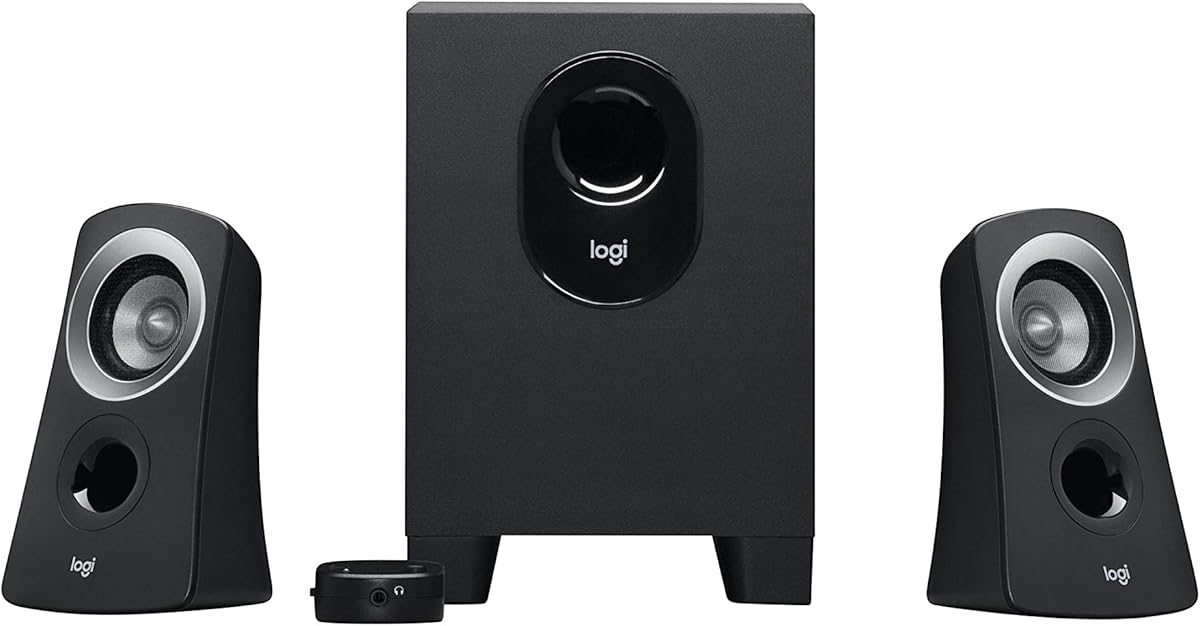
The Logitech Z313 is the traditional 2.1 choice in this guide, combining two satellite speakers, a compact subwoofer, and a dedicated control pod. Its 4.4 rating and 25-watt RMS output make it appealing for users who want more impact than a basic stereo pair can deliver.
We may earn a commission when you buy through this link, at no additional cost to you.
The subwoofer handles the lower end, allowing the satellites to focus on the main stereo presentation. Its compact construction is a practical response to the large subwoofers found in older multimedia systems. A separate control pod gives the user a central place to adjust the system, reducing the need to reach individual speakers during routine use.
Compared with the Bose Companion 20, the Z313 uses three speaker components plus a control pod, so it is less tidy. Compared with the Edifier bookshelf systems, it does not offer tone adjustment or dual source inputs in the supplied information. Wireless support is also absent. Those limitations make it less flexible for modern multi-device desks.
Choose the Z313 when movies, games, and music benefit from a dedicated low-frequency speaker and you have room for a subwoofer. It is a natural fit for a small entertainment area or a desk where the compact enclosure can sit below or beside the furniture.
A dedicated subwoofer allows the system to emphasize low notes that a small two-speaker setup may struggle to reproduce. This can make explosions, film scores, and game effects feel more substantial.
The included control pod keeps system adjustments in one accessible location. It also helps maintain a cleaner main desk because routine controls do not need to be spread across separate speaker cabinets.
We may earn a commission when you buy through this link, at no additional cost to you.
The Nylavee RGB Computer Speakers provide a modern desktop-speaker option for users who want both wired and wireless playback. They carry a 4.2 rating and combine a 14-watt RMS AC-powered system with Bluetooth 5.0, 3.5mm AUX, RGB lighting, and selectable equalizer modes.
We may earn a commission when you buy through this link, at no additional cost to you.
The speaker array includes four speaker units and two passive radiators, which the listing says produce cleaner highs and fuller mids. A dedicated one-button control switches between two EQ profiles, while the physical volume knob and additional buttons make operation possible without software. Bluetooth and AUX support also allow use with desktops, laptops, monitors, a PS5, or smartphones.
The four ambient lighting modes can add atmosphere, but the ability to turn them off is important for offices and distraction-sensitive setups. At 3.2 by 4.0 by 7.5 inches, the speakers remain relatively compact, although they are taller than several office-oriented alternatives. The supplied information does not list a headphone output, included audio cable details, or a subwoofer.
This system is well suited to a modern gaming or mixed-device desk where wireless convenience matters. It is especially appealing if you want louder everyday audio than a basic four-watt pair and appreciate adjustable lighting without giving up an entirely wired setup.
Bluetooth 5.0 and a 3.5mm AUX input let the speakers serve more than one kind of device. The system can move between a desktop computer, laptop, monitor, game console, or phone with the appropriate connection.
RGB illumination can enhance a gaming desk, but an off mode lets users remove the visual distraction. Two EQ modes also provide quick tonal changes without requiring a full desktop application.
We may earn a commission when you buy through this link, at no additional cost to you.
The LITTOAK GM03 is the most explicitly gaming-oriented system in the guide, pairing 15 watts per speaker with Bluetooth, multiple EQ modes, RGB lighting, a headphone connection, and a USB port. Its 4.2 rating makes it a credible option for users who want their computer audio to match a feature-rich gaming setup.
We may earn a commission when you buy through this link, at no additional cost to you.
Two 2.75-inch drivers in each cabinet are specified to produce the system's strong output. Presets for Music, Movie, and Gaming allow quick changes depending on the activity, while six lighting modes offer visual customization. The front controls are designed for easy access, including a power button that can be long-pressed for quick activation.
Connection options include Bluetooth and a supplied 3.5mm audio cable, with compatibility listed for desktops, laptops, tablets, monitors, smartphones, and televisions. The package also includes a speaker cable, power adapter, and user guide. A headphone connection and USB port add further convenience, although the USB port should not be assumed to carry digital audio simply because it is present.
Choose the GM03 for a colorful gaming desk that benefits from strong output and quick preset changes. It may be more elaborate than necessary for office listening, and buyers who dislike RGB or do not need a broad device list should prioritize a more neutral bookshelf or compact wired system instead.
Music, Movie, and Gaming modes provide quick tonal starting points for different media. A dedicated EQ button reduces the need to enter settings for every change in use.
Bluetooth, AUX, a headphone connection, and a USB port broaden the system's utility around a computer. The included cables and power adapter support a mostly ready-to-use setup.
We may earn a commission when you buy through this link, at no additional cost to you.
The right AC-powered computer speaker depends on room size, sound expectations, available inputs, and how much attention you want to give setup and controls. Use the following factors to narrow the field before choosing between a compact wired pair, a powered bookshelf system, or a gaming-focused model.
Power is one of the clearest indicators of how a system will handle volume and low-frequency output. The four-watt Cyber Acoustics and the Amazon Basics pair are appropriate for close listening at a desk, while the 24-watt Edifier R980T and 25-watt Logitech Z313 provide more headroom for a larger area. The Bose Companion 20 takes a different approach, using advanced port design and Bose TrueSpace processing to create a broad presentation from two speakers rather than relying on a separate subwoofer.
Match available power to the space. Compact office speakers need less output than a gaming system intended to fill a room, and choosing a small pair for a large entertainment area can leave it sounding strained at higher levels.
Most computer speakers rely on a 3.5mm audio connection, but the number of simultaneous sources varies. The Edifier R1280T and R980T accept two AUX inputs at once, the Bose Companion 2 Series III and II provide multiple wired inputs, and the Nylavee and LITTOAK systems add Bluetooth. Consider whether your desktop is the only source or whether you regularly switch among a computer, phone, console, or television.
Wireless support is convenient but should complement, not automatically replace, a reliable wired path. Bluetooth can be useful for casual listening, while a 3.5mm or auxiliary cable may remain preferable for a stationary gaming computer.
Headphone output is especially useful in offices and shared spaces. The Amazon Basics, Bose Companion 2 Series III, Cyber Acoustics CA-2014, and LITTOAK GM03 are explicitly listed with headphone connections. For system control, the Edifier R1280T includes a remote and side-panel tone knobs, the Bose Companion 20 uses a dedicated control pod, and the Logitech Z313 also places controls in a separate pod.
Think about where the controls will be placed. Front-facing buttons are convenient, but too many controls can make a simple setup feel cluttered. The best arrangement is one you can understand and reach without moving your chair.
A larger driver can move more air and generally has more potential for impactful low and midrange output, though enclosure design and processing also shape the result. The Edifier R980T uses four-inch drivers in wooden cabinets, while the Edifier R1280T combines a four-inch full-range unit with a 13mm silk-dome tweeter. Bose models emphasize stereo processing and equalization, and the LITTOAK system uses two 2.75-inch drivers per cabinet with passive radiators.
Choose based on the balance you want rather than driver size alone. Listeners focused on tonal adjustment may value dedicated bass and treble controls, while those wanting a conventional multimedia experience may prioritize a wider soundstage and uncomplicated operation.
A pair of large bookshelf speakers can overwhelm a small workstation even if it sounds excellent. The Cyber Acoustics CA-2014 is designed specifically for limited spaces, and the Amazon Basics speakers are also relatively compact. The Edifier bookshelf models and Bose Companion 20 have a more substantial presence, while the Logitech Z313 adds a subwoofer that needs separate placement.
Consider monitor distance, viewing angle, and available furniture. A system that looks balanced beside your display and leaves room for your keyboard is likely to be more satisfying than one that occupies valuable working space.
Gaming-oriented speakers often add RGB lighting, preset equalizers, and compatibility with game consoles. The Nylavee system offers Bluetooth, AUX, two EQ modes, and four lighting modes, while the LITTOAK GM03 provides 15 watts per speaker, three EQ presets, six RGB modes, and a gaming-styled control layout. These additions can make a setup feel more cohesive, though they are not necessary for accurate or enjoyable computer listening.
Prioritize a neutral appearance if the speakers will also support work calls or focused study. A lighting-off mode is useful because ambient effects that improve a game atmosphere can be distracting during office use.
Fixed sound is convenient, but adjustable bass and treble can make one pair work better across different content. The Edifier R1280T places separate tone controls on the active speaker, and its remote handles volume. The Nylavee and LITTOAK systems use preset EQ modes instead, offering faster changes with less precise adjustment. Other systems in the guide prioritize their processor design, stereo expansion, or general multimedia balance.
Decide whether you actively adjust sound. Frequent listeners may value fine control, while occasional users may find presets easier and less distracting.
Begin by placing the left and right speakers on either side of the monitor, with the active or control-equipped unit in the position that best matches your setup. Keep the cabinets on a stable, hard surface and leave enough clearance around the front ports and drivers. Connect the appropriate audio cable before powering the system, then use the computer's sound settings to select the correct output and adjust the balance.
For a 3.5mm or auxiliary connection, plug the cable into the computer's headphone or line-out jack and the matching input on the speakers. If using Bluetooth, put the speaker into pairing mode and select it from the computer or phone's Bluetooth menu. Keep the volume moderate during the first minute of playback, then increase it gradually so you can identify any hum, distortion, or imbalance without overwhelming the room.
Use the front volume control, remote, or control pod for everyday changes, and reserve equalizer controls for content that needs tonal adjustment. Clean the cabinets with a soft, dry cloth, avoid spraying cleaner directly onto the speakers, and keep liquids away from drivers, ports, and control panels. Route cables so they do not create a pull hazard, and switch the speakers off when they will not be used for an extended period.
AC-powered speakers can be a better choice when you want more consistent output without occupying a USB port. They also leave laptop or desktop USB ports available for peripherals and charging. USB-powered models can still sound good, however, and may be preferable for travel because they are simpler to power. The best choice depends on output needs, portability, and your available connections.
A subwoofer is not necessary for clear everyday audio, and some two-speaker systems are designed to provide convincing low-frequency response without one. It can make a meaningful difference for games, action films, and bass-heavy music. The Logitech Z313 is the dedicated 2.1 option in this guide, while the Bose Companion 20 aims for room-filling low notes through its two-speaker enclosure and port design.
Yes, provided the laptop and speakers use compatible connections. Most of the selected systems support a 3.5mm audio cable, while the Nylavee and LITTOAK systems also support Bluetooth. The speakers still require access to wall power, so you will need an AC outlet or suitable power solution even when the computer itself is portable.
Bluetooth is convenient when you want to move between a computer, phone, or tablet without changing cables. A wired connection can be equally dependable for a fixed desktop and may satisfy users who never listen to anything except their computer. The Edifier R1280T and R980T are strong choices for multi-source wired setups, while the Nylavee and LITTOAK models serve users who want both wired and wireless options.
Compact desktop speakers can sound good in a small room when listened to at a moderate distance from the computer. Higher-output systems are more useful when you want strong volume, a large soundstage, or robust low-frequency impact. The four-watt Cyber Acoustics CA-2014 is a practical small-space option, while the Edifier R980T, Logitech Z313, and feature-rich gaming systems provide more power for louder entertainment.
A two-speaker system is simpler, takes less room, and is usually easier to position around a monitor. A 2.1 system adds a subwoofer, which can improve low-frequency impact for games and movies but introduces another component and more cable placement. Choose the simpler pair for a small or multipurpose desk, and consider the 2.1 format when dedicated home entertainment matters more than a minimal footprint.
Place the left and right units at roughly equal distances from the listener and on either side of the monitor when space allows. Keep them on a stable surface and point the front of each cabinet toward the listening position. For a subwoofer, placing it near the main desk area can help maintain a consistent low-frequency response, though the supplied information does not prescribe one exact position.
Start by checking that the power adapter and audio cable are firmly connected and that the speakers are not placed beside a strong source of electrical interference. Lower the computer and speaker volume briefly to identify whether the noise follows the audio source or the power connection. Also check the selected input, disconnect unused cables, and avoid placing the power strip directly beside the audio cable.
The Cyber Acoustics CA-2014 is the most economical and compact choice for improving basic desktop audio. The Edifier R1280T stands out with a strong rating, simultaneous dual inputs, a remote, and adjustable bass and treble, making it the most versatile general-purpose pick. For a larger acoustic presentation, the Bose Companion 20 offers TrueSpace processing, a dedicated control pod, and a polished two-speaker design.
Prioritize the features that match your actual environment. Small workspaces benefit from compact units and accessible front controls; fixed desks with several devices benefit from multiple inputs; entertainment setups may benefit from more power, wider stereo processing, or a subwoofer. RGB lighting and preset EQ modes are useful additions for gaming, but they should complement rather than determine a purchase.
Before ordering, verify the current product listing, connector type, included accessories, dimensions, and availability. Product details and prices can change over time, and regional power requirements may also matter. Checking those details alongside your desk space and listening habits will help you choose a system you will enjoy using every day.