
Lexar Dual-Slot SD/Micro SD Card Reader
4.6Editor score
Up to 205MB/s performance
USB-A and USB-C connectors
Two simultaneous card slots
An SSD card reader for PC gives photographers, videographers, and content creators a fast, convenient way to move files from memory cards into a computer. The right model should match your card formats, port type, workflow, and transfer demands while remaining simple to use.
We compared ten products across important considerations including supported cards, USB interfaces, simultaneous reading, transfer specifications, operating-system compatibility, portability, and installation requirements. The list covers external readers, multi-card hubs, an internal desktop installation, and specialized storage alternatives.
Each review explains the product's strongest use case and relevant limitations. The top selections provide the most balanced options for different needs, from budget-friendly everyday transfers to high-speed workflows and expanded desktop connectivity. Prices and availability can change.
4.6Editor score

4.6Editor score

4.5Editor score
As an Amazon Associate we earn from qualifying purchases.
The comparison below highlights connection methods, card support, transfer capabilities, and practical specialties, from portable dual-slot readers to multi-format hubs and an internal desktop upgrade.


The SmartQ C368 earns the top position because it combines broad card compatibility, a straightforward USB 3.0 interface, and cross-platform operation in a practical single-purpose reader. Its 4.6 rating reflects a generally favorable user response, while the included card organizer is a thoughtful addition for travel.
We may earn a commission when you buy through this link, at no additional cost to you.
Its four-in-one design accepts SD, microSD, Memory Stick, and CompactFlash cards, giving it broader appeal than readers limited to SD and microSD. The stated USB 3.0 transfer rate can reach 5Gbps, although real results depend on the card, computer, files, and connection involved. A blue LED provides clear confirmation that the reader is powered.
The main limitation is its USB-A connection. Newer laptops and tablets increasingly favor USB-C, so an adapter may be required even when the reader itself is otherwise suitable. It also reads one card format at a time according to its description, making it less convenient for users who routinely need several cards connected at once.
This is a strong recommendation for photographers or travelers who want one dependable reader across several card standards. It is especially useful when a PC has a full-size USB port and value plug-and-play operation, broad operating-system support, and a useful travel organizer more than USB-C symmetry or multi-card concurrency.
Supporting SD, microSD, MS, and CF cards means the C368 can cover cameras, older devices, and modern compact cards without requiring separate readers. Verify that your specific card standard is supported before purchasing.
Windows, macOS, and Linux support makes this reader useful for mixed computer setups. Its no-driver design also reduces friction when moving between machines or working on location away from a permanent desk.
We may earn a commission when you buy through this link, at no additional cost to you.
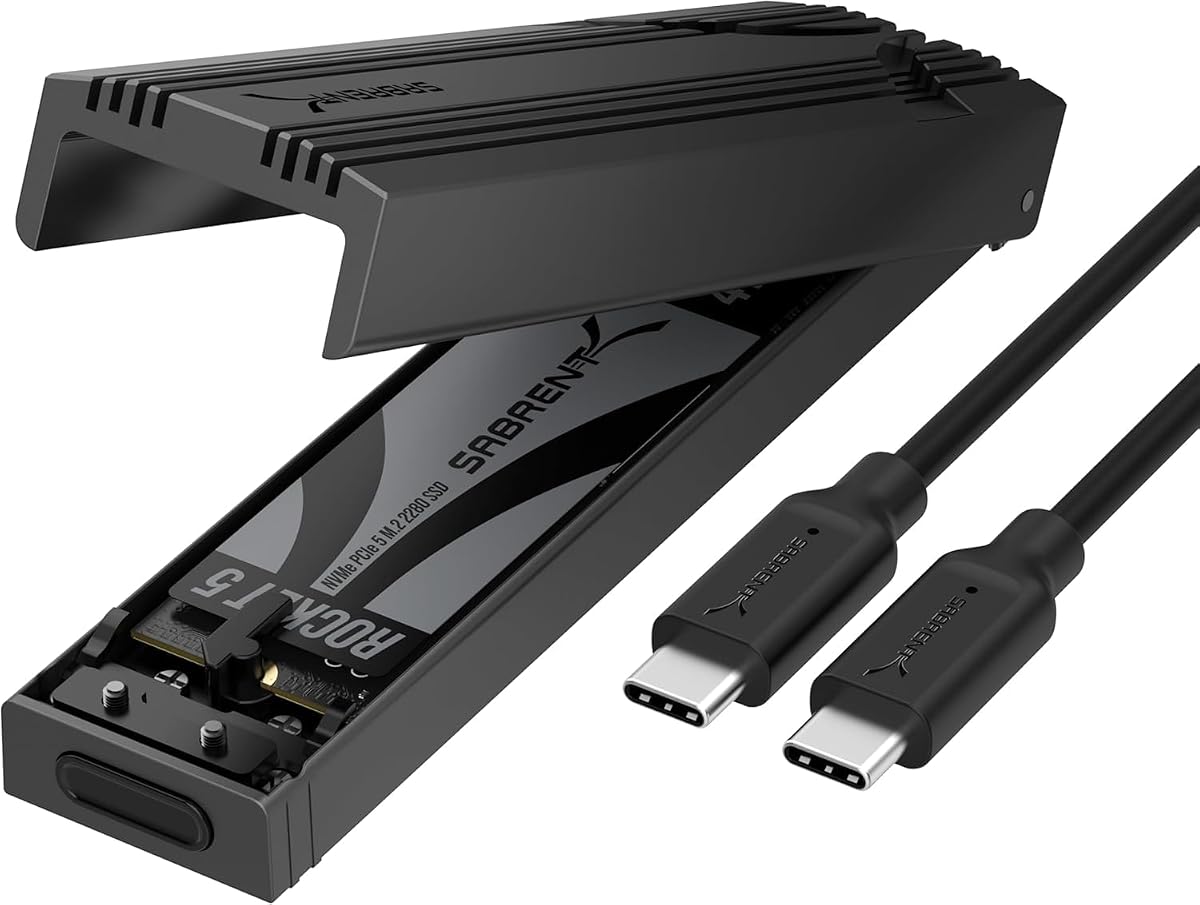
The SABRENT EC-PNVO is a specialized USB-C NVMe enclosure rather than a conventional SD card reader. It is included because PC users who need fast direct access to an M.2 solid-state drive can use it for file transfer, cloning, troubleshooting, upgrades, or portable workspace storage. Its 4.5 rating indicates strong general satisfaction.
We may earn a commission when you buy through this link, at no additional cost to you.
The enclosure supports M.2 PCIe NVMe drives in 2230, 2242, 2260, and 2280 formats, with capacity support stated up to at least 8TB. Its USB 3.2 Gen 2 interface offers a maximum 10Gbps connection, and the tool-free flip-open design makes swapping drives straightforward.
Thermal management is one of the clearest advantages. An aluminum enclosure presses a thermal pad against the drive to improve heat transfer, supporting more stable performance during extended transfers. The important limitation is compatibility: it does not read SD or microSD cards and cannot accept M.2 SATA drives.
Choose this product if you already own a compatible NVMe SSD and want a reusable, high-speed enclosure for a PC. It is not the right solution for a photographer who needs card slots, but it is a compelling upgrade for a builder, technician, editor, or power user who regularly works with internal-style solid-state drives.
Opening the cover, inserting the drive, and closing the enclosure requires no screws. This makes frequent drive swapping and portable testing workflows considerably more convenient.
The aluminum shell and direct thermal pad help move heat away from the SSD. That design supports steadier 10Gbps operation when moving large files or handling sustained workloads.
We may earn a commission when you buy through this link, at no additional cost to you.
The 7-in-1 Multi Card Reader is designed for users who need more than standard SD and microSD support. It includes slots for CF, two SD positions, TF, microSD, XD, and MS cards, plus a five-card simultaneous read-and-write capability. Its 4.5 rating reflects a versatile feature set.
We may earn a commission when you buy through this link, at no additional cost to you.
One of the most useful advantages is concurrency. Photographers transferring footage from several cards, or editors handling media from multiple devices, can work more efficiently without repeatedly disconnecting and reconnecting cards. The USB-C and USB-A connectors also offer flexibility across modern and older computers.
Its advertised 5Gbps transfer rate applies through USB 3.0, with backward compatibility for USB 2.0 and 1.1 connections. The reader supports numerous standards, including SDXC up to 2TB, SDHC, microSDXC, microSDHC, high-speed CF, XD, and MS. As with every card reader, the memory card and source device determine actual speed.
This is a good choice for a mixed media kit or an IT bench that must handle varied card types. It may be more than a photographer needs, and obsolete formats add physical bulk, but the simultaneous operation and connector flexibility justify the design for users who prioritize adaptability.
Reading and writing up to five cards at the same time can streamline sorting sessions. It reduces repeated connector changes while keeping multiple camera or device cards accessible.
The combination of USB-C and USB-A makes the reader convenient for recent laptops and older systems alike. Its broad card support also suits workshops, studios, and multi-device workspaces.
We may earn a commission when you buy through this link, at no additional cost to you.
The 4-in-1 USB-C Reader focuses on moving media between memory cards and a wide range of modern devices. It supports SD, TF, CF, and MS card families, including common high-capacity and microSD variants. Its 4.5 rating suggests that users value the broad device compatibility and simple operation.
We may earn a commission when you buy through this link, at no additional cost to you.
The native USB-C connector works directly with compatible smartphones, tablets, laptops, and computers. A detachable USB-C-to-USB adapter expands support for older PCs and other USB-A arrangements. With full OTG support, the reader can also serve compatible iPhone, Android, iPad, and MacBook workflows.
Unlike many competing models, this product does not publish a specific maximum transfer rate. It does identify support for standard photo formats such as JPEG and RAW, along with H.264 and MPEG-4 HD video. That makes it a functional transfer hub, although buyers prioritizing speed should compare it with readers offering explicit performance figures.
This is a compelling pick for content creators who want one reader to move files between a camera card, phone, tablet, and computer. It is less suitable if you depend on Wi-Fi-enabled SD cards, which the product explicitly does not support.
Native USB-C and the detachable USB adapter allow the reader to serve phones, tablets, laptops, and desktop PCs. This flexibility is valuable for creators who alternate between mobile editing and computer-based workflows.
The four slots cover SD, TF, CF, and MS card families, including micro variants and high-capacity formats. Check the exact physical card type before use, especially for specialized CF or Memory Stick standards.
We may earn a commission when you buy through this link, at no additional cost to you.
The BENFEI 4-in-1 Reader combines four card slots, simultaneous operation, and both USB-C and USB 3.0 connections. It supports SD, microSD or TF, Memory Stick, and CF cards, making it a practical four-format option for a photographer moving between modern and older equipment. It holds a 4.5 rating.
We may earn a commission when you buy through this link, at no additional cost to you.
With a USB Type-C or USB 3.0 connection, the reader supports UHS-I transfer rates up to 160MB/sec. Final speed depends on the memory card and computer port, an important qualification because readers cannot exceed the slower part of the connection. An advanced IC chip is included to handle high-speed signals.
All four card types can be read and written simultaneously, helping organize multiple shoots without repeated reconnection. The product also works with a broad range of modern Apple, Microsoft, Samsung, HTC, Google, and Dell devices. Its integrated connectors mean no separate adapter is required.
There are important compatibility exclusions: standard Memory Stick, Memory Stick Micro M2, and CF Type I are not supported. SDXC cards of 64GB or larger require exFAT, which may not be available on older Windows or macOS systems. For compatible modern hardware, this remains a versatile and well-balanced reader.
Simultaneous reading and writing lets you import from several cards at once. This is especially helpful after a multi-camera shoot or when organizing separate photo and video media.
The stated 160MB/sec ceiling applies under UHS-I conditions with a suitable USB port and card. Checking both the card rating and computer interface prevents unrealistic transfer expectations.
We may earn a commission when you buy through this link, at no additional cost to you.
The UGREEN SD Card Reader is a clean, compact solution for users whose storage needs center on SD and microSD cards. Its 4.6 rating makes it one of the highest-rated options here, while the combined USB-C and USB-A design reduces the need to carry a separate adapter.
We may earn a commission when you buy through this link, at no additional cost to you.
The reader supports a maximum transfer rate of 5Gbps over USB 3.0 and can handle SD and microSD cards simultaneously. Supported standards include SDXC, SDHC, SD, MMC, RS-MMC, microSDXC, microSD, and microSDHC, covering common cameras, action cameras, dash cameras, and surveillance devices.
It is designed to be slim and lightweight for a camera bag or laptop sleeve. No drivers or external power are required, and the stated platform compatibility covers Windows, macOS, and most Android devices. The product also lists compatibility with iPhone 15, 16, and 17 Pro and Pro Max models as part of its USB-C device support.
Choose this reader for everyday photo and video transfers when you do not need CF or legacy Memory Stick support. It delivers the most focused feature set for modern SD workflows, combining dual slots, dual connectors, and easy portability without unnecessary complexity.
Dedicated SD and microSD slots keep the setup simple for cameras, phones, drones, and other modern devices. Two-card operation speeds routine sorting without adding unrelated formats.
The integrated USB-C and USB-A interfaces make the reader practical across different computers. It is especially convenient for travelers who want fewer dongles in their equipment bag.
We may earn a commission when you buy through this link, at no additional cost to you.
The GRAUGEAR 5.25-Inch Front Panel is built for desktop builders who want permanent front-panel access to memory cards, USB devices, and two-inch drives. Instead of an external reader, it installs inside a standard 5.25-inch bay. Its 4.3 rating is slightly lower than the leading portable options.
We may earn a commission when you buy through this link, at no additional cost to you.
The front panel includes UHS-I SD and microSD card slots, a high-speed USB-C connection advertised at 20Gbps, and dual USB-A ports. Internally, it connects through USB 3.2 Gen2x2 A-Key, a USB 3.0 19-pin header, and SATA power. This makes it more of a desktop connectivity upgrade than a conventional reader.
Two tool-free 2.5-inch bays accept 7mm and 9.5mm SATA SSDs or hard drives, allowing the installation to serve as a storage front panel as well. The design suits a custom workstation where repeatable access to cards and removable media is important.
This product requires compatible hardware and careful internal installation, so it is not appropriate for a laptop or for a simple plug-and-play purchase. Desktop owners who want an integrated, always-available card reader and front-panel USB hub will find it more capable than a loose external adapter.
Installing SD and microSD readers at the front of the case eliminates repeated searches for an external adapter. This convenience is particularly useful in a photo-editing or production workstation.
The front USB-C and USB-A ports turn the panel into a broader desktop hub. Dual 2.5-inch drive bays add convenient front access for compact SATA storage.
We may earn a commission when you buy through this link, at no additional cost to you.
The Lexar Dual-Slot Reader is the premium choice for speed-conscious users who work with SD and microSD cards. It advertises read speeds up to 312MB/s through USB 3.2 Gen1 Type-C and holds a 4.5 rating. The dual slots also allow both card formats to be handled at once.
We may earn a commission when you buy through this link, at no additional cost to you.
For UHS-I SD and microSD cards, the stated backward-compatible maximum is 170MB/s. Faster published results depend on the card and computer connection, but this reader is clearly aimed at users who want to minimize waiting when importing high-resolution photos or large video files.
An LED activity light provides useful confirmation while the reader is working. Its compact form is appropriate for a camera bag, and the two-year limited warranty adds some reassurance for regular professional use. It also remains compatible with USB 2.0 ports, although connection speed will be lower.
This is the strongest premium recommendation for a fast desktop workflow built around SD and microSD media. It is less flexible than multi-format readers for CF or legacy cards, and USB-C-only connectivity may require an adapter on an older desktop, but it delivers a focused and capable high-speed experience.
A stated read rate of up to 312MB/s can shorten waits when importing large image libraries or footage. The memory card and source computer must support the corresponding transfer rate for the full benefit.
Concurrent SD and microSD handling supports fast card rotation and media organization. The activity LED gives a straightforward visual cue during transfers and card changes.
We may earn a commission when you buy through this link, at no additional cost to you.
The Insta360 Quick Reader is a portable USB-C SSD with 512GB of built-in storage, not a reader with removable memory-card slots. It offers an alternative for creators who want immediate access to footage without carrying a separate card. Its 4.2 rating is the lowest among the listed products, but its specialized design remains useful.
We may earn a commission when you buy through this link, at no additional cost to you.
Read and write speeds of 420MB/s can make it effective for offloading camera footage quickly. It connects directly to iOS and Android devices as well as PCs, requires no power or Wi-Fi, and uses a USB-C port for broad modern-device compatibility. The included covers and spacer support use with Insta360 action cameras.
Its strongest advantage is convenience. At 5.4 grams and roughly the size of a coin, it is easy to carry and can serve as immediate working storage rather than merely a pass-through adapter. That also means it does not need a card inserted, and it cannot directly read an SD, microSD, or CF card.
Choose it when your priority is fast direct access to stored footage across phones and computers. If your goal is importing files from removable memory cards, a true card reader is the better purchase. For Insta360 users seeking a pocket-sized offload and viewing solution, this product fills a different and useful niche.
The built-in 512GB capacity provides space for offloaded footage and direct playback. It removes the need to keep swapping cards while working on a phone or tablet.
The 5.4-gram body and USB-C connection suit mobile shooting setups. Included camera covers and a port spacer add compatibility for the specified Insta360 camera families.
We may earn a commission when you buy through this link, at no additional cost to you.
The Lexar Dual-Slot Reader combines a 205MB/s stated performance level with both USB-A and USB-C connectors. It supports SD and microSD cards, transfers from both slots simultaneously, and requires no extra drivers. Its 4.6 rating places it among the strongest options in the roundup.
We may earn a commission when you buy through this link, at no additional cost to you.
The dual connectors make it a practical choice for a mixed PC environment. USB-C works with newer laptops and desktops, while USB-A supports older systems and many accessories. Backward compatibility with USB 2.0 is useful as a fallback, though it will limit transfer performance.
A maximum speed of 205MB/s is well suited to importing substantial photo and video collections without moving to a specialized high-end reader. As with every reader, actual results depend on the memory card's rating, the source device, and whether the computer connection supports the necessary bandwidth.
This is the best value-oriented selection for users who want fast SD and microSD transfers, two simultaneous slots, and broad connector support in a compact package. It does not accept CF, XD, or Memory Stick cards, so photographers with mixed legacy formats should choose a broader multi-card reader instead.
USB-A and USB-C support lets the same reader work across old and new PCs. That makes it easier to keep one dependable adapter in a camera bag or workstation drawer.
Both SD and microSD slots can operate at the same time, reducing repeated card changes. The compact design remains easy to carry between a desk and an on-location session.
We may earn a commission when you buy through this link, at no additional cost to you.
The right PC card reader depends on the formats you use, your available ports, and the amount of data you move. These factors help narrow the field before you compare speed claims and convenience features.
Begin with the physical cards you already own. SD and microSD cover a large share of modern cameras, phones, drones, and action cameras, while CompactFlash and Memory Stick remain relevant for older or specialized equipment. A reader's slot label is not always enough, because formats may include several capacities and speed generations. Check for the exact standards you need, including SDXC, microSDXC, CF Type II, or the specific Memory Stick variation.
Choose a multi-format reader only when the extra slots serve a real need. Focused dual-slot models are usually easier to carry, while broad hubs can simplify mixed equipment workflows.
Match the reader to the ports on your computer. USB-C is common on recent laptops, tablets, and modern desktops, while USB-A remains useful on older systems and many desktop towers. Some readers integrate both interfaces, which avoids carrying a separate adapter. Others use a detachable adapter, offering similar versatility in a slightly different form. USB-C alone is not automatically better, as the host port and connected card determine real throughput.
Integrated dual connectors offer the simplest cross-machine use. A single USB-C reader is cleanest for modern portable systems, while an adapter-based design may be more convenient for mixed office equipment.
Published maximum speed can be misunderstood. A reader's interface ceiling does not guarantee that every card will reach it, and slower cards, older ports, small files, or processing overhead can reduce results. UHS-I card ratings are often more relevant for ordinary SD workflows than the headline interface number. For a reader advertised at 205MB/s, use a card capable of comparable sequential reads and connect it to a port that supports the required bandwidth.
Prioritize a clear speed rating when moving large video files. For routine photos, a reliable dual-slot reader with a modern connector may deliver a more satisfying overall experience than paying attention only to the highest advertised figure.
Simultaneous reading lets a PC recognize more than one card at once. This can shorten import and sorting sessions when several devices are used during one shoot. It is especially valuable for photographers working across multiple cameras, videographers comparing footage, and studios that need to ingest from several cards at once. Confirm the number of cards and formats that can operate simultaneously, as some readers only allow one card to be active.
Dual-slot operation is a useful middle ground. Multi-slot hubs offer the greatest concurrency but are naturally larger, while single-slot readers remain appropriate when only one card is used at a time.
A no-driver reader that works with Windows, macOS, and Linux offers the greatest flexibility. Mobile-device support is also important for creators, but it depends on USB-C host support and compatible OTG behavior. When using an iPhone or tablet, verify that the operating system recognizes external storage and that the specific card format is supported. Some desktop systems may lack front USB-C ports or may place them on different cards and buses.
Choose broad compatibility if you switch computers. For a fixed workstation, matching the reader to that machine's exact ports and operating system can be enough.
External readers are ideal for camera bags, travel, shared workstations, and laptops. Their compact size makes them easy to pair with a specific computer and use with changing card formats. An internal desktop panel offers a different benefit: permanent front access without searching for an adapter. It requires a compatible 5.25-inch case bay and internal wiring, making it more appropriate for a planned workstation build than an immediate upgrade.
Choose portability for mobile work. Choose an internal panel when desk space, appearance, and permanent connectivity matter more than a minimal equipment footprint.
A reader used in the field should be small, sturdy, and easy to orient. An LED can confirm that the device is powered or active, which helps distinguish a working transfer from a connection problem. Cable organizers can keep compact adapters from disappearing in a bag. Desktop users may value a fixed reader more than a particularly tiny portable model, while travelers may prefer a body that can be attached securely and retrieved quickly.
Prioritize a design that matches where it will live. Useful status feedback and tidy storage can matter as much as the theoretical transfer specification in daily use.
Card capacity support matters when using high-capacity SDXC or microSDXC media. Some operating systems and older devices cannot access exFAT volumes of 64GB or larger, so confirm that the computer supports the card's file system before formatting. A 2TB card class exists in modern readers, but the computer, reader, and file system must all participate. For specialized high-capacity cards, test a smaller card first and preserve important files before changing any format.
Check capacity and file-system support together. A reader may physically fit the card while the operating system remains unable to mount its partition.
Before inserting a card, confirm that the reader supports its exact format and that the card is formatted in a file system recognized by your computer. Connect the reader first if the setup instructions recommend it, then insert the card firmly but gently. Avoid forcing a card into the wrong slot, since SD, CF, XD, and Memory Stick connectors have different shapes and can be damaged.
Use the operating system's normal file-transfer tools to copy or import content. Wait for the activity indicator to stop and for the computer to confirm completion before removing the card. Safely eject the reader or removable volume first, then release the card by pressing it gently until it springs out. Do not pull a card out while files are still being written or read.
Keep the reader clean, dry, and away from extreme heat. Use the card slot covers or a protective pouch when carrying it, and avoid leaving cards inserted while the computer is powered down if there is a chance of accidental removal. For high-volume workflows, periodically check storage health, back up important media, and avoid using the reader as the only location for irreplaceable files.
The fastest option depends on the memory card and computer connection as much as the reader. Among the products listed, the Lexar reader advertising up to 312MB/s and the Insta360 portable SSD offering 420MB/s read and write show strong headline performance. Actual transfers will vary, and the portable SSD is not a removable-card reader.
A USB-C reader is ideal if your PC has a USB-C port and you want direct connectivity without an adapter. USB-A readers remain useful with older desktops and computers that lack USB-C. Models with both connectors offer the most convenient option for a mixed equipment setup.
Yes, most modern readers include separate SD and microSD slots. Several options can read both simultaneously, which helps when importing multiple cards or switching between devices. The slots accept different physical sizes, so avoid forcing an SD card into a microSD slot or using an incompatible adapter.
Most listed USB 3.0 readers are backward compatible with USB 2.0, including the SmartQ, BENFEI, multi-card hub, and UGREEN models. They will still function, but transfer speed can be substantially lower because the older port becomes the bottleneck.
Start by trying another USB port, reconnecting the reader, and confirming that the card is seated correctly. Check whether the card uses a file system unsupported by your operating system, particularly for high-capacity exFAT media. Updating the computer's system software and testing the card directly can help isolate the problem.
The external readers in this guide are designed for plug-and-play use without external power, drawing power from the connected host. The internal GRAUGEAR panel instead connects to desktop power for its broader hub and drive-bay functions. Always follow the manufacturer's connection instructions.
No. Compatibility depends on the exact slots and standards built into the reader. Some models support SD, microSD, CF, and MS cards, while others focus only on SD and microSD. The BENFEI model also excludes standard Memory Stick, Memory Stick Micro M2, and CF Type I, so exact format checks are important.
Format a card only when you intend to erase its contents and have already backed up important files. Choose a file system supported by every computer that will use the card, and avoid formatting between systems that cannot read that format. High-capacity cards commonly use exFAT, which older Windows and macOS versions may not support.
The SmartQ C368 is the most balanced overall choice because it supports four major card families, uses a widely available USB 3.0 connection, and works across major desktop operating systems. The Lexar 205MB/s reader stands out as the best budget-oriented option, while the 312MB/s Lexar model is the stronger premium pick for demanding SD and microSD transfers.
Prioritize the card formats and connector you will actually use, then consider simultaneous card handling, verified device compatibility, and a realistic transfer-speed expectation. Multi-card hubs help mixed workflows, compact dual-slot readers suit modern photography, and the GRAUGEAR internal panel serves a permanent desktop build. The Insta360 Quick Reader and SABRENT enclosure serve distinct storage needs rather than ordinary memory-card imports.
Before purchasing, check the current product listing, included accessories, and operating-system support because configurations and availability can change. Current prices can also vary, so compare the reader's features against your card standards and computer ports rather than relying on cost alone.