
NinABXY Dockable Case for Nintendo Switch 2
4.3Editor score
One-press Joy-Con release
Dock and kickstand compatible
Textured ergonomic grips
Our Nintendo Switch Rugged Case guide compares 10 protective covers for durability, grip, docking, portability, storage, and precise model compatibility.
A rugged Nintendo Switch case should do more than prevent a scratch. It should absorb impacts, improve grip, fit the console precisely, and remain practical for docked play, travel, and everyday handling. Because Nintendo has released several distinct hardware models, compatibility with the original console, the OLED model, and Nintendo Switch 2 must be checked before buying.
The ten products in this guide were compared using the information supplied by their manufacturers and retailers. Key considerations included impact protection, raised screen edges, Joy-Con access, kickstand or dock support, grip design, storage, portability, material construction, and model-specific fit. The list includes protective shells, grip cases, and travel cases designed for different gaming routines.
Each review explains the product's strongest features, practical limitations, and ideal owner. The top three picks range from a feature-rich protective shell to a premium travel case, while every listed model has a distinct use case. Product ratings can change over time, and prices also fluctuate, so readers should confirm current availability and cost before making a final purchase.
4.3Editor score

4.6Editor score

4.8Editor score
The comparison below organizes all ten cases by console compatibility, protection approach, practical features, and intended use, making it easier to identify the right model for handheld gaming, docked play, or travel.




This black SUPCASE is a feature-rich protective shell for the Nintendo Switch 2, earning a 4.6 rating among the products reviewed. Its combination of a rigid polycarbonate exterior, shock-absorbing design, raised screen bezel, and rubberized grip makes it a convincing all-round choice for owners who regularly carry their console or play away from a protected surface.
We may earn a commission when you buy through this link, at no additional cost to you.
The hinged Joy-Con coverage is the most distinctive element. Rather than requiring the entire case to be pulled away when controllers need to detach, the mechanism can open to release the Joy-Con while continuing to shield them from vibration and accidental movement. The 139g weight-balanced construction is designed to preserve the console's natural feel, while the textured surface improves security during motion-controlled and competitive games.
Protection is also thoughtfully addressed beyond the screen. The case is described as meeting U.S. military-grade standards, specifically MIL-STD-810G 516.6, for shock, impact, and scratch resistance. Its 2.5mm raised bezel helps keep the display away from flat surfaces, and the German Bayer polycarbonate is described as resistant to yellowing, fingerprints, and dust. These details make it more practical for regular commuting than a simple snap-on cover.
There is one important limitation: the product is not compatible with the Switch 2's kickstand function. It is also designed exclusively for the 2025 Switch 2 release, so it will not fit the original Switch or OLED model. Despite that limitation, the combination of shock protection, precise docking, easy Joy-Con removal, and a secure grip makes this a strong recommendation for Switch 2 owners who prioritize protection in handheld play.
Best suited to Switch 2 players who want serious impact protection without sacrificing the ability to dock the console. The hinged controller system is especially useful for users who frequently move between solo and multiplayer play.
The rigid shell, shock-oriented construction, and raised bezel provide meaningful everyday protection, but the case also remains convenient to live with. Users can dock the console without removing it and can release the Joy-Cons through the hinge rather than taking off a full enclosure.
The anti-slip rubberized texture adds confidence when the console is used for motion games, action titles, or longer sessions. Its weight-balanced construction helps retain the familiar feel of the Switch 2 rather than turning it into a bulky, uneven handheld.
We may earn a commission when you buy through this link, at no additional cost to you.
The Dexnor case is built for the Nintendo Switch OLED model and carries a 4.3 rating. It stands out from conventional rugged covers because it combines a shockproof TPU-and-PC shell with storage for five game cards and five microSD cards. That makes it especially appealing for owners who want their physical and downloaded games organized in one protective package.
We may earn a commission when you buy through this link, at no additional cost to you.
Its kickstand is another meaningful advantage for the OLED model. Owners can prop the console at a comfortable angle on a bumpy surface without relying on a separate accessory. The openings are designed specifically for the OLED hardware, while the shell combines flexible TPU for shock absorption with sturdy PC for structural protection. Ergonomic grips are also incorporated to improve comfort during extended handheld sessions.
The main trade-off is that the storage-focused design naturally adds more bulk than a slim grip case. It is also explicitly designed for the 2021 OLED console, meaning it will not fit the original Switch or the Nintendo Switch 2. Buyers need to verify their hardware model because a case advertised for one version of the console can appear deceptively similar to cases intended for another.
Despite these caveats, the Dexnor model is a compelling choice for OLED owners who regularly carry multiple games and want useful organization. The combination of card storage, microSD slots, a kickstand, and rugged construction reduces the need for several separate accessories. It is less suitable for buyers who place a higher priority on minimal size or use a different Nintendo console generation.
Best for Nintendo Switch OLED players who carry a substantial game library, need a kickstand, and want one case to handle protection, storage, and tabletop viewing.
Five dedicated game-card positions and five microSD slots keep essential media organized and easy to retrieve. This is a meaningful convenience for players who travel with multiple titles or regularly switch between physical and downloaded games.
The integrated adjustable stand provides a stable viewing angle on desks, beds, picnic surfaces, and other uneven places. It adds genuine utility for handheld gaming without requiring a separate kickstand accessory.
We may earn a commission when you buy through this link, at no additional cost to you.
The SUPCASE FrostBlack grip case earns a 4.5 rating and offers a straightforward combination of shock absorption, ergonomic handling, and easy installation for the Nintendo Switch OLED model. It is designed for owners who want more handhold than the bare console but do not need the larger storage layout of a travel-oriented shell.
We may earn a commission when you buy through this link, at no additional cost to you.
Its construction uses flexible, shock-absorbing TPU alongside hard, drop-resistant PC. That layered approach helps protect against bumps and impacts while preserving a relatively clean profile. Textured edges and an ergonomic shape improve grip, particularly during action games or sessions in which fatigue makes small hand movements more noticeable. Precise cutouts maintain access to buttons, sensors, and ports.
Convenience is a key strength. The clip-on design does not need to be removed for charging, and the product is described as fitting the dock. That means players can move from handheld sessions to television play without making case removal a routine step. The straightforward installation also makes it easier to assess the fit before putting the console back together.
The main omissions are the lack of an integrated kickstand and exclusive compatibility with the 2021 OLED model. This makes it a better fit for users who dock regularly or value simple grip over tabletop support. Overall, the product balances several common needs without becoming visually or functionally excessive, making it an easy recommendation for the right console owner.
Best for Switch OLED users who want an ergonomic, dock-friendly grip case with dependable dual-material protection and straightforward installation.
Flexible TPU helps absorb shock, while the rigid PC section resists drops and everyday abrasion. Together, they provide balanced protection without requiring the user to sacrifice normal charging and docking routines.
Ergonomic contours and textured edges reduce the risk of slipping and improve hand comfort. These details are especially valuable for players who regularly use the OLED model away from a desk or dock.
We may earn a commission when you buy through this link, at no additional cost to you.
The PiMivco case is a rugged grip cover made for the original 2017 Nintendo Switch, and it holds a 4.5 rating. Its central selling point is a design that fits the original dock while maintaining protection, ergonomic handling, and easy access to the console's ports and features.
We may earn a commission when you buy through this link, at no additional cost to you.
Protection comes from flexible TPU paired with anti-scratch frosted transparent PC. The TPU components are positioned to absorb bumps and impacts, while the PC surfaces help defend against scratches, dust, and fingerprints. This construction is particularly useful for the original Switch because it protects the console without requiring it to be removed every time the owner wants to charge or dock it.
The ergonomic handles are shaped to improve grip and reduce hand fatigue. Precise cutouts allow access to controls and ports without removing the case, which helps maintain a smooth transition between docked television gaming and portable play. The frosted translucent appearance also lets some of the console's original design remain visible.
Compatibility is the decisive limitation. This case is specifically for the Nintendo Switch released in 2017 and is not intended for the OLED model or Switch 2. It also offers no game storage or kickstand. Even so, for an original Switch owner seeking a basic, dock-friendly protective grip, it is a well-balanced and thoughtfully engineered option.
Best for owners of the original Nintendo Switch who want drop, scratch, and grip protection while retaining normal dock and charging compatibility.
The case is designed to fit inside the compatible dock without being taken off. This reduces friction when alternating between handheld and television play and avoids repeated installation.
A flexible grip frame and clear PC panels guard vulnerable areas without creating a large travel enclosure. The result is closer to an everyday grip case than a storage-heavy travel case.
We may earn a commission when you buy through this link, at no additional cost to you.
The NinABXY case is a hard-shell protective option for the Nintendo Switch 2, carrying a 4.3 rating. It focuses on three practical needs: protecting the console, supporting docked and tabletop play, and allowing the Joy-Con controllers to be removed quickly when multiplayer or motion play calls for them.
We may earn a commission when you buy through this link, at no additional cost to you.
Its most notable feature is the pop-up, one-press Joy-Con release. According to the product information, pressing the plus or minus buttons on the back activates a hidden spring-latch mechanism, allowing the controllers to detach in about a second. This avoids the need to pull off an entire shell, which can make changing between solo and shared play more convenient.
The shell is designed to fit the original Switch 2 dock, and a precision cutout leaves the built-in kickstand usable. Its anti-slip carbon-fiber texture is intended to improve stability, while the expanded palm curve distributes the console more comfortably across the hand. The material is also described as anti-yellowing, helping preserve the case's appearance over time.
Some of the product listing includes very specific testing and performance claims, so shoppers should evaluate those statements critically and compare them with their own needs. The case is also exclusive to the Switch 2. Even so, its combination of quick controller access, dock support, kickstand access, and a grippy surface makes it one of the most functionally complete options in the roundup.
Best for Switch 2 players who regularly detach the Joy-Cons, use the kickstand, or alternate quickly between handheld, social, and docked play.
The spring-latch release mechanism is the feature that sets this model apart. It is intended to make controller swaps quicker and reduce the temptation to pry against a full protective shell.
Dock compatibility, a kickstand cutout, scratch-resistant construction, and a textured grip allow one case to support handheld sessions, tabletop play, and television gaming without frequent reconfiguration.
We may earn a commission when you buy through this link, at no additional cost to you.
This blue SUPCASE is essentially a color-focused alternative to the black version in the same Switch 2 family, earning the same 4.6 rating. It combines a protective hard shell, hinged Joy-Con coverage, an anti-slip surface, and compatibility with the official dock.
We may earn a commission when you buy through this link, at no additional cost to you.
The case is constructed from Bayer polycarbonate described as eco-friendly, lightweight, and resistant to yellowing, fingerprints, and dust. It is engineered to U.S. military-grade standards, with particular attention to shock, impact, and scratch resistance. A 2.5mm raised bezel provides separation between the screen and surrounding surfaces.
The hinged controller mechanism lets users open and disassemble the Joy-Con sections while preserving coverage around them. The description says the design helps shield the controllers from vibration and keeps them firmly connected during play. Its 139g weight-balanced construction and rubberized texture are intended to maintain a natural feel and improve handling.
The blue model shares the same important limitation as the black SUPCASE: it is compatible only with the Nintendo Switch 2 and does not work with the console's kickstand. It also provides no storage for cartridges or accessories. For a buyer who wants the same proven feature set in a brighter finish, however, it delivers a strong combination of impact resistance and everyday convenience.
Best for Switch 2 owners who prioritize rugged grip and controller coverage but prefer a blue finish to the more neutral black version.
The blue finish gives the case a more expressive appearance without sacrificing the core protective design. Owners receive the same hinged coverage, raised bezel, textured grip, and dockable construction discussed across this product line.
Resistance to fingerprints, dust, and yellowing helps the exterior remain presentable over time. The anti-slip surface also provides functional value during motion-controlled and fast-paced handheld games.
We may earn a commission when you buy through this link, at no additional cost to you.
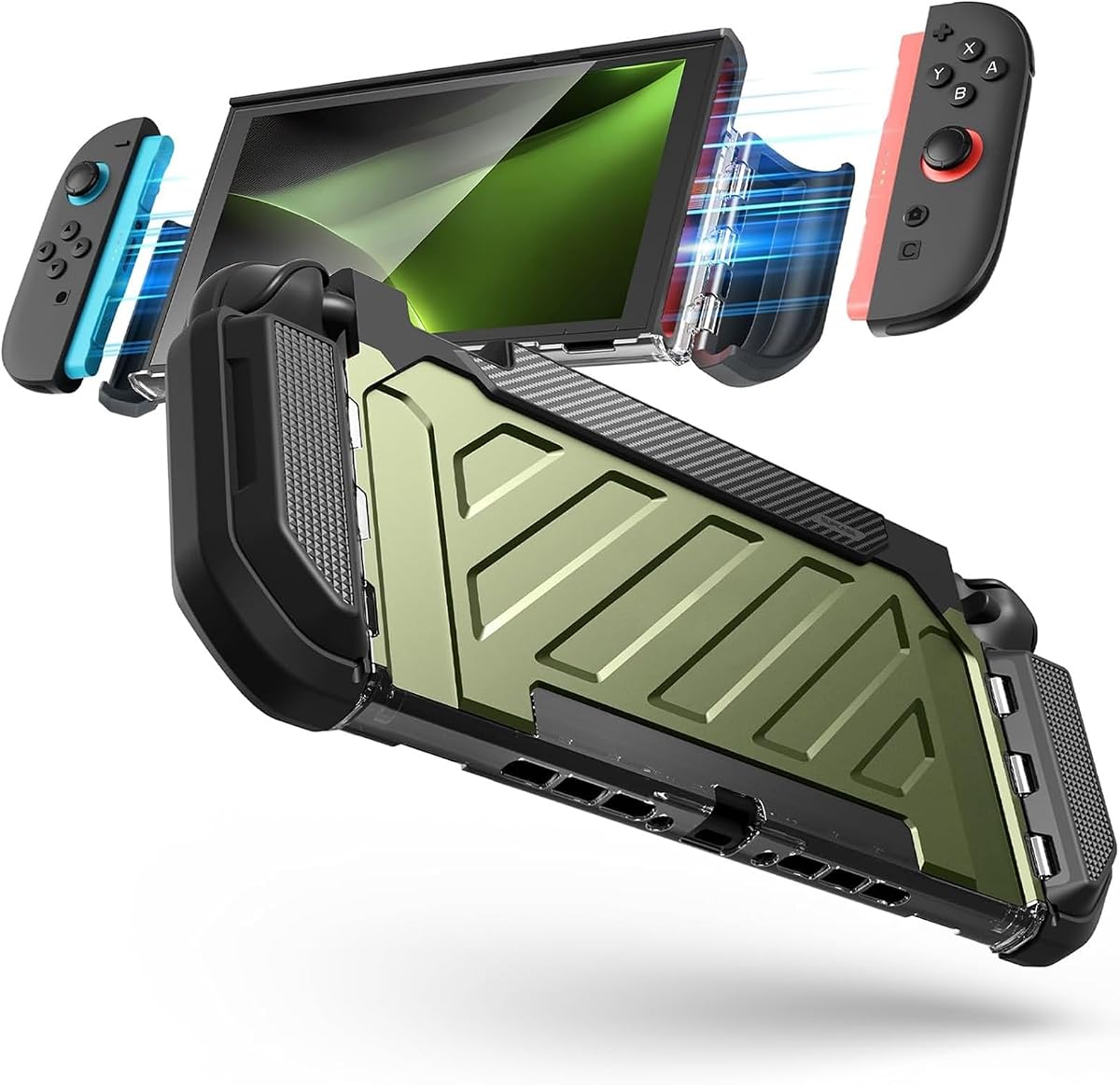
The green SUPCASE provides the same well-rounded Switch 2 protection as the black and blue versions, with a 4.6 rating and a particularly clear emphasis on alignment with official docks and charging stations. That focus makes it attractive for owners who alternate among handheld play, charging, and television gaming.
We may earn a commission when you buy through this link, at no additional cost to you.
Its protective construction uses a shock-oriented hard shell and a 2.5mm raised screen bezel. The hinged Joy-Con sections support quick controller assembly and disassembly while helping guard against vibration and movement. A rubberized anti-slip texture and weight-balanced 139g construction are intended to preserve a comfortable handheld experience.
The exterior is described as Bayer polycarbonate engineered to resist yellowing, fingerprints, and dust. The product is also advertised as meeting MIL-STD-810G 516.6 standards for shock, impact, and scratch protection. These points give the case a more deliberate protective profile than a basic decorative cover, although actual performance can depend on how the product is used and handled.
Like the other cases in this SUPCASE line, it is exclusive to the 2025 Switch 2 and does not support the built-in kickstand. It is a protective grip shell rather than a travel organizer, so buyers who need cartridge storage or room for a charging cable should consider the Pro Edition carrying cases instead. For its intended role, it balances protection, docking, and grip well.
Best for Switch 2 users who want a distinctive finish, dependable impact protection, and convenient alignment with official docks and charging stations.
The case is optimized to align with official docks and charging stations, so users can connect the console without removing its protective shell. This is a meaningful convenience for daily charging routines.
The raised bezel, hinged controller protection, anti-slip texture, and stain-resistant polycarbonate work together to address common sources of wear. The result is a practical shell for regular travel and handheld use.
We may earn a commission when you buy through this link, at no additional cost to you.
The black SUPCASE Pro Edition carrying case is the most complete travel-oriented option in the guide, carrying a 4.8 rating. Rather than forming a thin shell around the console, it creates a structured transport environment with rigid components, padding, organized storage, and restraints for the hardware.
We may earn a commission when you buy through this link, at no additional cost to you.
The exterior combines a waterproof PU material with a rugged EVA-molded shell and metallic plastic reinforcement on the top cover. Shock-absorbing padding in the lid helps manage impacts and compression, while a plush velvet lining protects the console's body and screen from internal contact. The exterior is also described as scratch-resistant, making the case suitable for baggage, closets, and busy travel surfaces.
Storage is unusually thorough. Custom compartments organize the console, Joy-Con controllers, charging cable, and accessories. Secure slots hold up to twelve game cartridges. Built-in elastic straps keep the console from shifting during transport, reducing the chance of unnecessary movement against the padded interior.
Portability is handled through a dual-purpose handle that can serve as a top handle or detach as a shoulder strap. Premium YKK zippers are included for smooth operation. The main trade-off is bulk: this is a travel case rather than a lightweight grip shell. It is also designed specifically for the 7.9-inch Switch 2 and integrates with the corresponding SUPCASE UB Pro Series protective cases.
Best for Switch 2 owners who travel regularly, carry many cartridges, or want a single organized home for the console, controllers, cable, and accessories.
A rigid EVA shell, reinforced top components, shock-absorbing lid padding, and a velvet interior create several layers between the console and the outside environment. The waterproof PU exterior adds resistance to spills and moisture.
Dedicated sections for the console, Joy-Con controllers, cable, accessories, and twelve game cartridges reduce clutter. Elastic restraints help keep the hardware stable when the case is carried or set down.
We may earn a commission when you buy through this link, at no additional cost to you.
The Blue/Red SUPCASE Pro Edition carrying case combines the same comprehensive travel protection as the black version with a more noticeable color treatment. Its 4.8 rating reflects a feature set built around transporting and organizing a Nintendo Switch 2 rather than simply adding grip to the console.
We may earn a commission when you buy through this link, at no additional cost to you.
The structure begins with a waterproof PU exterior and rugged EVA-molded interior. Metallic plastic components reinforce the top cover, while built-in lid padding absorbs shock, drops, and compression. A plush velvet lining surrounds the interior space and helps prevent the console's body and screen from contacting harder surfaces directly.
Custom compartments accommodate the console, Joy-Con controllers, charging cable, and accessories. Twelve secure game-card slots offer room for a substantial physical library, and elastic straps keep the console secured. The case can be carried with its top handle or configured with the detachable shoulder strap for hands-free transport.
As with other large carrying cases, the main downside is its greater size compared with a grip shell. It is also made specifically for the Nintendo Switch 2's 7.9-inch model and is intended to integrate with the matching SUPCASE UB Pro Series case. The blue and red finish may also appeal less to buyers who prefer understated accessories.
Best for Switch 2 owners who want an expressive travel case with extensive storage, protective padding, and flexible carrying options.
Twelve cartridge slots and separate areas for cables, accessories, and controllers help keep a travel kit orderly. The dedicated design makes it easier to find items and reduces loose-item movement.
The blue and red exterior distinguishes the case visually, but the underlying construction remains focused on protection. Rugged molded components, padding, lining, and secure restraints are retained.
We may earn a commission when you buy through this link, at no additional cost to you.
This SUPCASE protective case is designed specifically for the Nintendo Switch 2 and earns a 4.5 rating. Its defining feature is a foldable hollow aluminum-alloy stand, which gives the console a firm, adjustable support for tabletop play and addresses the instability often associated with small plastic kickstands.
We may earn a commission when you buy through this link, at no additional cost to you.
The stand can be adjusted between 30 and 90 degrees and folds flush against the back for handheld use. That makes the case suitable for desks, tray tables, hotel furniture, and other locations away from a television. Its dock-compatible construction also allows a transition to TV mode without removing the protective shell.
Protection comes from a multi-layer hard shell, a 2.5mm raised screen bezel, and a 1mm buffer around the ZR and ZL buttons. The shell is balanced at 145g, slightly heavier than the lighter grip models in the guide, but the larger ergonomic grips and textured anti-slip finish are intended to make that weight feel secure and comfortable.
Flip-out hinge covers keep the Joy-Cons connected during play while permitting removal when users want to share the screen. The manufacturer advises opening the hinge gently rather than pulling directly on the controllers. The case is heavier than a standard shell and remains exclusive to the Switch 2, but it is especially well suited to users who alternate frequently between handheld, tabletop, and docked gaming.
Best for Switch 2 players who want a rigid, dock-friendly protective case with a stable adjustable stand for gaming away from a television.
The aluminum-alloy construction provides a firmer support than a typical flexible console kickstand. Its 30-to-90-degree range allows owners to adjust the viewing angle for different surfaces and play styles.
Dock compatibility, raised screen protection, textured grips, and hinged controller access combine in a single case. Players can move among portable, tabletop, and television use while keeping protection attached.
We may earn a commission when you buy through this link, at no additional cost to you.
The right rugged case depends on the console model, the environments where it will be used, and whether protection, storage, controller access, grip, or tabletop support matters most.
Nintendo's original 2017 Switch, the 2021 Switch OLED, and the 2025 Switch 2 have different dimensions and layouts. A case may look similar while fitting only one generation, so buyers should verify the model name and release year before ordering. The Dexnor and FrostBlack models in this guide fit the OLED console, the PiMivco case fits the original Switch, and the remaining protective shells and travel cases are designed for Switch 2.
Choose the case made specifically for your console and avoid assuming that visually similar cases are interchangeable. Correct model compatibility protects against loose fits, blocked ports, inaccessible buttons, and damage to the case or console.
A protective shell is designed to remain on the console during normal gaming. It offers impact protection and improved grip without adding much storage. A carrying case is larger and better suited to travel because it can include padding, organized compartments, cartridge slots, a shoulder strap, and restraints for the console and accessories.
For stationary or short commuting use, a shell is usually more convenient. For flights, road trips, and extended periods away from home, a structured travel case provides better all-around protection and organization.
Look for a raised bezel or screen edge that keeps the display from contacting a table when the console is placed flat. Hard shell sections help resist scratches and impacts, while flexible TPU around vulnerable areas can absorb shock. Cases with padded interiors or molded EVA structures offer greater separation during transport.
The most useful design is the one that protects the screen, corners, buttons, and Joy-Con areas without blocking the features you regularly use. Always check whether a case states actual protective dimensions or materials rather than relying only on general claims.
A dockable case lets the console move between portable and television play without being removed. This is especially useful for users who dock regularly, charge through an official dock, or use a compatible charging station. Precision port alignment is important because a case that fits visually may still block connectors if its edges sit in the wrong position.
Look for explicit dock compatibility and a design that leaves charging ports accessible. If you depend on the console's built-in kickstand, confirm that the case includes a kickstand cutout or its own stand rather than assuming every protective shell permits that function.
Some rugged cases require the entire shell to be removed before the Joy-Con controllers can detach. That is inconvenient for motion play, local multiplayer, and users who frequently change between solo and social sessions. Hinged controller covers, flip-out latches, and spring-loaded quick-release systems provide more direct access.
Choose quick-release construction when removing the Joy-Cons is part of your routine. Check how the mechanism is operated, since a control intended to protect the console should not be activated by pulling forcefully on a controller.
The stock Joy-Con design can feel narrow during long sessions, particularly when the console is held without a grip accessory. Rugged cases address this with flared edges, textured surfaces, larger palm contours, and reinforced handles. A subtle texture can improve stability during motion-controlled games without making the case overly difficult to clean.
Choose grips that feel secure without creating sharp pressure points. Also consider weight: added shell material can improve protection but may reduce the lightness of the handheld experience. A balanced case should feel purposeful rather than cumbersome.
A built-in or console kickstand is useful for watching video, arranging menus, and playing games with external controls. However, many full protective shells do not support the Switch 2 kickstand or other hardware-specific stands. Cases with precision cutouts, flexible hinges, or a separate adjustable metal stand can solve that limitation.
Think about how often you play away from a television. If tabletop use is common, a stand is worth prioritizing. If the console is mainly used in handheld or docked modes, a slimmer shell without a stand may be more convenient.
Travel cases can include dedicated positions for game cartridges, microSD cards, charging cables, Joy-Con controllers, and other accessories. The Dexnor model is especially practical for owners who carry a mixed physical and digital library, while the SUPCASE Pro Edition travel cases accommodate as many as twelve cartridges each.
Storage is most useful when it is organized and secure. Avoid treating a large number of slots as valuable if they are difficult to access or allow cartridges to shift. Consider whether you regularly carry cables, extra controllers, or games before selecting the largest available case.
Before installing a shell, confirm that the console is powered off and compare the model label with the product description. Align the case with the screen, Joy-Con rails, ports, and buttons, then press it onto the console gradually. Avoid forcing any section; resistance can indicate that the case is reversed or belongs to a different console model.
For hinged or quick-release cases, operate the latch as intended. On the SUPCASE designs, open the hinge gently so the mechanism releases the Joy-Con instead of transferring force to the controller itself. When docking, inspect the connection area for debris and confirm that the console sits fully in place. Keep protective films or accessories from obstructing the charging port or kickstand cutout.
Clean the case with a soft, lightly dampened cloth and avoid harsh chemicals, abrasive pads, and excessive moisture. Pay particular attention to textured grip areas, where fingerprints and residue can collect. For travel cases, remove loose cartridges and accessories if possible, tighten the restraints, and let any trapped moisture escape before closing the case. Periodically check the shell for cracks, loose hinges, and worn edges.
No. The original Switch, Switch OLED, and Switch 2 have different dimensions and control layouts, so their cases are not generally interchangeable. Always confirm the exact model and release year shown on the console before purchasing. The cases listed for the Switch 2 in this guide should only be considered for the 2025 system, while the Dexnor and SUPCASE FrostBlack options are specifically for the OLED model.
A rugged case can reduce the risk of scratches and absorb some impact, but no accessory can guarantee that a console will be undamaged after a serious fall. Material quality, corner reinforcement, raised screen edges, and secure fit all influence protection. Using a case together with a screen protector, avoiding unstable surfaces, and keeping the console in a travel case during transit can provide a more complete protection strategy.
That depends on the model and charging setup. The SUPCASE Switch OLED FrostBlack and PiMivco original Switch case are specifically described as allowing charging or docking without removal. Switch 2 models in the guide are also designed for dock use, although the exact charger, dock alignment, and case feature should be checked before use.
A protective shell is intended to stay attached to the console during play and usually emphasizes impact resistance, grip, and controller access. A carrying case is larger, heavily padded, and organized for transport, often with compartments for cables, accessories, and game cartridges. The latter is preferable for flights and long journeys, while the former is generally more convenient for everyday gaming.
No. The black, blue, and green SUPCASE Switch 2 cases described in this guide are explicitly not compatible with the Switch 2 kickstand function. The NinABXY case includes a precision kickstand cutout, and the SUPCASE aluminum-stand model includes its own adjustable support. Check the listed features carefully if tabletop play is an important use case.
Not necessarily. Weight can correspond to stronger or thicker materials, but protection also depends on material quality, shock-absorbing design, reinforced corners, raised edges, and how closely the case fits the console. A well-designed case can provide substantial protection while remaining comfortable for extended handheld play, so weight should be considered alongside ergonomics and portability.
Most slim protective shells focus on guarding the console rather than storing game media. The Dexnor Switch OLED case is a clear exception, with five game-card slots and five microSD card positions. The SUPCASE Pro Edition Switch 2 travel cases provide secure slots for up to twelve cartridges and separate areas for accessories and charging cables.
Use a soft, lightly dampened cloth and mild cleaning solution appropriate for the materials, then wipe the case dry before reinstalling the console. Avoid abrasive pads, harsh chemicals, and flooding the ports or controls. If the case has a textured grip, clean it gently because trapped dirt can make the surface less effective and may create abrasive contact with the console.
The SUPCASE for Nintendo Switch 2 in black is the strongest overall choice for owners who want military-grade-oriented protection, a raised bezel, secure grip, hinged Joy-Con access, and seamless dock compatibility. The NinABXY Switch 2 case is a practical alternative for players who prioritize quick controller release, kickstand access, and a grippy hard shell, while the black SUPCASE Pro Edition travel case is ideal for organized, padded transport.
The right choice ultimately depends on the console model and daily routine. Original Switch owners should look for a dockable TPU-and-PC grip, OLED owners can consider the FrostBlack case or Dexnor's storage-rich design, and Switch 2 buyers should verify Joy-Con access, dock fit, kickstand behavior, and kickstand support before ordering. Storage becomes important when traveling with many cartridges, while grip and raised edges matter for regular handheld use.
Ratings, features, and prices can change as product listings evolve, so buyers should verify the current description and compatibility at the time of purchase. Checking the exact console model is essential, but comparing protection, everyday convenience, and intended use will help narrow the field to the most suitable rugged case.