
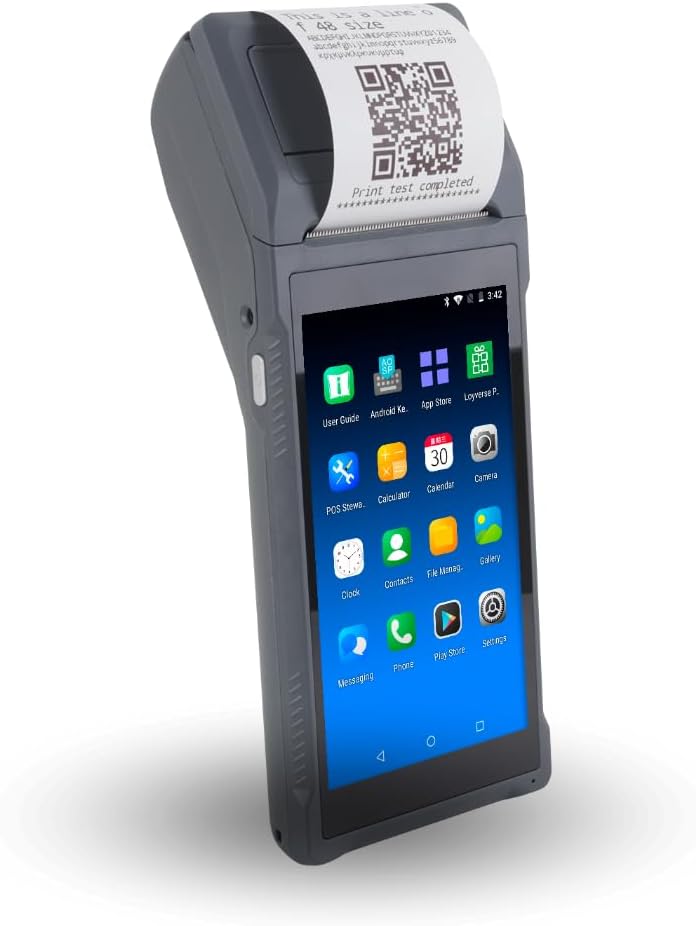
Multzo H10
4.2Editor score
Android 14 octa-core platform
Integrated thermal receipt printer
NFC and 1D/2D scanning
A handheld POS system puts checkout tools in the palm of your hand, helping teams take orders, collect payments, scan products, and print receipts away from a fixed counter. The right device should balance mobility, durability, screen visibility, connectivity, printing, and compatibility with the software used by your business.
We compared ten products using their stated specifications, features, ratings, and intended business uses. The list covers compact Square and Clover systems, Android-based terminals, integrated receipt printers, barcode scanners, cellular options, and solutions designed for retail, hospitality, warehouses, queues, and mobile service businesses.
Each review explains the strongest reasons to consider a particular model, along with limitations that deserve attention before purchase. Ratings and product details can change over time, and current prices, software subscriptions, payment-processing terms, and merchant-account requirements should be verified before buying.
4.2Editor score

4.7Editor score

5.0Editor score
As an Amazon Associate we earn from qualifying purchases.
The comparison below highlights the principal differences among all ten devices, including their operating platforms, built-in hardware, connectivity, and most appropriate operating environments. Specifications come from the supplied product information and should be checked against current merchant requirements before purchase.




The Square Handheld is a purpose-built portable payment terminal for restaurants, retailers, beauty professionals, and service businesses that need to move away from a traditional register. Its 4.7 rating reflects a strong overall balance of portability, payment features, and practical hardware. The slim body is designed to fit comfortably in a palm or pocket, making tableside transactions and mobile checkout more natural.
We may earn a commission when you buy through this link, at no additional cost to you.
Its standout qualities are focused mobility and resilience. A built-in barcode scanner supports product lookups, line-busting, and inventory-related workflows, while a long-lasting battery is intended to last through a shift. Offline payment capability allows a business to continue taking payments when its internet connection is unavailable. The device is also designed to withstand water splashes and dust, with an optional protective case available for added drop protection.
The main limitation is its narrower role compared with general-purpose Android handhelds. It is primarily built around Square's payment ecosystem rather than a broad selection of business applications, so buyers should confirm that its software and hardware match their operational needs. It also does not include a thermal receipt printer, which may matter for restaurants or retailers that require immediate paper receipts. Protection against accidental drops is optional rather than standard.
This is the strongest general recommendation for a business seeking a dedicated handheld payment device without the bulk of a rugged PDA. It is especially convincing for tableside service, pop-up retail, beauty appointments, and mobile sales where portability and dependable offline payment support matter. For those who need extensive third-party applications, an Android terminal may be more appropriate.
The compact, lightweight enclosure makes the Square Handheld well suited to roaming transactions. Staff can move through a dining room, salon, stockroom, or event space without relying on a fixed checkout station or a separate printer for every sale.
Offline payment support and a shift-length battery help reduce disruption when connectivity is inconsistent. Water-splash and dust resistance also make the device better suited to active service environments, provided it receives appropriate care.
We may earn a commission when you buy through this link, at no additional cost to you.
The Multzo H10 is a feature-rich Android handheld terminal for mobile retail, food trucks, field sales, and businesses that want printing and scanning in one device. It carries a 4.2 rating and pairs Android 14 with an octa-core processor, providing a more modern platform than several other Android options in this list. Its 720 by 1440 touchscreen is designed for quick navigation during daily transactions.
We may earn a commission when you buy through this link, at no additional cost to you.
This terminal integrates several useful components. A 58mm direct thermal printer produces monochrome receipts without ink cartridges, while the rear 5-megapixel camera scans both 1D and 2D barcodes. NFC supports contactless tap-to-pay workflows, and dual-band Wi-Fi, 4G LTE, Bluetooth, and USB cover common connectivity needs. The included 6000mAh battery is stated to deliver up to 14 hours of runtime, with 10W charging able to complete a full charge in two hours.
The important caveat is that this is a hardware platform rather than a clearly specified all-in-one payment service. Buyers must confirm compatible POS applications, payment processors, SIM requirements, and the security of their chosen software stack. Its 345-gram weight is manageable but somewhat substantial during an entire shift, and the printed receipt width may be narrower than required for some restaurant or warehouse workflows.
The H10 is a compelling value-oriented choice for organizations that need flexibility without carrying several separate devices. It offers the broadest collection of practical features for the category, including modern Android, cellular service, printing, contactless reading, and barcode scanning. It is best for technically informed buyers who already know which applications and payment partner they intend to use.
The combination of thermal printing, NFC, and 1D/2D scanning can simplify mobile checkout workflows. Instead of moving between a computer, card reader, barcode tool, and receipt printer, staff can perform more tasks from a single Android terminal.
Dual-band Wi-Fi and 4G LTE offer practical flexibility for shops, vehicles, and outdoor events. The included charger and fast-charging capability help support continuous use, although battery performance varies with workload and connectivity conditions.
We may earn a commission when you buy through this link, at no additional cost to you.
The Bisofice Cerulean is a compact PDA-style receipt printer aimed at small businesses, cafeterias, boutiques, bookstores, and warehouse workflows. It has a 4.0 rating and combines a 5.45-inch touchscreen with Android 8.1, integrated thermal printing, and wireless connectivity. Its design emphasizes portability and simple transaction handling rather than a premium appearance.
We may earn a commission when you buy through this link, at no additional cost to you.
The 58mm printer accepts 35mm-wide thermal paper and avoids recurring ink cartridge costs. A 5000mAh rechargeable battery supports extended work periods, while 3G, Wi-Fi, Bluetooth 4.0, and USB OTG provide multiple ways to connect with peripherals or online services. The device also includes 4GB of NAND flash and a camera, giving it more flexibility than a receipt-only printer.
Its biggest weakness is the age of the Android 8.1 operating system. Some newer applications, security features, and operating requirements may not be supported, so compatibility should be checked before purchase. The stated 4GB storage capacity is also modest, and the product information does not describe a dedicated 1D/2D scanning engine. Businesses requiring encrypted card processing or current Android applications should look for more clearly documented support.
The Bisofice remains a practical selection for a small operator who values an integrated receipt printer, compact dimensions, and low-noise operation. It can work well for temporary sales desks, internal transactions, or small venues where a full-size register would be excessive. It is best suited to buyers who prioritize hardware value and have confirmed that their required applications support the operating system.
The handheld format supports sales away from a permanent counter, which is useful in compact shops, mobile service settings, and internal distribution points. Its integrated printer helps each completed transaction include a receipt without requiring nearby equipment.
Direct thermal printing avoids ink cartridges and ribbons, simplifying routine maintenance. Paper must still be stocked correctly, and buyers should confirm that 58mm rolls and the narrower stated paper width suit their transaction format.
We may earn a commission when you buy through this link, at no additional cost to you.
The Bisofice H10S 4G is a handheld Android 13 PDA designed for warehouse, logistics, manufacturing, retail, and other scanning-intensive environments. Its 4.0 rating reflects a broadly capable platform with cellular connectivity, an integrated printer, and camera-based barcode recognition. The 5-inch HD screen and 2GB of RAM provide a conventional mobile-computer form factor.
We may earn a commission when you buy through this link, at no additional cost to you.
Its most useful differentiator is a 5-megapixel rear camera with autofocus and flash that can read both 1D and 2D barcodes. The device supports 4G, 3G, 2G, Bluetooth, Wi-Fi, and GPS, which helps when work moves beyond a stable indoor network. A built-in 58mm thermal printer allows labels or receipts to be produced on the move, and a roll of thermal paper is included.
The 2GB RAM and 16GB storage configuration is modest for demanding applications or extensive local data. Its 3000mAh battery is also smaller than those in several competing devices, potentially requiring more frequent charging during long warehouse shifts. The product information does not clearly establish encrypted payment-card processing, so a merchant needing a dedicated terminal should verify compatibility with a PCI-certified reader.
This model is a strong fit for inventory, delivery, field-service, and warehouse workflows where scanning and mobile printing outweigh heavy payment-terminal specialization. It is less compelling for a business seeking a simple, ready-made card reader unless the selected Android applications and payment provider are fully compatible. Buyers should evaluate battery needs and app support before finalizing their choice.
A camera with autofocus and flash can support rapid 1D and 2D code recognition in warehouses, stockrooms, and delivery environments. On-device printing reduces the need to return to a fixed station before labels or records can be produced.
Support for cellular networks and GPS is valuable when workers travel between locations. Service quality will depend on the selected carrier, coverage, SIM arrangement, and the business's connected applications.
We may earn a commission when you buy through this link, at no additional cost to you.
The Square Terminal is a straightforward mobile payment solution for small retailers and service providers that want one device to ring up sales, accept cards, and print receipts. It has a 4.5 rating and supports use at a counter or anywhere in a store. Its familiar Square setup makes it less intimidating than a general Android terminal.
We may earn a commission when you buy through this link, at no additional cost to you.
The cordless built-in battery is designed to last all day, allowing staff to move between customers without remaining tethered to a counter. The terminal accepts major credit and debit cards, processes chip cards quickly, and uses a simple stated payment structure without hidden fees or a long-term contract. Printed receipts are handled by the integrated printer.
Compared with the newer Square Handheld, this model offers fewer mobility-oriented features. There is no stated built-in barcode scanner, offline payment function, or protective resistance, and its screen and controls may feel less modern than those of a larger Android device. The product also requires the appropriate Square account and processing relationship, which should be reviewed before purchase.
Square Terminal is a strong recommendation for a small business seeking a simple wireless card machine and receipt printer without a large Android device. It is particularly useful for shops, studios, and professional services that can check out from a counter or roam through a modest space. Those needing advanced inventory scanning should consider the Square Handheld or an Android alternative.
Combining sales entry, card acceptance, and receipt printing in a familiar Square format reduces the number of separate devices employees must manage. That makes the Terminal approachable for staff who change shifts frequently.
The all-day battery allows the terminal to move around a sales floor when needed. Buyers should still establish charging routines and keep spare power solutions available during unusually long shifts or high-volume events.
We may earn a commission when you buy through this link, at no additional cost to you.
The Q2i Mobile POS Terminal is an Android 11 device aimed at shops and mobile sellers that want an integrated receipt printer and barcode scanner while retaining access to several familiar POS applications. Its 3.2 rating is the lowest among the ten listed products, so buyers should investigate current software and merchant support carefully. The included package contains the terminal, power adapter, USB-C cable, paper roll, and quick-start guide.
We may earn a commission when you buy through this link, at no additional cost to you.
A 5.5-inch HD capacitive touchscreen, integrated 58mm thermal printer, and camera-based 1D scanner cover the basics of mobile checkout. The printer can produce monochrome output at up to 80mm per second. Stated compatibility includes Loyverse, Square, Helcim, KORONA POS, and Stripe Terminal, giving buyers more choice than products tied narrowly to one processing platform.
The scanner is limited to standard 1D barcodes, including UPC, EAN, and Code 128, and explicitly does not read QR codes. There is also no stated 4G cellular option, which may limit use away from Wi-Fi coverage. With 2GB RAM and 16GB storage, the device is best for focused POS tasks rather than demanding multitasking, and the relatively low rating reinforces the need to verify software support.
Q2i makes sense for a buyer who knows it will use one of the listed applications and values a complete package with a printer. It can serve retail floors and tableside operations where 1D scanning is enough. For mobile work beyond reliable Wi-Fi, outdoor events, or workflows requiring QR scanning, a model with cellular support and broader 2D recognition would be a better fit.
Stated support for several payment and retail applications can prevent unnecessary platform lock-in. Confirm the exact version, required permissions, hardware support, and ongoing fees of the intended app before committing.
The supplied power adapter, USB-C cable, paper roll, and guide provide the basic accessories needed to begin setup. The integrated scanner and printer still need compatible applications configured correctly before they can support live sales.
We may earn a commission when you buy through this link, at no additional cost to you.
The 8 Seconds P1 is a premium countertop payment terminal built around the Dejavoo hardware and software platform. It has a 5.0 rating and is positioned for retail stores, salons, and small restaurants that want modern payment acceptance, a physical keypad, a touchscreen, and an integrated receipt printer in one compact unit.
We may earn a commission when you buy through this link, at no additional cost to you.
Payment versatility is the principal strength. The terminal accepts tap, EMV chip, magnetic swipe, and mobile wallets such as Apple Pay and Google Pay. Dual Ethernet and Wi-Fi connectivity is intended to provide stable processing and fast failover options, while a five-inch HD Android touchscreen offers clear navigation for staff and customers. The built-in high-speed thermal printer reduces counter clutter.
Although the product title mentions Wi-Fi and 4G, the supplied feature details specifically describe dual Ethernet and Wi-Fi rather than a cellular radio. Buyers wanting true mobile-cellular use should verify that point directly. The device is also designed for fixed checkout locations, so it is less naturally portable than the compact handhelds in this guide. Merchant onboarding, payout timing, and support terms are provided by 8 Seconds Processing rather than being completely universal.
The P1 is the best premium choice for a fixed counter that values a complete payment terminal and receipt printer without assembling several separate components. It is particularly appropriate for businesses handling varied payment types, customer-facing checkout, and staff who appreciate both touch and keypad input. Mobile operations that require cellular independence should look to the Android handhelds instead.
A touchscreen, physical keypad, payment reader, and receipt printer reduce the number of separate counter devices. The result is a compact station that can handle card-present transactions while producing paper records.
Ethernet and Wi-Fi give a fixed checkout two common network paths, which can improve operational resilience. The terminal should still be configured to handle temporary network loss according to the processor's supported procedures.
We may earn a commission when you buy through this link, at no additional cost to you.
The Alacrity NB65 is a large-screen Android 14 handheld built for inventory, logistics, manufacturing, retail, and field operations. It carries a 5.0 rating and stands apart through its combination of a 6.5-inch HD display, 3GB RAM, 32GB storage, an eight-core 2.0GHz processor, and a 6400mAh battery. Those specifications make it closer to a mobile computer than a minimal receipt printer.
We may earn a commission when you buy through this link, at no additional cost to you.
Its scanning module supports numerous 1D formats, including UPC, EAN, Code 128, Code 39, Code 11, and Codabar, plus 2D formats such as PDF417, Aztec, Data Matrix, QR Code, Micro PDF, and Interleaved 2 of 5. Maxicode is not supported. The adjustable thermal printer accepts 80mm or 58mm paper, offering more output flexibility than fixed-width models, and NFC, GPS, dual-band Wi-Fi, Bluetooth, and SIM support broaden its capabilities.
The 6.5-inch screen improves visibility but makes the device bulkier for prolonged handheld use. A large screen, 6400mAh battery, printing mechanism, and scanner also make the unit heavier than compact payment terminals. As with other general Android handhelds, encrypted card processing depends on the selected payment application and reader, and the supplied information does not establish PCI certification for this device.
NB65 is a strong choice for inventory-heavy organizations that need broad code recognition, flexible receipt widths, and robust mobile connectivity. It is well suited to warehouse picking, delivery operations, factory work, and larger mobile checkout teams. Retailers focused primarily on lightweight payment collection may prefer a smaller dedicated terminal, while scanning specialists will appreciate the broad supported formats.
Wide barcode-format support and adjustable paper width make the NB65 useful across mixed inventory environments. Teams should still standardize label dimensions and test their most common codes before rolling the device out broadly.
The 6.5-inch HD display and 3GB plus 32GB configuration provide room for more detailed workflows than smaller terminals. Those extra capabilities improve versatility but can make the device less convenient for employees who need an ultra-light handheld.
We may earn a commission when you buy through this link, at no additional cost to you.
The Alacrity Q50 is a mobile Android terminal designed for queue management, online-order fulfillment, takeaway service, and other retail tasks that combine a large screen, receipt printing, and barcode capture. It has a 4.2 rating, Android 12 software, 3GB RAM, 16GB storage, and an upgraded ten-core processor rated up to 2.5GHz. Its 5.9-inch display provides more room than a compact receipt printer.
We may earn a commission when you buy through this link, at no additional cost to you.
The integrated thermal print head produces continuous-paper receipts at 80mm per second, and a built-in zigzag-edge cutter helps separate printed output. A 5-megapixel autofocus camera with flashlight reads 1D and 2D codes, including damaged or poorly lit labels. Cellular, Wi-Fi, and Bluetooth connectivity supports mobile order and queue workflows, while NFC can read non-encrypted cards such as memberships, loyalty identifiers, and access badges.
Most importantly, the Q50 is not a dedicated card-payment terminal and does not support encrypted credit or debit card transactions. It must be paired with a separate PCI-certified third-party card reader if secure payments are required. Its printer accepts continuous thermal receipt or ticket paper rather than labels or die-cut media, and buyers should confirm that this restriction matches their exact output needs.
Q50 is best for a business that wants to move order entry, queue management, scanning, and ticket printing onto one Android device while using a separate certified payment reader. Restaurants, takeaways, and event operations may value its speed and mobility. It is not a standalone payment solution, making it a weaker choice for sellers who primarily want a simple all-in-one card machine.
The 80mm-per-second printer and integrated cutter support rapid ticket production during busy service periods. Continuous thermal paper is efficient for orders and receipts, but operators need the correct roll format.
The Q50's NFC capability is limited to non-encrypted identifiers and should not be mistaken for secure card acceptance. Pairing it with a certified reader adds another device but keeps card handling within a properly supported system.
We may earn a commission when you buy through this link, at no additional cost to you.
The third-generation Clover GO is a compact mobile payment terminal that connects wirelessly to a smartphone through Bluetooth. Its 5.0 rating reflects a streamlined alternative for merchants who want Clover-oriented features without carrying a full handheld computer. The device is small enough to live in a pocket and is especially useful for occasional mobile checkout.
We may earn a commission when you buy through this link, at no additional cost to you.
Its software supports custom percentage tips, multiple tax rates, and configurable employee permissions. Customers can receive paperless receipts by email or text, which reduces the need for stored receipt rolls and simplifies digital record delivery. End-to-end security is also highlighted, and the system separates what each employee can access within the business interface.
The procurement condition is unusually important. The product requires processing through SwyftPAY, and the listing is for United States businesses only. The dock is sold separately, and the GO depends on a compatible smartphone for its broader interface, so it is not a fully self-contained Android terminal. Buyers should also consider the need to carry and charge both the phone and reader.
Clover GO is best for a small United States business that values a familiar Clover-style payment workflow, tip and tax controls, digital receipts, and pocketable hardware. It may be ideal for mobile appointments, market stalls, and occasional counter overflow. Buyers seeking a standalone receipt printer, cellular capability, barcode scanner, or broad application control should choose a more self-contained Android handheld.
Bluetooth connectivity allows a compatible smartphone to provide the screen and software interface. That keeps the dedicated terminal compact, although operators must account for carrying, charging, and securing two devices.
Configurable tips, multiple tax rates, employee permissions, and digital receipt delivery cover common retail and service needs. These functions still depend on correct account configuration and the processing arrangement available at purchase.
We may earn a commission when you buy through this link, at no additional cost to you.
A useful handheld POS should fit the way your team works, not merely combine the longest feature list. Payment compatibility, mobility, connectivity, printing, scanning, battery life, and software support deserve careful attention before choosing a device.
A screen, scanner, and receipt printer do not automatically make a device a secure payment terminal. Some products are full card-payment systems, while others are general Android handhelds intended to work with a separate PCI-certified reader. The Clover GO, for example, requires SwyftPAY processing and connects to a smartphone. The Q2i lists several compatible applications, and the Alacrity Q50 explicitly does not support encrypted credit or debit transactions. Before buying, identify your processor, the applications involved, card-reader requirements, supported payment methods, account approval process, payout schedule, and refund policy.
Choose a device only after confirming that the complete payment path is supported. Hardware compatibility alone does not guarantee that tap, chip, swipe, mobile wallet, refunds, subscriptions, or offline transactions will work as intended.
An integrated thermal printer can reduce counter clutter and allow staff to issue receipts or tickets wherever a sale occurs. The Multzo H10, Bisofice Cerulean, Bisofice H10S, Q2i, 8 Seconds P1, Alacrity NB65, and Alacrity Q50 all provide printing, but their paper systems differ. Fixed 58mm units suit standard receipts, while the NB65 can work with 80mm or 58mm paper. The Q50 prints continuous receipt and ticket stock but does not support labels or die-cut media. Check roll width, paper thickness, cutter behavior, included paper, and whether your workflow requires a separate printer.
Integrated printing is convenient, but compatible paper must be available consistently. If your business uses custom labels, kitchen tickets, or unusually long documents, a standard receipt printer may not be adequate.
Scanning turns a handheld into a more useful inventory and service tool. The Square Handheld includes a built-in scanner, while the Multzo H10 and Alacrity units use camera-based recognition for 1D and 2D codes. The Q2i is limited to 1D barcodes and does not read QR codes, while the NB65 supports many formats but not Maxicode. Consider the exact symbols used on products, shelves, tickets, licenses, and shipping labels, then test readability under your actual lighting and handling conditions.
More formats do not automatically mean a better experience. Autofocus, illumination, scan speed, and dedicated scan hardware can matter more than a long compatibility list for a busy warehouse or crowded retail counter.
Wi-Fi is sufficient for many shops, but cellular support gives mobile teams more freedom. The Multzo H10 and Bisofice H10S support 4G networks, and the Alacrity NB65 and Q50 combine cellular with Wi-Fi and Bluetooth. The Q2i offers dual-band Wi-Fi and Bluetooth but no stated 4G radio, while the 8 Seconds P1 emphasizes Ethernet and Wi-Fi for a fixed counter. The Square Handheld specifically supports offline payments, which can be valuable during outages. Compare available network bands, SIM requirements, router compatibility, failover behavior, and the processor's offline procedures.
A device can only operate as designed when its connectivity plan is in place. Businesses should test coverage at every real service location rather than assuming indoor or outdoor performance will match the specification sheet.
Battery life determines whether a portable terminal remains useful throughout a full shift. Stated capacities range from 3000mAh in the Bisofice H10S to 6400mAh in the Alacrity NB65, while the Multzo H10 advertises up to 14 hours of runtime. These figures are not directly comparable because battery size, screen use, printing, radio activity, and workload all affect results. A business should evaluate whether the included charger supports its operating schedule and consider spare batteries or charging stations for intensive use.
Choose a battery that comfortably covers the longest expected shift, with time left for unexpected delays. A larger battery is useful, but it may add weight, and charging support should match the device's stated fast-charging capability.
A handheld POS must remain readable and comfortable in the environment where it is used. The Square Handheld favors a slim, pocketable design, the Bisofice Cerulean emphasizes compactness, and the Q2i uses a 5.5-inch screen. Larger devices such as the NB65 and Q50 offer more display space but may be heavier during long shifts. Weight, grip, one-handed operation, screen viewing angle, button placement, and glove use should be tested with representative staff. The Square Handheld also states water-splash and dust resistance, while an optional protective case addresses accidental drops.
The most feature-rich device is not the best fit if employees find it tiring or awkward. Choose a balance of display size, weight, durability, and controls that matches the people using it.
Android handhelds can be valuable when a business needs inventory, warehouse, delivery, queue, or custom workflows beyond basic card collection. The Multzo H10 uses Android 14 with an octa-core processor, the Bisofice H10S runs Android 13, and the Alacrity NB65 combines Android 14 with 3GB RAM and 32GB storage. Dedicated systems such as Square Terminal, Square Handheld, 8 Seconds P1, and Clover GO may be simpler within their supported ecosystems. Confirm operating-system version, app availability, update policy, data storage, cloud synchronization, API access, and any need for an SDK.
Choose openness when specialized operations matter, but only if you can support the additional configuration. A simpler dedicated terminal may reduce training and maintenance for a conventional retail counter.
Checkout features should match how your business sells. Clover GO supports custom tips, multiple tax rates, digital receipts, and employee permissions. Square Terminal combines payment and receipt output, while the 8 Seconds P1 supports modern payment types and includes a printer. The Bisofice Q50 includes a zigzag-edge cutter for continuous tickets. Decide whether customers need paper, emailed, texted, or both; whether tip screens are needed; how tax rates are managed; and which employees may issue discounts, refunds, voids, or reports. These functions depend on the active software and processing account.
Write down the required checkout sequence before selecting hardware. The best terminal is the one that supports the full transaction process without workarounds or unnecessary extra steps.
Begin by confirming the device, operating system, POS application, payment processor, and account are compatible. Install the required software, sign in with the correct business account, update the system, configure tax, tips, products, permissions, receipts, and connectivity, and run several test transactions before opening to customers. Test every card and payment method the business intends to accept, including refunds and offline procedures where supported.
Create a simple daily routine for staff. Confirm that the battery is charged, the paper roll is correctly installed, and the device has a stable network connection at the start of a shift. Avoid pulling thermal paper against the cutter, exposing the terminal to excessive heat or liquid, and leaving the screen or scanner exposed during cleaning. Use only suitable cleaning methods and avoid spraying liquid directly onto the device.
Protect the handheld from impact, extreme temperature, and moisture even when it carries a protective case. Keep software updated, use secure business accounts and appropriate access permissions, and log devices out or erase business data before returning or replacing equipment. Maintain a backup charging method and a plan for network loss so staff can continue serving customers without improvising insecure workarounds.
A handheld POS lets staff move away from a fixed register and complete orders, collect payments, scan items, or print receipts wherever customers are. It is especially useful in restaurants, salons, markets, warehouses, delivery operations, and mobile service settings. The best model is the one that combines the required features with reliable connectivity and software support.
No. Some products are complete payment terminals, while others are general Android devices that require a separate certified card reader. The Alacrity Q50, for example, reads non-encrypted NFC identifiers but does not handle encrypted card transactions. Always confirm the processor, reader, applications, and payment methods before purchasing.
It depends on the workflow. Integrated printing is useful for tableside orders, queue tickets, delivery labels, and mobile checkout, but it adds weight and creates a need for replacement paper. Some products, such as Square Handheld and Clover GO, do not provide the same integrated thermal printing capability as the Bisofice, Alacrity, Q2i, and 8 Seconds models.
Wi-Fi-only models are often suitable for shops and venues with reliable indoor coverage. A 4G model is more appropriate when staff work in vehicles, outdoors, at events, or across locations with inconsistent Wi-Fi. The Multzo H10, Bisofice H10S, and Alacrity NB65 and Q50 provide stated cellular options, but carrier coverage and SIM requirements still need verification.
The answer depends on what the business scans. Retail buyers may need UPC and EAN, warehouses may rely on Code 128 and 2D labels, and delivery teams may use QR codes. The Q2i supports 1D formats but not QR codes, while the NB65 supports numerous 1D and 2D formats except Maxicode. Testing actual labels is the safest approach.
Requirements depend on the application and whether the business stores catalog or customer data locally. Configurations in this guide range from 2GB plus 16GB to 3GB plus 32GB, while the Clover GO relies on a smartphone. Cloud-centric workflows may need less local capacity, but buyers should check offline requirements, app size, update space, and data-retention policies.
It depends on the product and payment processor. Square Handheld explicitly supports offline payments, while other devices may need active Wi-Fi or cellular service for certain functions. A business should ask what remains available during an outage, how transactions are stored, when they synchronize, and how card authorization and receipts are handled.
General Android handhelds can often combine these tasks when compatible applications are installed. The Multzo H10, Bisofice H10S, Alacrity NB65, and Alacrity Q50 offer combinations of printing, scanning, cellular connectivity, and expandable software support. Dedicated systems may simplify checkout but provide less flexibility for specialized inventory or operational workflows.
The Square Handheld is the most balanced overall recommendation for businesses wanting a dedicated, highly portable payment device with a scanner and offline capability. The Multzo H10 stands out as a capable budget-oriented Android system with a printer, NFC, modern software, and cellular connectivity, while the 8 Seconds P1 is the premium countertop choice with broad payment acceptance and integrated receipt output.
Prioritize the requirements that cannot be changed after deployment: secure payment compatibility, application support, connectivity, paper format, scanning needs, and battery endurance. Dedicated systems can be easier for conventional checkout, while Android handhelds offer greater flexibility for warehouses, mobile inventory, queues, and customized workflows. Staff ergonomics and software configuration deserve the same attention as the specification list.
Finally, check current prices and complete account terms before ordering, because costs and merchant conditions can change. Confirm processor availability, hardware compatibility, cellular coverage, included accessories, warranty coverage, and any required dock or separate reader. The right handheld POS is the one that supports your daily transactions reliably and can be operated comfortably by the entire team.


