
GIGABYTE B650 AORUS Elite AX
4.4Editor score
Ryzen 9000 series support
14+2+1 power design
PCIe 5.0 NVMe support
WIFI6E and 2.5GbE
Our expert guide compares the 10 best motherboards with DDR5, covering AM5 and LGA 1700 performance, features, connectivity, expansion, and value for builders.
Motherboards with DDR5 form the foundation of modern gaming, content-creation, and high-performance computing systems. A strong board should deliver stable power, effective cooling, flexible storage expansion, modern networking, and enough rear and front-panel connectivity for the devices you actually use.
We compared ten DDR5 motherboards based on their processor support, power-delivery design, memory features, M.2 configuration, networking, USB connectivity, form factor, and practical enthusiast features. The selection covers AMD AM5 and Intel LGA 1700 builds across full-size ATX and compact mATX designs.
Each review explains where the board stands out, where compromises appear, and which builders are most likely to benefit from it. The top selections recognize a balanced general-purpose option, a feature-rich choice, and a compact alternative, while current prices and availability should be checked before purchasing.
4.4Editor score

4.4Editor score

4.4Editor score
The comparison below highlights each board's platform, core specifications, storage support, networking, and standout practical features to help builders identify the most suitable DDR5 foundation.



The GIGABYTE B650 AORUS Elite AX earns the Best Budget award because it combines a capable AM5 platform with unusually mature power delivery and current connectivity. Its 4.4 rating reflects a board that delivers the essentials without making every specification an extreme. The 14+2+1 power design, four DIMM slots, and support for Ryzen 9000, 8000, and 7000 series processors make it a flexible foundation for a new PC.
We may earn a commission when you buy through this link, at no additional cost to you.
Thermal engineering is one of the board's strongest points. The package includes a 6mm heatpipe, fully covered MOSFET heatsinks, an M.2 Thermal Guard, and PCIe Ultra Durable Armor. These features are particularly helpful with power-hungry processors and fast solid-state drives. Connectivity is also well balanced: PCIe 5.0, a PCIe 5.0 NVMe x4 M.2 position, front and rear USB-C, WIFI6E, and 2.5GbE cover the most common enthusiast requirements.
The main limitation is its position within the wider ecosystem. B650 is an established chipset rather than the newest option, so buyers prioritizing the latest platform-specific features may prefer B850 or X870E. The board also has fewer M.2 slots and less elaborate thermal hardware than the premium ASUS ROG alternatives in this guide. Those are meaningful differences, but they do not undermine its value for a conventional high-performance build.
This motherboard suits gamers, creators, and general enthusiasts who want AM5 support, fast memory, fast storage, and fast networking without chasing every enthusiast accessory. Pairing it with a capable Ryzen processor and a well-chosen DDR5 kit creates a balanced system. It is our top general-purpose recommendation because it focuses on the features that deliver the greatest day-to-day value.
The twin 14+2+1 power-stage arrangement and eight-layer, two-ounce-copper PCB provide a reassuring foundation for Ryzen processors. Combined with the covered MOSFET heatsinks and 6mm heatpipe, this design is well suited to sustained gaming and productivity workloads.
WIFI6E, 2.5GbE, PCIe 5.0, and USB-C provide a modern connection package without making the board dependent on optional add-in cards. It is an especially practical configuration for a high-performance general-purpose PC.
We may earn a commission when you buy through this link, at no additional cost to you.
The GIGABYTE B850 AORUS Elite WIFI7 is a logical choice for builders who want AM5 without moving to the most expensive X870E models. Its 4.4 rating indicates a strong overall result, while the B850 chipset provides a current feature set and support for Ryzen 9000, 8000, and 7000 series processors. Four DDR5 DIMM slots give users room to begin with a modest kit and add more memory later.
We may earn a commission when you buy through this link, at no additional cost to you.
The 14+2+2 power design gives this board a useful level of headroom for demanding Ryzen chips. VRM heatsinks and an M.2 Thermal Guard support two of its most important thermal areas. Storage is more flexible than the B650 AORUS Elite AX because the board includes three M.2 slots, alongside PCIe 5.0. Wireless and wired connectivity are both current, with WIFI7 and 2.5GbE networking.
Its trade-offs concern refinement and extreme expansion rather than basic capability. It does not have the five-storage-slot arrangement or advanced AI-assisted controls of the ROG Strix X870E-E. The four DIMM slots also mean memory configuration remains important: a matched two-module kit is generally easier to tune than populating every slot. Those considerations are most relevant to enthusiasts planning very large storage arrays or heavily tuned memory configurations.
The board is best for AM5 builders who prioritize modern networking, a capable power section, and three storage positions without stepping into premium ROG pricing. It can serve a gaming system, a productivity workstation, or a mixed-use build. Buyers should still check case dimensions, CPU cooler clearance, and the desired M.2 layout before ordering.
B850 support makes this board attractive for a new Ryzen 9000-series build that should remain current for several hardware generations. Its VRM and M.2 thermal provisions help it operate as a dependable everyday foundation rather than merely a basic entry point.
Three M.2 positions provide room for an operating system drive, active game library, and either a second project drive or a high-speed scratch disk. The PCIe 5.0 support ensures the fastest installed drive can use the newest interface.
We may earn a commission when you buy through this link, at no additional cost to you.
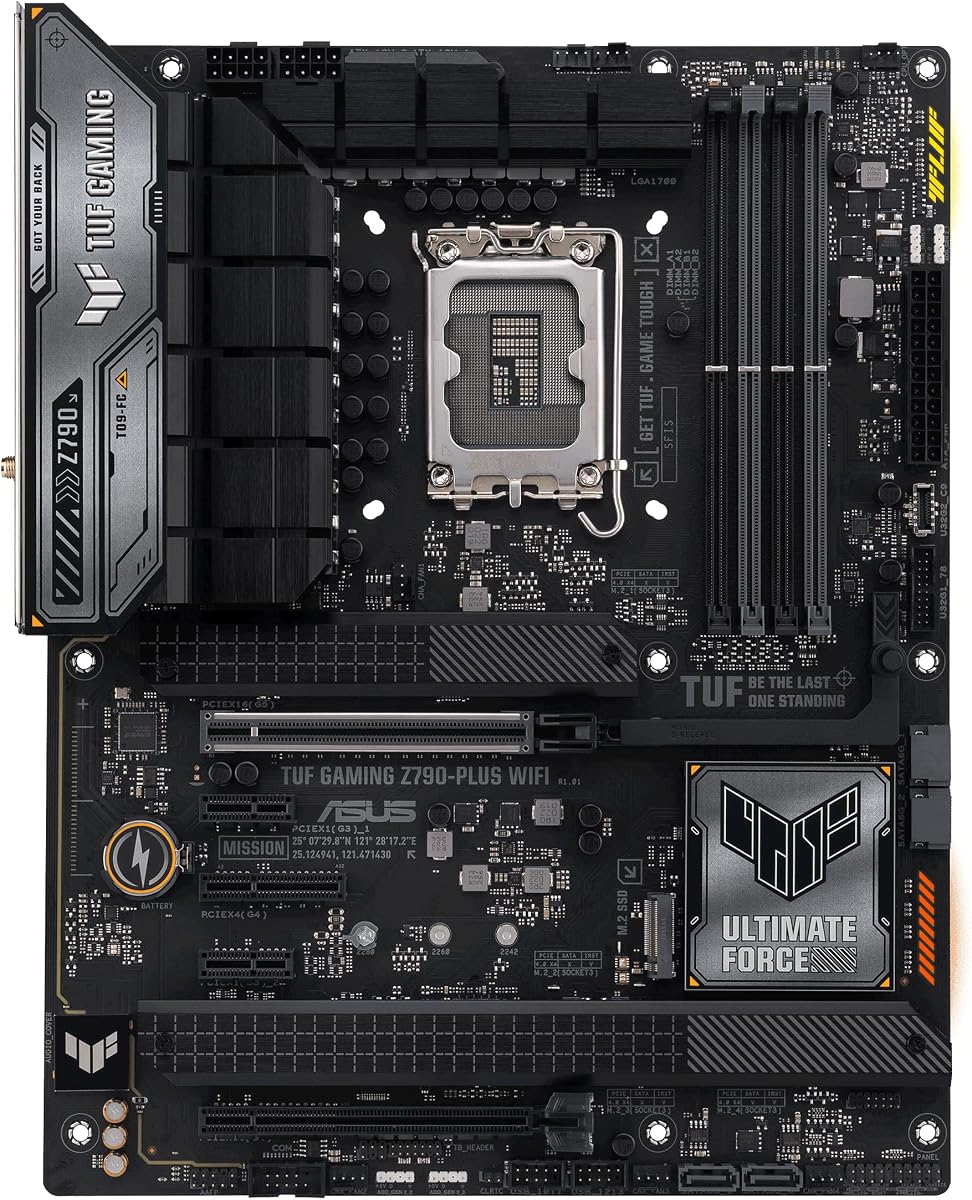
The ASUS TUF Gaming Z790-Plus WiFi stands out as the most balanced Intel option in the guide. It carries a 4.5 rating and supports 12th, 13th, and 14th generation Intel Core processors through LGA 1700. The board's 16+1 DrMOS power solution, military-grade TUF components, and Digi+ VRM are designed to provide stable power delivery for gaming and sustained multi-core workloads.
We may earn a commission when you buy through this link, at no additional cost to you.
Its feature set is unusually complete for the TUF series. Four M.2 slots support considerable NVMe storage, while a PCIe 5.0 platform prepares the system for high-speed graphics cards and drives. Connectivity includes Intel AX201 WiFi 6, I225-V 2.5Gb LAN, TUF LANGuard, TurboLAN, a front USB-C header, USB Gen 2×2 Type-C, and a Thunderbolt 4 header. A VRM heatsink, PCH fanless heatsink, M.2 heatsink, and hybrid fan headers cover the major cooling needs.
Compared with newer boards, its principal compromises are the WiFi 6 standard and the aging limits of the LGA 1700 upgrade path. It also lacks some advanced AI-assisted tuning features found in the latest ASUS enthusiast models. For a builder already committed to a compatible Intel processor, though, these limitations matter less than the mature feature set, four-drive storage support, and practical networking.
This is the recommendation for an Intel gaming PC, especially one that benefits from extensive storage and flexible USB connectivity. It is also a sound workstation foundation when paired with compatible memory and processors. Check the CPU's memory and power support before finalizing the build, especially when considering memory overclocking.
TUF combines a robust 16+1 DrMOS arrangement with extensive cooling and connectivity. That makes it a safer all-around recommendation for builders who value established support and useful features over chasing the newest chipset or wireless standard.
Four NVMe-capable M.2 positions reduce the need for add-in storage cards in many gaming and creative builds. Multiple heatsinks also help keep compact, high-performance drives at more suitable operating temperatures.
We may earn a commission when you buy through this link, at no additional cost to you.
The MSI B850 GAMING PLUS WIFI bundle is distinctive because it includes one 16GB TEAMGROUP T-Force Delta DDR5 6000MHz module. With a 4.6 rating, it leads this guide's customer ratings. The bundle gives a new builder a compatible DDR5 starting point and preserves an open DIMM slot for a future upgrade, while the board itself supports Ryzen 9000 through 7000 series processors.
We may earn a commission when you buy through this link, at no additional cost to you.
Memory performance is the central selling point. The included module is specified at 6000MHz, PC5-48000, and CL38, and can use Intel XMP 3.0 or AMD EXPO through the motherboard BIOS. The board advertises DDR5 support up to 8200+ MT/s under overclocking. It also provides PCIe 5.0 x16 and PCIe 4.0 x16 expansion, a Gen5 M.2 position, WiFi 7, and 5GbE.
The included one-module configuration is the main caveat. Single-channel memory is less desirable for a finished performance system, and matching another module later requires finding a compatible kit. The 6000MHz profile is particularly relevant for modern Ryzen processors, but the board's higher advertised ceiling should not be treated as a guarantee that every memory module will reach it. A board capable of high memory speeds still depends on the processor, BIOS, and DIMM combination.
This package is ideal for a first AM5 build that wants a motherboard and memory in one order. It also works well for a temporary platform while the builder plans a larger matched memory kit. For immediate high-performance use, however, replacing the single module with a matched two-DIMM set may produce a more balanced final configuration.
Including a TEAMGROUP T-Force Delta DDR5 module reduces one common compatibility obstacle for first-time builders. Users can boot with the supplied memory and add a matching module later if their workload and budget justify a dual-channel configuration.
Support for advertised DDR5 speeds above 6000MHz makes the board relevant to memory enthusiasts. Real-world results depend on the processor's memory controller and the exact module, so profile-based settings remain more realistic than manual maximum-speed assumptions.
We may earn a commission when you buy through this link, at no additional cost to you.
The GIGABYTE Z790 AORUS Elite AX is a feature-rich Intel board with a 4.4 rating. It supports 12th, 13th, and 14th generation Intel Core processors and provides four SMD DDR5 DIMM slots with XMP 3.0 support. Its twin 16+1+2 power design uses 70A power stages, giving the board a strong foundation for Intel processors that can consume substantial power under sustained load.
We may earn a commission when you buy through this link, at no additional cost to you.
Storage and expansion are major strengths. The board includes four PCIe 4.0 x4 M.2 positions, a PCIe 5.0 graphics slot, and USB 3.2 Gen 2×2 Type-C connectivity. Networking combines WIFI6E with 2.5GbE. Thermal provisions include an M.2 Thermal Guard III, fully covered MOSFET heatsinks, PCIe Ultra Durable Armor, and a six-layer PCB, all intended to support stable operation under demanding conditions.
The limitation is that this board belongs to an established platform and uses WiFi 6E rather than WiFi 7. Its long-term processor upgrade path is also more constrained than that of the newest platforms. For most users, those are planning considerations rather than immediate defects, especially when a compatible Intel processor is already selected. As with any high-speed memory setup, XMP success and the attainable speed depend on the CPU and installed DIMMs.
The Z790 AORUS Elite AX is well suited to an Intel gaming system with several fast NVMe drives. It provides ample storage, mature overclocking features, and current-enough networking without moving to the most expensive enthusiast models. It is particularly compelling when four internal storage devices and high-bandwidth USB are priorities.
Four PCIe 4.0 x4 M.2 slots make this board unusually useful for creators who keep projects, caches, and libraries on separate NVMe drives. A PCIe 5.0 primary graphics slot complements that storage flexibility.
The 16+1+2 design with 70A stages and a six-layer PCB provides a durable power foundation. Fully covered MOSFET heatsinks help maintain stable operation with power-hungry Intel Core processors.
We may earn a commission when you buy through this link, at no additional cost to you.
The GIGABYTE B850M AORUS Elite WIFI6E ICE is the guide's compact mATX selection. Its 4.6 rating is among the strongest in the group, and it brings a B850 chipset, DDR5 support, and compatibility with Ryzen 9000, 8000, and 7000 series processors into a smaller board. The ICE name also differentiates its light-colored design for builders creating a coordinated compact system.
We may earn a commission when you buy through this link, at no additional cost to you.
Despite its smaller footprint, the board has a capable 12+2+2 power design, four DIMM slots, VRM and M.2 thermal guards, and PCIe 5.0 support. WiFi 6E and 2.5GbE provide strong wired and wireless networking, while USB-C and EZ-Latch improve everyday usability. For a compact gaming PC, these specifications are more than sufficient for a high-performance processor and several major accessories.
The primary disadvantage is physical expansion. Two M.2 slots are enough for many systems, but a content creator may eventually need additional drives. The reduced PCB and connector count also make the board less flexible for add-in cards, extra headers, and elaborate cooling compared with full-size ATX models. Case dimensions and cooler height must be checked carefully because microATX does not guarantee that every compatible component will fit.
This motherboard is best for a small-form-factor or space-conscious AM5 gaming build. It offers modern chipset features, strong networking, and a 4.6 rating without requiring a full-size tower board. Its target user values a clean, efficient layout more than maximum storage slots or endless expansion.
The B850 chipset brings current platform capabilities into a compact board. Four memory slots, PCIe 5.0, USB-C, fast networking, and modern storage support preserve most of the functionality expected from a larger design.
Two M.2 positions are practical for a focused gaming system with an operating system drive and a game library. Builders needing more storage can add a supported expansion card, although that reduces the board's layout simplicity.
We may earn a commission when you buy through this link, at no additional cost to you.
The ASUS ROG Strix X870E-E Gaming WiFi is an advanced AM5 platform with a 4.4 rating. It supports Ryzen 9000, 8000, and 7000 series desktop processors and combines them with DDR5 support, PCIe 5.0, WiFi 7, and 5Gb Ethernet. Its 18+2+2 power solution is rated for 110A per stage and uses dual ProCool II connectors, making it a strong choice for flagship Ryzen processors and demanding workloads.
We may earn a commission when you buy through this link, at no additional cost to you.
Five M.2 slots provide exceptional storage flexibility. Three support PCIe 5.0 and two support PCIe 4.0, with substantial cooling assigned to the positions. External connectivity is equally ambitious, including dual USB4 Type-C ports, a 20Gbps front-panel Type-C connector, a 10Gbps port with up to 30W PD 3.0, nine additional 10Gbps ports, a safe PCIe 5.0 x16 slot, and HDMI.
The board's software and physical features target experienced builders. AI Overclocking, AI Cooling II, AI Networking, AEMP, Dynamic OC Switcher, Core Flex, asynchronous clock controls, and PBO Enhancement offer several approaches to tuning. Q-Release Slim, M.2 Q-Latch, Q-Slide, Q-Antenna, Q-Dashboard, Q-Code, Q-LED, a start button, BIOS FlashBack, and a clear CMOS button improve installation and maintenance.
The downside is obvious: this much capability is unnecessary for a modest PC. A simple gaming system may never use five NVMe slots, USB4, or the extensive tuning suite. Even so, the board remains a compelling recommendation for a high-end AM5 build that wants ample storage, fast accessories, robust power delivery, and convenient enthusiast features in one package.
The 18+2+2 design and 110A-rated stages give the board considerable power-delivery headroom. Massive heatsinks, thermal pads, and an L-shaped heatpipe help manage sustained loads with high-core-count processors.
Three PCIe 5.0 and two PCIe 4.0 M.2 slots make this one of the most flexible storage platforms in the guide. Comprehensive cooling and tool-free retention features simplify installation and maintenance.
Dynamic OC Switcher, Core Flex, asynchronous clock controls, and PBO Enhancement give overclocking enthusiasts several paths to optimize a Ryzen system. AI-assisted tools can simplify setup for builders who want guided configuration.
We may earn a commission when you buy through this link, at no additional cost to you.
The ASUS ROG Strix B650-A Gaming WiFi offers an unusual combination of ROG styling, useful features, and affordability. It has a 4.5 rating and supports AMD Ryzen 9000, 8000, and 7000 series desktop processors. Its DDR5 configuration and 12+2 power-stage design provide a capable AM5 foundation, particularly for mainstream and midrange processors.
We may earn a commission when you buy through this link, at no additional cost to you.
Storage is handled by one PCIe 5.0 M.2 slot and two PCIe 4.0 M.2 slots, all equipped with heatsinks. Networking includes 2.5G LAN and WiFi 6E. A USB 3.2 Gen 2×2 Type-C connection provides high-bandwidth peripheral support, while Aura Sync adds a familiar lighting option for compatible components and accessories.
Two caveats should influence the decision. The listed primary expansion is PCIe 4.0 rather than PCIe 5.0, so the newest graphics cards and high-end storage devices will operate without the newest interface generation. Also, the supplied information notes that a BIOS update may be required when using Ryzen 9000 or 8000 series processors. Buyers should confirm the board's BIOS state before installing a newer processor.
This motherboard is a strong choice for a budget-conscious AM5 gaming system where the processor and graphics card remain the main performance investments. It offers three storage positions, modern networking, and a polished feature set without requiring a flagship board. For builders prioritizing every new interface, the X870E-E or TUF B850-PLUS would be more forward-looking.
Aura Sync, refined board styling, robust networking, and three cooled storage positions make the B650-A feel more premium than a basic entry board. It suits builders who want recognizable aesthetics without paying for flagship power and connectivity.
One PCIe 5.0 M.2 position accommodates a modern boot drive, while two PCIe 4.0 slots add game and project storage. Every included M.2 position has a heatsink, helping manage heat from dense drives.
We may earn a commission when you buy through this link, at no additional cost to you.
The ASUS ROG Crosshair X870E Hero represents the premium end of this guide. Its 4.4 rating reflects a high-end platform designed around AMD X870E, Ryzen 9000, 8000, and 7000 series processors, and DDR5 memory. The board's Advanced AI PC positioning is supported by extensive power and connectivity provisions intended for demanding computing, content creation, and future-facing workloads.
We may earn a commission when you buy through this link, at no additional cost to you.
Its 18+2+2 power stages are rated at 110A, with ProCool II connectors, MicroFine alloy chokes, and premium metallic capacitors. Five M.2 positions, PCIe 5.0, WiFi 7, USB4, and tool-free PCIe slot release create a broad hardware platform. The software layer includes AI Overclocking, AI Cooling II, AI Networking, AEMP, Dynamic OC Switcher, Core Flex, asynchronous clock controls, and PBO Enhancement.
The corresponding trade-off is its premium positioning. A buyer can achieve excellent AMD performance with less expensive boards, and the flagship features may remain unused in a typical gaming system. The Crosshair name also implies an expectation of fine-grained control that new builders may not immediately use. The platform makes the most sense for enthusiasts who deliberately want a long-term, expandable, feature-rich foundation.
This motherboard is best for a no-compromise AM5 workstation or enthusiast gaming system with multiple high-speed drives, demanding processors, and advanced tuning requirements. It should be selected for the specific features a builder will use, not simply because it sits at the top of a range. For most users, the ROG Strix X870E-E delivers similar core capabilities at a more approachable level.
The 110A-rated power stages and premium electrical components are designed to support high-end Ryzen processors reliably. This provides a strong foundation for sustained rendering, compiling, gaming, and heavily threaded applications.
Five M.2 slots and PCIe 5.0 support allow a large collection of high-speed storage to coexist. USB4 and WiFi 7 round out a connectivity package intended to take advantage of current and emerging standards.
Core Flex, Dynamic OC Switcher, asynchronous clock settings, and PBO Enhancement provide multiple tuning methods. These controls make the board especially relevant to enthusiasts who enjoy optimizing processor behavior and system-specific settings.
We may earn a commission when you buy through this link, at no additional cost to you.
The ASUS TUF Gaming B850-PLUS WiFi is a well-equipped AM5 board that emphasizes everyday versatility. It has a 4.4 rating, supports Ryzen 9000, 8000, and 7000 series processors, and uses a 14+2+1 power-stage arrangement with 80A DrMOS components. An eight-layer PCB, 8+8-pin ProCool connectors, alloy chokes, and durable capacitors form a solid power foundation.
We may earn a commission when you buy through this link, at no additional cost to you.
Storage includes one PCIe 5.0 M.2 slot and two PCIe 4.0 slots, with all three equipped with heatsinks. Connectivity is notably current: WiFi 7, Realtek 2.5Gb Ethernet, a PCIe 5.0 x16 slot, a rear 20Gbps Type-C port, a front 10Gbps Type-C connector, and Thunderbolt or USB4 header support. DisplayPort and HDMI are also listed, while BIOS FlashBack simplifies firmware recovery when a processor or graphics card is unavailable.
Its main limitation is that it does not attempt to maximize every specification. Three M.2 slots are fewer than the five offered by the flagship ASUS X870E boards, and the power design is not aimed at the same extreme overclocking market. On the other hand, the feature set is more than sufficient for a high-end gaming PC, a creator's system, or a mixed-use workstation without adding several expansion cards.
This motherboard suits builders who want modern AM5 features, robust power, fast networking, and flexible USB connectivity without moving into ROG Crosshair territory. It also works well for those who appreciate TUF's practical approach to cooling and maintenance. Pair it with a suitable DDR5 kit and processor, and it can deliver excellent performance with less emphasis on exotic tuning.
The 80A DrMOS stages, 8+8-pin power connections, and eight-layer PCB provide stable delivery for mainstream and high-performance Ryzen processors. This is ample power infrastructure for gaming and productive workloads.
WiFi 7, 2.5Gb Ethernet, 20Gbps rear Type-C, 10Gbps front Type-C, and USB4 header support cover a broad range of modern peripherals. BIOS FlashBack adds a practical recovery option for system building.
Three heated M.2 positions provide a useful mix of PCIe 5.0 and 4.0 support. The layout is large enough for a substantial local game or project library without reaching the physical scale of a flagship enthusiast board.
We may earn a commission when you buy through this link, at no additional cost to you.
The right DDR5 motherboard depends on processor compatibility, memory behavior, expansion needs, case size, and networking preferences. Reviewing these factors before purchasing helps prevent expensive mismatches and leaves room for a build that can evolve.
The motherboard socket must support the exact processor family you intend to use. AMD AM5 models in this guide cover Ryzen 9000, 8000, and 7000 series desktop chips, while the Intel LGA 1700 boards support 12th, 13th, and 14th generation Core processors. Platform age also affects future upgrade options, so processors with less socket longevity should be considered carefully when choosing a new board.
Buy for the processor and platform you need now, while noting the expected upgrade path. Confirming chipset, socket, and BIOS support prevents a mismatch.
All ten boards provide four DDR5 DIMM slots, but occupancy affects memory configuration and potentially stability. Two matched modules are generally easier to tune than four, while a larger capacity can help demanding content-creation and workstation applications. XMP 3.0 and AMD EXPO profiles are useful because they apply a tested or vendor-provided speed and timing configuration without extensive manual tuning.
Choose memory capacity first, then select a stable profile appropriate for the CPU. Remember that advertised board memory speeds are maximum platform capabilities, not guaranteed results for every module.
Power-phase counts, stage amperage, connector layout, PCB layers, and heatsink coverage offer clues about a motherboard's capability. A robust 18+2+2 design may suit a flagship processor, while a 12+2 arrangement can be sufficient for a mainstream Ryzen chip. Thermal design matters just as much, particularly around the VRM, M.2 drives, and power connectors in a compact case.
Match the power system to the processor and cooling quality to the case. For high-core-count chips, prioritize substantial VRM heatsinks and multiple sturdy power connections.
The boards range from two to five M.2 slots, and interface support varies between PCIe 5.0 and PCIe 4.0. A modern gaming system often benefits from one fast boot drive and one larger games drive, while creators may separate operating systems, project files, caches, and archives. M.2 heatsinks are important because compact and high-performance solid-state drives can generate significant heat.
Count the drives you need now and add realistic room for expansion. Check M.2 lane sharing carefully because some slots may reduce graphics or other expansion when populated.
Every board includes 2.5GbE or faster wired networking, while several add WiFi 6E or WiFi 7. Fast wired Ethernet is valuable for large downloads, cloud workflows, game streaming, and local file transfers. Wireless connectivity provides convenience, although placement and antenna quality can affect signal strength. A desktop placed far from a router may benefit more from Ethernet than from a newer wireless standard.
Choose WiFi 6E or WiFi 7 when convenient wireless access matters. Otherwise, rely on 2.5GbE or 5GbE and plan the network cable route before the case becomes difficult to access.
USB-C, USB4, Thunderbolt headers, and USB 10Gbps or 20Gbps ports determine how easily the system can use external storage, docks, displays, and high-bandwidth accessories. The featured boards range from USB-C 3.2 Gen 2 to dual USB4 Type-C ports. Display outputs vary, and some builds will rely on a discrete graphics card rather than motherboard video outputs.
List the external devices you expect to connect before choosing. Pay particular attention to rear USB-C ratings, front-panel header compatibility, and whether additional adapters are acceptable.
Nine selections use the full-size ATX form factor, while the GIGABYTE B850M AORUS Elite WIFI6E ICE is microATX. Smaller boards can suit compact cases, but they usually offer fewer expansion slots and may constrain large coolers. ATX boards require a case that accepts their dimensions, and the graphics card's length, width, and height should also be checked before purchase.
Verify motherboard dimensions, socket clearance, cooler height, and graphics-card clearance. A board is not compatible merely because its socket matches the processor.
Modern motherboards increasingly provide tools that simplify setup and recovery. EZ-Latch, Q-Latch, M.2 Q-Slide, Q-Release, pre-mounted I/O shields, clear CMOS buttons, diagnostic displays, and BIOS FlashBack can save time or prevent a major frustration. One supplied specification notes that a BIOS update may be required for Ryzen 9000 and 8000 series processors on the ASUS ROG Strix B650-A, making firmware readiness an important check.
Look for retention tools and recovery features that suit your comfort level. Confirm current BIOS support for the chosen CPU before assembly.
Begin by reading the motherboard manual, checking CPU and memory compatibility, and confirming that the case supports the board's form factor. Install the processor and cooler before securing the board in the case, or follow the manufacturer's recommended sequence. Fit the memory according to the manual's recommended slots, especially when using two modules, and avoid forcing a DIMM until its retaining clips close properly.
Before the first boot, install a CPU with a compatible cooler, memory, graphics output if the processor requires it, and at least the basic storage or boot device. Enter the BIOS, confirm that the processor and memory are recognized, and enable XMP 3.0 or AMD EXPO only if the selected memory profile is appropriate. Update the firmware when needed, using a stable power connection and the correct recovery procedure if a BIOS FlashBack feature is available.
For long-term care, keep airflow clear around the VRM, M.2 heatsinks, and expansion area. Monitor temperatures under sustained workloads, keep chassis filters clean, and avoid placing excess cables beneath storage drives. When changing hardware, shut down, disconnect power, discharge residual electricity, and consult the manual for clear CMOS or firmware recovery. Periodically check that screw terminals and memory modules remain firmly seated.
Yes, a DDR5 motherboard is required for DDR5 modules because the memory generation is not physically or electrically compatible with DDR4 boards. The processor must also support DDR5, and its integrated memory controller determines which modules and speeds work reliably. Always verify the CPU and motherboard specifications before buying memory.
No. AM5 is the socket used by the supported AMD Ryzen 7000, 8000, and 9000 series processors, while LGA 1700 supports the listed Intel 12th, 13th, and 14th generation Core processors. A board designed for one socket cannot physically or electrically support the other platform.
Enabling XMP 3.0 or AMD EXPO is the simplest way to apply a memory kit's advertised performance profile. Without one of these profiles, the memory may run at a slower default JEDED setting. The profile still needs to be stable, and CPU memory-controller quality can affect the final result.
No. VRM requirements depend on the processor, workload, cooling, and desired power limits. A mainstream Ryzen chip may operate comfortably on a well-cooled 12+2 board, while a high-core-count flagship benefits from a larger 18+2+2 design and substantial heatsinks. Match the board to the chip rather than choosing by phase count alone.
Two slots are often enough for a focused gaming PC, while three to five are useful for creators, large game libraries, and separate scratch or project drives. Check the interface generation, heatsink coverage, and whether any slot shares PCIe lanes with a graphics card or another device.
No. The newer standard can offer higher theoretical performance, better efficiency, and improved behavior in crowded wireless environments. Actual speed depends on the router, internet connection, interference, distance, antenna placement, and the specific network adapter. A nearby WiFi 6E router may still outperform a distant WiFi 7 access point.
That depends on the physical slot and power requirements of the graphics card, not only the motherboard chipset. A PCIe 5.0 x16 slot on a modern ATX board can generally accommodate a large card, but case clearance, slot spacing, cooling, and the graphics card's power connectors must also be verified.
The better choice depends on the processor, compatible memory, graphics card, and future plans. AMD AM5 models in this guide support three listed Ryzen generations, while the Intel options cover three listed Core generations. Compare total platform cost, available memory, cooler support, and realistic upgrade plans rather than choosing on chipset branding alone.
The GIGABYTE B650 AORUS Elite AX is the strongest all-round value choice because it combines robust power delivery, PCIe 5.0, USB-C, WIFI6E, and 2.5GbE without excess complexity. The ASUS ROG Strix X870E-E Gaming WiFi is the most feature-rich recommendation for modern expansion, and the ASUS ROG Crosshair X870E Hero represents the premium enthusiast alternative.
Other builders may find better fits in the GIGABYTE B850M AORUS Elite WIFI6E ICE for a compact system, the ASUS TUF Gaming Z790-Plus WiFi for an Intel build, the MSI B850 GAMING PLUS WIFI bundle for a straightforward memory starting point, or the ASUS TUF Gaming B850-PLUS WiFi for current AM5 connectivity. Prioritize processor compatibility, power and cooling, memory stability, required storage, and physical case clearance.
Motherboard specifications can change as firmware and bundles evolve, so verify the current CPU support, memory compatibility, included components, and retailer listing before ordering. Check current prices and availability as well, because promotions and stock levels may shift. The right board is the one that supports the intended system cleanly and provides the expansion, networking, and reliability needed for the build.

