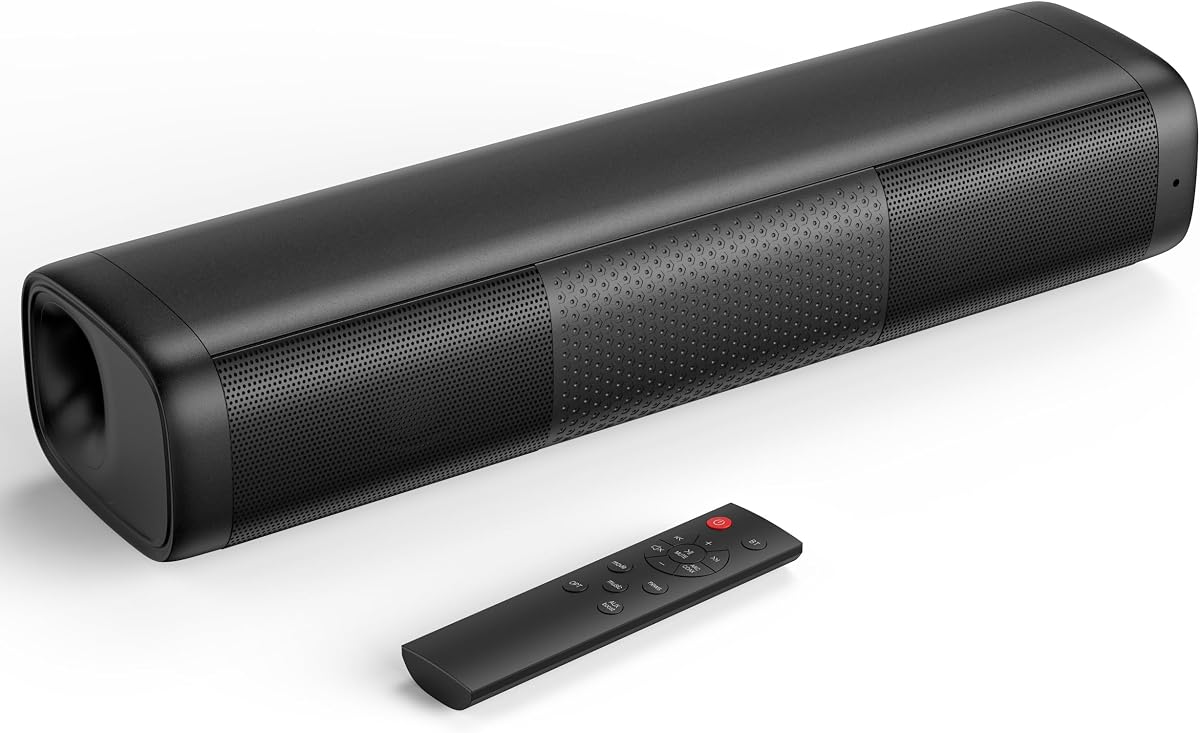
Saiyin 11.7-inch Sound Bar
4.2Editor score
Compact 11.7-inch footprint
Automatic volume boost
Multiple familiar connections
Our Soundbar for Elderly guide compares 10 models for dialogue clarity, simple controls, connectivity, compact design, and easier TV listening at home.
A soundbar for elderly listeners should make television speech easier to understand without requiring complicated menus or a powerful remote. The most useful models combine focused dialogue, automatic volume enhancement, familiar TV-remote control, and connections that work with modern and older televisions.
We compared ten soundbars using the supplied specifications, focusing on speech enhancement, volume control, connectivity, physical size, setup requirements, and the extra equipment needed for bass or surround sound. The guide covers compact 2.0 systems, models with wireless subwoofers, and premium all-in-one designs.
Each review identifies the features most relevant to older adults, including quiet listening controls, readable dialogue modes, flexible placement, simple power management, and compatible remotes. Product ratings and configurations can change over time, and current prices should be checked before purchasing.
4.2Editor score

4.3Editor score

4.4Editor score
The comparison below highlights dialogue tools, channel configurations, connections, control options, and physical design. These details help distinguish a straightforward television speaker from a more elaborate home-theater system.


The Bose TV Speaker is a straightforward all-in-one solution for people who struggle to understand dialogue on a television. Its 4.3 rating reflects a broadly positive reception, while the defining feature for elderly listeners is a dedicated dialogue mode that lifts and clarifies vocals without requiring a home-theater setup.
We may earn a commission when you buy through this link, at no additional cost to you.
Two angled full-range drivers create a wider sound field than the small footprint might suggest, while the remote provides quick access to speech enhancement and a separate bass boost. The included optical cable makes connection straightforward, and HDMI, optical, AUX, and Bluetooth provide options for different televisions and personal audio devices. At just over two inches tall, it can also sit in front of a television without visually dominating the room.
The trade-offs are modest for this category. The basic Bose Bass Module 500 or 700 requires separate purchase, as do wall brackets and an HDMI cable when that connection is preferred. Bass is therefore not as substantial as it would be with a bundled subwoofer, but the core dialogue experience is directly aligned with the needs of this roundup.
This is the strongest general recommendation for older adults who want a recognizable brand, a simple remote, and speech-focused listening without navigating a complicated app. Choose it when clarity, compact placement, and uncomplicated operation matter more than cinematic bass or a full surround-speaker package.
The dedicated dialogue mode specifically focuses on vocals and pronunciation. It can be useful during news, interviews, documentaries, and ordinary television when fast or quiet speech becomes difficult to follow.
The supplied optical cable supports quick setup, while Bluetooth, AUX, and HDMI broaden compatibility. A low profile makes the speaker practical for living rooms, bedrooms, and compact sitting areas.
We may earn a commission when you buy through this link, at no additional cost to you.
This detachable soundbar stands out for its automatic volume boost and unusually flexible physical design. The 4.1 rating suggests broadly positive performance, and its 80W stated output is designed to make quiet program material more noticeable without requiring users to keep changing the television volume.
We may earn a commission when you buy through this link, at no additional cost to you.
The two sections can be arranged horizontally, vertically, on a tabletop, or mounted on a wall, allowing listeners to adapt the placement to their room. Movie, music, and news equalizer modes provide understandable starting points, with the news mode particularly relevant to speech. Bluetooth 5.0, ARC, optical, and AUX ensure that it can work with many televisions, computers, projectors, and phones.
Its primary weakness is the limited brand-specific identity, which may make support and long-term ownership less reassuring than with a major manufacturer. The product information also refers to an 18-month warranty, online support, and a replacement policy, so buyers should verify the current terms and seller listing. The flexible construction may also be less practical if the two parts cannot be positioned securely.
This model is worth considering when automatic speech enhancement, detachable components, and multiple mounting positions are priorities. It is especially relevant to someone who wants a more versatile soundbar without committing to a large system with a separate subwoofer and surround speakers.
The boost function is intended to elevate faint material. It may help when television dialogue is mixed low or when an older listener prefers a more noticeable voice without demanding high overall volume.
Horizontal placement emphasizes a conventional soundbar appearance, while vertical and wall-mounted arrangements can suit different furniture layouts. The detachable format also provides room to place the sections where they are most useful.
We may earn a commission when you buy through this link, at no additional cost to you.
The Samsung HW B400F combines a soundbar and built-in woofer in one unit, reducing the number of boxes and cables an elderly user must manage. Its 4.0 rating reflects an even mix of practical benefits, with speech amplification and one-remote operation standing out most clearly.
We may earn a commission when you buy through this link, at no additional cost to you.
The Voice Enhance mode is designed to make voices easier to hear, while surround sound expansion projects audio across the room. Samsung TV remotes can handle key functions such as power, volume, and sound effects. A quiet-hours feature also lowers volume and minimizes bass, allowing a viewer to watch without creating excessive disturbance for others in the home.
Although the built-in woofer avoids the need for a separate subwoofer, the system remains a 2.0 design rather than a true surround package. The exact experience will also depend on television compatibility and the input selected. Buyers should check the connection guide before installation and confirm that their Samsung television supports the intended control method.
This soundbar is a practical choice for households seeking clearer voices, bass without another large component, and familiar remote operation. It is especially suitable for a Samsung television and for viewers who want a straightforward upgrade without a complicated speaker arrangement.
Automatic dialogue amplification targets the content most listeners want to understand. The built-in woofer adds low-frequency weight while keeping the physical system consolidated.
The reduced-bass and lower-volume mode is useful when household members are sleeping. It supports the goal of intelligible speech without requiring every late program to be played loudly.
We may earn a commission when you buy through this link, at no additional cost to you.
The Saiyin 11.7-inch Sound Bar is a compact option for bedrooms, apartments, and other spaces where a conventional full-width soundbar would be inconvenient. It has a 4.2 rating and 48W of stated peak power, with a balanced presentation intended for dialogue, music, and games.
We may earn a commission when you buy through this link, at no additional cost to you.
Bluetooth, optical, and 3.5mm AUX connections allow it to serve televisions, computers, and phones. A dedicated subwoofer output offers a path to stronger bass without committing to the size of a bundled subwoofer. Compatibility is listed with Fire TV, Roku television, Chromecast, and Apple TV remotes, although the Roku Stick is expressly excluded.
The most important setup caveat is that the television must send a compatible PCM, stereo, or non-surround signal. Otherwise, the product information warns that cracking or no sound may occur. The small red standby light and subtle indicators help reduce visual distraction, but some users may still prefer a completely dark status light.
This is a strong choice when space, straightforward connections, and a compact appearance matter most. It is less suitable for someone who wants an explicitly labeled dialogue mode and no source adjustment. Buyers should also verify their streaming device and television output settings before finalizing the setup.
At 11.7 by 3.5 by 2.5 inches, the unit fits beneath many screens and on small shelves. Its understated dimensions are especially useful when easy placement is more important than a large home-theater footprint.
Bluetooth, optical, and AUX cover common sources, while the sub-out offers optional bass expansion. Correctly selecting the television's PCM or stereo output remains important for stable sound.
We may earn a commission when you buy through this link, at no additional cost to you.
The TCL S45H provides a more refined feature set than a basic compact speaker without requiring separate surround speakers. Its 4.3 rating and up to 100W stated output make it a credible option for improving television audio in apartments, bedrooms, and small-to-medium living rooms.
We may earn a commission when you buy through this link, at no additional cost to you.
Dolby Atmos and DTS Virtual:X create a spacious impression from the 2.0 enclosure, while AI Sonic Auto Room Calibration adjusts the output to the layout and listening position through the TCL app. HDMI eARC or ARC, optical, Bluetooth, and AUX provide broad connection support. The package includes an HDMI cable, power cord, remote with batteries, and wall-mounting kit.
Room calibration introduces an app-based step that may feel less immediate than choosing a physical remote setting. The system also has no separate subwoofer, so bass impact will remain below a dedicated 2.1 package. Its 31.89-inch width may also be substantial for a small television stand, although the low 2.36-inch height helps with placement.
This soundbar suits listeners who want more advanced sound processing and a convenient remote while avoiding a large multi-component theater. It is a particularly sensible choice when a family member can complete the one-time app calibration and then use the included remote for everyday adjustments.
AI Sonic adjusts the sound for the room and listening position. Once configured, that calibration can make voices and other details more consistent across a space that is not acoustically ideal.
HDMI, optical, Bluetooth, and AUX make the S45H useful with numerous television and streaming arrangements. The included HDMI cable reduces the need for an immediate extra purchase.
We may earn a commission when you buy through this link, at no additional cost to you.
The Sonos Beam Gen 2 is a premium all-in-one soundbar for households that value polished design, strong dialogue, and a wide soundstage. It carries a 4.4 rating, and Dolby Atmos processing gives it a more dimensional presentation than a conventional 2.0 speaker.
We may earn a commission when you buy through this link, at no additional cost to you.
Its five drivers create a panoramic sound field, with clear dialogue and vibrant bass highlighted as core strengths. The system supports streaming of music, radio, podcasts, and audiobooks when the television is off. Control can come from the Sonos app, television remote, Apple AirPlay 2, or voice, while Trueplay tuning adapts the output to the room.
Setup is designed to remain easy, requiring only two cables, although the full feature set is more sophisticated than on basic models. The app-based approach may be less intuitive for a technology-averse user, and expansion to true surround sound or multiroom listening can require additional equipment. The premium tier may also be unnecessary for someone who only needs louder television speech.
The Beam Gen 2 is best for an older adult who wants a discreet, attractive system and has a family member available to help with initial network and app setup. Its combination of dialogue quality, compact design, and flexible control justifies consideration when the budget supports a premium audio upgrade.
The array of drivers creates a panoramic presentation with Dolby Atmos effects. This can make voices feel more distinct while also improving the sense of space around a television.
Only two cables are needed for basic installation, and Trueplay tunes the system to the room. The Sonos app remains the central point for network setup and ongoing streaming control.
We may earn a commission when you buy through this link, at no additional cost to you.
The TCL S65K S Series is built for viewers who want a complete home-theater presentation rather than a single compact speaker. Its 4.4 rating reflects the appeal of a 5.1 package that includes a soundbar, wireless surround speakers, and a wireless subwoofer with a 6.5-inch driver and bass boost.
We may earn a commission when you buy through this link, at no additional cost to you.
A built-in center channel and center tweeter are particularly relevant to dialogue, helping voices remain clear during action-heavy scenes. Ray Danz technology, Dolby Atmos, and DTS:X create a wider and more dimensional soundstage. AI Sonic Auto Room Calibration tailors the output to the room, while Bluetooth allows music streaming from a phone or tablet.
The added speakers and subwoofer require more placement effort than an all-in-one bar. Rear channels need suitable positions, and a crowded room may not accommodate the complete system. Consequently, it is less convenient for a small bedroom or for anyone who wants a single uncluttered component.
This package is a strong recommendation for a larger living room, a family that watches films together, or an older viewer who appreciates a dedicated center channel and room tuning. It is less appropriate when simplicity, compact size, and minimal setup are the main objectives.
The center speaker and tweeter help keep voices consistent during busy scenes. That focus makes the system more attractive than a basic bar for viewers who prioritize understandable speech.
Wireless rear speakers and a substantial subwoofer create a more enveloping presentation. Their placement requires planning, but the result is closer to a dedicated theater system.
We may earn a commission when you buy through this link, at no additional cost to you.
The TCL S55H balances a relatively compact main bar with the impact of a wireless subwoofer. Its 4.4 rating reflects strong performance, while the stated output of up to 220W is aimed at deeper, more dynamic playback in small-to-medium rooms.
We may earn a commission when you buy through this link, at no additional cost to you.
Dolby Atmos and DTS Virtual:X add height and surround effects, and the wireless subwoofer handles low frequencies that a slim bar cannot reproduce alone. AI Sonic Auto Room Calibration adjusts the sound for the room and listening position through the TCL app. HDMI, optical, Bluetooth, and AUX connections ensure compatibility with many different sources.
The main trade-off is space. The subwoofer measures 7.68 by 12.60 by 7.68 inches and needs to be placed on the floor or another stable surface. The app-based calibration also asks the user to complete a one-time setup, and the soundbar itself shares a 31.89-inch width that may not suit a very small screen.
This is an excellent middle ground for older listeners who want clearer speech and meaningful bass but not a full set of surround speakers. It is particularly useful in a living room where one additional subwoofer is manageable and the family can assist with the first-time setup.
The included wireless subwoofer adds low-end impact without requiring an audio cable to run from the main bar. It can be positioned in a convenient corner to suit the room.
AI Sonic adjusts the output after setup through the app. The result is intended to provide more balanced speech and detail across the room rather than only at one central seat.
We may earn a commission when you buy through this link, at no additional cost to you.
The Bose Smart Dolby Atmos Soundbar combines compact physical design with extensive processing and voice-control options. It has a 4.1 rating, and its most relevant feature for elderly listeners is A.I. Dialogue Mode, which balances voices against the surrounding sound for clearer vocal presentation.
We may earn a commission when you buy through this link, at no additional cost to you.
Five transducers are fitted into the enclosure, including two upward-firing drivers. Bose TrueSpace analyzes non-Atmos signals such as stereo and 5.1 audio before upmixing them for a more spacious effect. Bluetooth, Apple AirPlay 2, Spotify Connect, and built-in Chromecast cover major streaming ecosystems, while Amazon Alexa and Bose Voice4Video add hands-on control.
The broad feature set creates more opportunities for setup complexity, and some users may prefer physical buttons over voice interaction. Optional Bose Ultra Open Earbuds can act as rear surround speakers, but they are sold separately and are not necessary for basic television viewing. A remote is included for those who do not want to rely on speech commands.
This soundbar is ideal for a technologically confident household that wants strong dialogue processing, flexible streaming, and discreet design. It is less suitable for a minimal or budget-oriented setup where those advanced functions would not be used regularly.
The dialogue mode adjusts the balance between spoken content and the wider sound field. It is especially useful during action, crowded scenes, or programs with background music.
Bluetooth, AirPlay 2, Spotify Connect, and Chromecast allow content to arrive through familiar ecosystems. Built-in voice control adds another way to manage playback and compatible television functions.
We may earn a commission when you buy through this link, at no additional cost to you.
The Samsung S60D delivers a five-channel, all-in-one alternative to systems that require several separate components. Its 4.4 rating reflects a strong feature set, and built-in subwoofers provide bass while preserving a relatively uncluttered setup.
We may earn a commission when you buy through this link, at no additional cost to you.
Wireless Dolby Atmos creates overhead and spatial effects without the usual collection of speaker cables. SpaceFit Sound Pro analyzes the room and optimizes the audio for the environment. Adaptive Sound identifies content and adjusts the mix, while the Active Voice Analyzer separates onscreen voices from room noise, making the system particularly relevant to clear television dialogue.
Q-Symphony allows the soundbar to work with compatible Samsung television speakers, creating a more integrated soundstage. Built-in Alexa, Chromecast, and AirPlay 2 support smart control and streaming. The catch is that these features require network and account configuration, which may need assistance from a more technically confident family member.
The S60D is a strong choice for a Samsung household seeking Atmos, dialogue optimization, and bass in one enclosure. It is less compelling for buyers who need true rear surround speakers or who want the absolute simplest possible setup.
The Active Voice Analyzer identifies spoken content and optimizes it against background noise. This can make programs easier to follow in rooms with household activity or television noise.
SpaceFit Sound Pro calibrates the output to the room, while Q-Symphony integrates the bar with compatible Samsung televisions. The result is intended to be more cohesive than isolated television and soundbar playback.
We may earn a commission when you buy through this link, at no additional cost to you.
The right choice depends primarily on speech intelligibility, ease of operation, television compatibility, room size, and the listener's tolerance for additional equipment. The following factors help narrow the field before comparing specific models.
Prioritize a clear, named speech feature over a vague promise of clarity.
Choose controls that are easy to find without navigating complicated menus.
Verify the port, audio format, and remote-control method before ordering.
Match the speaker and subwoofer footprint to the room before considering output.
Prioritize intelligibility at moderate volume, not just maximum power.
Add speakers only when their sound benefits justify the extra setup.
Choose calibration when the household can complete and remember the setup.
Add smart services only when they improve routines already in use.
Begin by placing the soundbar where it does not obstruct the television or create a tripping hazard. Connect it with the recommended cable, select the matching source on the television, and set the television's audio output to a compatible PCM or stereo format when required by the manual. Before moving the unit, learn the dialogue control, volume limit, and input selection so everyday changes require only the included remote.
For clearer listening, begin with the dialogue, vocal, or news setting and adjust the television volume until speech is comfortable. Avoid immediately maximizing every control, since that can make dialogue harsh. Set a reasonable nighttime level, reduce bass if it disturbs nearby rooms, and test several seating positions. If a wireless subwoofer or surround speaker is included, give each component a stable position and an unobstructed connection.
Keep the soundbar away from dust, moisture, direct heat, and crowded surfaces. Clean the housing with a soft, dry cloth rather than spraying cleaner into openings. Do not place cables where someone may trip over them, and check that wall-mounted hardware is secure. Periodically review connections, firmware or app updates, input settings, and battery-powered remotes, especially if the television or soundbar is moved to a different room.
The easiest choice is the model whose everyday controls are simplest, not necessarily the one with the most features. Look for an included remote, a dedicated dialogue mode, and compatibility with the television's existing remote. A family member should also be available to set the television's audio format correctly. The Bose TV Speaker is a strong example because it places speech enhancement directly on its simple remote.
A subwoofer is optional for speech intelligibility, because most dialogue comes from the main soundbar section. It can make films and music feel more substantial, though. Listeners who watch mostly news or talk programming may prefer the simpler arrangement, while those wanting a home-theater experience may appreciate the added low-frequency impact of a 2.1 system.
Yes, when the system has a well-tuned dialogue, voice-enhance, or news mode. Such modes can raise voices or reduce the prominence of music and effects, making speech easier to isolate. They work best at moderate overall volume and may need fine-tuning for each television, program, and room. Hearing-loss symptoms should also be discussed with a qualified healthcare professional.
Optical audio is commonly available on older televisions and can provide a stable digital connection. Newer televisions may support HDMI ARC or eARC, while some very old sets have a 3.5mm headphone output. Check the television's available ports and supported audio formats before buying. Bluetooth alone is generally not a complete replacement for a wired television-audio connection.
The app is usually needed only for initial setup or advanced adjustments. Once configured, many systems allow the included remote or television remote to handle volume, power, and sound modes. A family member can install the app, connect the soundbar to the network, complete room calibration, and label the input so the older user does not have to navigate those steps later.
A larger speaker can provide more output and bass, but size does not automatically mean clearer dialogue. Tuning, speaker placement, room acoustics, and the availability of a dedicated voice mode can matter more. A compact model may also be easier to place and less disruptive in a bedroom or apartment. Choose the smallest system that reliably makes the listener's preferred content easy to understand.
The correct level depends on hearing, room noise, speaker quality, and the program itself. A good goal is to understand speech without straining or making the sound uncomfortably loud for others. Dialogue modes and bass reduction can help during quieter broadcasts. If speech remains difficult at comfortable levels, hearing evaluation is more important than simply increasing the system's output.
No. A soundbar can improve television clarity and reduce the need for high household volume, but it does not diagnose or treat hearing loss. It may also make voices easier to hear for some listeners without addressing every real-world communication challenge. Anyone experiencing significant difficulty should seek advice from a hearing-care professional rather than relying solely on a speaker.
The Bose TV Speaker is the most straightforward overall recommendation because it combines a compact footprint, a dedicated dialogue mode, multiple wired connections, and a simple included remote. The Saiyin 11.7-inch Sound Bar is the budget-oriented choice for constrained spaces, while the Sonos Beam Gen 2 offers a polished premium path to spacious sound and flexible streaming.
For listeners who need more bass or theater-style presentation, the TCL S55H adds a wireless subwoofer, while the TCL S65K S Series goes further with surround speakers. The Samsung S60D provides an all-in-one alternative with room calibration and voice analysis. In every case, prioritize understandable speech, manageable controls, correct television compatibility, and a safe physical layout.
Ratings, model details, promotions, and prices can change, so check the current listing and official setup requirements before buying. Confirm the television connection, read the included instructions, and ask a trusted family member to assist with installation if complex features or app-based calibration are involved.