
JSAUX HB0503 4-in-1 Dock
4.4Editor score
4K at 60Hz HDMI
2K at 120Hz output
Two USB 2.0 ports
Up to 100W input
Discover the best ROG Ally X docking station options, comparing HDMI, USB, Ethernet, charging, cooling, compatibility, and design for handheld gaming.
A ROG Ally X docking station can transform a portable gaming PC into a practical living-room or desktop setup by adding external video, wired networking, faster peripherals, and convenient charging. The best model depends on the display, accessories, and level of cooling support you actually need, rather than simply the number of ports printed on the box.
This guide compares ten ROG Ally X docking stations on video output, USB connectivity, Ethernet, power delivery, cooling, physical design, and device compatibility. It covers compact four-in-one models, feature-rich RGB designs, docks with magnetic fans, and bundles that include a charger, allowing readers to find the right balance for gaming, media use, or a permanent desk setup.
Each recommendation reflects the specifications and compatibility details supplied for the listed products. The three highlighted selections represent the strongest budget, overall, and premium options, while the full comparison shows what changes as dock size and feature sets expand. Product availability and configurations can change, so buyers should verify the latest listing before ordering.
4.4Editor score

4.4Editor score

4.3Editor score
The table below compares the ten shortlisted docks by their most consequential features: display modes, wired networking, USB configuration, charging capability, cooling, and compatibility. It also distinguishes docks made for the original ROG Ally family from models explicitly designed for the newer ROG Xbox Ally and ROG Xbox Ally X.

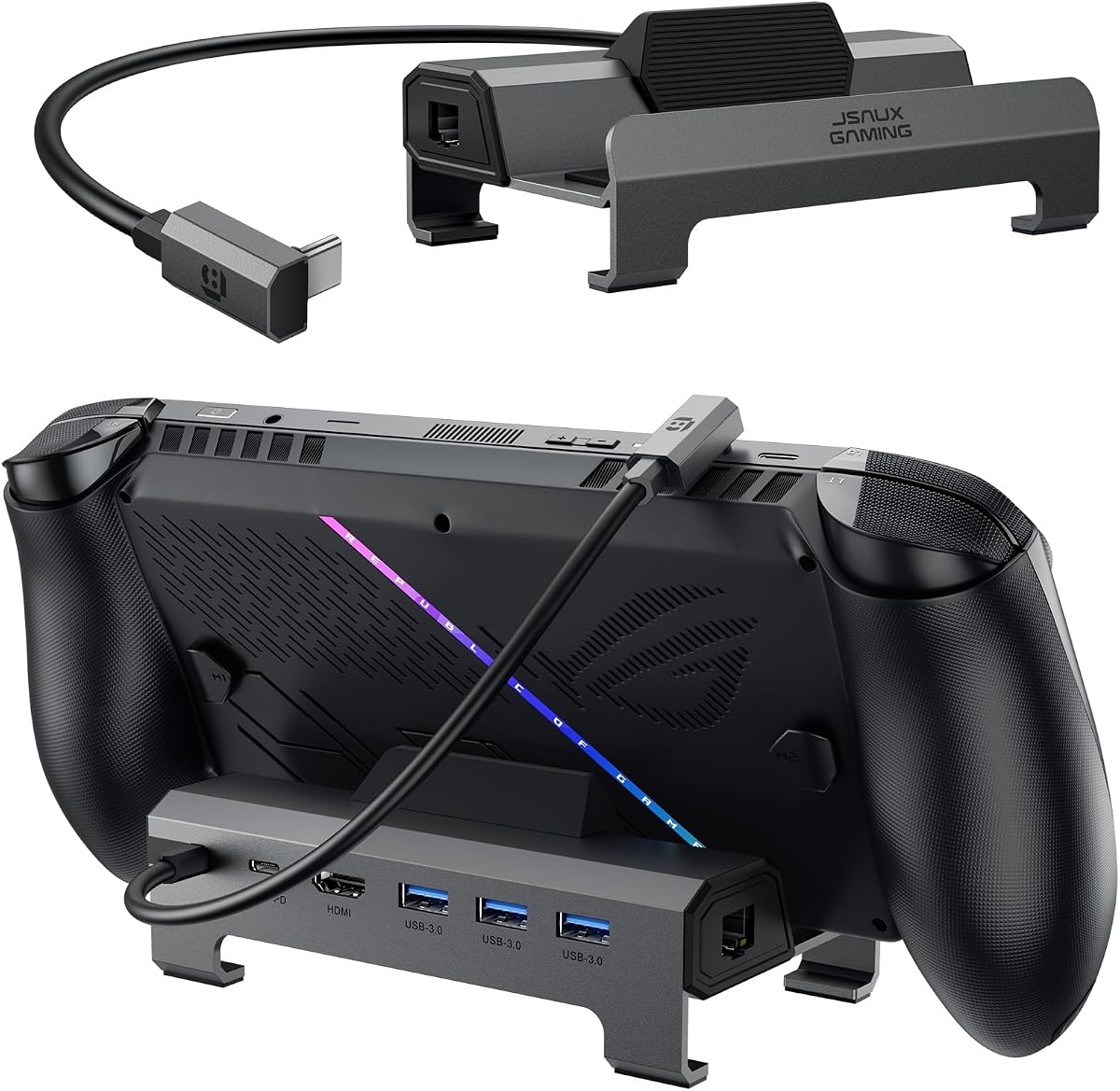



The JSAUX HB0609 is a broadly compatible six-in-one dock that earns its place as a flexible option for owners of the ROG Ally X, original ROG Ally, and several other Windows or SteamOS handhelds. Its 4.3 rating reflects a useful balance of display, charging, networking, and peripheral connectivity. It supports HDMI output up to 4K at 120Hz or 1080p at 240Hz, making it appropriate for both high-resolution televisions and refresh-focused gaming monitors.
We may earn a commission when you buy through this link, at no additional cost to you.
Connectivity is more useful than the six-in-one label initially suggests. Gigabit Ethernet provides a stable alternative to wireless networking, while one USB-C 3.2 Gen 1 port and two USB-A 3.2 Gen 1 ports can accommodate a controller, keyboard, mouse, storage device, or other peripherals. A dedicated USB-C power path supports up to 100W of power delivery, allowing the dock to keep the handheld charged while the console remains in use.
The modular construction is another meaningful strength. Users can operate the device directly on the dock or remove the base and use that component as a standalone stand. A silicone pad improves grip and viewing angles, while the front cover can be removed to accommodate a custom card measuring 3.00 by 1.13 by 0.01 inches. The principal limitation is that this model does not support VRR or ALLM. It also lacks an active cooling fan, so buyers wanting those gaming-display features or additional cooling should consider the HB0705.
This dock is a strong recommendation for a general-purpose ROG Ally X setup, especially when one device must support both handheld and docked use. It is less suitable for a display owner who considers variable refresh rate essential. A 100W PD charger is recommended for optimal charging, particularly with the ROG Xbox Ally and ROG Xbox Ally X, because the dock itself consumes part of the supplied power.
The mix of high-refresh video, wired Ethernet, multiple USB ports, and pass-through charging covers the most common docked-gaming needs without making the design excessively complicated. It is especially convenient for users who alternate between playing in handheld mode and connecting the Ally X to a larger screen.
Removing the base creates a more conventional desktop stand, while the silicone pad helps keep the handheld stable at the preferred viewing angle. The removable cover and custom-card opening also make it easy to give the dock a personal or themed appearance.
We may earn a commission when you buy through this link, at no additional cost to you.
The JSAUX HB0705 stands out as the most complete option in this guide for a ROG Ally X owner seeking a dedicated gaming dock rather than a generic USB-C hub. It combines a 4.4 rating with a 4K-at-120Hz HDMI 2.1 connection, Gigabit Ethernet, USB-C power delivery, one USB-C 3.0 port, and two USB-A 3.0 ports. It also supports VRR, ALLM, HDR, and Quick Frame Transport for compatible displays.
We may earn a commission when you buy through this link, at no additional cost to you.
Its magnetic RGB cooling fan is the defining feature. The fan is custom-shaped to align with the ROG Ally and ROG Ally X intake, allowing it to make more effective use of the handheld's airflow than a generic clip-on fan. It detaches when active cooling is unnecessary. Because the intake arrangement differs on other handhelds, the manufacturer notes that cooling efficiency may be reduced when the fan is used with Steam Deck, Legion Go, or other supported devices.
The dock adds five RGB modes to its base and a seven-color gradient on the fan, allowing a coordinated setup without requiring separate lighting controllers. A custom card slot accepts a 3.00 by 1.13 by 0.01-inch insert, and the detachable base can function as a stand. All these extras do come with a trade-off: 30W Turbo Mode on the ROG Ally and Ally X requires a 100W PD charger, which is not included in the standard configuration.
Overall, the HB0705 is the most versatile high-performance pick in the list. It suits a gamer with a modern gaming monitor who values high refresh rates, adaptive display features, wired networking, active cooling, and a polished desk setup. It is less attractive for someone who only needs a simple TV connection, but for a broad ROG Ally X desktop ecosystem it offers an unusually balanced feature set.
Support for 4K at 120Hz, VRR, ALLM, HDR, and QFT gives the dock a clear advantage when paired with a suitably equipped monitor. These specifications make it a better fit for competitive and high-refresh gaming than docks limited to 4K at 60Hz.
The removable magnetic fan aligns directly with the ROG Ally family's air intake. That tailored design is more meaningful than simply having a fan, particularly during extended docked sessions or when the handheld is propped upright on the stand.
We may earn a commission when you buy through this link, at no additional cost to you.
The JSAUX HB0612 combines one of the strongest listed ratings with a straightforward six-port design. Its 4.8 rating makes it an attractive recommendation, and the specification set directly addresses the essentials of a docked ROG Ally X: 4K-at-120Hz HDMI 2.1 output, Gigabit Ethernet, three USB 3.0 ports, and up to 100W of power delivery.
We may earn a commission when you buy through this link, at no additional cost to you.
The widened and raised base is especially relevant to newer handhelds with protruding grips. The listed compatibility includes ROG Xbox Ally and ROG Xbox Ally X, Steam Deck LCD and OLED, ROG Ally and Ally X, Legion Go, Legion Go 2, Legion Go S, Acer Predator Atlas 8, MSI Claw, and OneXPlayer. A silicone-style fit and the raised platform are intended to provide stability without forcing the device into an awkward position.
All three USB 3.0 ports operate at up to 5Gbps, making the dock practical for a keyboard, mouse, external storage, and controller at the same time. Gigabit Ethernet is valuable for online gaming, streaming, and large transfers. The charging path supports up to 100W and full Turbo Mode for the ROG Ally, ROG Xbox Ally series, and several other compatible handhelds, provided the appropriate charger is used.
The HB0612 is a strong all-rounder for buyers who want broad device support without a large collection of lighting, card-reader, or cooling features. It does not mention VRR, ALLM, an active fan, or customizable front card, so the HB0705 is better suited to enthusiast display and cooling setups. Even so, for a clean desk with a modern monitor, this dock offers an effective combination of compatibility and everyday functionality.
The widened and raised base accommodates models whose grips extend beyond the central body. This design choice makes the dock feel less generic and more likely to provide stable support for the ROG Xbox Ally family and other large handhelds.
Three 5Gbps USB-A ports provide room for a controller, keyboard, mouse, or storage device without requiring a separate hub. That makes the dock a convenient central connection point for a desktop-style configuration.
We may earn a commission when you buy through this link, at no additional cost to you.
The white JSAUX HB0609 offers the same useful core specification as the standard HB0609 while suiting a lighter desk aesthetic. It has a 4.4 rating, HDMI 2.1 output up to 4K at 120Hz, Gigabit Ethernet, one USB-C 3.2 Gen 1 data port, two USB-A 3.2 Gen 1 ports, and USB-C power delivery up to 100W.
We may earn a commission when you buy through this link, at no additional cost to you.
Its compatibility list includes ROG Xbox Ally X and ROG Xbox Ally released in 2025, as well as ROG Ally X, ROG Ally, Steam Deck, Legion Go, Legion Go S, Razer Edge, AYA NEO, AYA ODIN, Logitech G Cloud, and OneXPlayer. That makes it one of the more broadly compatible docks featured here, particularly for users who may move between several handheld platforms.
The modular base can remain attached for a docked setup or be detached for use as a standalone stand. A silicone pad helps prevent slipping and adjusts the support angle, while the removable front cover accepts a custom card of the same dimensions described for the other HB0609 model. The white finish can coordinate especially well with pale desks, wall-mounted displays, and minimalist accessories.
The same limitations apply as with the standard HB0609: there is no VRR, ALLM, or active fan. For the newest ROG Xbox Ally models, a 100W PD charger is recommended because the dock consumes some input power and a lower-power charger can produce an insufficient-power message. Even with those caveats, this version is a polished and versatile choice for users who prioritize both practical connectivity and appearance.
The white housing gives the dock a distinctive appearance compared with the many dark gaming accessories on the market. It is a simple but meaningful advantage when the setup is visible in a living room or on a desk shared with other equipment.
The dock supplies the essential ports for display, wired networking, peripherals, and charging. Buyers who do not need VRR, ALLM, or an integrated fan can focus on the practical 4K-at-120Hz output and flexible stand arrangement.
We may earn a commission when you buy through this link, at no additional cost to you.
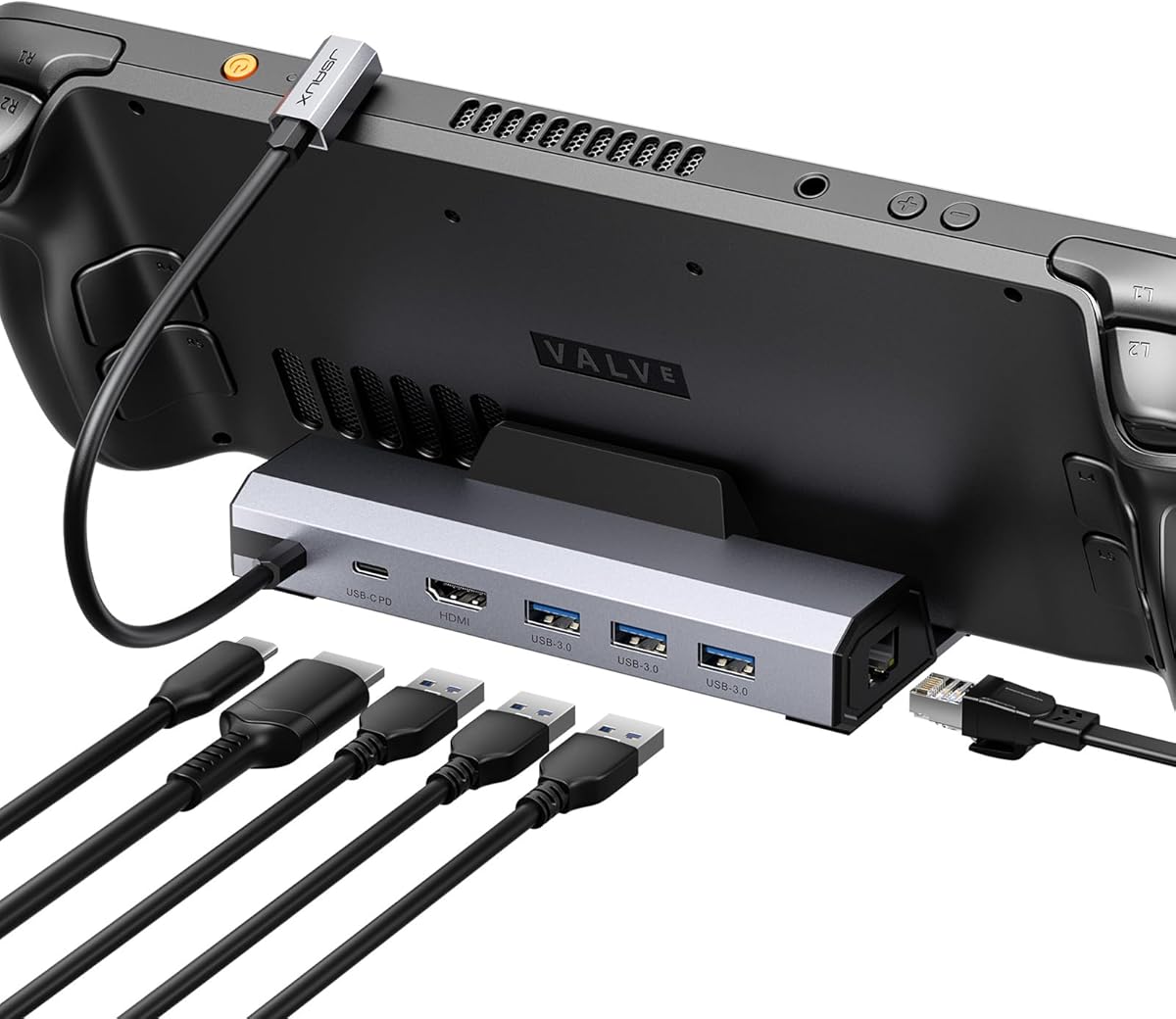
The JSAUX HB0503 is the best budget choice in this guide because it focuses on the most common needs of a docked ROG Ally X without adding a larger collection of ports. Its 4.4 rating indicates a well-regarded product, while the four-in-one design includes HDMI, two USB 2.0 ports, and power delivery.
We may earn a commission when you buy through this link, at no additional cost to you.
The display specification is more useful than the four-port count might initially imply. It supports 4K at 60Hz for detailed television viewing and 2K at 120Hz for smoother high-refresh gaming. That makes it a sensible choice for a 1080p gaming monitor operating at 120Hz or 144Hz, although it does not offer the dock's full 4K-at-120Hz capability.
The widened and raised base is designed to accommodate handhelds with protruding grips. Compatibility covers ROG Xbox Ally, ROG Xbox Ally X, Steam Deck LCD and OLED, ROG Ally and Ally X, Legion Go, Legion Go 2, Legion Go S, Acer Predator Atlas 8, MSI Claw, and OneXPlayer. Power delivery reaches up to 100W, with full Turbo Mode support listed for the ROG Ally family, ROG Xbox Ally series, Legion Go series, Steam Deck, and other compatible devices.
The principal compromises are the absence of Ethernet and the use of USB 2.0 rather than faster USB 3.x data connections. A wireless controller can avoid the data-speed limitation, but a wired controller, external drive, keyboard, or mouse may benefit from a faster port. For a straightforward television setup, an entry-level monitor, or a traveler who wants a lightweight dock, the HB0503 remains a capable recommendation.
The dock omits Ethernet, card readers, audio, and extra USB sockets, which keeps the design compact. It focuses on the features most likely to be used in a living-room configuration: external video, controller connections, and charging.
4K at 60Hz is well suited to many televisions, while 2K at 120Hz provides a useful high-refresh option for compatible computer monitors. This flexibility lets buyers prioritize a simple dock without giving up all modern display functionality.
We may earn a commission when you buy through this link, at no additional cost to you.
The iVANKY 8-in-1 Dock is notable for listing 4K at 144Hz HDMI output, one of the highest display specifications in this group. Its 4.2 rating is supported by a broad port selection: a 1Gbps Ethernet connection, three 5Gbps USB-A 3.0 ports, a charging USB-C port, and the HDMI output. It is designed for the ROG Ally, ROG Ally X, Legion Go, MSI Claw, and other compatible USB-C gaming handhelds.
We may earn a commission when you buy through this link, at no additional cost to you.
The ROG Ally-specific software guidance is important. To use the handheld's 30W Turbo Mode, the listed instructions call for BIOS version 323. The manufacturer also strongly recommends updating the dock firmware to avoid HDMI mirroring issues and improve the extended-display experience. Users should therefore treat the initial setup as more involved than merely attaching the console and connecting a cable.
The physical design includes two joystick caps intended to protect the controls from friction and scratches. Power delivery supports up to 100W, although actual charging speed is governed by the handheld: the supplied information lists a 45W maximum for Steam Deck and 65W for ROG Ally. The dock also includes an 18-month warranty, providing added reassurance for a peripheral that depends on both electrical and firmware compatibility.
This model is a compelling choice for a gamer with a 4K 144Hz monitor and a clear preference for USB-A accessories. Its unusually high listed display mode deserves attention, but buyers should ensure that both the handheld, graphics settings, game, and monitor can actually drive that resolution and refresh rate. Updating the firmware is essential for the intended experience.
The 4K-at-144Hz specification targets demanding monitor setups and high-end televisions. It offers an attractive ceiling, although the final output still depends on the connected hardware and the capabilities of the game being played.
Three 5Gbps USB-A ports make it easy to connect a mouse, keyboard, controller, or storage device. This is particularly useful for setups that prefer standard USB-A accessories over a collection of USB-C adapters.
We may earn a commission when you buy through this link, at no additional cost to you.
The iVANKY 14-in-1 RGB Dock is the premium connectivity option in this guide, with a 4.3 rating and a broad selection of ports. Its headline specifications include 4K-at-120Hz HDMI 2.1 output, 1Gbps Ethernet, two 10Gbps USB-A 3.2 ports, two 5Gbps USB-A 3.0 ports, a rapid-charging USB-C port, a 3.5mm audio jack, and both TF and SD card slots.
We may earn a commission when you buy through this link, at no additional cost to you.
The variety makes it useful beyond the core task of connecting a handheld to a monitor. Fast USB-A ports can support high-performance storage, while the two slower USB-A ports handle everyday peripherals. The audio jack provides a convenient wired option, and the dual card slots may appeal to users who transfer media or game files locally. Two joystick caps are also included to help protect the controls.
Its dual-foldable stand is designed to avoid obstructing the rear cooling vents of compatible consoles. Seven RGB modes—listed as Direct, Breathing, Rainbow Wave, Spectrum Cycle, Race Cycle, and Stacking, with the product description referring to seven modes—allow visual coordination with other gaming hardware. The product is compatible with Steam Deck OLED, ROG Ally X, ROG Xbox Ally X released in 2025, and Lenovo Legion Go.
The main caveat is that it does not include an active cooling fan, despite its extensive size and feature set. Firmware updating is also recommended to prevent HDMI mirroring issues and improve extended-display behavior. It is best suited to users who value ports, lighting, media access, and a refined stand more than a dedicated ROG cooling fan. A 24-month warranty is listed for added coverage.
Two 10Gbps and two 5Gbps USB-A ports cover both high-speed storage and conventional accessories. The Ethernet, audio, charging, and dual card slots extend the dock beyond a basic display adapter into a more complete workstation hub.
Multiple RGB effects let the dock match a broader gaming setup, while the foldable stand helps preserve access to rear ventilation. The combination gives the dock a polished appearance without requiring the device to be propped against a wall.
We may earn a commission when you buy through this link, at no additional cost to you.
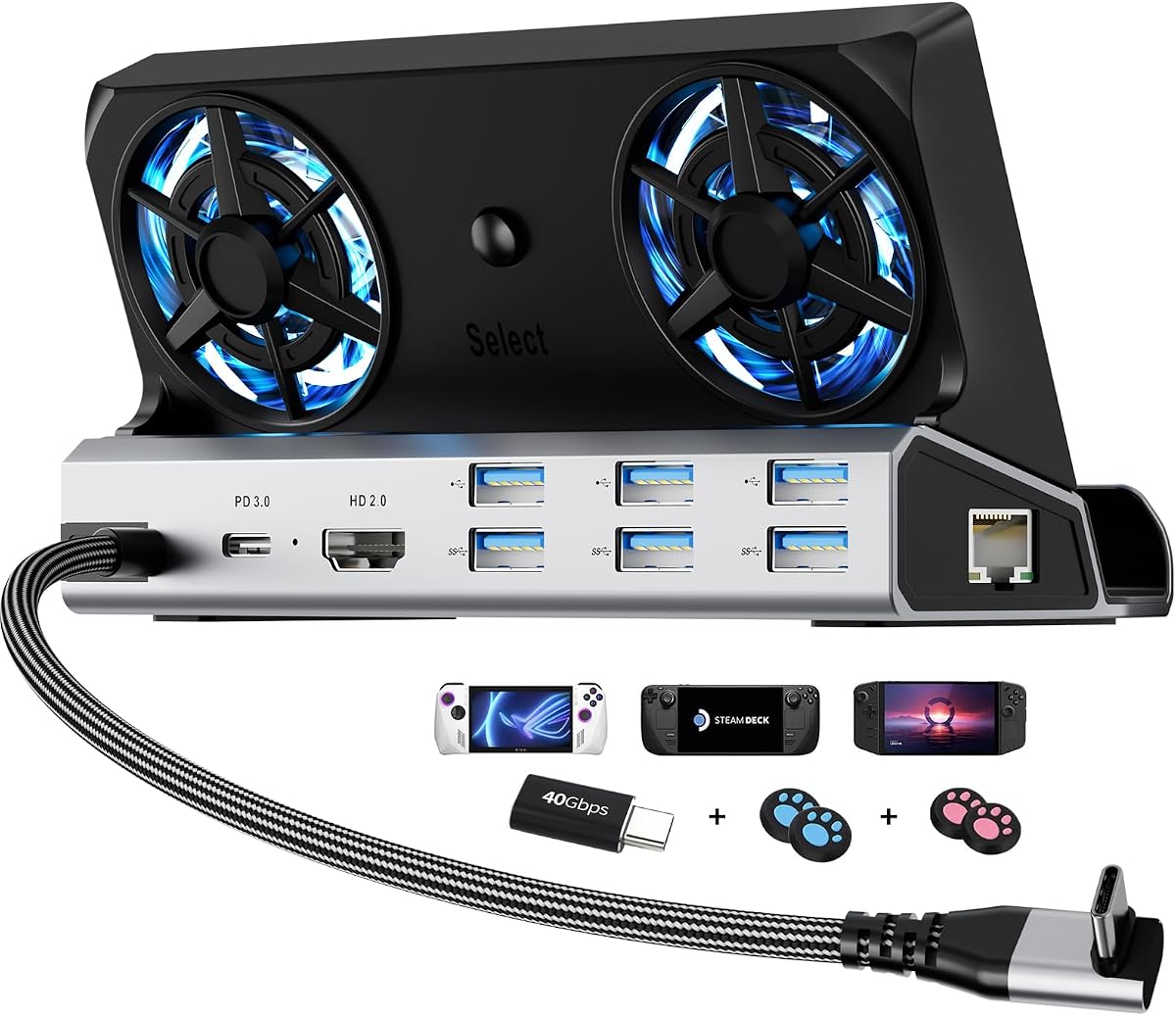
The YCE 12-in-1 Dock is built around extensive connectivity, active cooling, and a durable aluminum body. It has a 4.2 rating and includes HDMI 2.0 with 4K-at-60Hz output, Gigabit Ethernet, three 5Gbps USB 3.0 ports, three USB 2.0 ports, and a Type-C PD 3.0 connection that supports 100W charging and up to 40Gbps data.
We may earn a commission when you buy through this link, at no additional cost to you.
Its most distinctive feature is the pair of 5cm RGB cooling fans, which are considerably larger than the small 2cm fans used by many compact docks. A rear switch turns off both the fans and lighting. The open fan area is intended to improve airflow, addressing a common limitation of enclosed docking designs where the handheld receives less ventilation while propped up.
The device slot is designed for units up to 27mm thick and is listed for Steam Deck LCD and OLED, Switch and Switch 2, ROG Ally and Ally X, Legion Go, Legion Go S, Legion Go 2, and MSI Claw. With the included Type-C cable, it can also be used with laptops, iPads, and Android devices. Nintendo platform data limitations still apply, as they do with other docks, and the product is not a universal solution for every Switch function.
The principal display compromise is 4K at 60Hz, which trails the high-refresh 4K output available from several JSAUX and iVANKY alternatives. However, the six USB ports, two sizable fans, aluminum construction, joystick caps, and Type-C extender create a compelling package for users who value active cooling and physical longevity. The included extender can also reduce repeated wear on the console's native port.
The twin 5cm fans and open airflow area distinguish this dock from minimalist models. This design is especially relevant when the handheld remains upright and enclosed during long gaming sessions.
The screwless aluminum alloy housing provides a more substantial feel than a basic plastic dock. A sacrificial Type-C extender can absorb repeated connection and disconnection, helping protect the handheld's own port over time.
We may earn a commission when you buy through this link, at no additional cost to you.
The JSAUX HB0609 Dock Bundle is the most convenient choice for buyers who do not already own a suitable USB-C PD charger. It combines the familiar six-port dock with a 100W PD charger, a USB-C-to-USB-C cable, and European and UK plug adapters. Its 4.4 rating and 4K-at-120Hz HDMI output preserve the core appeal of the standard HB0609.
We may earn a commission when you buy through this link, at no additional cost to you.
The included charger simplifies setup and helps avoid the insufficient-power message that can occur when the newer ROG Xbox Ally or ROG Xbox Ally X is connected to a dock with a 65W or lower PD source. The dock's own power consumption reduces the amount available to the handheld, but the bundle is prepared to address that issue from the beginning.
Its remaining ports are well chosen for a desktop gaming setup. Gigabit Ethernet creates a reliable wired network, one USB-C 3.2 Gen 1 port and two USB-A 3.2 Gen 1 ports accommodate common accessories, and the charging path supports full-speed charging within each device's limits. The modular base works as part of the dock or detaches into a standalone stand, and the removable cover permits a custom card.
As with the standard HB0609, VRR and ALLM are absent, and there is no active fan. Users seeking a display with adaptive-refresh features or a ROG-specific cooling solution should look to the HB0705. For everyone else, this bundle offers a complete, straightforward way to establish a docked ROG Ally X setup.
The package includes the dock, a 100W PD charger, a USB-C cable, and regional plug adapters. That removes the need to identify a separate charger capable of supporting the dock and the handheld's higher-power modes.
The bundle retains high-refresh HDMI, Gigabit Ethernet, and multiple USB data connections. Although it does not cover every enthusiast feature, it provides the core functions required for gaming, browsing, and media use on an external display.
We may earn a commission when you buy through this link, at no additional cost to you.
The JSAUX HB0603 is a six-in-one dock built for the original ROG Ally X and several other established handheld platforms. It carries a 4.3 rating and offers HDMI 2.1 output up to 4K at 120Hz, up to 100W power delivery, three fast USB-A 3.0 ports, and Gigabit Ethernet. For the right buyer, those fundamentals remain more than enough for a complete docked setup.
We may earn a commission when you buy through this link, at no additional cost to you.
Its compatibility is the most important point to verify. The listed devices include Steam Deck LCD and OLED, ROG Ally and Ally X, Legion Go and Legion Go S, and MSI Claw. However, the product explicitly states that it is not compatible with ROG Xbox Ally or ROG Xbox Ally X. That restriction prevents it from being a safe recommendation for buyers who own the newer Xbox-branded models or may upgrade to them.
The three USB-A 3.0 ports are a practical alternative to the HB0609's mixture of USB-A and USB-C. They can support a keyboard, mouse, controller, or storage device while Ethernet handles network traffic. A 100W charger is recommended for the best result, and the ROG Ally's 30W Turbo Mode is fully supported. The dock therefore serves both ordinary docked gaming and higher-performance power modes.
The HB0603 is a solid choice for a Steam Deck, original ROG Ally, or compatible device already in hand. It is not as well suited to the newest ROG Xbox family, and buyers prioritizing variable refresh rate, automatic low-latency mode, or integrated active cooling will find better options elsewhere. Within that compatibility boundary, it remains a capable and straightforward dock.
The dock was designed specifically around the original ROG Ally generation and remains well matched to it. Its high-refresh output, fast USB ports, Ethernet, and Turbo Mode support cover the main reasons to dock that handheld.
ROG Xbox Ally and ROG Xbox Ally X are explicitly excluded from compatibility. Buyers should confirm the exact handheld model before choosing this dock, particularly if they intend to upgrade to the newer platform later.
We may earn a commission when you buy through this link, at no additional cost to you.
The right ROG Ally X dock depends on the display, accessories, cooling expectations, and whether you own the original Ally X or the newer ROG Xbox Ally X. Reviewing these factors before purchasing helps avoid paying for unused ports or missing a feature that matters to the intended setup.
In short, verify the exact handheld name before ordering, especially when comparing an original Ally X with an Xbox-branded model.
Choose output modes based on your real monitor and game library, not simply the largest resolution printed on the package.
Choose the smallest port set that supports every controller, input device, and storage accessory you expect to connect.
Include Ethernet in the decision if network consistency matters more than having the smallest possible dock.
Treat the dock and charger as one system, and use a sufficiently capable PD source when planning long high-power sessions.
Choose active cooling for long, enclosed, or high-load sessions; a simpler dock remains adequate when airflow is unrestricted.
A stable stand should support the exact grip shape without blocking vents or forcing an uncomfortable viewing angle.
Treat lighting, card slots, and decorative panels as finishing touches after the core electrical and display requirements are met.
Begin by placing the dock on a stable, level surface near the display and connecting the appropriate HDMI cable, Ethernet cable, and any required peripherals. Attach the handheld carefully, ensuring the USB-C connector is fully seated without forcing it. Connect a suitable PD charger before launching demanding games, particularly when using Turbo Mode. On models with an adjustable silicone pad, position the handheld at a comfortable viewing angle and confirm that the grips do not extend beyond the stable support area.
For the best display mode, access the handheld's display settings after connection and select the refresh rate supported jointly by the monitor, dock, and game. If the image does not extend to the external display, consult the dock's firmware guidance; the iVANKY products specifically recommend updating firmware to avoid mirroring issues and improve the extended-display experience. The iVANKY 8-in-1 also calls for BIOS version 323 to use 30W Turbo Mode on the ROG Ally. Close the dock's custom front card securely after inserting an insert, and avoid placing cables where they can pull the handheld off the stand.
Care for the dock by removing it gently rather than yanking the USB-C connector from the console. Use the included Type-C extender where one is provided to reduce wear on the handheld's native port. Keep dust away from the removable silicone pad, intake areas, card slots, and fan openings, and use the rear switch to deactivate cooling and lighting on models that include it when appropriate. Periodically inspect the connector for looseness, confirm that cooling fans are unobstructed, and update the relevant dock firmware when the manufacturer provides new instructions.
Some models explicitly support both, while others support only the original ROG Ally family. The JSAUX HB0609, HB0609 White, and HB0609 bundle list both the original ROG Ally X and the ROG Xbox Ally X released in 2025. The JSAUX HB0503, HB0612, and iVANKY 14-in-1 also list the newer ROG Xbox models. The JSAUX HB0603 explicitly does not support ROG Xbox Ally or ROG Xbox Ally X, so buyers should verify the exact model before ordering.
A 100W PD charger is strongly recommended, especially when using the newer ROG Xbox Ally models or ROG Turbo Mode. Many docks accept up to 100W, but the dock itself consumes some of that power, leaving less for the handheld. A 65W or lower source may trigger an insufficient-power message and lead to slower charging. The JSAUX HB0609 bundle includes a 100W charger, while several other listings recommend purchasing one separately.
Both modes provide a 3840-by-2160 resolution, but 120Hz refreshes the image twice as often as 60Hz. That can make movement and camera motion appear smoother, which is especially noticeable in competitive shooters, racing games, and fast-paced action. The ROG Ally X, game, graphics settings, and external monitor must all support the selected mode. A 4K-at-60Hz dock may still be entirely suitable for a television where the device operates mainly in 30Hz or 60Hz modes.
They are valuable for owners of compatible gaming monitors, but not essential for every display. VRR synchronizes the refresh rate with the frame rate, while ALLM can automatically enable low-latency settings. The JSAUX HB0705 explicitly lists support for VRR, ALLM, HDR, and Quick Frame Transport. The other docks in this guide do not advertise those features, so users who consider them important should verify the dock and monitor specifications before buying.
Not always, because a handheld in an open position can dissipate heat effectively without a dock fan. Active cooling becomes more useful during extended sessions, in warmer environments, or when the device is upright and surrounded by the dock. The JSAUX HB0705 uses a magnetic fan designed around the ROG intake, while the YCE 12-in-1 includes two 5cm fans. Other users may prefer a simpler dock with fewer moving parts.
The best choice depends on the accessories already owned and the ones likely to be added. USB-A is convenient for many controllers, keyboards, mice, and storage devices, while USB-C can provide higher data speeds and a more compact single-cable setup. The JSAUX HB0609 offers a mixture of one USB-C and two USB-A data ports. Buyers should check the shape and speed of their essential accessories before choosing a dock.
Some docks are designed to work with more than a handheld console. The YCE 12-in-1 can connect to laptops, iPads, and Android devices through its included Type-C cable, provided the device supports compatible display output and power delivery. Other models are optimized for gaming handhelds and should not be assumed to support every tablet or laptop function. Device support, video output, and charging requirements should be checked separately.
Use an HDMI cable and a monitor that supports the resolution and refresh rate selected in the handheld's display settings. Update the dock firmware when instructed, particularly for iVANKY models, because older firmware may cause mirroring or extended-display issues. For the iVANKY 8-in-1, the listed instructions also call for BIOS version 323 to enable ROG Ally 30W Turbo Mode. A 100W PD charger helps maintain consistent performance during longer sessions.
The JSAUX HB0705 is the strongest all-round recommendation because it combines 4K-at-120Hz output, VRR, ALLM, HDR, QFT, Gigabit Ethernet, multiple USB ports, and a magnetic cooling fan designed specifically for ROG Ally hardware. The JSAUX HB0503 is the best budget pick for buyers seeking a simple TV-oriented dock with 2K-at-120Hz output and charging. The iVANKY 14-in-1 RGB Dock is the premium selection for anyone who prioritizes extensive connectivity, storage ports, lighting, and a refined foldable stand.
Before making a final choice, prioritize the requirements that directly affect the setup. Confirm compatibility with the exact handheld model, select a dock that supports the monitor's desired resolution and refresh rate, and confirm that a suitable PD charger is available. Add active cooling, VRR, Ethernet, or faster USB ports only when they will be used. A simpler dock can be the more sensible choice for television gaming, while a monitor-centered setup benefits more from high-refresh video, low-latency features, and a complete peripheral selection.
The specifications and configurations of docking stations can evolve, and compatibility details may differ between listing revisions and regional variants. Buyers should check the current product listing, package contents, and device support immediately before purchase. Doing so ensures that the selected dock matches the ROG Ally X or ROG Xbox Ally X, the chosen display, and the peripherals intended for the completed setup.