
Sonnet Solo10G T5
Professional 10GBASE-T adapter
Thunderbolt 5 certified platform
Bus-powered silent aluminum design
Expert guide comparing 10 Thunderbolt hubs with 10GBE Ethernet, including true 10G adapters, docks, port layouts, compatibility, displays, power, and value.
Thunderbolt hubs with 10GBE Ethernet are built for users who need faster wired networking than ordinary gigabit or 2.5GbE connections can provide. A capable system can accelerate access to NAS devices, large media files, shared storage, virtual machines, and high-bandwidth services, but the quality of the host port, controller, cable, and network equipment all influence the result.
This guide compares ten Thunderbolt-based adapters and docking stations, concentrating on the five products that explicitly provide 10GbE while also examining closely related multiport docks with faster USB and display expansion. We assess Ethernet speed, host compatibility, physical design, power delivery, display support, port selection, and practical suitability for professional or home workflows.
The recommendations show why a simple 10GbE adapter may suit a focused workstation while a larger dock can consolidate displays, storage, charging, and networking. Ratings reflect the supplied marketplace feedback, and availability, configurations, compatibility, and prices can change, so readers should verify current listings and system requirements before purchasing.

3.3Editor score

4.4Editor score
The comparison below separates true 10GbE adapters from general-purpose Thunderbolt docks that offer 2.5GbE or 1GbE networking, making it easier to identify the product that matches both network and peripheral requirements.





The OWC Thunderbolt 4 10G Ethernet Adapter is a focused solution for adding a fast wired connection to a computer that lacks suitable Ethernet. Its supplied rating is 4.5, and the strongest part of its proposition is straightforward: one RJ45 port, one short Thunderbolt cable, and a controller designed to deliver real-world transfers exceeding 900MB/s when the surrounding network supports that throughput.
We may earn a commission when you buy through this link, at no additional cost to you.
Its versatility is unusually broad for an Ethernet adapter. The product supports 10Gb/s, 5Gb/s, 2.5Gb/s, 1Gb/s, and 100Mb/s Base-T, automatically negotiating with compatible infrastructure. Cable reach extends to 100 meters using Cat6a, while shorter or lower-grade cables can support reduced network rates. Wake-on-LAN readiness adds practical value for remote access, and the stated AVB readiness makes the adapter relevant to synchronized professional audio and video applications.
The main trade-off is that this is a network adapter rather than a full desktop dock. It does not consolidate displays, USB peripherals, storage, and charging into one hub. The included 0.3-meter Thunderbolt cable is useful for immediate setup but may be short for some desk arrangements, and performance remains constrained by the host port, switch, router, storage device, and Ethernet cable elsewhere in the chain.
This is the strongest general recommendation for someone whose priority is dependable 10GbE expansion without a large dock. Mac and Windows users with Thunderbolt-equipped systems can take advantage of the fast link and flexible negotiation, while NAS-focused users gain a practical path to large transfers. Buyers should think of it as a high-speed network specialist rather than an all-in-one workstation hub.
For users moving large projects between a computer and shared storage, the stated performance of more than 900MB/s can make the adapter dramatically more useful than 1GbE hardware. That result still requires a matching 10GbE-capable switch, router, or NAS and suitable cabling.
Automatic negotiation across five Ethernet rates makes the adapter practical in offices where nearby infrastructure may vary. It can connect at the best mutually supported speed without requiring users to manually choose a link rate.
We may earn a commission when you buy through this link, at no additional cost to you.
The OWC Thunderbolt 5 Dual 10GbE Network Dock is the most complete networking-focused product in this group. It provides two rear-facing 10GbE RJ45 ports and a front-facing 2.5GbE port, making it especially relevant to workstations that need multiple wired connections. Although its supplied rating of 3.3 trails several simpler adapters, its 11-port connectivity and Thunderbolt 5 feature set give it a distinct role.
We may earn a commission when you buy through this link, at no additional cost to you.
The dock supports up to three 8K displays at 60Hz with DSC, two 8K displays at 120Hz with DSC, or three 4K displays at 144Hz with DSC, subject to the host. It includes a Thunderbolt 5 uplink, three downstream Thunderbolt 5 USB-C ports, one 10Gb/s USB-C port, and three 10Gb/s USB-A ports. Host charging reaches 90W, while each Thunderbolt device port can provide 15W for connected equipment.
Compatibility is a central consideration. Thunderbolt 5 Macs require macOS 15.3.x or later, while listed PC configurations require Windows 11. Thunderbolt 4 and USB4 Apple silicon Macs need macOS 14.x or later, Thunderbolt 3 support is limited to Mac systems, and Linux users are directed toward the latest Ubuntu version. These conditions are detailed rather than universal, so users with older computers should check carefully.
The OWC dock is a strong premium recommendation for a Mac or modern Windows workstation that needs dual 10GbE links, high-end display expansion, fast peripherals, and one-cable power. Its complexity and relatively low supplied rating make it less convincing for a user whose sole need is one extra network port, but it offers a notably capable consolidation point for demanding desks.
The pair of 10GbE ports separates the dock from ordinary Thunderbolt adapters. It can serve different machines, virtualized environments, storage systems, or separate network segments without requiring a second network adapter.
The extensive downstream Thunderbolt capabilities allow displays, storage, and accessories to expand from a single uplink. This makes the dock more suitable for a permanent editing or production desk than a portable adapter.
We may earn a commission when you buy through this link, at no additional cost to you.
The WAVLINK USB4 to 10Gbps Ethernet Adapter combines a 10GbE RJ45 connection with broad support for USB4 and Thunderbolt 3, 4, and 5. Its 4.4 rating places it among the strongest-rated products here, while its compact aluminum design makes it a practical choice for a laptop that needs a fast wired network without carrying a full docking station.
We may earn a commission when you buy through this link, at no additional cost to you.
The AQC113-B1 controller supports automatic negotiation from 10Gbps down through 5Gbps, 2.5Gbps, 1Gbps, 100Mbps, and 10Mbps. The product is aimed at demanding work including media editing, NAS access, virtualization, large transfers, and multi-gig fiber service, though a fast internet plan alone does not create a 10Gbps local link. The router or switch, host interface, cable, and target system must all participate in the negotiated rate.
Compatibility is the main complication. Mac operating systems include native drivers, while Windows 10 or 11 and Linux require manual installation of the Marvell AQtion driver. The adapter will not work with a host limited to USB 3.2, 3.1, 3.0, or 2.0, nor with ordinary mobile phones and tablets. Users should look for a USB4 or Thunderbolt symbol rather than assuming every USB-C port is suitable.
This is the best budget-oriented choice among the genuine 10GbE options for buyers who already have modern Thunderbolt or USB4 hardware. It delivers the important network capability in a small format, and its 4.4 rating provides encouraging marketplace feedback. It is less convenient than a plug-and-play product and offers no display, charging, or USB hub functionality, but it addresses the core need cleanly.
The adapter's small aluminum housing is useful for mobile workstations and desks with limited space. Passive heat dissipation supports stable operation, while status LEDs make link speed and data activity easy to check.
Reaching the advertised class of performance requires Cat6a or better cabling, a 10G network endpoint, and a compatible USB4 or Thunderbolt host. Jumbo frames, flow control, hardware offloading, and full-duplex configuration can also affect real-world results.
We may earn a commission when you buy through this link, at no additional cost to you.
The Sonnet Solo10G T5 is purpose-built for professional workflows that need one reliable 10GBASE-T connection without a full desktop dock. It supports Thunderbolt 5, Thunderbolt 4, USB4, and Thunderbolt 3 computers, including M-series and Intel Macs, Windows and Linux systems, and iPad Pro. No marketplace rating is supplied, so the feature set and stated platform qualifications are more useful than customer feedback for this selection.
We may earn a commission when you buy through this link, at no additional cost to you.
Its Marvell 10GbE controller is designed for high-speed networking, shared storage, NAS and SAN access, media servers, post-production, and large file transfers. Hardware acceleration, TCP and UDP checksum offloading, flow control, and lower host CPU utilization are all relevant for sustained workloads. On Mac, Audio Video Bridging support through IEEE 802.1Qav adds value for synchronized professional media applications.
The adapter is compact, fanless, and powered by the bus, so it does not require an external supply and operates silently. Its 7.5-watt design is particularly useful on location or in an equipment bag. The enclosure is rugged aluminum, and the included replaceable Thunderbolt 5 cable reduces the risk of a single damaged cable ending an otherwise useful deployment.
The Solo10G T5 is a compelling recommendation for media professionals, IT administrators, and owners of shared storage who value a focused, certified platform. It supports 10GbE over Cat6 up to 55 meters and Cat6A up to 100 meters, while NBASE-T allows 2.5GbE and 5GbE over lower-grade cabling with compatible equipment. It does not solve display or peripheral expansion, but for its stated purpose, the specialization is an advantage.
Hardware acceleration and checksum offloading can reduce the processing burden placed on the host computer during large transfers. These features make the Solo10G T5 particularly relevant to storage, rendering, and media-production environments.
Bus power and a fanless enclosure make the adapter straightforward to deploy in mobile rigs or production cases. Its silent construction also avoids adding workstation noise during long transfer sessions.
We may earn a commission when you buy through this link, at no additional cost to you.
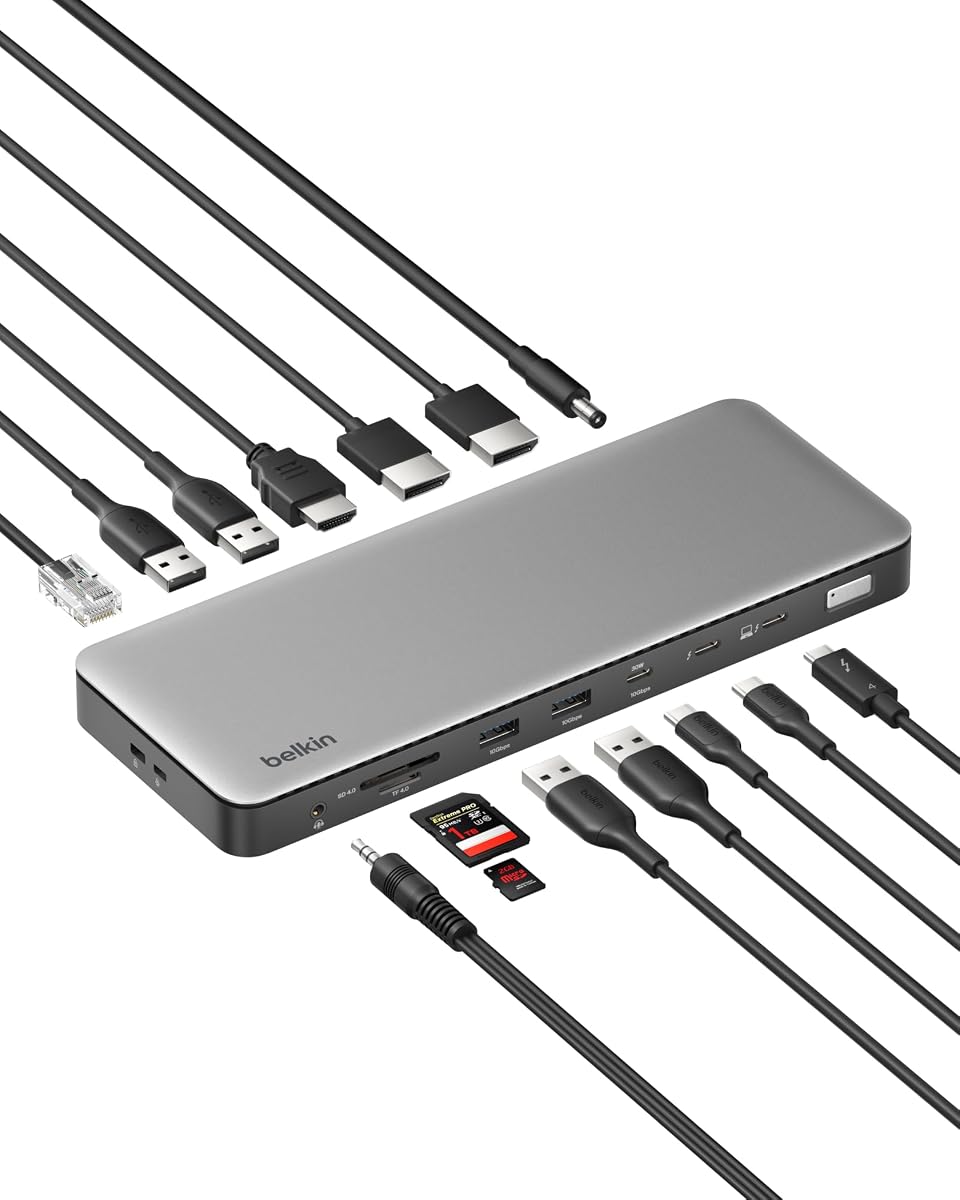
The Belkin Thunderbolt 4 14-in-1 USB-C Hub is the highest-rated product in the supplied dataset, with a rating of 4.6. It is a capable general-purpose desktop dock with 14 ports, up to 40Gbps Thunderbolt 4 throughput, 96W host charging, and support for three extended 4K displays at 60Hz. Its Ethernet interface supports 2.5GbE rather than 10GbE.
We may earn a commission when you buy through this link, at no additional cost to you.
That distinction matters for anyone searching specifically for a 10GBE Ethernet hub. A 2.5GbE connection can still improve on gigabit networking and may be sufficient for office traffic, calls, downloads, and moderately sized transfers. It will not deliver the full 10Gbps class emphasized by the category or keep pace with certain high-speed NAS and production-storage systems. Buyers should therefore treat it as a related alternative, not a direct 10GbE solution.
The broader dock strengths are substantial. A single connection can serve displays, storage, wired networking, peripherals, and laptop charging, reducing desk clutter. USB-C daisy chaining offers room to expand storage and displays, while the built-in safety system addresses over-voltage, overload, over-current, over-temperature, short circuits, and fire-resistant materials. Belkin also includes a three-year coverage program.
The Belkin is an excellent choice for a general professional desk that values display support, charging, and peripheral expansion more than maximum Ethernet throughput. Its 4.6 rating and 2.5GbE link make it a polished everyday option. It should not be selected over a genuine 10GbE adapter when transferring multi-gigabyte files to 10G storage is the central requirement.
Fourteen ports and 96W charging make the dock useful for users who want one connection to manage displays, storage, networking, and accessories. This broad utility explains its strong supplied rating despite the limited Ethernet rate.
The 2.5GbE interface is a meaningful improvement over 1GbE but remains well below 10GbE. Users with 10G infrastructure should choose a product with an actual 10GbE controller and RJ45 port.
We may earn a commission when you buy through this link, at no additional cost to you.
The SABRENT Thunderbolt and USB4 10GbE Ethernet Adapter is a direct solution for adding a 10Gigabit Ethernet RJ45 port to a compatible computer. Its supplied rating is 3.6, and its central appeal lies in an uncomplicated upgrade path: connect the USB-C end to Thunderbolt 3, Thunderbolt 4, Thunderbolt 5, or USB4, then use Ethernet to join a 10G network.
We may earn a commission when you buy through this link, at no additional cost to you.
The adapter automatically negotiates among 10GbE, 5GbE, 2.5GbE, 1GbE, and 100Mbps. A genuine 10G link requires a compatible router, switch, or NAS at the other end and a Cat6a or better cable. Merely subscribing to a 10Gbps internet service does not guarantee that local transfers will run at 10Gbps, and a slower host port will establish a lower link rate.
Its aluminum enclosure also functions as a heatsink. The manufacturer warns that it can become hot during sustained 10G transfers and should remain in open air rather than under a laptop or inside a closed bag or drawer. Status LEDs indicate a green 10GbE link, an amber lower-speed link, and flashing activity. Windows and Linux may require the Marvell AQC113 driver, although macOS and many modern Thunderbolt 4 or USB4 systems work directly.
The NT-P10G is a practical recommendation for IT teams, creators, and home users who need 10GbE access but do not require a multi-display dock. Wake-on-LAN and PXE boot add value for managed deployments, while jumbo-frame and receive-buffer tuning can improve transfer behavior in suitable environments. The main caveats are heat management and the possibility of driver configuration.
Wake-on-LAN and PXE support extend the adapter beyond ordinary desktop networking. These features are especially helpful for systems accessed remotely or booted over the network in controlled IT environments.
Because the aluminum shell is the heat-dissipation mechanism, sustained transfers can make it warm to the touch. Keeping it uncovered preserves the intended cooling path and is particularly important during long file operations.
We may earn a commission when you buy through this link, at no additional cost to you.
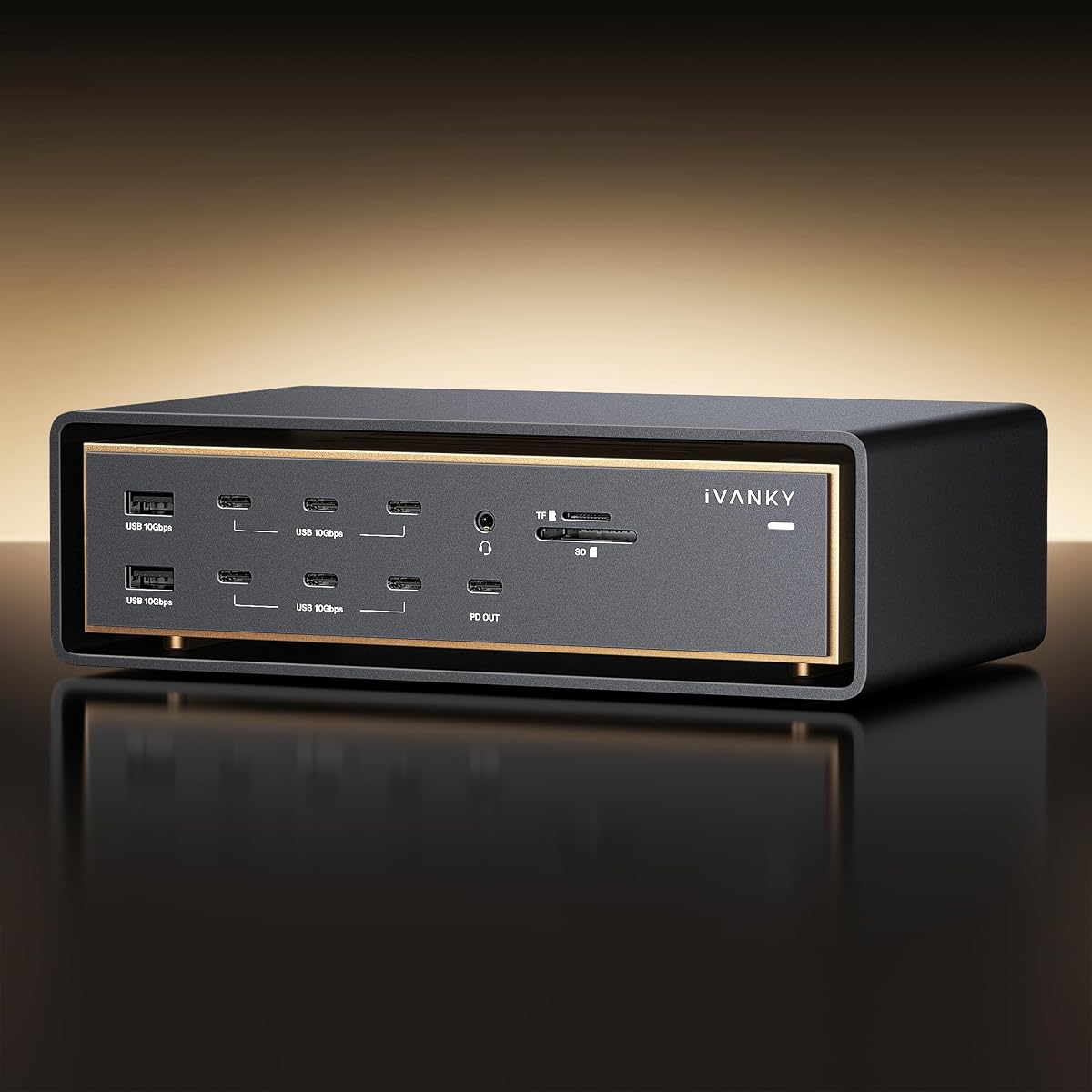
The iVANKY 26-in-1 FusionDock Ultra is a Mac-specific workstation dock with a 10GbE RJ45 port, 140W host charging, four high-speed downstream USB-C ports, and support for up to two 8K displays at 60Hz or four 6K displays at 60Hz. Its 4.2 rating reflects a capable package, although the product's Mac-only orientation sharply limits its audience.
We may earn a commission when you buy through this link, at no additional cost to you.
Its unusual dual-chip architecture is stated to deliver 80 to 120Gbps through dedicated downstream connectivity, giving the dock ample headroom for RAID arrays and other high-bandwidth peripherals. A 10Gbps Ethernet port supports fast server access, while the SD 4.0 slot is specified for photo transfers at up to 300MB/s. The extensive interface suite also includes optical audio, multiple USB connections, and a separate 45W USB-C charging port for an iPad or iPhone.
Thermal management receives unusual attention for a dock. The listed cooling stack combines an NTC-controlled fan, internal copper heat sinks, and a floating chassis that creates a chimney effect. Such active cooling makes sense when the dock is expected to sustain very high bandwidth continuously, but it also reflects the device's greater size and power requirements compared with a simple network adapter.
This is a strong recommendation for a MacBook-based production system that needs 10GbE alongside multiple high-resolution displays and fast storage. The product comes with a 24-month warranty and replacement support, while the manufacturer asks buyers to review the compatibility documentation before ordering. Windows and Linux users should look elsewhere, and buyers who only need a fast network connection may find the FusionDock unnecessarily elaborate.
Combining 10GbE, high-speed storage, multiple displays, and extensive downstream ports can eliminate several separate adapters from a production desk. The Mac-specific design also allows the dock to focus on a particular ecosystem and its display requirements.
Active fan control, copper heat sinks, and a chimney-effect chassis help manage the heat generated during sustained high-bandwidth activity. This is a useful feature for workloads that repeatedly move large media files rather than touch a dock only occasionally.
We may earn a commission when you buy through this link, at no additional cost to you.
The Anker Prime TB5 is a 14-in-1 Thunderbolt 5 dock built for high-speed data, modern displays, and substantial charging. Its 2.5Gbps Ethernet port is the main reason it does not satisfy a strict 10GbE requirement, but its broader feature set is impressive. The supplied rating is 4.2, reflecting a generally capable product with room for specialized networking needs.
We may earn a commission when you buy through this link, at no additional cost to you.
The dock includes a Thunderbolt 5 upstream port, two downstream Thunderbolt 5 ports, two USB-C ports, three USB-A ports, SD and TF card readers, an audio jack, an AC input, and either an HDMI 2.1 or DisplayPort 2.1 connection. It supports one 8K display at 60Hz or dual 8K displays at 60Hz on compatible Thunderbolt 5 Windows laptops. Active cooling helps preserve performance under a heavy simultaneous workload.
Power delivery reaches 140W through the upstream Thunderbolt 5 connection, using PD 3.1, while the two front USB-C ports share 45W. The package includes a 3.3-foot Thunderbolt 5 cable, a 6-foot AC power cable, and a 24-month warranty. A stated example shows a 150GB file moving in 25 seconds over Thunderbolt 5, illustrating the dock's strength for direct storage workflows.
The Anker Prime TB5 is a compelling choice for a high-end laptop desk that prioritizes displays, fast peripherals, card access, and charging. It is not the right recommendation for a user with 10G NAS hardware who needs a genuine 10GbE link. For those buyers, one of the dedicated 10GbE adapters is the more efficient and technically appropriate solution.
The multiple Thunderbolt 5 connections allow fast direct-attached storage to coexist with displays and peripherals. The stated 150GB transfer example highlights how useful that bandwidth can be for editing, backup, and media-handling tasks.
A 140W upstream power budget can keep demanding laptops charged while peripherals are attached. Active cooling is particularly useful because it helps the dock sustain performance when several high-bandwidth paths operate together.
We may earn a commission when you buy through this link, at no additional cost to you.
The Belkin USB-C Hub 8-in-1 is a versatile, compact hub for users who need reliable display, charging, USB, and basic wired-network expansion. Its 4.4 rating is among the strongest in the group, but the product uses 1Gb Ethernet, so it does not meet the defining 10GBE requirement. It belongs in the comparison as a useful lower-bandwidth alternative.
We may earn a commission when you buy through this link, at no additional cost to you.
The hub supports two displays at up to 4K 60Hz, provides 100W host power delivery, and includes a monitor privacy button that switches connected displays on or off. Data transfers can reach 10Gbps, twice the rate of USB 3.0, according to the product information, which benefits external storage and media workflows even though the wired-network port remains limited to 1GbE.
The housing uses 75% post-consumer recycled materials, and the package is plastic-free. A six-point safety system covers over-voltage, overload, overcurrent, over-temperature, short circuits, and fire-resistant materials. The hub also comes with three-year coverage, making it a polished option for shared offices, home desks, and Windows users who prioritize convenience over advanced networking.
This Belkin model is recommended for routine productivity, display expansion, and stable charging. It is especially attractive for users who do not need to move large files over a 10G local network. Anyone building a media server, high-speed NAS, or virtualized storage environment should move up to a genuine 10GbE adapter or dock.
The one-click privacy button can turn connected displays off or on, which is helpful in offices and shared workspaces. It offers a simple physical control instead of requiring users to manage display settings through software.
The 10Gbps data capability applies to compatible USB storage and peripherals rather than the RJ45 connection. Buyers should separate port-specific speeds carefully when comparing this hub with Thunderbolt-based 10GbE adapters.
We may earn a commission when you buy through this link, at no additional cost to you.
The Belkin Connect Thunderbolt 4 5-in-1 is a compact core dock for users who want high-speed data, display support, and charging without a large port array. Its supplied rating is 3.8, and its primary strengths are the Thunderbolt 4 backbone, up to 40Gbps transfer capability, 96W host charging, and support for either a single 8K display or dual 4K displays.
We may earn a commission when you buy through this link, at no additional cost to you.
The product lists three upstream and one downstream Thunderbolt 4 USB-C ports, allowing it to work with up to six daisy-chained devices. It can distribute power while other connections remain active, with up to 15W available for downstream charging. Certified overcurrent protection is included, supporting the dock's emphasis on a permanent desk setup.
A crucial limitation is that the supplied product data does not identify a 10GbE Ethernet port. It should therefore not be considered a direct answer for buyers searching for 10GBE networking, even though the Thunderbolt connection could potentially support an appropriate external 10GbE adapter. Users who need a built-in high-speed network port should look to the OWC, WAVLINK, Sonnet, SABRENT, or iVANKY options instead.
The 5-in-1 design is a sensible recommendation for a streamlined professional desk where a full-size dock would be excessive. It can handle high-resolution displays, fast file movement, and laptop power with fewer peripherals. Its suitability is determined by whether the missing dedicated 10GbE function matters, and for this category, that function is usually the main point.
The five-port format is attractive for desks that need display, charging, and data expansion but not a broad collection of legacy connectors. Its smaller design may also be easier to incorporate into an existing cable-management layout.
A high-bandwidth Thunderbolt uplink does not automatically provide a 10GbE network interface. The product must include a suitable controller and Ethernet port, so absent a stated 10GbE specification, buyers should assume it does not meet that need.
We may earn a commission when you buy through this link, at no additional cost to you.
The right choice depends on whether you need one fast network port or a complete workstation dock, what host interfaces your computer supports, and whether your storage, switches, cabling, and displays can take advantage of the additional bandwidth. These factors separate genuinely 10GbE-capable products from docks that merely look fast because they use Thunderbolt.
Look for wording such as 10Gigabit Ethernet, 10GBASE-T, 10GbE, or 10Gbps Ethernet in the product specifications. Be cautious when a listing mentions fast Thunderbolt data and fast USB data but does not clearly identify the Ethernet link rate.
Choose a product whose supported host interfaces match the computer you already own. Avoid assuming that USB-C means USB4 or Thunderbolt, since many USB-C ports support only slower data modes.
Audit the entire network path before purchasing. If only the computer lacks Ethernet, an adapter is enough; if several devices lack 10GbE, upgrade those endpoints as well.
Choose an adapter for a focused network upgrade and a dock for a complete desk setup. Buying a larger dock with unnecessary ports can add cost, clutter, and power requirements.
Verify both display resolution and refresh rate, along with the host's supported display configuration. Choose enough host charging for the laptop and any demanding USB-C peripherals attached at the same time.
Check driver requirements before buying, especially in managed business environments. A device that needs a specific driver may be less convenient than a broadly plug-and-play alternative.
For travel, favor a compact, bus-powered adapter with room for airflow. For a permanent high-load workstation, a larger actively cooled dock may handle sustained demand more comfortably.
Prioritize management and media features that support your actual deployment. A simple adapter with reliable negotiation may be more valuable than a larger dock loaded with ports the workflow never uses.
Begin by identifying the correct host port. Look for the Thunderbolt or USB4 symbol rather than relying only on the connector shape, and confirm that the computer's operating-system version meets the adapter or dock requirements. For the best chance of reaching 10GbE, connect the host through a certified Thunderbolt cable and negotiate a link with a switch, router, or NAS that also supports 10Gigabit Ethernet.
Use Cat6a or higher-quality Ethernet cabling for a full 10GbE link, especially across longer distances. The Sonnet supports 10GbE over Cat6 up to 55 meters and Cat6A up to 100 meters, while the OWC 10G Adapter also lists Cat6a for 100-meter operation. After connecting, inspect the adapter's status LEDs or operating-system network panel to confirm the negotiated rate rather than assuming the advertised maximum has been reached.
Give the hardware appropriate airflow and sensible operating conditions. Bus-powered adapters should not be buried under a laptop or stored in a closed bag during sustained transfers, and large docks should retain unobstructed space around their cooling systems. Update any required drivers, use Energy-Efficient Ethernet settings as recommended, and avoid changing advanced buffering or frame settings unless the entire network path has been tested and configured to support them.
No. Thunderbolt 5 describes the connection between the host and dock, not the speed of the dock's Ethernet controller. A dock must specifically include a 10GbE or 10GBASE-T RJ45 interface. The OWC Dual 10GbE Dock and iVANKY FusionDock Ultra provide explicit 10GbE connections, while the Anker Prime TB5 and Belkin 14-in-1 Dock provide 2.5GbE instead.
Only if the USB-C port is actually USB4 or Thunderbolt and the attached adapter supports that interface. A USB 3.2, 3.1, 3.0, or 2.0 host cannot provide the necessary path for the full 10GbE class. The WAVLINK and SABRENT adapters explicitly require USB4 or Thunderbolt, so users should inspect the port symbol before buying.
You also need a 10GbE-capable switch, router, NAS, workstation, or other network endpoint, plus suitable Cat6a or better cable. The computer's host interface and driver must support the required mode. A 10Gbps internet subscription does not, by itself, make local storage transfers run at 10Gbps.
Usually, yes, because the leading adapters support automatic negotiation at 10G, 5G, 2.5G, 1G, and 100M rates. The connection will settle at the highest speed supported by both ends. If the network only provides gigabit Ethernet, the adapter remains usable but will not deliver 10Gbps throughput.
It depends on the product and operating system. macOS and many modern Thunderbolt or USB4 systems are plug-and-play, while some Windows and Linux configurations require a Marvell AQtion or AQC113 driver. Follow the included instructions, allow the adapter to initialize, and check the negotiated link speed and advanced Ethernet settings.
Some can, especially compact aluminum models with passive cooling. The SABRENT NT-P10G explicitly warns that its enclosure may become hot during sustained 10G transfers because the housing serves as the heatsink. Keep adapters in open air, avoid enclosing them under a laptop, and allow them to cool when not in use.
Choose an adapter if your computer needs only a faster Ethernet connection and you already have a suitable display, charging, and peripheral setup. Choose a dock if one connection should also handle displays, storage, USB devices, and host charging. The OWC Dual 10GbE Dock and iVANKY FusionDock Ultra are the 10GbE options in this guide that also provide broad workstation expansion.
It can be important in professional media environments where multiple data streams must remain synchronized. The OWC 10G Adapter is described as AVB-ready, and the Sonnet Solo10G T5 supports AVB through IEEE 802.1Qav on Mac. For ordinary file transfer and internet access, AVB support is optional, but synchronized production workflows may benefit from it.
The OWC Thunderbolt 4 10G Adapter is the most straightforward all-around choice for adding one fast Ethernet port, with strong stated transfer performance, flexible negotiation, and broad host compatibility. The OWC Dual 10GbE Dock goes further for permanent workstations by adding two 10GbE ports, 2.5GbE, extensive Thunderbolt expansion, high-resolution displays, and 90W charging. For a compact and comparatively budget-oriented solution, the WAVLINK adapter offers 10GbE in an aluminum enclosure, provided the user has a proper USB4 or Thunderbolt host and is comfortable installing drivers where necessary.
Prioritize the bottleneck you actually need to solve. Choose a focused adapter for direct NAS, SAN, server, or high-speed file-transfer access. Choose a complete dock when displays, charging, card readers, fast storage, and peripherals need to share one connection. Before ordering any 10GbE adapter, verify the host interface, network endpoints, cable category, operating-system version, and driver requirements; otherwise, the fastest advertised controller may still settle at a much lower link rate.
Finally, check the current listing, included accessories, warranty terms, and compatibility documentation at the time of purchase. Product configurations and marketplace ratings can change, and several Thunderbolt docks in this comparison provide 2.5GbE, 1GbE, or unspecified Ethernet rather than a true 10GbE port. Confirm the network specification directly before buying, especially if 10Gbps local transfers are central to your workflow.