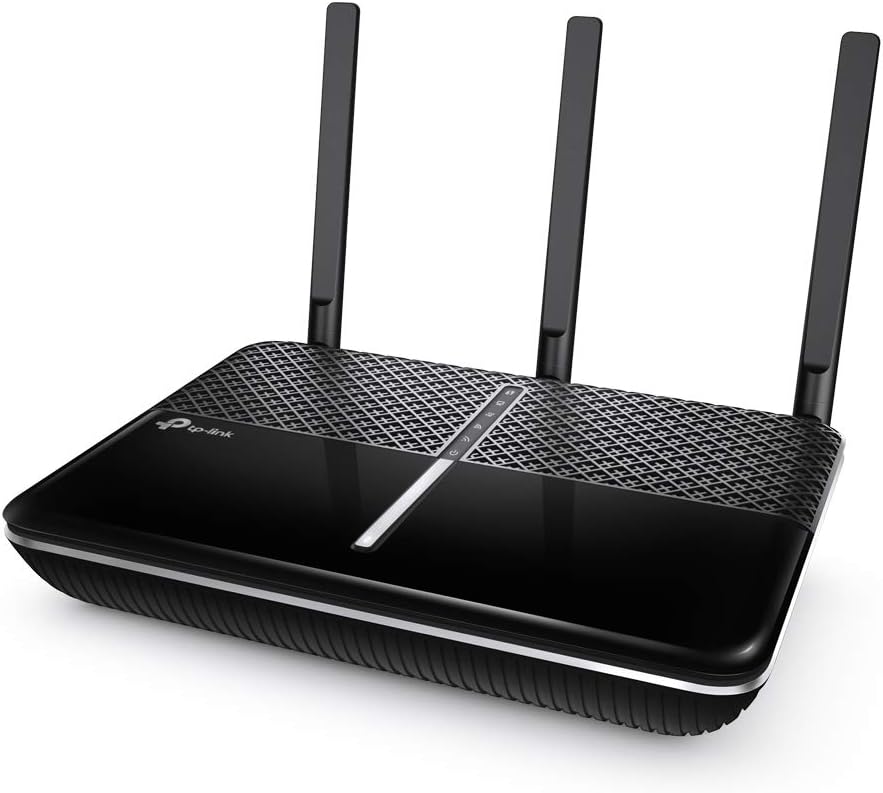
TP-Link Archer A10
4.5Editor score
Dual-band 2533 Mbps wireless
MU-MIMO and Smart Connect
VPN server and Tether app
Explore the best AC2600 WiFi Router options, comparing speed, coverage, features, connections, and suitability for modern homes.
An AC2600 WiFi Router combines dual-band wireless performance with enough capacity for streaming, gaming, video calls, and connected devices in many homes. The most useful model is not simply the one with the highest stated speed; antenna design, processing power, MU-MIMO, wired ports, coverage, and management features all influence the experience.
This guide compares ten routers selected for the AC2600 search, including dedicated dual-band models and newer WiFi 6 or WiFi 7 alternatives. We evaluated the supplied ratings and specifications, focusing on throughput, simultaneous-device support, range, Ethernet connectivity, security, ease of setup, and the features that distinguish each model.
Each review explains who benefits most from the router and where compromises may appear. The list also reveals that a current WiFi 6 or WiFi 7 router can outperform a traditional AC2600 device without carrying the same class designation. As with all networking equipment, prices and availability change, so confirm current offers before buying.
4.5Editor score

4.3Editor score
4.4Editor score
This side-by-side comparison covers traditional AC2600 dual-band routers alongside newer WiFi 6 and WiFi 7 options, making it easier to compare wireless speed, coverage, processing features, and wired connectivity.


The TP-Link Archer A10 is a well-rounded AC2600-class router with a 4.5 rating and one of the strongest feature combinations in this guide. It offers up to 1733 Mbps on the 5 GHz band and 800 Mbps on 2.4 GHz, giving it ample headroom for ordinary home broadband, high-resolution streaming, online gaming, web browsing, and common smart-home activity.
We may earn a commission when you buy through this link, at no additional cost to you.
Its most valuable features are MU-MIMO, Smart Connect, and Airtime Fairness. MU-MIMO allows the router to communicate with multiple devices simultaneously, while Smart Connect can place compatible clients on the most appropriate band. Airtime Fairness is intended to prevent demanding devices from consuming disproportionate wireless opportunities, which helps when several people use the network at once.
The hardware design supports a broad home rather than a single room. Three external antennas and one internal antenna work with beamforming to focus wireless signals toward connected clients. The router also includes Gigabit Ethernet for wired devices, an intuitive phone interface, Tether app management, and both OpenVPN and PPTP server functions for secure remote access to a home network.
The principal limitation is that this is a conventional dual-band WiFi 5 design. It lacks the 6 GHz spectrum and newer efficiency features found in the Archer AXE75, and it does not have the high-end storage connectivity of the Nighthawk R7800. Even so, it balances speed, range, management simplicity, and value better than most direct AC2600 competitors, making it the strongest general recommendation here.
The Archer A10 is particularly well suited to homes where phones, televisions, laptops, consoles, and smart devices share bandwidth. MU-MIMO, dual-band operation, and Airtime Fairness help the network remain responsive when several bandwidth-intensive tasks begin at once.
Tether app setup reduces the configuration burden for less experienced users, while the built-in VPN server adds a practical way to reach a home network remotely. Alexa support is limited to convenient guest-network controls, making voice assistance more useful than purely novelty-oriented.
We may earn a commission when you buy through this link, at no additional cost to you.
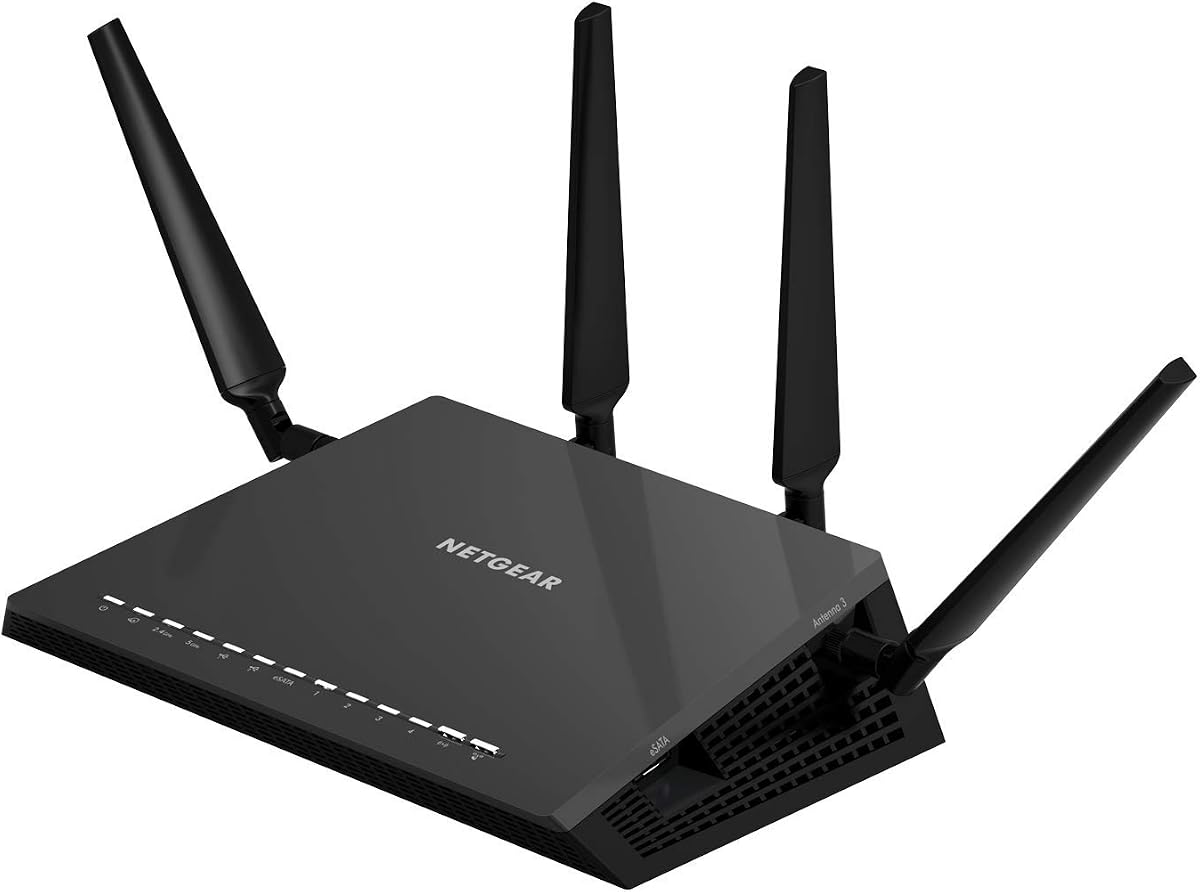
The NETGEAR Nighthawk X4S R7800 is the most fully equipped traditional AC2600 router in the comparison. Its 4.4 rating reflects a mature design that combines dual-band performance of up to 800 Mbps on 2.4 GHz and 1733 Mbps on 5 GHz with a 4×4 radio configuration on both frequencies. That emphasis gives it unusual flexibility for a WiFi 5 device.
We may earn a commission when you buy through this link, at no additional cost to you.
NETGEAR recommends the router for as many as 45 devices and up to 2,500 square feet of coverage. A 1.7 GHz dual-core processor, four amplified antennas, beamforming, MU-MIMO, and Dynamic QoS support simultaneous activity across a relatively demanding home network. These specifications make it suitable for large families, home offices, and households with numerous connected products.
The wired and peripheral connections distinguish it from most competitors. Four Gigabit Ethernet ports accommodate computers, game consoles, and streaming devices, while two USB 3.0 ports and one eSATA port can be used to share a printer or storage drive. The latter also supports the creation of personal cloud storage for access from outside the home.
Its age and older wireless standard are the main considerations. Newer WiFi 6 and WiFi 7 routers can provide better efficiency, more modern security capabilities, and in some cases a faster multi-gigabit uplink. However, the R7800 remains compelling for buyers who value USB sharing, eSATA, a large device capacity, and a broad high-end feature set rather than the latest radio standard.
The X4S's 4×4 transmit-and-receive configuration and support for up to 45 devices make it a good candidate for busy homes. It also offers enough processing power and traffic-management tools to keep streaming, browsing, gaming, and smart-home functions from competing inefficiently.
Two USB 3.0 ports and an eSATA connection are uncommon among routers in this class. They provide a straightforward path to centralizing files, sharing a printer, or creating accessible personal storage without requiring a separate dedicated network-storage system.
We may earn a commission when you buy through this link, at no additional cost to you.
The D-Link DIR-2640 is a 4.1-rated AC2600 dual-band router aimed at households that want solid everyday performance and accessible controls. It supports up to 2600 Mbps combined wireless speed, with MU-MIMO and Smart Connect helping distribute traffic efficiently across multiple devices and both radio bands.
We may earn a commission when you buy through this link, at no additional cost to you.
Its dual-core processor is a meaningful component for a home network handling streaming, gaming, video communication, and smart-home devices. Four Gigabit Ethernet ports provide dependable low-latency connections for game consoles, smart televisions, Android boxes, and other devices that benefit from a wired link.
Parental controls are the model's most distinctive family-focused feature. Users can create profiles for individual people, assign devices to those profiles, and control when and how shared equipment accesses the internet. Setup and management take place through the D-Link WiFi app for Android and iOS, which keeps routine changes reasonably approachable.
The DIR-2640 does not have the same specialized storage connectivity, multi-gigabit uplink, or newest wireless standard as some alternatives. Its 4.1 rating also trails the leading picks. Even so, it is a sensible option when parental profiles, uncomplicated app management, and a conventional AC2600 platform matter more than access to the newest WiFi generation.
Device-specific and person-specific profiles make it possible to organize access around different family members. The controls can also be applied to shared entertainment devices, helping parents manage screen use without separating every television or console from the main network.
The D-Link WiFi app guides setup and puts common changes within reach. This is useful for users who want to adjust parental settings, inspect connected equipment, or make network changes without navigating a deeply technical desktop interface.
We may earn a commission when you buy through this link, at no additional cost to you.
The NETGEAR Nighthawk R7450 pairs an AC2600-class wireless specification with a 4.3 rating and a feature set aimed at households that need predictable performance. It provides up to 800 Mbps on 2.4 GHz and 1733 Mbps on 5 GHz, creating a combined theoretical ceiling of 2533 Mbps.
We may earn a commission when you buy through this link, at no additional cost to you.
MU-MIMO allows simultaneous data delivery to multiple compatible clients, while Advanced QoS is designed to keep gaming and streaming smoother by prioritizing selected network traffic. A dual-core processor supports wireless, wired, and WAN-to-LAN operations, which helps the router remain consistent when multiple services are active.
Coverage is supported by three amplifiers and external antennas, improving the router's ability to provide usable signal throughout a residence. The design is aimed at users who want more deliberate traffic management than a basic entry-level model without paying for the extensive USB and storage features of the R7800.
The R7450 does not include the 6 GHz band or WiFi 6 efficiencies found in newer selections, and its storage sharing is more limited. It remains a compelling traditional choice for gamers, streamers, and busy households that value QoS, MU-MIMO, and a mature dual-band design.
Advanced QoS is the R7450's standout feature for competitive gaming and households that notice delay when large downloads or streaming sessions begin. Assigning importance to selected devices helps keep essential activity responsive when the network is otherwise congested.
MU-MIMO and a dual-core processor work together to improve efficiency across several connected clients. Three amplifiers and external antennas further support the model's goal of maintaining dependable coverage through different parts of a home.
We may earn a commission when you buy through this link, at no additional cost to you.
The ASUS Blue Cave is an AC2600 dual-band router built around security, flexible management, and future expansion. It carries a 3.9 rating, placing it behind several higher-rated options, but its underlying feature set remains relevant for users who prioritize network protection and ASUS's AiMesh ecosystem.
We may earn a commission when you buy through this link, at no additional cost to you.
Its Intel WiFi technology uses 4×4 802.11ac operation to provide performance up to 2600 Mbps across the 2.4 and 5 GHz bands. The router also supports MU-MIMO, although compatible client devices are required to realize the benefit. This makes it important to consider the devices already in the home, particularly older hardware that may only support the more basic WiFi standard.
AiProtection, powered by Trend Micro, blocks external threats and helps protect devices connected to the home network. Advanced parental controls allow administrators to view, manage, and schedule family internet and app use from a mobile device. The ASUS router app handles installation and routine management, while Alexa and Echo integration adds basic voice-control convenience.
The Blue Cave's 3.9 rating is the principal drawback in this comparison. It also lacks the newest wireless bands and high-end wired features. It is best recommended to buyers who place greater importance on built-in security, scheduling controls, and AiMesh compatibility than on having the latest WiFi standard.
AiProtection provides router-level threat blocking and supports the model's promise of commercial-grade network security. That built-in protection can appeal to households seeking stronger controls without depending on a separate security subscription.
AiMesh compatibility gives the router a useful expansion option. Users who later need broader coverage can add compatible ASUS mesh equipment rather than treating the Blue Cave as a fixed point in the home's wireless layout.
We may earn a commission when you buy through this link, at no additional cost to you.
The TP-Link Archer AXE75 is a WiFi 6E tri-band router with a 4.3 rating, and it offers a substantial technological step beyond conventional AC2600 hardware. Its three bands deliver up to 2402 Mbps on 6 GHz, 2402 Mbps on 5 GHz, and 574 Mbps on 2.4 GHz for a combined wireless figure of 5378 Mbps.
We may earn a commission when you buy through this link, at no additional cost to you.
The dedicated 6 GHz band supplies additional bandwidth and can reduce congestion on the traditional bands. WiFi 6E capabilities, OFDMA, and true tri-band operation allow the router to serve numerous devices concurrently, while the 1.0 GHz dual-core processor and 512 MB of memory provide more resources for a demanding modern household.
This is also a flexible platform. EasyMesh compatibility lets users extend coverage with compatible routers, extenders, or wireless powerline adapters. The router supports both OpenVPN, PPTTP, and L2TP server and client functions, while TP-Link HomeShield provides basic network security, IoT device identification, parental controls, quality of service, and weekly or monthly reports.
It is not a literal AC2600 router, but that distinction works in its favor for a buyer searching for a fast, current home network. The 6 GHz band and WiFi 6E efficiencies are unavailable on the traditional models. Its main limitation is that compatible 6 GHz clients are needed to enjoy every advertised advantage, and it requires a modem or gateway for most internet services.
Separating traffic across 2.4, 5, and 6 GHz allows compatible devices to use less crowded spectrum. The result can be a more responsive network when modern phones, laptops, televisions, and other WiFi 6E clients are active at the same time.
EasyMesh support makes the AXE75 less of a sealed appliance. If one router cannot cover every floor or wing of a home, compatible mesh hardware can extend the system while preserving a more unified network experience.
We may earn a commission when you buy through this link, at no additional cost to you.
The NETGEAR Nighthawk RS90 brings dual-band WiFi 7 to homes that need modern efficiency and a faster wired uplink. Its 4.3 rating and stated 3.6 Gbps aggregate wireless speed place it among the strongest performance-oriented options here, even though it is not an AC2600-class router.
We may earn a commission when you buy through this link, at no additional cost to you.
Across the 2.4 and 5 GHz bands, WiFi 7, MU-MIMO, and OFDMA allow multiple devices to send and receive data at the same time. The stated device capacity reaches 50 clients, with coverage marketed for up to 2,000 square feet. As with every router, walls, floors, interference, and device capabilities can reduce the practical result.
A major advantage is the 2.5 Gigabit WAN port, which can take advantage of compatible multi-gigabit internet service. Four 1 Gigabit Ethernet LAN ports serve computers, gaming consoles, smart televisions, and storage devices. The Nighthawk app supports guided setup, WiFi management, speed tests, device pausing, and guest-network configuration.
NETGEAR also enables security features by default, offers automatic firmware updates, and provides a 30-day trial of the optional Armor subscription. It is an excellent choice for buyers with compatible WiFi 7 clients or multi-gig service, though an AC2600 router may be more appropriate when those advanced capabilities are unnecessary.
The 2.5 Gigabit WAN port is the feature most likely to affect users on a high-speed fiber or other multi-gig plan. It removes a potential wired bottleneck between the provider's gateway and the home network.
WiFi 7 can improve efficiency and simultaneous transmission for compatible hardware. The benefit is most meaningful in homes with many recent devices, while older clients will continue to operate over supported previous standards.
We may earn a commission when you buy through this link, at no additional cost to you.
The NETGEAR Nighthawk R6700AX is a dual-band WiFi 6 router with a 4.2 rating, positioned for apartments and small homes that want current wireless efficiency without moving to a premium tri-band system. It supports speeds up to 1.8 Gbps and remains backward compatible with WiFi 5 and earlier clients.
We may earn a commission when you buy through this link, at no additional cost to you.
Its stated coverage is up to 1,500 square feet for up to 20 connected devices, making it more compact in scope than the R7800, RS90, or other high-capacity choices. The Nighthawk app provides guided setup, speed tests, device pausing, WiFi management, and guest-network access through iOS or Android.
Four Gigabit Ethernet LAN ports support computers, consoles, streaming players, and storage drives, while a separate Gigabit WAN port connects to the modem or gateway. WPA3 encryption, a guest network, automatic firmware updates, and enabled-by-default security provide a reassuring baseline without making a subscription mandatory for those core protections.
The main limitation is its Gigabit WAN connection in an age where multi-gig options are expanding. It also has a lower recommended device count than the largest Nighthawk models. For a modest home on a standard broadband plan, however, the R6700AX offers a straightforward upgrade over older WiFi 5 equipment.
WiFi 6 brings updated efficiency and capacity behavior to compatible devices, while WPA3 improves the baseline protection available on the network. Core security features work out of the box, even though the optional Armor trial offers additional subscription-based services.
The R6700AX focuses its coverage and capacity claims on apartments and small residences. It can be a sensible match for a typical family rather than an unnecessary high-end router selected without a corresponding need for extra bands or ports.
We may earn a commission when you buy through this link, at no additional cost to you.
The NETGEAR Nighthawk Pro XR500 is a renewed AC2600 gaming router with a 4.3 rating and a clear focus on latency-sensitive play. It delivers dual-band wireless speeds up to 2.6 Gbps and uses a 1.7 GHz dual-core processor to support the demands of modern consoles, computers, streaming devices, and other connected equipment.
We may earn a commission when you buy through this link, at no additional cost to you.
Advanced Quality of Service can place designated gaming traffic in an express lane, helping it bypass congestion and reduce lag spikes, jumps, and jitter. Geo-filtering offers another competitive advantage by helping clients connect to nearby game servers and players, potentially lowering network travel time and responsiveness.
Four Gigabit Ethernet ports give gamers a dependable way to connect consoles and gaming PCs with less concern about wireless interference. The router's combination of wired access, traffic prioritization, and a high-performance processor makes it more focused than the general-purpose AC2600 options in this guide.
The renewed status is the most important caveat. Buyers should review the seller's condition details, included accessories, warranty information, and return terms carefully. It also uses an older wireless generation, but for a latency-focused setup, its gaming controls and Ethernet connectivity may matter more than access to a 6 GHz band.
Advanced QoS is tailored to the kind of sudden congestion that can affect competitive sessions. Giving selected devices priority can reduce disruption from streaming, downloads, or other household activity occurring at the same time.
Four Gigabit Ethernet ports make it practical to connect multiple consoles, gaming computers, and accessories. Wired gaming removes avoidable wireless contention and provides a stable connection path for sessions where consistency matters most.
We may earn a commission when you buy through this link, at no additional cost to you.
The TP-Link Archer C2600 is a conventional AC2600 dual-band router with a 3.8 rating, making it the lowest-rated selection here. It nevertheless includes the core features that define a useful modern home router: 4-stream MU-MIMO, a dual-core processor, four Gigabit Ethernet ports, beamforming, and parental controls.
We may earn a commission when you buy through this link, at no additional cost to you.
Its wireless configuration can provide up to 800 Mbps on 2.4 GHz and 1733 Mbps on 5 GHz. MU-MIMO improves simultaneous communication with multiple supported clients, while the 1.4 GHz dual-core processor is designed to maintain performance when network traffic increases. Four dual-band antennas with amplifiers and beamforming help extend and focus the wireless signal.
Four Gigabit Ethernet ports are unusually useful at this level because they allow several products to remain connected by wire. That can be valuable for a desktop computer, smart television, game console, or network storage device, particularly when nearby wireless coverage is weaker than expected.
The model lacks a 6 GHz band and several contemporary management, security, and storage features found among the higher picks. It is best suited to straightforward households that want familiar TP-Link functionality, decent wired connectivity, and basic MU-MIMO support without paying for a premium platform.
Four Gigabit Ethernet ports create a practical foundation for a mixed home network. Users can reserve stable wired links for stationary devices while leaving phones, tablets, and other portable equipment on wireless.
The Archer C2600 concentrates on the fundamentals: dual-band speed, simultaneous wireless communication, beamforming, and a dual-core processor. It may lack premium extras, but those core components are well suited to everyday browsing, streaming, and gaming.
We may earn a commission when you buy through this link, at no additional cost to you.
Choosing a router requires balancing wireless generation, coverage, device capacity, wired connections, security, and management. The following factors help explain which specifications matter and where the models in this guide differ most.
AC2600 refers to a dual-band WiFi 5 performance class, generally combining an 800 Mbps 2.4 GHz link with a faster 5 GHz link. These routers remain useful for many homes, but modern alternatives offer important upgrades. The Archer AXE75 adds a 6 GHz band and WiFi 6E, the RS90 adds WiFi 7, and the R6700AX uses dual-band WiFi 6. A buyer should compare the router with the devices that will actually use it, because a modern standard only delivers its full benefit when compatible clients are present.
Choose a traditional AC2600 model for compatibility, familiar dual-band behavior, or a specific feature it offers. Choose WiFi 6E or WiFi 7 when you own compatible clients, want greater capacity in a crowded home, or expect to keep the router for several years.
The advertised speed is only one part of coverage. Antenna number, amplification, beamforming, radio layout, wall construction, and the router's placement can have a greater effect on the signal reaching a particular room. The R7800 is rated for up to 2,500 square feet, the RS90 for 2,000 square feet, and the R6700AX for 1,500 square feet. These are useful guides, not guarantees; floors, heavy materials, appliances, and neighboring networks can reduce effective range.
For a small home, a well-placed dual-band router may be sufficient. For a large or multi-story residence, prioritize models with strong antenna systems or expansion support. The Archer AXE75, ASUS Blue Cave, and several Nighthawk options are better candidates when the goal is to add compatible equipment later rather than depending on a single access point.
Every phone, television, speaker, camera, console, and work computer consumes wireless resources. MU-MIMO and OFDMA help a router serve several clients concurrently, while processors and memory influence how comfortably it handles crowded traffic. The R7800 is recommended for up to 45 devices, the RS90 for up to 50, and the R6700AX for up to 20. The smaller figure is not a failure point; it is a more realistic target for an appropriately sized home.
Count current devices and add room for guests, wearables, and future purchases. A family that simultaneously streams in 4K, plays online games, and works from home benefits from more concurrent capacity and newer efficiency features than a household that mostly browses and watches television.
Gigabit Ethernet is useful for desktop computers, game consoles, smart televisions, and storage devices that benefit from a stable low-latency link. Most traditional AC2600 routers in this list provide four Gigabit LAN ports. The Nighthawk X4S R7800 adds USB 3.0 and eSATA for storage or printer sharing, while the RS90 provides a 2.5 Gigabit WAN port for compatible high-speed internet plans. The new AXE75 and R6700AX should also be checked for their current port arrangements before purchase.
Count the wired devices you expect to connect, and check whether your internet service exceeds Gigabit speed before paying for a multi-gig uplink. Otherwise, four Gigabit LAN ports are usually the more relevant criterion for household flexibility.
Raw throughput cannot prevent every source of lag. Quality of Service allows a router to prioritize selected devices or applications, which can be useful when downloads, cloud backups, video calls, and gaming compete. The R7450 offers Advanced QoS, while the renewed XR500 takes a more specialized approach with gaming traffic prioritization and geo-filtering. MU-MIMO and Smart Connect also help distribute simultaneous connections more efficiently across available radios.
Competitive gamers should consider wired Ethernet, QoS, and server-distance tools alongside wireless speed. Streamers may prioritize stable 5 GHz coverage and range, while video-call users benefit from latency management and room-to-room signal consistency.
A modern home router should provide a secure default configuration, current wireless encryption, guest-network separation, and straightforward firmware updates. The ASUS Blue Cave stands out for AiProtection powered by Trend Micro and detailed parental scheduling. The R6700AX includes WPA3, a guest network, and automatic updates without requiring a subscription for those core protections. The R7800, RS90, and AXE75 also offer built-in security and management features, although optional subscription services can expand protection.
Compare mandatory features with optional services. The R6700AX's no-subscription security baseline is notable, while the Blue Cave and TP-Link HomeShield options appeal to households wanting additional controls. Always change default administrator credentials, use the strongest supported encryption, and keep firmware current.
App-based setup is now a major convenience. The A10, DIR-2640, Blue Cave, AXE75, RS90, and R6700AX all offer smartphone-oriented management, while the Nighthawk products also provide established desktop and mobile ecosystems. Remote VPN support can be valuable for travelers or home-office users who need to reach local devices. The A10 and AXE75 provide server functionality, and the AXE75 also supports client operation for selected VPN protocols.
Choose a router whose interface matches your comfort level. Simplicity matters for basic household setup, while advanced controls are useful for VLAN-aware users, custom network segmentation, or technical enthusiasts. Confirm that the app and desired management features are available in your region.
A router may need to grow with its household. EasyMesh compatibility on the Archer AXE75 allows compatible extenders, routers, and wireless powerline adapters to broaden coverage. The ASUS Blue Cave supports AiMesh, while larger homes can consider an Orbi system according to NETGEAR's guidance. Wired-backhaul mesh can be especially useful where walls, floors, or distance make a single access point unreliable.
Prefer a system that offers a clear expansion path if you expect new access points, more connected devices, or a move to a larger property. Expansion should complement, not excuse, poor initial placement; even advanced mesh equipment needs an appropriate node layout and reliable backhaul connection.
Begin by positioning the router near the center of the home and away from enclosed cabinets, appliances, mirrors, and other objects that can weaken or obstruct wireless signals. If the provider supplied a modem and router combination, connect the new router to the appropriate gateway or modem using Ethernet, and check whether bridge mode or another compatible arrangement is required. Follow the manufacturer's app or web setup process, update the firmware, set a strong administrator password, and choose unique wireless passwords.
After setup, connect one device at a time and test performance in the rooms that matter most. Separate the 2.4 and 5 GHz networks during initial testing if the router permits it, because the lower band offers longer range while the upper band is better suited to high-bandwidth devices near the access point. Use Smart Connect when supported, create a separate guest network for visitors, and enable automatic security updates. If dead zones appear, test placement and Ethernet backhaul before simply adding more equipment.
Treat the router as part of the home's electrical and network environment. Keep ventilation openings clear, avoid stacking it with heat-producing devices, and use surge protection appropriate for the power environment. Review connected devices periodically, remove forgotten clients, change the administrative and wireless passwords if exposed, and install firmware updates promptly. Do not reset the router unnecessarily, because that can erase customized network settings and require the full setup process again.
AC2600 is a performance designation associated with dual-band 802.11ac, or WiFi 5, routers. The specification generally combines a maximum 2.4 GHz rate of 800 Mbps with a maximum 5 GHz rate near 1733 Mbps. It describes theoretical hardware capability rather than guaranteed internet speed, so real results depend on the internet plan, client devices, distance, interference, and the number of active users.
For many households, an AC2600 router has enough throughput for 4K streaming, web browsing, video calls, and online gaming. It can be less comfortable when many high-demand devices operate simultaneously or when clients sit far from the router. MU-MIMO, beamforming, Smart Connect, and traffic prioritization help, but a WiFi 6E or WiFi 7 model may be a better long-term choice for a crowded or device-heavy home.
An AC2600 router is a wireless standard and performance class, while a mesh system is a coverage architecture built from multiple coordinated access points. A capable AC2600 router may cover an apartment or modest home, but a mesh system can be more appropriate for a large or multi-story residence. Some standalone routers, including the Archer AXE75 and ASUS Blue Cave, also support mesh expansion.
Replacing it can be worthwhile if the supplied equipment has weak WiFi coverage, limited Ethernet ports, outdated security, or an interface that is difficult to manage. It may not be necessary if your provider supplies a modern router that adequately covers your home and supports the speeds and device count you need. Check compatibility with the provider's gateway before making a change.
Only when the original bottleneck supports that conclusion. A faster router cannot exceed the speed available from your internet service, and it may make little difference if the limitation comes from the provider, an outdated modem, weak WiFi coverage, or a saturated device. It can help when the old router is the limiting factor or when newer wireless features improve efficiency for compatible clients.
There is no universal number because each device uses a different amount of bandwidth and may be active only intermittently. The R7800 is recommended for up to 45 devices, while smaller or newer models have different stated targets. A modest household may perform well with fewer devices than the maximum, but simultaneous streaming, gaming, and work sessions require a router with adequate processing, MU-MIMO, and prioritization features.
WiFi 6E is a stronger long-term choice when you own compatible 6 GHz clients or expect many modern devices to share the network. The Archer AXE75 provides a dedicated 6 GHz band and tri-band operation, while the R6700AX is a simpler dual-band WiFi 6 alternative. A traditional AC2600 router can still be sensible when its price, features, and compatibility meet your needs more directly.
Start by moving the router to a more central, elevated position and checking the result on the 5 GHz band near the area with poor performance. Reduce unnecessary network load, update the firmware, choose cleaner channels where possible, and connect stationary devices through Ethernet. If dead zones remain, adding a compatible mesh node or extender with a strong wired backhaul is generally more dependable than relying on a distant wireless signal.
The TP-Link Archer A10 is the best overall traditional AC2600 choice, combining a strong 4.5 rating with MU-MIMO, Smart Connect, beamforming, VPN server support, and approachable app management. The TP-Link Archer AXE75 is the best modern upgrade, bringing tri-band WiFi 6E, a dedicated 6 GHz band, OFDMA, and EasyMesh expansion, while the NETGEAR Nighthawk X4S R7800 stands out as the best premium AC2600 platform with USB, eSATA, and broad device capacity.
Prioritize the features your household will actually use. Gamers should examine QoS and Ethernet, larger homes should examine coverage and expansion, and security-conscious families should compare encryption, parental controls, built-in threat protection, and firmware support. If most connected devices are recent, compare the AXE75, RS90, and R6700AX against older WiFi 5 models so you do not overlook a worthwhile generational upgrade.
Finally, verify current prices, availability, warranty terms, and the exact features shown on the seller's listing before purchasing. Networking equipment can vary by listing condition, especially renewed models, and prices change over time. Use this guide to narrow the field by performance and features, then confirm that the selected router works with your modem, provider, home layout, and current devices.