
Arduino Nano ESP32 with Headers
4.6Editor score
Dual-core ESP32-S3 processor
Wi-Fi and Bluetooth 5.0
USB-C programming interface
MicroPython compatibility
This Arduino Nano Board guide compares classic, wireless, and modern models for performance, connectivity, prototyping needs, and ease of use.
The Arduino Nano Board is a compact microcontroller platform suited to breadboard prototyping, embedded controls, robotics, sensors, wearables, and connected devices. A good choice balances processing power, memory, accessible I/O, power options, programming convenience, and the form factor needed for the finished project.
This guide compares ten Nano options based on their documented processors, memory, digital and analog I/O, wireless capabilities, connectors, programming support, and physical construction. It includes classic ATmega328P boards, upgraded ATmega4809 and Renesas models, and an ESP32-based board for connected projects.
Each selection highlights a different reason to consider a Nano, from broad beginner suitability to wireless networking or advanced processing. Ratings and specifications reflect the supplied product information, while availability and prices can change, so confirm the current listing before purchasing.
4.6Editor score
![Arduino Nano [A000005]](https://m.media-amazon.com/images/I/61R1A7CuHTL._AC_SL1200_.jpg)
4.6Editor score
4.6Editor score
The table below compares all ten boards by processor, memory, connectivity, and practical hardware features, making it easier to identify the right platform for learning, prototyping, connected products, or embedded installations.


The LAFVIN Nano V3.0 is a strong all-around Arduino Nano Board option, earning a 4.6 rating in the supplied data. It combines the familiar ATmega328P platform with a CH340G USB interface, while the three-board bundle gives makers room to keep separate projects active at the same time.
We may earn a commission when you buy through this link, at no additional cost to you.
Its primary strength is compatibility with the Arduino Nano form factor and IDE. The documentation states support for Windows, Mac, and Linux, ISP downloading, USB downloading, and USB power. The CH340G interface also provides a practical alternative to the FT232RL interface used by some earlier boards, although users may need to install the appropriate USB driver.
The board uses an Atmel ATmega328P-AU microcontroller and follows a compact, breadboard-friendly layout. It is therefore a natural fit for LED demonstrations, sensor projects, motor-control experiments, and embedded prototypes. The trade-off is that it is a compatible third-party Nano rather than an official Arduino-branded product, so buyers should check the final pin arrangement and included accessories against their project needs.
This is an excellent choice for beginners, educators, and hobbyists who want several ready-to-program boards. It is particularly useful for classrooms, workshops, or parallel experiments where dedicated hardware prevents project switching and accidental board resets. For those needs, the multipack delivers more flexibility than purchasing a single board.
Having three separate boards is useful for learning, comparisons, and simultaneous prototypes. You can keep one connected to a breadboard, install another in a robot, and use the third for isolated testing without repeatedly moving components.
Arduino IDE compatibility, ISP support, and USB download make the board approachable for conventional Nano sketches. The ATmega328P also preserves the programming model many beginners learn first.
We may earn a commission when you buy through this link, at no additional cost to you.
The Arduino Nano [A000005] is the definitive official choice for makers who want an authentic Arduino Nano Board without compatibility questions. It carries a 4.6 rating and uses the widely understood ATmega328P processor, offering 22 digital I/O pins, eight analog inputs, PWM support, and built-in USB connectivity.
We may earn a commission when you buy through this link, at no additional cost to you.
Its biggest advantage is the combination of compact dimensions and a generous pin count. That makes it useful for embedded systems, wearables, portable devices, robotics, automation, and interactive prototypes where space is limited but external components still need reliable connections. The IDE ecosystem also supplies extensive examples and libraries for common sensors, displays, and actuators.
The main limitation is that this is a mature design rather than a wireless or high-performance modern platform. It uses mini-USB, and third-party Nano clones often provide a similar ATmega328P experience with USB-C and lower costs. Nevertheless, official Arduino provenance can matter for educational consistency, accessory confidence, and projects that value the official platform identity.
Choose the A000005 when authenticity, straightforward documentation, and a well-known hardware platform are priorities. It is especially suitable for students, educators, and experienced developers moving between classic Arduino environments. For wireless IoT or substantially greater processing power, consider the Nano ESP32 instead.
Eight analog inputs are valuable when a project reads several variable signals, such as potentiometers, light sensors, or analog temperature modules. This makes the board less dependent on external multiplexing for modest sensor arrays.
The official Arduino identity provides a consistent platform for education and long-running projects. IDE compatibility and access to established libraries make examples easier to adapt without learning a different programming model.
We may earn a commission when you buy through this link, at no additional cost to you.
The ELEGOO Presoldered Nano Board is built for projects that should begin without a soldering session. It has a 4.6 rating, ships as a three-board set, includes a USB-A to USB-C data cable, and arrives with headers already attached for immediate placement on a standard solderless breadboard.
We may earn a commission when you buy through this link, at no additional cost to you.
The board follows a familiar 5V, 16MHz AVR architecture and includes 32KB flash, 2KB SRAM, 1KB EEPROM, 14 digital I/O pins, six PWM outputs, and eight analog inputs. UART, I2C, and SPI support make it suitable for serial modules, displays, storage, sensors, LEDs, buttons, and motor-driver projects.
A USB-C socket does not automatically mean every USB-C cable will work. The supplied guidance specifically recommends the included USB-A to USB-C data cable and notes that USB-C-to-C host cables are not supported. Users may also need the CH340 serial driver. These are manageable setup details, but they deserve attention before beginning a workshop or classroom exercise.
This bundle is a compelling pick for educators, students, and rapid prototyping. The presoldered headers remove one of the most common early obstacles, while three boards let a group work in parallel. It is less suitable for projects that require Wi-Fi, Bluetooth, or significantly more memory.
The 18 by 45mm footprint and attached headers allow immediate breadboard use. This is especially helpful for learners who have not soldered before or for workshops where every saved minute matters.
The three-board set works well for shared classrooms, group exercises, and parallel debugging. Each team member can keep a working setup while testing changes on another board.
We may earn a commission when you buy through this link, at no additional cost to you.
The Arduino Nano Every modernizes the classic Nano formula with an ATmega4809 microcontroller, 48KB flash memory, 6KB SRAM, 20 digital I/O pins, eight analog inputs, and a USB-C connection. Its 4.6 rating reflects a balanced option for projects that need more capacity without adding wireless complexity.
We may earn a commission when you buy through this link, at no additional cost to you.
The increased memory is the most important distinction. Compared with the traditional Nano, the Every offers more room for programs and data handling, while retaining the recognizable small footprint. Its documentation also states compatibility with existing Nano shields, which can reduce the transition effort for familiar hardware arrangements.
Buyers should not treat it as a drop-in hardware replacement in every situation. The ATmega4809 differs from the ATmega328P, so sketches and libraries that depend on processor-specific behavior or registers may require review. It also offers no built-in Wi-Fi or Bluetooth, making it a middle ground rather than a connected platform.
Choose the Nano Every for a more modern official Nano with USB-C, expanded memory, and an established Arduino workflow. It is well suited to wearable, robotics, and embedded prototypes where the classic processor would feel constrained but wireless hardware is unnecessary.
The 48KB flash and 6KB SRAM provide more headroom than the original Nano architecture. That extra capacity can help when a project combines several libraries, retains more state, or processes larger collections of data.
The USB-C interface reflects current connection standards and removes the need for a mini-USB cable. Check cable and host compatibility before transferring an existing project.
We may earn a commission when you buy through this link, at no additional cost to you.
The Arduino Nano ESP32 is the standout for connected projects, combining an ESP32-S3 processor with Wi-Fi, Bluetooth 5.0, USB-C, and a compact Nano-style format. It earns a 4.6 rating and offers a 4.5 by 2.0 inches footprint with headers included, bringing substantial capability to space-conscious builds.
We may earn a commission when you buy through this link, at no additional cost to you.
Its dual-core Xtensa 32-bit LX7 processor can operate at up to 240MHz, considerably more processing power than a classic ATmega328P. That capacity suits real-time data handling, advanced embedded applications, voice recognition, edge machine learning, custom HID devices, and IoT nodes that communicate over Wi-Fi or Bluetooth.
This is not simply a drop-in substitute for every older Nano sketch. Hardware behavior, library support, power considerations, and development tools should be checked against the project. Its MicroPython compatibility is nevertheless a major advantage for developers who prefer a Python workflow for rapid experimentation.
Choose the Nano ESP32 when wireless communication is central to the build. It is ideal for connected sensors, smart-home prototypes, remote monitoring, and custom input devices. For a simple local LED or sensor demonstration, a classic Nano may remain simpler and more economical.
Integrated Wi-Fi and Bluetooth 5.0 simplify connected prototypes that would otherwise need separate radio modules. The result is a smaller, cleaner design with fewer interconnections to assemble.
Human Interface Device support allows the board to function as a keyboard, mouse, or similar peripheral. This opens practical possibilities for accessible controls, macro devices, and specialized computer interfaces.
We may earn a commission when you buy through this link, at no additional cost to you.
The Two-Pack Nano V3.0 offers a practical way to keep two independent ATmega328P projects active, earning a 4.5 rating in the supplied information. It combines an ATmega328P with a CH340G interface and provides two boards, two USB cables, and a familiar 5V Nano layout.
We may earn a commission when you buy through this link, at no additional cost to you.
Connectivity and programming are straightforward. The board supports Arduino IDE, ISP programming, USB download, PWM, and SPI, while documented operating system support includes Windows, Mac, and Linux. Fourteen digital I/O pins, six PWM outputs, six analog inputs, a reset button, and an ICSP port cover many common prototype needs.
Its flexible power design accepts USB-C, a 6 to 12V unregulated external supply, or a regulated 5V input, then automatically selects the source with the higher potential. That removes the need for a power-selection jumper, although the product still needs suitable current limits for motors, relays, and other demanding loads.
The two-board configuration is useful for testing changes without disrupting a working circuit, comparing sensor readings, or teaching paired assignments. It may be less suitable for projects requiring eight analog inputs or integrated wireless communication.
Keeping a baseline and experimental board running side by side makes troubleshooting more efficient. It also lets one project stay connected while another is programmed.
The board can switch between USB and external supplies without a manual jumper. This is convenient when a prototype moves between a laptop and a larger circuit.
We may earn a commission when you buy through this link, at no additional cost to you.
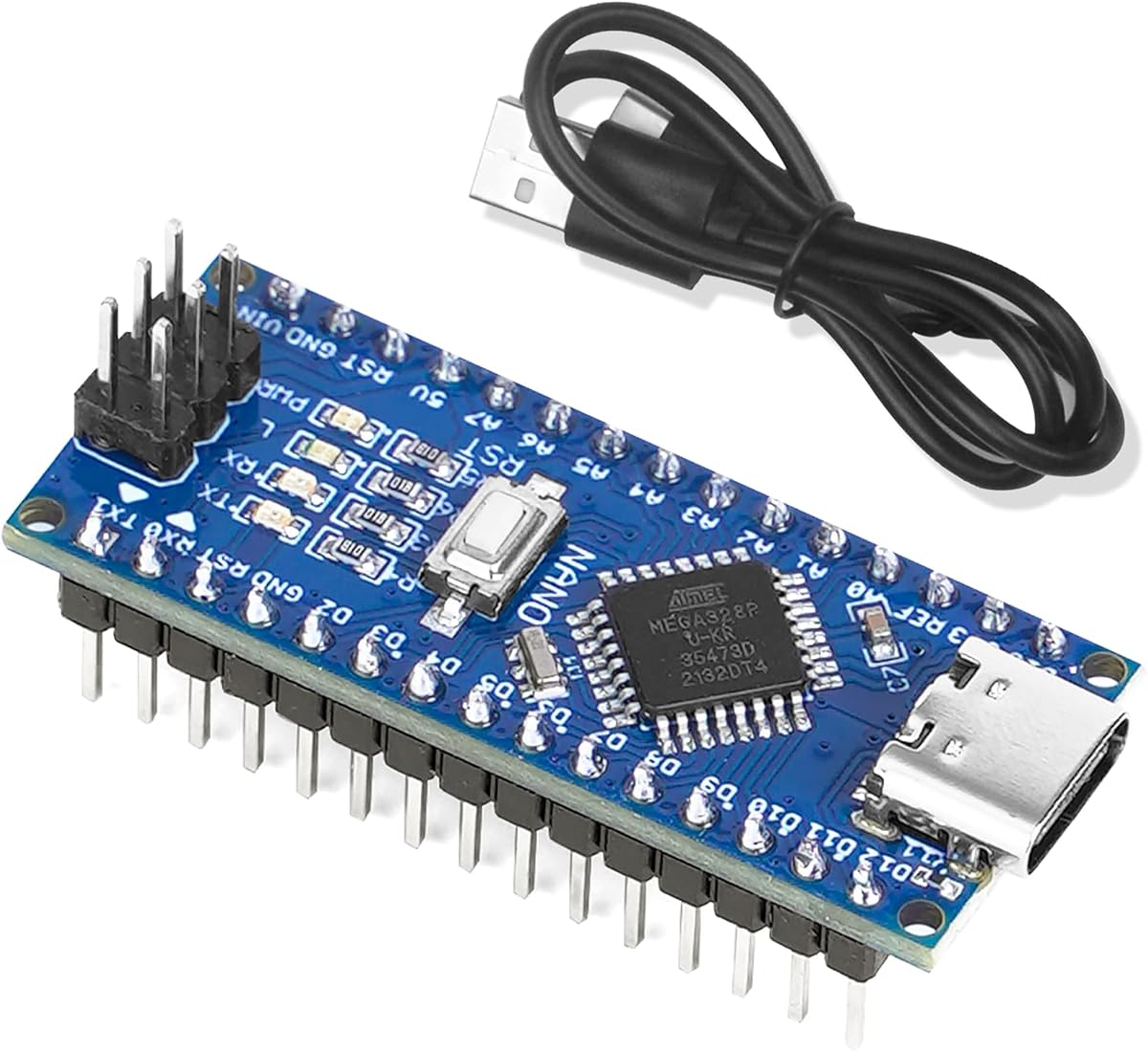
The Three-Pack Nano V3.0 is a capable classroom or workshop bundle, with a 4.5 rating and three ATmega328P-based boards. The set includes a cable and uses a CH340G USB interface, offering a conventional Nano workflow at a compact size.
We may earn a commission when you buy through this link, at no additional cost to you.
The listed hardware provides 14 digital I/O pins, six PWM outputs, six analog inputs, a 16MHz quartz oscillator, an ICSP port, a reset button, and a USB-C socket. It accepts USB-C, 6 to 12V unregulated external power, or regulated 5V input, with automatic switching to the source having the greater potential.
As a third-party board, it may require a CH340 driver, and projects designed around the official Arduino A000005 should verify pin labeling and connector details. Its operating system support includes Windows, Mac, and Linux, which helps schools avoid maintaining separate boards for different computers.
This bundle is a strong fit for training multiple learners, running simultaneous experiments, or keeping a spare board nearby. The main benefit is logistical rather than technical: three matching boards make it easier to standardize a classroom and support parallel troubleshooting.
Using identical hardware across a group means examples, pin assignments, and troubleshooting steps remain consistent. That reduces confusion when several beginners are working simultaneously.
The USB-C connection aligns with current cables and avoids the need to stock mini-USB leads. As with other CH340 boards, the host driver and supported cable should be confirmed before use.
We may earn a commission when you buy through this link, at no additional cost to you.
The Arduino Nano R4 with Headers is one of the most capable modern boards in this guide. It carries a 4.5 rating and uses a Renesas RA4M1 microcontroller with 256KB flash, 32KB RAM, and a 48MHz clock, all within a remarkably small 4.3 by 1.7cm footprint.
We may earn a commission when you buy through this link, at no additional cost to you.
Pre-soldered headers make the board immediately usable on a breadboard, while its single-sided layout and castellated edges also suit more permanent embedded designs. The Qwiic connector and separate 5V I2C port provide convenient paths to compatible sensors and peripherals without crowding every available header pin.
A programmable RGB LED offers a useful built-in diagnostic and user-feedback tool. As with the Nano Every, however, the R4 represents a platform evolution rather than a transparent ATmega328P replacement. Existing sketches and libraries should be checked for compatibility, especially in projects that rely on exact pin behavior or older register definitions.
Choose the R4 with Headers for advanced education, connected sensor networks, and compact embedded prototypes that need substantially more performance and memory than the classic Nano. It is especially attractive when Qwiic accessories and fast prototyping are priorities.
The 48MHz Renesas processor, 256KB flash, and 32KB RAM provide useful headroom for larger sketches and data structures. This is a meaningful upgrade for control systems that outgrow a basic ATmega328P.
The dedicated expansion connector makes modular sensor and accessory testing straightforward. Combined with pre-soldered headers, it reduces assembly work during rapid iterations.
We may earn a commission when you buy through this link, at no additional cost to you.
The Arduino Nano R4 without mounted headers is designed for makers who need control over the final board configuration. It includes loose male header pins, allowing them to be soldered for breadboard work or omitted when mounting the board directly onto a custom PCB through its castellated edges.
We may earn a commission when you buy through this link, at no additional cost to you.
Underneath the assembly choice, the board shares the Nano R4's Renesas RA4M1 processor, 256KB flash, 32KB RAM, and 48MHz operating speed. It also includes a Qwiic connector, a 5V I2C connection, and a programmable onboard RGB LED. Those features make it suitable for compact products, custom electronics, and sensor prototypes.
The principal compromise is assembly. Without pre-soldered headers, the board is not immediately ready for a solderless breadboard, and beginners without soldering experience may prefer the ready-to-use version. Its 4.2 rating is also the lowest listed here, so buyers should consider the available feedback carefully rather than assuming every use case is equally represented.
Choose this version for an enclosure, a custom carrier board, or a controlled production-like assembly. It is less convenient for immediate experimentation, but the option to leave the headers uninstalled can produce a cleaner embedded result.
The included loose pins support a conventional breadboard arrangement, while the unsoldered state is useful when the board will sit directly on a PCB. This flexibility aligns with different assembly methods.
Exposed edge contacts allow the board to be mounted by a custom board. That can produce a more compact final assembly than using a separate development board and adapter.
We may earn a commission when you buy through this link, at no additional cost to you.
The OSOYOO Nano Module is an accessible single-board option for first projects, earning a 4.6 rating in the supplied data. It uses an ATmega328P-AU microcontroller, operates at 5V and 16MHz, and follows the Arduino Nano V3.0 programming model.
We may earn a commission when you buy through this link, at no additional cost to you.
Its generous accessory bundle includes both USB-C-to-A and USB-C-to-C cables. The board can also receive 6 to 12V unregulated external power or a regulated 5V input, automatically selecting the source with the greater potential. This makes it convenient to move between USB-powered prototypes and larger circuits.
The standard I/O complement is 14 digital I/O pins, six PWM outputs, six analog inputs, an ICSP port, and a reset button. Compatibility is documented for Windows, Mac, and Linux. The principal setup consideration is the CH340 interface, which may require a driver installation depending on the computer and operating system.
Choose the OSOYOO module when you want a straightforward, inexpensive first board and do not need multiple units. It is well suited to LEDs, basic sensors, automation demonstrations, and beginner training. More involved projects may justify the official A000005 or a modern board with additional memory and connectivity.
Supplying both USB-C-to-A and USB-C-to-C cables covers more host arrangements and avoids a separate cable purchase for common setups. Compatibility should still be confirmed for the specific computer and board.
The ATmega328P-AU and familiar 5V architecture support a large body of conventional Nano examples. Learners can focus on circuits and programming without changing processor families.
We may earn a commission when you buy through this link, at no additional cost to you.
The right Arduino Nano Board depends on the processing demands, communication needs, physical installation, and programming experience of your project. Compare the processor, memory, I/O, connectors, and accessories rather than treating every compact board as interchangeable.
The classic ATmega328P remains effective for LEDs, basic sensors, button inputs, and straightforward control logic, but it has limited memory compared with modern alternatives. The ATmega4809 in the Nano Every offers 48KB flash and 6KB SRAM, while the Renesas RA4M1 boards provide 256KB flash, 32KB RAM, and a 48MHz clock. The ESP32-S3 adds a dual-core processor capable of running up to 240MHz. Choose based on the libraries, data structures, timing requirements, and processing tasks your sketch will actually need.
In short, use the ATmega328P for conventional learning and uncomplicated prototypes, and consider a newer processor for larger sketches or more demanding embedded behavior.
Flash memory stores compiled firmware, while SRAM supports working data during execution. The classic boards documented here use 32KB flash, 2KB SRAM, and 1KB EEPROM, which is adequate for many examples but can become restrictive when many libraries are combined. The Nano Every triples the listed flash and SRAM, while both Nano R4 versions offer substantially more capacity. Review the memory used by the libraries in your planned project and leave reasonable room for future revisions.
Choose the ATmega328P for lean sketches, but favor more memory when using complex libraries, display interfaces, data logging, or several simultaneous subsystems.
Most classic Nano boards in this guide communicate over USB and standard serial, SPI, and I2C interfaces. They do not include Wi-Fi or Bluetooth. The Nano ESP32 is the exception, combining Wi-Fi and Bluetooth 5.0 with a powerful ESP32-S3 processor. If the finished device must connect directly to a network or communicate wirelessly with phones and computers, this distinction is more important than small differences in the pin count.
Choose a classic Nano for local wired control, or the Nano ESP32 when wireless communication is a core requirement rather than an optional add-on.
Digital I/O pins control LEDs, buttons, relays, and digital sensors, while PWM-capable pins support dimming, motor speed control, and audio-style signals. Analog inputs read variable sensor outputs. Most ATmega328P boards in the guide provide 14 digital I/O pins, six PWM outputs, and either six or eight analog inputs. The official A000005 and Nano Every each list eight analog inputs, which can simplify projects using several variable signals.
Count the outputs, analog readings, and PWM channels your circuit requires before buying. Add a small margin for expansion, and use a module driver for motors, relays, and high-current loads rather than powering them directly from a pin.
The official Arduino Nano [A000005] uses mini-USB, the Nano Every and Nano R4 use USB-C, and most compatible ATmega328P boards in the list use USB-C with a CH340 interface. A modern connector does not guarantee universal cable support, and CH340 boards can require a driver before the computer recognizes a serial port. Review the product guidance, select the board and correct COM port in the IDE, and confirm that your data cable can carry programming signals.
Choose the connector that matches your available equipment, and test driver installation early if you are considering a CH340-based board.
Pre-soldered headers are ideal for solderless breadboards and quick classroom setup. The ELEGOO bundle arrives ready to plug into a breadboard, and the Nano R4 with Headers is designed for immediate prototyping. Boards without mounted headers are useful for custom PCB integration, and the OSOYOO, LAFVIN, two-pack, and three-pack compatible designs are described as breadboard friendly. Decide whether the board will remain a development platform or become part of a permanent, compact assembly.
Choose pre-soldered headers for fast prototyping, and choose loose or unmounted headers when you want control over soldering and final integration.
The listed classic boards can generally be powered through USB, a 6 to 12V unregulated external source, or a regulated 5V input, with the board automatically selecting the source of higher potential. The ELEGOO listing specifies USB-C, 7 to 12V VIN, or regulated 5V. Powering sensors and actuators may require more careful budgeting than the Nano itself. Use common ground connections and appropriate driver modules for motors, relays, lamps, and other loads.
Choose a supply that matches the board's documented input range, then calculate the current needed by every attached component before connecting it.
Official Arduino boards provide a consistent platform, direct IDE integration, and a clear ecosystem of documented libraries and accessories. Compatible third-party boards can provide USB-C, multipacks, presoldered headers, or lower entry cost while retaining the familiar ATmega328P workflow. Verify pin labels, connector type, operating system support, and library compatibility. Existing classroom material and published tutorials may assume a specific processor or board configuration.
Choose the official A000005 for maximum platform consistency, or a compatible board when its particular hardware bundle better matches your project and budget.
Before the first upload, identify the exact board model and processor, install any required USB driver, and select the correct serial or COM port in the Arduino IDE. Use the programming cable recommended for the product, especially when a board uses CH340 or USB-C. Begin with a simple Blink sketch to confirm power, communication, and pin behavior before attaching more complex modules.
Build the circuit on a breadboard while the board is disconnected from external power whenever practical. Connect sensors and modules according to their voltage and signal requirements, join grounds as appropriate, and use driver modules for motors, relays, solenoids, and other high-current devices. Check polarity carefully and avoid forcing a signal or power pin into an incorrect connector.
Treat the board as an exposed electronic component. Keep it away from conductive objects, moisture, excessive heat, and static discharge. Do not exceed documented input or supply limits, and power the project through a suitable source rather than an unverified external adapter. For permanent installations, secure the board, protect accessible connections, and perform a final review of voltage, grounding, and component ratings.
No. They share a compact form factor and Arduino IDE support, but they can use very different processors and features. The classic Nano uses an ATmega328P, the Nano Every uses an ATmega4809, the Nano R4 uses a Renesas RA4M1, and the Nano ESP32 uses an ESP32-S3 with wireless connectivity. Check processor-specific sketch and library compatibility before substituting one model for another.
A classic Nano is based on the ATmega328P and focuses on general-purpose, low-power prototyping through wired connections. The Nano ESP32 provides a much faster dual-core processor along with built-in Wi-Fi and Bluetooth 5.0. It is the better choice for directly connected IoT equipment, while a classic Nano remains simpler for local controls and basic learning projects.
The computer may not have the correct CH340 serial driver installed, or the IDE may not be using the right port. Install the driver required for your operating system, reconnect the board, and select its available COM or serial port from the IDE menu. Also confirm that your cable is a data-capable USB cable rather than a power-only lead.
It depends on the package. The ELEGOO bundle and Arduino Nano R4 with Headers arrive with headers installed, making them convenient for solderless breadboards. Other boards may include loose pins, require soldering, or be intended for direct custom-PCB mounting. Check the package description and the form of the connector before beginning assembly.
No, high-current motors, relays, solenoids, and bright lighting loads should use suitable driver modules. Nano pins are intended for control signals and modest loads, so powering a motor directly can damage the microcontroller. Provide the load with an appropriate supply, connect the grounds, and use a driver circuit or module designed for that current and voltage.
Yes, provided it offers the required processor, IDE compatibility, documentation, and driver support. Third-party boards can be useful because some include USB-C, presoldered headers, multiple boards, or cables. For a first project, look for clear pin labeling and a simple setup guide, and avoid changing processor families midway through a tutorial series.
Compatibility depends on the board, especially its voltage, pin layout, processor, and available I/O. The Nano Every is explicitly described as compatible with existing Nano shields, but other compatible boards may require careful pin and voltage checks. Verify the shield documentation against the board specifications before applying power.
The choice depends on required processing and integration. The Nano R4 offers strong performance, 256KB flash, 32KB RAM, a Qwiic connector, castellated edges, and a very small footprint. The version with headers suits immediate breadboard work, while the version without mounted headers gives more control over a custom PCB assembly. The Nano ESP32 is preferable when wireless connectivity is essential.
The Arduino Nano [A000005] is the strongest general recommendation for an official, recognizable platform with 22 digital I/O pins and eight analog inputs. The Arduino Nano ESP32 takes the lead for Wi-Fi, Bluetooth, MicroPython, and more demanding connected work, while the OSOYOO Nano Module provides an accessible ATmega328P starting point with useful cables included.
Prioritize the processor and memory that your libraries require, then select the connectivity, header arrangement, and power options that match the physical project. Classic ATmega328P boards are sufficient for many learning and control tasks, whereas the Nano Every, Nano R4, and Nano ESP32 are better when memory, processing power, modern connectors, or wireless communication matter.
Product availability and prices can change over time, so check the current listing, included accessories, driver requirements, and exact board variant before ordering. Confirming those details can prevent a simple compatibility issue from delaying the project.