
CLABEL 221D
4.1Editor score
Unrestricted universal thermal labels
Bluetooth mobile and USB computer printing
203 DPI barcode and QR output
Bluetooth label printers for barcodes give small businesses, online sellers, retailers, and home organizers a flexible way to print product identification labels without staying beside a desktop computer. The strongest choices combine dependable thermal output, broad platform support, useful editing apps, and a label format that matches your actual workflow.
The products in this guide were compared using the information supplied for each model, focusing on supported label widths, Bluetooth and wired connections, operating systems, barcode and QR-code features, app capabilities, print resolution, speed, portability, and intended business use. The list covers both compact product-label printers and larger 4×6 shipping-label models.
Each review explains where a printer stands out, where its limitations may matter, and which type of user is most likely to benefit. Featured qualities include unrestricted label media, 203 DPI output, batch printing, OCR tools, and support for major commerce platforms. Product availability and pricing can change, so confirm current details before ordering.
4.1Editor score

4.3Editor score

4.4Editor score
As an Amazon Associate we earn from qualifying purchases.
The comparison below highlights the major differences among compact product-label printers, portable label makers, and 4×6 shipping-label models. Pay particular attention to media width, connection methods, app requirements, and whether your workflow needs a direct Bluetooth connection or an app-based print path.






The CLABEL 221D is a compact 2-inch Bluetooth label printer aimed at small businesses that need flexible product tagging. Its 4.1 rating reflects a practical balance of useful features and a few workflow limitations. It stands out immediately by allowing standard universal thermal paper rather than requiring proprietary media with RFID chips or an ID lock.
We may earn a commission when you buy through this link, at no additional cost to you.
Its 25–50 mm label-width range accommodates common retail price tags, clothing labels, jewelry stickers, file-folder labels, bakery-date labels, and gift labels. Direct thermal technology produces 203 DPI text, barcodes, and QR codes without ink or toner. The Clabel trade app adds ready-made layouts, custom design saving, and batch-printing support, which can reduce repetitive data entry during larger jobs.
The main compromise is that this is an item-label printer rather than a shipping-label printer. It is explicitly not designed for 4×6 labels, receipts, tablets, or POS systems. Computer work is handled through USB with Windows, while Bluetooth is intended for iOS and Android phones. That makes it flexible for counter and back-office tasks, but less suitable for a warehouse that needs parcel-sized labels.
This is a strong choice for retailers, bakeries, craft sellers, and office teams that want a dependable 2-inch printer without being restricted to one paper brand. The combination of unrestricted consumables, barcode support, and a free app makes it particularly valuable for small operations trying to standardize labeling without overcomplicating the setup.
The absence of RFID or ID restrictions is the model's defining advantage. Users can select compatible standard thermal rolls from multiple suppliers, making replenishment easier and giving the printer broader long-term utility.
Bluetooth serves phone-based counter work, while USB provides a more stable path for Windows bulk labeling. This division lets the same printer support mobile tasks and back-office batch jobs.
We may earn a commission when you buy through this link, at no additional cost to you.
The SUPVAN T50M Pro is a creative label maker with a 4.4 rating and a strong emphasis on approachable design. It supports label widths from roughly 3/4 inch to 2 inches, making it suitable for storage bins, bottles, jars, food containers, school materials, product information, QR codes, barcodes, and logos. The included tapes also make it more immediately useful for a range of labeling tasks.
We may earn a commission when you buy through this link, at no additional cost to you.
Its companion app is one of the more notable features. Users can add images from a phone, tablet, or computer, then customize labels with more than 30 fonts, over 50 frames, and more than 660 icons. These elements are stated to be free to use, while automatic label-size recognition helps prevent unnecessary setup errors. Image processing is also designed to produce clear, high-resolution monochrome output.
There is no ink or toner to replace, but direct thermal output is black-and-white only. It is a label maker for organized identification rather than a high-volume 4×6 parcel printer. Users who need colorful artwork, continuous industrial rolls, or large shipping formats may need to look beyond this category, although it remains versatile for homes, classrooms, offices, and small product businesses.
The T50M Pro is a good match for someone who values attractive, customized labels as much as basic barcode accuracy. It is especially useful for home organizers, teachers, crafters, and small retailers who want a simple app, attractive assets, and several compatible label styles in one package.
Fonts, frames, icons, and image editing give the T50M Pro more creative flexibility than a basic text-only printer. Automatic size recognition further reduces the chance of misaligned label layouts.
Compatibility with square, round, address, cable, jewelry, and file labels allows one compact machine to serve several labeling systems instead of forcing a single consumable format.
We may earn a commission when you buy through this link, at no additional cost to you.
The Phomemo M110 is a portable Bluetooth thermal label printer with a 4.3 rating and a rare built-in display. That screen makes it easier to preview or edit label content directly on the device, reducing the need to complete every adjustment on a phone. Its 20–50 mm width range suits clothing, price, cable, jewelry, school, address, and folder labels.
We may earn a commission when you buy through this link, at no additional cost to you.
The Print Master app expands the device with multiple templates, custom templates, and Excel batch printing. Its OCR feature can recognize text from an image in about four seconds and convert that text into editable content. This is particularly useful when a product code, packing list, or inventory note exists only in a photograph and needs to become a structured label.
Bluetooth 4.0 offers a stated range of up to 33 feet, and the one-click connection process is designed to reduce setup delays. The package includes a test thermal roll, USB-C cable, and manual. The product does not support color printing or shipping labels. Certain app templates, icons, and fonts marked with a diamond are reserved for paid members, although unmarked options remain free.
The M110 is a particularly thoughtful choice for field technicians, school organizers, home users, and small retailers who want more control than a basic phone-only label maker. Its display, OCR, and batch-printing functions create a more complete workflow without moving into the much larger 4×6 shipping-printer category.
The integrated display gives immediate visual feedback during setup. It is especially helpful for checking spacing, content length, and label fit before sending a larger batch to print.
Recognizing text from photographed documents and turning it into editable content can save considerable time when stock information must be reproduced accurately across multiple labels.
We may earn a commission when you buy through this link, at no additional cost to you.
The KNAON 4×6 is the most functionally comprehensive model in this roundup, combining wireless and wired printing with a large app library. Its 4.4 rating reflects strong versatility for small online sellers. It supports 4×6 shipping labels as well as smaller barcode, price, thank-you, name, and product labels, giving it a wider role than a dedicated compact label maker.
We may earn a commission when you buy through this link, at no additional cost to you.
FlashLabel Pro provides more than 3,000 templates, more than 5,000 icons, and over 100 fonts. The app works with iPhone, Android, Windows, and macOS, while the included USB drive carries drivers and tutorial videos. The printer measures 7.17 by 3.9 by 3.43 inches and reaches speeds of up to 180 mm/s, with paper widths from 1.5 to 4.2 inches supported.
Compatibility extends to Amazon, eBay, Shopify, USPS, UPS, Etsy, PayPal, Poshmark, DHL, and other services. The important workflow detail is that users generally download a logistics label as a PDF and then import it into FlashLabel Pro. Devices cannot all connect directly to Bluetooth, so the app remains an essential part of setup even on compatible hardware.
This printer is best suited to online retailers, home-office shippers, and small fulfillment operations that want a single compact device for parcels and secondary labels. Its wide platform coverage and template library reduce the need for separate tools, while the fast output rate is more appropriate for active order flow than a small product-tag printer.
The common app approach gives iOS, Android, Windows, and macOS users a similar design and print process. This consistency is useful for teams operating more than one type of device.
A 180 mm/s maximum speed and broad paper-width range make the model better aligned with parcel workflows. It can handle both standard 4×6 material and smaller operational labels.
We may earn a commission when you buy through this link, at no additional cost to you.
The Ponek M100 is a lightweight 2-inch Bluetooth label printer designed for home, office, school, and small-business use. Its 4.2 rating reflects a capable portable package with a broad design library. The 0.78–2 inch width range supports address labels, barcodes, logos, QR codes, folders, documentation, name labels, jars, bins, and containers.
We may earn a commission when you buy through this link, at no additional cost to you.
Print Master provides more than 6,000 icons, over 3,000 templates, and around 300 fonts, along with borders, text, time, tables, barcode labels, and QR codes. Diamond-marked templates are premium-member features, while other templates are free. Mobile users connect through Bluetooth after downloading the app; PC users install the Labelife application and drivers through the supplied USB connection.
Direct thermal printing operates at 203 DPI and a stated 20 mm/s. A single charge is claimed to support as many as 4,200 labels, and the NTC temperature sensor is intended to support battery management and safer charging. Smart first-label rewinding is another thoughtful feature that can reduce media waste during initial setup.
The M100 is a compelling option for mobile users who need more than simple text labels but do not need a 4×6 printer. Its print speed is modest, so it may be less suitable for large fulfillment batches. For classroom sorting, home inventory, and small retail tagging, though, the broad template selection and portable construction make it highly useful.
Thousands of templates and icons make the M100 more than a basic text printer. Barcodes, QR codes, tables, and time-based fields support practical organization as well as visual identification.
A claimed capacity of up to 4,200 labels per charge and a 0.6-pound body support mobile use. The temperature sensor adds an additional layer of charging and battery management.
We may earn a commission when you buy through this link, at no additional cost to you.
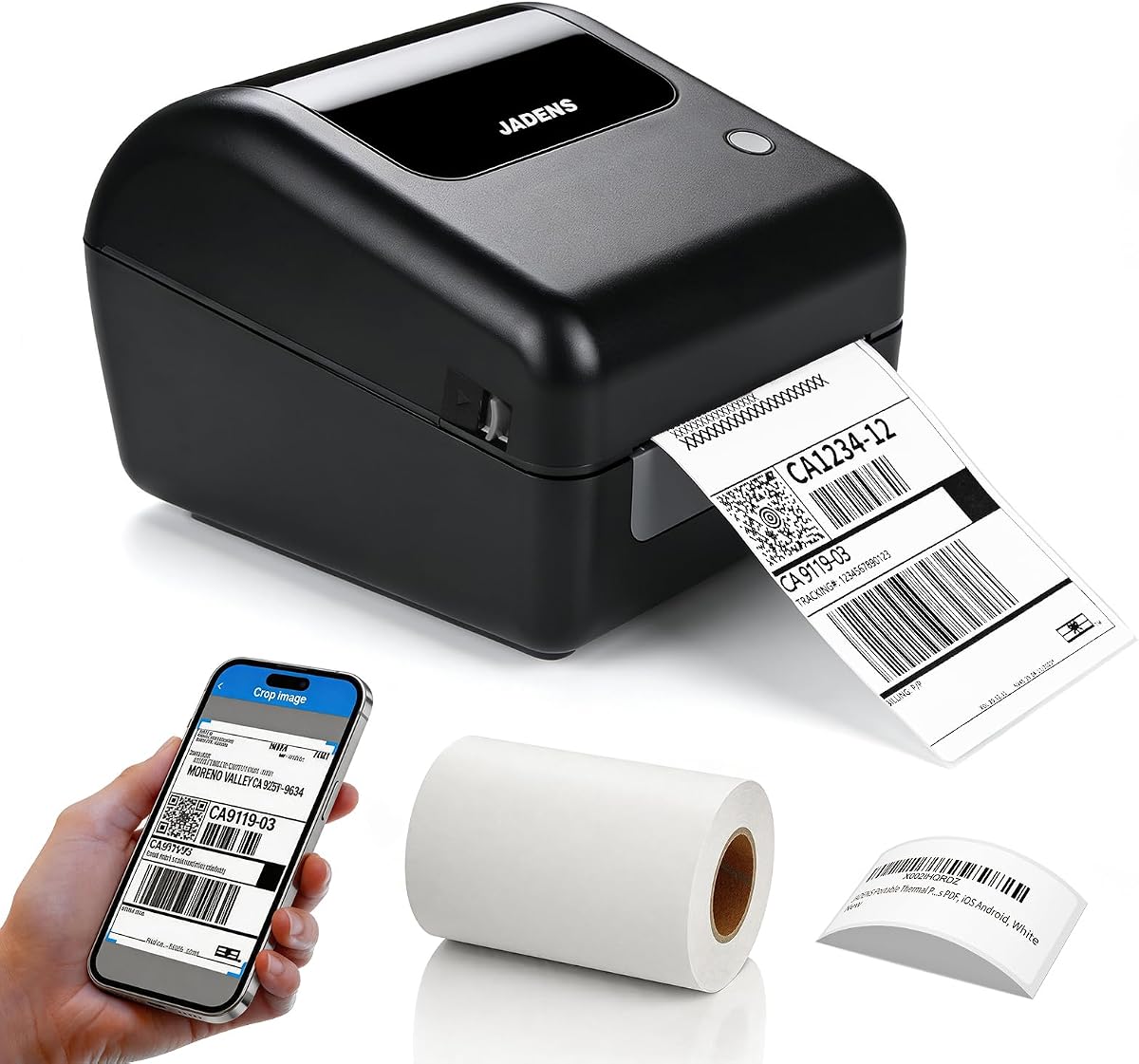
The JADENS 4×6 is a wireless thermal shipping printer with a 4.4 rating and a clear focus on operational reliability. It uses a Japanese thermal print head at 203 DPI and supports both roll labels and fanfold labels. Its supported media width extends from 1.57 to 4.1 inches, enough for common 4×6 shipping stock and narrower warehouse labels.
We may earn a commission when you buy through this link, at no additional cost to you.
Windows 8 and later computers and Macs can print wirelessly through Bluetooth. Android and iPhone users must use the Jadens printer app. USB provides another option for Windows 7 and newer systems and macOS 10.9 or later. When changing label stock, users need to long-press the feed button so the printer can identify and calibrate the new size.
The printer works with shipping and marketplace services including Endicia, Dazzle, ShipStation, Shipping Easy, Shippo, ShipWorks, Ordoro, eBay, Amazon, and Shopify. A USB drive includes drivers, instructional videos, and troubleshooting material. Support is available through email, phone, and remote control, and the product includes a one-year warranty.
The JADENS is best for small online businesses and home fulfillment operations that need reliable 4×6 output and appreciate accessible support resources. Its connection method and manual media calibration require more setup attention than app-centric models, but they provide a straightforward path for users accustomed to conventional desktop thermal printers.
Supporting both roll and fanfold labels gives the printer more freedom than models limited to one stock format. The 1.57–4.1 inch range also covers many warehouse and shipping sizes.
Phone, email, remote support, instructional media, and a one-year warranty make troubleshooting more accessible. These resources are valuable when a printer is part of a time-sensitive fulfillment process.
We may earn a commission when you buy through this link, at no additional cost to you.
This 4×6 Bluetooth shipping printer is distinguished by an integrated label holder that positions roll media inside the printer body. Its 4.2 rating reflects a straightforward shipping-label solution with useful platform compatibility. The design is intended to keep labels aligned and make roll changes more convenient without requiring a separate external stand.
We may earn a commission when you buy through this link, at no additional cost to you.
Bluetooth printing is supported for iPhone, iPad, Android, and Windows, while Mac users can print through USB. Direct thermal media from 1.57 to 4.1 inches wide is supported, and roll labels of up to 350 sheets fit the described format. Output is 203 DPI with speeds reaching 150 mm/s for standard label production.
The printer supports USPS, UPS, FedEx, Amazon, Etsy, Shopify, eBay, ShipStation, Pirate Ship, Shippo, and other services that use standard label files. It can produce shipping, barcode, address, warehouse, inventory, and product labels. The package includes 50 4-by-6-inch thermal labels, making it possible to begin a standard parcel workflow immediately.
This model is a good fit for home offices and small businesses that prefer organized roll handling and have a straightforward parcel-label requirement. It is less compelling for users who need a full touchscreen-style editing interface or extensive creative templates, but its platform support and included media make the core shipping workflow approachable.
The built-in holder positions compatible rolls within the printer structure. This keeps the media path organized and supports convenient daily changes between shipping and smaller labels.
Support for major carriers and marketplaces covers many common small-business shipping routes. Compatible standard label files extend its usefulness beyond a single carrier.
We may earn a commission when you buy through this link, at no additional cost to you.
The NADAIIN N20 is a portable 2-inch label maker with a 4.4 rating and a simple phone-centered workflow. It weighs 296 grams and includes a 2,000 mAh rechargeable battery, making it easy to carry between rooms, retail counters, classrooms, or mobile workstations. Its 20–50 mm supported width covers common identification and organization labels.
We may earn a commission when you buy through this link, at no additional cost to you.
The NADA Print app provides more than 30 fonts, over 50 frames, and more than 660 icons at no stated extra cost. Users can select the N20 model within the app, connect it, and then create labels with text and images from a phone or tablet. Setup is intentionally direct, which makes the printer approachable for users without prior thermal-printing experience.
Direct thermal output at 203 DPI supports standard white labels as well as round, transparent, square, and colored thermal surfaces. Labels can include logos, mailing addresses, barcodes, QR codes, name tags, and organization identifiers. A starter roll is included, and the maximum printing size is 50 by 80 mm. Shipping labels and color output are expressly outside the supported scope.
The N20 is best for home organization, classroom identification, bakery packaging, handmade products, and small retail price tags. Its 4.4 rating and generous app assets make it an attractive general-purpose label maker, provided the user does not expect parcel-size labels or full-color printing.
The setup path requires downloading the app, selecting the printer model, connecting, and printing. This keeps configuration approachable while still providing a broad customization library.
Support for round, transparent, square, and colored thermal labels is broader than it initially appears. It allows the compact printer to handle jars, containers, bottles, files, and packaged goods.
We may earn a commission when you buy through this link, at no additional cost to you.
The CLABEL 221B is a 2-inch Bluetooth thermal label printer that combines unrestricted media compatibility with three included label rolls. Its 4.2 rating reflects a straightforward package for users who want to begin printing without sourcing consumables first. The 25–50 mm range covers common product, price, address, jewelry, retail, bakery, warehouse, and office labels.
We may earn a commission when you buy through this link, at no additional cost to you.
Bluetooth supports Android and iOS smartphones, while a USB cable provides computer access. The Clabel trade app is designed around a simple open-connect-print workflow and offers hundreds of templates, icons, and fonts without an extra stated charge. Excel batch printing and image-to-text functionality add useful productivity tools for turning stored information or photographed content into labels.
The printer uses direct thermal technology, so it does not require ink, toner, or ribbons. Its matching thermal labels are described as waterproof, oil-resistant, and resistant to friction and scratches, making them suitable for busy kitchens, retail shelves, and other demanding environments. The supplied rolls reduce the initial setup barrier for common labeling projects.
The 221B is a good fit for mobile small businesses and personal organizers that want an unrestricted label ecosystem. Its limitations are the lack of iPad support and reliance on USB rather than Bluetooth for computers. Those constraints are modest for a phone-first product-labeling system but worth considering for tablet-based operations.
Three included rolls make it easier to test different label sizes or begin a batch without separate consumable purchases. The printer still permits the use of other standard thermal rolls.
Excel batch printing and image-to-text conversion support repetitive product labeling. These tools help move data into label layouts without manually recreating every item.
We may earn a commission when you buy through this link, at no additional cost to you.
The CLABEL Desktop 221D is a 2-inch thermal barcode printer for office and small-business workflows that primarily use a Windows computer. Its 3.8 rating is the lowest in the list, but its core proposition remains focused and useful: compact construction, unrestricted consumables, and a simple desktop application for standard identification labels.
We may earn a commission when you buy through this link, at no additional cost to you.
The printer handles self-adhesive labels from 20–50 mm wide and 15–150 mm high. It accepts printer paper from any brand, avoiding proprietary media restrictions. Its compact, lightweight body can be lifted with one hand and positioned near different work areas, while the stated setup process involves downloading software, installing it, connecting the printer, and powering it on.
The clabel trade app includes a scan function, 11 font styles, 58 multi-templates, and more than 300 icons. It supports barcodes, QR codes, Excel printing, graphics, images, and tables, and does not require registration. The result is a capable desktop tool for inventory, price, product, and content labels even though it lacks Bluetooth phone connectivity.
This model is best for a fixed Windows-based labeling station rather than mobile workers. Its lower rating and limited connection method place it behind the more versatile Bluetooth choices, but it may still suit users who value the ability to reuse existing label rolls and need a straightforward desktop workflow.
A dedicated Windows setup keeps the process focused on a computer-based workflow. It is a sensible alternative for users who do not need phone printing or a broader set of device connections.
The ability to use printer paper from any compatible brand gives the printer flexibility. It also reduces the chance that a discontinued proprietary roll will block future work.
We may earn a commission when you buy through this link, at no additional cost to you.
The right Bluetooth label printer depends on label dimensions, connection behavior, software workflow, print volume, and where the device will be used. Comparing these factors before buying prevents a convenient-looking compact printer from becoming a poor fit for shipping, inventory, or retail operations.
Choose the printer that physically matches your recurring media, not merely the largest format mentioned in its listing.
Prioritize a printer whose stated connection path matches the devices your team actually uses.
Look for 203 DPI or better, but prioritize dependable output and correct label positioning over resolution alone.
Match speed to workload rather than assuming the fastest model is necessary for occasional labeling.
Evaluate the complete editing workflow, including recurring batch jobs and any paid-template restrictions.
Choose a comfortable, rechargeable model with enough endurance for the longest mobile task.
Confirm that the printer accepts the exact file format used by your fulfillment platforms.
Flexible consumables and accessible support are often more valuable than a small increase in headline specifications.
Begin by fully charging the printer and installing the correct roll or fanfold media. Load the labels in the direction specified by the manufacturer, then use the calibration, feed, or size-recognition control described in the manual. Selecting the accurate media size in the app is essential because automatic recognition does not work identically on every model. Print a short test strip containing text, a barcode, and a QR code before committing to a large batch.
For Bluetooth printing, install the manufacturer's app, choose the exact printer model when prompted, and keep the printer close during the first pairing. For USB operation, use the specified data cable and install any required drivers or desktop software. When transferring a marketplace label, download the label as a PDF or otherwise export it in the required file format, open it in the printer app, confirm that the content fills the page correctly, and print a proof before a full run.
Care for the printer by keeping the thermal printhead clean and free of adhesive residue, using compatible media, and avoiding abrasive cleaning methods. Store the device away from excessive heat, moisture, and direct sunlight, and follow the charging guidance in the manual. Roll the printer only when it is fully charged, inspect the label path if paper jams, and avoid pulling a partially printed label through the mechanism. For high-volume operations, periodically verify that barcodes remain aligned and that the recognized label size still matches the loaded stock.
Yes, but you need a model specifically designed for the label dimensions and format you use. The KNAON, JADENS, and built-in-bin 4×6 model are oriented toward 4×6 shipping labels, while most 2-inch models are intended for product, price, address, and organization tags. Confirm the supported width, roll or fanfold format, and your fulfillment platform's export requirements before buying.
A smartphone is commonly used to design and send labels over Bluetooth, although several products also support USB with a computer. Some printers offer a built-in display or dedicated controls, but the full editing library is usually still strongest in the phone, tablet, or desktop app. Review the exact operating-system list because some designs support mobile Bluetooth while requiring USB for computer printing.
Choose the width of the media you already use rather than selecting only by the barcode's length. Compact printers in this guide commonly support labels from approximately 20 to 50 mm wide, which fits jars, files, cables, clothing tags, and many retail products. A shipping printer may support widths up to roughly 4.1 inches and can therefore handle standard 4×6 labels as well.
The featured compact models use direct thermal technology and primarily produce black-and-white output. They can print on colored thermal media, but the image itself remains monochrome. Color inkjet or thermal-transfer systems would be a separate product category, so buyers who need full-color artwork should not treat a standard thermal label maker as a color printer.
Range matters when the printer is kept in a fixed counter position while a phone or computer moves around the workspace. The Phomemo M110 lists a range of up to 33 feet, while other models do not provide a specific figure. Walls, interference, device settings, and app behavior can affect the usable distance, so nearby pairing is the most reliable option for critical tasks.
No. Media must match the printer's supported width, height, core, and loading format, and some products use proprietary rolls. Several models in this guide specifically support standard or universal thermal media without RFID restrictions, which provides more flexibility. Always compare the printer specification with the exact size and construction of the labels you intend to buy.
These printers commonly work with those services by receiving a label file through the associated app rather than establishing a direct hardware connection. The usual process is to create or purchase the shipping label on the platform, download it as a PDF, import it into the printer app, and then print. Check whether the service or app changes its export procedure before relying on a specific workflow.
First confirm the media size, orientation, and remaining roll length. Then print a test label with the actual barcode, scan it, and check its alignment and contrast. For batch jobs, verify that imported data matches the correct items and that the app preview shows no cropping or scaling. A small proof can prevent many wasted labels and costly shipping errors.
The CLABEL 221D stands out as a flexible and economical choice for 2-inch product labels because it accepts universal thermal media and supports both phone and Windows workflows. The Phomemo M110 adds a built-in display, OCR, and Excel batch printing, making it especially appealing for organized mobile work. The KNAON 4×6 takes the lead for broad shipping-label needs, combining wireless and USB connections with extensive marketplace support and rapid output.
Prioritize the format of your existing labels, the devices used by your team, and the need for batch or shipping workflows before focusing on minor feature differences. A mobile-only design may frustrate a desktop-heavy office, while a 4×6 printer may be excessive for simple jar labels. Confirm app requirements, premium-template restrictions, and calibration procedures so the chosen model fits your actual routine.
Finally, check current product details, package contents, compatibility lists, and pricing before placing an order. Printer specifications and marketplace software can change, and label dimensions or connection requirements may evolve. A short test print using your own label stock and barcode data remains the best final check before a high-volume purchase.