
Cooler Master Q300L V1
4.5Editor score
Supports Micro-ATX motherboards
Accommodates 360mm graphics cards
Perforated airflow-focused panels
Movable modular I/O panel
Our Compact E ATX Case guide compares 10 compact chassis for airflow, full-size GPU clearance, ATX PSU support, build quality, and portability.
A compact E ATX case must reconcile a surprisingly broad hardware platform with a smaller footprint than traditional mid-towers. The right enclosure manages full-size motherboards, power supplies, graphics cards, cooling hardware, and tidy cable routing while preserving airflow and making installation practical.
We compared all 10 candidates using the supplied specifications, focusing on motherboard support, graphics card clearance, power supply accommodation, cooling options, front connectivity, accessibility, portability, and enclosure design. The list includes compact ATX, E-ATX, and closely related Micro-ATX models for different build priorities.
Each pick reveals what its design is best suited to, from affordable small-form-factor systems to portable high-performance builds. Ratings and specifications may change, and prices fluctuate frequently, so confirm the current listing and every clearance before purchasing components.
4.5Editor score

4.7Editor score

3.9Editor score
The table below places all 10 compact chassis side by side, emphasizing motherboard format, graphics card clearance, power supply support, and cooling rather than treating a smaller exterior as the only measure of quality.



The Cooler Master QUBE 540 is a compact ATX mid-tower built around unusual flexibility, earning a 4.4 rating among the listed options. It accepts ITX, standard ATX, and E-ATX motherboards, including boards as wide as 11 inches, while offering graphics card clearance up to 415mm when the front fan is not installed.
We may earn a commission when you buy through this link, at no additional cost to you.
Its most distinctive feature is the ability to operate in horizontal or vertical orientation. A reversible I/O panel and movable handles make changing the layout more convenient, particularly when the user wants to reposition a complete system beneath a desk or beside other equipment. The full front mesh panel and included SickleFlow 120mm fan support a clear airflow strategy, while the tempered glass side offers a view of the components.
The main trade-off is that achieving the stated 415mm GPU clearance requires giving up the front fan position. Builders who want both maximum card length and multiple front fans will need to plan their configuration carefully. The enclosure also accommodates unusually broad motherboards for a compact model, so buyers should still check socket placement, riser use, cooler height, and the combined dimensions of every part rather than relying on motherboard format alone.
This is a strong choice for a builder who wants a compact enclosure that does not force a choice between E-ATX support, long graphics cards, and flexible placement. It is especially suitable for workstations or high-performance systems that need generous internal compatibility without moving into a full-size tower.
The reversible I/O panel and movable handles make it practical to use the QUBE 540 in either orientation. This gives compact builders more freedom when fitting a finished system into a crowded workspace.
Full front mesh, a preinstalled 120mm fan, and substantial GPU space create a useful combination. Removing the front fan unlocks the maximum stated card clearance for unusually long graphics hardware.
We may earn a commission when you buy through this link, at no additional cost to you.
The Lian Li O11D Mini V2 combines standard ATX support with a compact mid-tower format, and its 4.7 rating is the highest among the 10 products. It is designed for builders who want more motherboard capability than a Micro-ATX model offers without accepting the footprint of a conventional tower.
We may earn a commission when you buy through this link, at no additional cost to you.
A slanted bottom improves direct cold-air intake and GPU cooling, while the protruding mesh side panel permits full-size ATX power supplies without abandoning the compact design. Horizontal and vertical GPU anti-sag brackets give builders flexibility in component orientation, and dedicated 24-pin cable brackets help keep the internal presentation neat. Pillar-less tempered glass panels provide a broad, unobstructed view of the system.
The clearest limitation is that the case is sold without fans. That gives buyers control over the exact fan and radiator configuration, but it also makes cooling planning and additional fan purchases part of the build. The support for ATX back-connect motherboards is another important detail, though it should not be interpreted as compatibility with every cable-management arrangement on every ATX board.
The O11D Mini V2 is an excellent recommendation for a polished, full-size ATX compact build. It particularly suits users who care about component visibility, orderly cable management, flexible GPU positioning, and modern power supply support more than having fans preinstalled.
The enclosure accepts standard ATX, M-ATX, and Mini-ITX motherboards. A protruding mesh side panel allows a full-size ATX power supply while preserving the intended compact footprint.
Pillar-less glass panels showcase the build, while included anti-sag brackets support a graphics card horizontally or vertically. A dedicated 24-pin bracket helps maintain a clean interior.
We may earn a commission when you buy through this link, at no additional cost to you.
The Mechanic Master C34Pro is the most overtly performance-oriented portable enclosure in this group, with a 3.9 rating and a specification set aimed at flagship components. It supports ATX and E-ATX motherboards and has a stated 30.6-liter capacity, which is compact without forcing a narrow hardware selection.
We may earn a commission when you buy through this link, at no additional cost to you.
Compatibility extends to 420mm graphics cards, 360mm radiators, 165mm tower coolers, and 220mm ATX power supplies. Multi-zone fan mounts are placed at the top, bottom, and front, accompanied by dust filters and a 2mm aluminum shell over a 1mm steel frame. Cable-management space is listed at 18mm, and an integrated carry handle makes the finished system easier to move between locations.
Its 3.9 rating is lower than the scores assigned to the other nine products, so buyers should interpret it as a feature-driven option rather than the most broadly favored enclosure. The sheer variety of supported hardware also makes fitment planning essential. Support for 420mm cards and 360mm radiators can involve different mounting arrangements, and power supply orientation should be selected before cable management is finalized.
The C34Pro makes the most sense for a builder who needs genuine portability, E-ATX support, long graphics card clearance, and extensive liquid-cooling options in one enclosure. Those priorities justify its specialized design and make it a strong premium pick for ambitious compact systems.
The case accommodates 420mm graphics cards, 360mm radiators, 165mm tower coolers, and 220mm ATX power supplies. These limits make it suitable for builds using larger enthusiast hardware.
An integrated carry handle and a 30.6-liter enclosure make the complete system easier to transport. Flexible power supply mounting adds further freedom when planning a portable workstation or gaming build.
We may earn a commission when you buy through this link, at no additional cost to you.
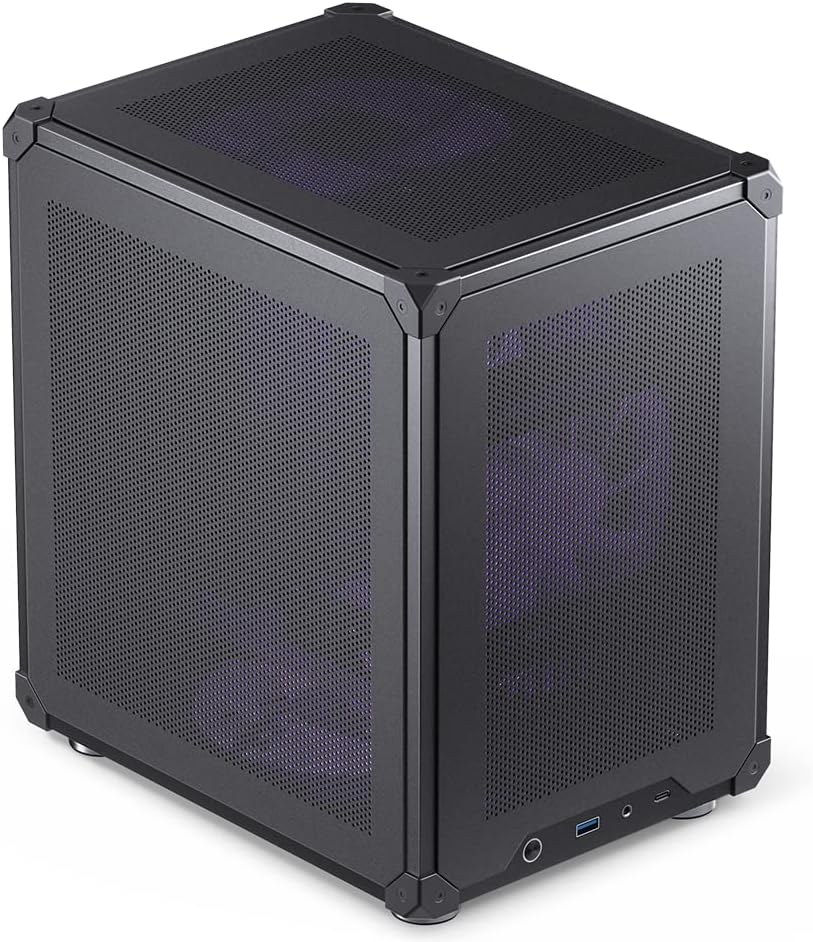
The Cooler Master Q300L V1 is a budget-oriented Micro-ATX enclosure with a 4.5 rating, offering enough internal room for capable compact systems without extending to full ATX dimensions. Its perforated side surfaces and transparent panel make airflow and component visibility central parts of the design.
We may earn a commission when you buy through this link, at no additional cost to you.
The case accepts Micro-ATX and Mini-ITX motherboards, graphics cards up to 360mm, CPU coolers up to 159mm, and power supplies up to 160mm long. Cooling support includes a 240mm liquid cooler and space for as many as five fans. A modular I/O panel can be positioned at the front, top, or bottom on either side, making it easier to align the case with a desk, shelf, or mounted system.
Its primary limitation is motherboard format. It is not an option for a standard ATX or E-ATX build, despite some similarities to larger ATX cases. The 160mm PSU limit can also rule out many extended ATX power supplies, and the older-looking transparent panel may not appeal to buyers seeking the pillar-less glass presentation found on newer premium models.
This is a practical recommendation for a Micro-ATX builder who values airflow, large graphics card support, and simple case placement over full-size motherboard compatibility. Its straightforward features make it particularly useful for a first compact gaming or productivity build.
Open perforated surfaces on all sides promote heat dissipation while the transparent panel preserves a view of the build. The design emphasizes cooling over a fully closed exterior.
The I/O panel can be repositioned at the front, top, or bottom on either side. This makes the enclosure easier to adapt to different furniture layouts and working habits.
We may earn a commission when you buy through this link, at no additional cost to you.
The Mechanic Master C34 Ultra combines a small exterior with standard ATX motherboard support and a 4.6 rating. It is designed for users who want a compact full-size ATX build that can also move between a LAN event, another workstation, or a reorganized room.
We may earn a commission when you buy through this link, at no additional cost to you.
Full-size ATX power supplies and graphics cards up to 335mm are supported. Cooling flexibility includes a 240mm liquid radiator and CPU air coolers up to 162mm. The internal layout is intended to simplify installation, and the metal front I/O panel includes USB 3.0 and USB Type-C connectivity. Most importantly for portability, the carry handle is built into the enclosure rather than added as an accessory.
The listed recommendation to use an SFX-L power supply for the cleanest result and easiest build experience reveals the main compromise. Although the case can physically accept a full-size ATX power supply, cable routing may be more difficult in that configuration. Its 335mm graphics card limit is also lower than the 360mm to 420mm allowances offered by several competitors.
The C34 Ultra is a strong fit for a portable ATX workstation, LAN-ready gaming system, or compact desktop that must be moved occasionally. It makes the most sense when the carry handle and full-size motherboard capability matter more than maximizing every millimeter of graphics card space.
The integrated handle makes the completed computer easier to carry between spaces. That portability is the defining benefit for users who regularly attend events or rearrange their work area.
Builders can select a 240mm liquid radiator or a tower air cooler up to 162mm. This provides meaningful cooling flexibility within a standard ATX enclosure.
We may earn a commission when you buy through this link, at no additional cost to you.
The ASUS Prime AP201 is a Micro-ATX chassis with a 4.7 rating, matching the highest score in the group. It is built around spatial efficiency, fitting a wide range of components into a stated 33-liter footprint while retaining substantial cooling and cable-management options.
We may earn a commission when you buy through this link, at no additional cost to you.
Its quasi-filter mesh panels use more than 57,000 machined 1.5mm holes to encourage airflow while still allowing the internal components to remain visible. The enclosure supports up to 280mm and 360mm radiators, as well as up to six fans. Graphics cards up to 338mm and ATX power supplies up to 180mm are accepted, and the design also accommodates custom liquid cooling and several storage devices.
Tool-free side panels simplify access, while the extended motherboard tray, cutouts, and 32mm cable gap help keep wiring concealed. The trade-off is that AP201 is a Micro-ATX design, so it does not address the need for standard ATX or E-ATX boards. It also lacks the integrated carrying feature found in the Mechanic Master models, making it better suited to a stationary desk or entertainment setup.
The AP201 is a compelling recommendation for a builder who wants efficient space, refined airflow, straightforward access, and good cooling options in a compact desktop footprint. It is particularly attractive for clean, modern systems where both component visibility and cable organization matter.
More than 57,000 precision-machined 1.5mm holes combine airflow with a view of the components. The result provides visual interest without relying on a conventional solid panel.
Clip-based side panels can be removed without tools. An extended motherboard tray and 32mm cable gap make it easier to conceal wiring and reach internal connectors.
We may earn a commission when you buy through this link, at no additional cost to you.
The Cooler Master Q300L V3 is a 4.6-rated Micro-ATX case that updates the compact formula with tempered glass, flexible cooling, and a generous selection of hardware allowances. It is a versatile option for a compact gaming or productivity system that uses a suitably sized motherboard.
We may earn a commission when you buy through this link, at no additional cost to you.
Graphics cards up to 366mm fit inside, and the enclosure supports up to six 120mm or 140mm fans, 240mm all-in-one radiators, and CPU air coolers up to 178mm. ATX power supplies up to 200mm can be installed. A movable I/O panel, magnetic dust filters, and cable-management provisions are included to simplify installation and maintenance.
As with other Micro-ATX cases in the comparison, the principal limitation is that it cannot accept a standard ATX or E-ATX motherboard. Its stated fan and radiator support describes where components can be mounted, not how many can run simultaneously at the best possible performance without considering the rest of the build. Buyers should also verify CPU cooler position and graphics card thickness against the case's available depth.
The Q300L V3 is recommended for a Micro-ATX builder who wants a long graphics card allowance, many cooling options, and a tempered glass side panel. It delivers a more modern feature set than the Q300L V1 while retaining a compact, accessible layout.
Up to six 120mm or 140mm fans, a 240mm AIO radiator, and 178mm CPU coolers give builders meaningful thermal choices. Magnetic dust filters support ongoing maintenance.
Graphics cards up to 366mm and power supplies up to 200mm are accepted. These allowances provide useful room for modern gaming hardware within a Micro-ATX enclosure.
We may earn a commission when you buy through this link, at no additional cost to you.
The Zalman CUBIX is a compact 17.1-liter Micro-ATX desktop case with a 4.5 rating. It focuses on a very small exterior, straightforward construction, and enough compatibility for office, media, or light gaming systems that do not require the latest oversized graphics hardware.
We may earn a commission when you buy through this link, at no additional cost to you.
The enclosure uses 0.8mm steel and includes a perforated front panel with a preinstalled 80mm fan. Standard ATX power supplies are supported, graphics cards can measure up to 260mm, and CPU coolers may reach 137mm. Front connectivity consists of one USB 3.0 port, one USB 2.0 port, and a 3.5mm stereo auxiliary connection.
The compact proportions inevitably introduce restrictions. A 260mm graphics card allowance is modest beside models that support 335mm to 420mm, and the 137mm CPU cooler limit may rule out many popular tower coolers. The 80mm fan also leaves less room for a larger cooling configuration than the airflow-focused designs in this comparison.
The CUBIX is best for buyers who place a very small footprint above all other considerations. It works well for a discreet desktop, a basic productivity machine, or a modest gaming build whose graphics card and cooler fit comfortably within the stated limits.
A total volume of 17.1 liters makes the CUBIX one of the smallest entries here. It is well suited to desks and entertainment units where physical space is limited.
A perforated front panel and preinstalled 80mm fan provide a straightforward cooling path. USB 3.0, USB 2.0, and a stereo audio connection cover essential front access.
We may earn a commission when you buy through this link, at no additional cost to you.
The JONSBO C6 is a compact mesh desktop chassis with a 4.6 rating, designed for ITX and Micro-ATX systems where access and a small exterior matter. Its stated dimensions are 202mm wide, 266mm deep, and 295.2mm high, including the footpad.
We may earn a commission when you buy through this link, at no additional cost to you.
All sides use mesh, and the front, upper, and lower sections provide three potential fan positions. The top plate accepts a 120mm or 140mm fan, the bottom accepts a 120mm or 140mm fan, and the front position supports a 120mm fan or a hard drive. The upper cover and side panel use a tool-free opening mechanism, and the front panel includes a 20-pin Type-C connection, one USB 3.0 port, and combined audio connections.
The component limits are the most important consideration. The CPU cooler allowance is only 75mm, which effectively points toward a low-profile cooler rather than a conventional tower, and graphics card support is listed from 200mm to 255mm. Storage is also modest, with one 3.5-inch hard drive or two 2.5-inch solid-state drives shown as the stated configuration.
The C6 is a good recommendation for a small, simple desktop where quiet low-profile cooling and quick access matter more than long graphics card support. It is less suitable for enthusiasts planning a large modern graphics card or a tall air cooler.
Mesh across all sides encourages airflow, while three mounting zones offer several fan arrangements. The front position can alternatively accommodate a hard drive.
The upper cover and side panel open without tools, making installation and maintenance easier. Front Type-C and USB 3.0 connectivity keeps frequently used devices within reach.
We may earn a commission when you buy through this link, at no additional cost to you.
The NZXT H5 Flow is a compact ATX mid-tower with a 4.6 rating and a well-rounded balance of cooling support, airflow, and cable organization. It arrives with two 120mm Quiet Airflow fans, one at the front and one at the rear, giving a new build a useful basic cooling foundation.
We may earn a commission when you buy through this link, at no additional cost to you.
Ultra-fine mesh covers the top, front, and side panels, while the power supply shroud is perforated on its side and bottom to draw air toward two additional 120mm fans that are not included. The front supports a radiator up to 360mm, and the top accepts a 240mm radiator. Wide routing channels, hooks, and straps help conceal cables and keep the interior tidy.
The shroud configuration is a worthwhile cooling feature, but it does not come with the two intake fans that would use those openings. Builders expecting the most effective airflow may need to add them. Front and top radiator options are generous for a compact chassis, though they are still more constrained than a full-size tower that offers multiple 360mm positions.
The H5 Flow is a strong recommendation for a standard compact ATX gaming build that wants some fans in the box, a clear cooling path, and tidy cable management. It offers a balanced package without requiring the more specialized portability or E-ATX capabilities found elsewhere in the list.
Two 120mm Quiet Airflow fans are installed at the front and rear. This gives the system an immediate foundation while leaving room for additional intake and radiator hardware.
Side and bottom perforations allow air to enter the shroud area. Two 120mm fans can be added there, although they are not included with the case.
We may earn a commission when you buy through this link, at no additional cost to you.
Choosing a compact E ATX case requires balancing motherboard format, component dimensions, cooling, accessibility, and the amount of space available in your room. Use the following factors to narrow the field before checking the live listing.
E-ATX support is one of the most valuable traits in this category, but not every compact case includes it. The Cooler Master QUBE 540 accepts boards up to 11 inches wide, the Mechanic Master C34Pro supports ATX and E-ATX, and the C34 Ultra accepts standard ATX. The Lian Li O11D Mini V2 supports standard ATX, M-ATX, and Mini-ITX, while the ASUS AP201, Q300L models, Zalman CUBIX, and JONSBO C6 are Micro-ATX-oriented designs. The NZXT H5 Flow is identified as a compact ATX mid-tower.
Choose the model based on the board you already own or intend to buy, not on a vague small-form-factor label. Micro-ATX can be excellent for a compact system, but it does not fulfill a requirement for E-ATX.
Graphics cards are often the limiting component in compact cases. The stated allowances range from 200mm to 255mm for the JONSBO C6, 260mm for the Zalman CUBIX, and 335mm for the Mechanic Master C34 Ultra. The ASUS AP201 accepts up to 338mm, the Q300L V1 up to 360mm, the Q300L V3 up to 366mm, the QUBE 540 up to 415mm, and the C34Pro up to 420mm. Check the card's full length, thickness, power connector position, and cooler overhang.
Longer clearance is useful, but it should not be pursued at the expense of the cooling position or power supply arrangement. Confirm the dimensions of the exact model rather than relying on a GPU family name.
A compact enclosure may accept an ATX power supply but make its installation or cable routing awkward. The Lian Li O11D Mini V2 uses a protruding side mesh to accommodate full-size ATX power supplies, while the C34 Ultra also supports them and recommends an SFX-L unit for the cleanest build. The Mechanic Master C34Pro supports 220mm ATX units and offers front, bottom, and side mounting positions. Smaller cases list tighter limits, such as 160mm, 180mm, 185mm, or 200mm.
Compare the power supply's length, connector placement, and cable bend radius with the case. If compactness and tidy wiring are priorities, consider whether a smaller SFX or SFX-L unit would simplify assembly.
CPU cooler height and radiator position determine whether a compact case can handle a high-performance processor. The QUBE 540 supports E-ATX and long GPUs, the C34Pro accepts 360mm radiators and 165mm tower coolers, and the C34 Ultra supports a 240mm radiator with 162mm air coolers. The Q300L V3 accepts 240mm AIO radiators and 178mm air coolers, while the JONSBO C6 has a much shorter 75mm cooler limit. The NZXT H5 Flow supports a 360mm front radiator and a 240mm top radiator.
A radiator rating alone does not guarantee compatibility. Check the actual mounting area, thickness including fans, CPU socket position, and the graphics card's proximity to the radiator.
Compact airflow depends on the path air can take through the enclosure and the fans available to move it. Mesh-heavy designs such as the QUBE 540, AP201, Q300L V1, JONSBO C6, and H5 Flow are designed around visible ventilation. The NZXT H5 Flow and Zalman CUBIX include fans, while the Lian Li O11D Mini V2 is specified without them. The QUBE 540 includes a SickleFlow 120mm fan, and the H5 Flow includes two 120mm fans.
Count the fans that come with the case, then plan where additional intake and exhaust models will go. Also check the stated radiator support so adding cooling hardware does not conflict with a long graphics card.
A compact case is harder to work inside if panels are awkward to remove or cables block the motherboard tray. The ASUS AP201 uses tool-free side panel clips and provides a 32mm cable gap, the JONSBO C6 has a tool-free upper cover and side panel, and the Q300L V1 offers a movable I/O panel. The Lian Li O11D Mini V2 includes a dedicated 24-pin cable bracket, while the C34Pro provides 18mm of cable-management space.
Prioritize clear access to CPU cooler mounting hardware, memory slots, and front-panel connectors. Clean routing is useful, but it should not require removing components that are difficult to reach.
Some compact cases are designed to remain on a desk, while others are explicitly portable. The Mechanic Master C34Pro and C34 Ultra have integrated carry handles, making them relevant for LAN events or systems moved between workstations. The QUBE 540 can operate horizontally or vertically and includes movable handles for repositioning. Other designs prioritize compact dimensions without making the complete computer easy to carry.
Consider the final orientation, available furniture space, and whether you will move the finished system. A case that fits neatly under a desk may be more valuable than one optimized for transport but awkward in its normal position.
Front connectivity determines how often you need to reach around the case. The QUBE 540, C34 Ultra, and JONSBO C6 include USB Type-C, while the AP201 emphasizes its precision-machined mesh and tool-free access. The Lian Li O11D Mini V2 and ASUS AP201 offer prominent glass presentation, and the Q300L V3 pairs tempered glass with magnetic dust filters. The Zalman CUBIX provides USB 3.0, USB 2.0, and a stereo auxiliary connection.
Choose a design that matches how often you will connect accessories and how prominently the build will be displayed. Presentation is a legitimate benefit, but it should be balanced against cooling and component access.
Before installing components, lay the empty case on a protected surface and inventory its removable panels, screws, fan mounts, and cable-routing points. Install the power supply, standoffs, and motherboard according to the case manual, then connect the front-panel wires only after the motherboard is secured. Work methodically to avoid scratching the compact interior or trapping a cable under a stanchion.
Plan cooling around the final GPU position. Fit radiators and fans only after confirming that the graphics card, CPU cooler, and power supply do not overlap. Route power and data cables behind the motherboard tray, use the provided hooks, straps, or brackets, and preserve enough slack for the removable panels to close without force.
For routine care, power down and disconnect the system before opening the case. Remove dust from mesh panels and filters on a regular schedule, using a soft brush or a gentle vacuum attachment that will not pull fans into the intake. Keep liquid-cooling hardware and radiator surfaces clean, verify that panels are secure, and periodically check whether cables remain behind the tray and whether fans spin freely.
A compact ATX case is a small chassis that accepts standard ATX motherboards, while a compact E-ATX case also supports the wider E-ATX platform. The latter is less common because accommodating a larger board requires careful cable routing and component planning. Verify the exact motherboard dimensions, including width, rather than assuming a case labelled compact supports every ATX variant.
Some can, but the stated support often depends on mounting position and cable routing. The Lian Li O11D Mini V2, Mechanic Master C34 Ultra, and Mechanic Master C34Pro all list full-size ATX power supply support, although the C34 Ultra recommends an SFX-L unit for the cleanest result. Compare the PSU length, connector location, and the case's available cable space before ordering.
It can be the right choice if you do not need an E-ATX motherboard and value a smaller footprint more. The ASUS Prime AP201, Cooler Master Q300L V1 and V3, and Zalman CUBIX are Micro-ATX options within this comparison. They are excellent compact cases, but they do not meet an E-ATX requirement simply because they support full-size GPUs and other ATX-class components.
Use the card manufacturer's exact length measurement and compare it with the case's maximum stated clearance. Also account for the power connector, cooler overhang, and any front radiator or fans that may occupy the same area. Listed limits range from 200mm to 255mm in the JONSBO C6 to as much as 420mm in the Mechanic Master C34Pro.
Not necessarily, but airflow design matters because compact components can be packed closely together. Mesh panels, a perforated power supply shroud, and well-placed intake and exhaust fans can create an effective cooling path. Cases such as the NZXT H5 Flow and Zalman CUBIX include fans, while the Lian Li O11D Mini V2 is specified without them, so compare the complete configuration rather than relying on the case category alone.
Only use a carrying handle if the case is specifically designed for it and the system is secured for movement. The Mechanic Master C34Pro and C34 Ultra include integrated handles, while the QUBE 540 has movable handles and flexible orientation. For any case, remove loose components if possible and protect the system from impacts and sudden temperature changes during transport.
It matters most to builders who regularly want to display internal components. The Lian Li O11D Mini V2 uses pillar-less tempered glass for a broad view, while the QUBE 540 and Q300L V3 also use tempered glass. Other compact designs prioritize mesh, accessibility, or a smaller exterior, so choose the presentation that best complements your build rather than treating glass as a requirement.
No. A power supply should be appropriate for the components and remain within the case's physical and thermal limits. Extra capacity can be useful for future upgrades, but excessive size can obstruct airflow or complicate cable routing. Confirm the required wattage, connector needs, dimensions, and the case's stated power supply support before making a choice.
The Lian Li O11D Mini V2 stands out for full-size ATX support, full-size power supply accommodation, flexible GPU positioning, and polished pillar-less glass. It is our Editor's Choice for buyers who want a compact enclosure with a premium presentation and careful cable-management provisions.
The Mechanic Master C34Pro is the strongest premium option for genuine E-ATX compatibility, unusually long graphics cards, extensive radiator support, and portability. The Cooler Master Q300L V1 represents the budget side of the comparison, while options such as the QUBE 540, ASUS AP201, Q300L V3, C34 Ultra, and NZXT H5 Flow serve distinct combinations of hardware support, cooling, portability, and accessibility.
Before purchasing, confirm the current listing, exact motherboard dimensions, graphics card measurements, power supply form factor, and CPU cooler clearance. Prices and product configurations can change, so use the comparison as a compatibility guide and recheck the latest specifications before completing your order.