
Fosi Audio K5 Pro
4.3Editor score
Multiple digital input options
Headphone output reaches 300Ω
Bass and treble controls
Our DAC for PS5 guide compares 10 digital-to-analog converters for gaming, comparing audio quality, connectivity, headphone power, features, and compatibility.
A DAC for PS5 can improve the clarity, power, and flexibility of your gaming audio setup, especially when paired with a wired headset or a larger pair of headphones. The right converter should make directional cues easier to understand without changing the character of the game or introducing distracting background noise.
We compared these ten products by examining their DAC chips, supported input methods, amplifier output, sampling capabilities, gaming features, headphone connections, and PS5 compatibility. The list covers compact dongles, desktop amplifiers, surround processors, portable interfaces, and converters designed to feed powered speakers.
Each review highlights the strongest reasons to choose a particular model and the compromises that may matter to your setup. Product specifications and ratings can change over time, and market prices fluctuate, so confirm the current listing and device requirements before purchasing.
4.3Editor score

4.7Editor score

4.5Editor score
The table below compares the ten shortlisted devices by core audio capability, connectivity, amplification, and gaming-oriented features so you can quickly identify the model that matches your PS5 setup.




The Fosi Audio K5 Pro is a compact digital-to-analog converter and headphone amplifier designed to give a PS5, computer, or active-speaker setup more flexible audio connections. Its 4.3 rating reflects a well-rounded approach rather than a specialized gaming feature set. The standout quality is versatility: USB Type-C, optical, and coaxial inputs feed both 3.5mm headphone and RCA outputs, allowing the same device to serve several entertainment and listening roles.
We may earn a commission when you buy through this link, at no additional cost to you.
The headphone stage uses a Texas Instruments NE5532 op-amp and is rated to drive headphones from 16Ω through 300Ω. Output power ranges from 1000mW at 16Ω to 80mW at 300Ω, giving the unit meaningful authority for demanding headsets while retaining enough control for lighter gaming headphones. USB supports up to 24-bit/96kHz, while optical and coaxial inputs reach 24-bit/192kHz. Measured performance is listed at THD of 0.003% or less and SNR of at least 110dB.
Its limitations are mostly related to feature specialization. There is no dedicated 7.1 processor, hardware footstep radar, or deep parametric equalizer in the supplied specifications. The master volume, bass, and treble controls can make broad tonal adjustments, but they are not a substitute for precise frequency correction. Buyers who want gaming effects or extensive equalizer profiles may find one of the gaming-focused models more satisfying, although those options add complexity and generally demand more setup.
The K5 Pro is a strong choice for a first PS5 DAC, especially if you want the option to connect wired headphones, powered speakers, or an external amplifier. The included 3.5mm splitter, optical cable, and USB-A/C-to-USB-C cable make it easier to assemble a functional desktop system. For straightforward amplification and flexible digital inputs at a manageable entry point, it is one of the most balanced recommendations in this guide.
USB Type-C, optical, and coaxial inputs allow the converter to sit at the center of a mixed entertainment setup. You can move between a compatible console, computer, television, or digital source without replacing the entire audio chain.
The stated output range makes the K5 Pro suitable for everything from sensitive in-ear monitors to high-impedance gaming headsets. It provides more usable drive than a basic passive adapter while remaining simple enough for everyday use.
We may earn a commission when you buy through this link, at no additional cost to you.
The Fosi Audio C3 is built specifically for players who want more than a basic headset adapter. It earns a 4.5 rating and stands out through native 7.1 surround processing, HRTF-based positioning, and StepSense footstep enhancement. Rather than treating gaming audio as an afterthought, it provides tools intended to make footsteps, movement, gunfire, and explosions easier to distinguish.
We may earn a commission when you buy through this link, at no additional cost to you.
Its CS43131 DAC supports PCM up to 32-bit/384kHz and DSD256, while the specified headphone output delivers 320mW per channel into compatible 16Ω to 300Ω headphones. Intelligent microphone processing is designed to reduce keyboard and background noise, and browser-based controls provide gaming, music, and streaming EQ presets as well as custom profiles. A single USB-C connection keeps the physical setup clean, and the CNC aluminum body is intended to complement a gaming desktop.
The important trade-off is that this is a more specialized device than a conventional converter. The C3 supports UAC 1.0 for plug-and-play console use and UAC 2.0 for higher-resolution PC and Mac operation. Switching modes and configuring browser-based EQ adds a setup burden compared with a simple volume knob. Its virtual surround and footstep effects may also be unnecessary for games in which the headset manufacturer already provides strong spatial processing.
Choose the C3 if competitive first-person shooters and repeatable positional cues are central to your gaming. It is particularly compelling when you want a wired analog headset to benefit from enhanced spatial audio without replacing it. For users who prioritize gaming-specific processing over a broad collection of physical inputs, this focused design makes more sense than paying for features they would never use.
StepSense prioritizes enemy movement while balancing other combat sounds, and the 7.1 system expands the presentation into a virtual surround field. These features can make subtle directional information easier to parse on a stereo headset.
UAC 1.0 offers straightforward console compatibility, while UAC 2.0 unlocks higher-resolution playback on PC and Mac. That makes the C3 useful for players who move between a PS5 and a computer-driven audio workflow.
We may earn a commission when you buy through this link, at no additional cost to you.
The Fosi Audio K7 is the most complete desktop audio hub in this group, and its 4.7 rating is the highest among the ten products. It combines a high-resolution DAC, a powerful discrete headphone amplifier, extensive inputs, a status display, and quick controls in a compact aluminum body. That combination makes it a natural choice for a serious PS5 gaming station that also handles music and desktop listening.
We may earn a commission when you buy through this link, at no additional cost to you.
At the core are an AK4493S DAC, XMOS XU208 USB processor, and TPA6120 headphone amplification stage. The device supports PCM up to 32-bit/384kHz and DSD256, with maximum output listed at 2100mW. Connections include USB-C, coaxial, optical, Bluetooth with aptX HD and LL, and a 3.5mm microphone input. Outputs cover 4.4mm balanced, 3.5mm single-ended, and RCA, so it can serve headphones, powered speakers, and downstream amplifiers.
The K7 requires more desk space than a dongle and offers more controls than a minimalist converter. Its dual knobs, five shortcut buttons, angled chassis, and high-resolution display improve operation, but they can feel substantial if the goal is simply to connect one headset to one console. Bluetooth is also not the ideal route for the lowest-latency competitive play; the wired digital and analog paths better suit a gaming-focused setup.
This is the recommendation for buyers who want one capable device to serve multiple roles. Balanced-headphone owners gain a proper 4.4mm path, high-impedance users receive ample power, and the RCA outputs expand the system to powered speakers. If the goal is a flexible, high-performance command center for PS5 gaming and desktop audio, the K7 provides the strongest all-around feature set.
The stated 2100mW output is one of the most significant distinctions in this roundup. It provides ample headroom for power-hungry gaming headphones while preserving balanced and single-ended options for different earphones.
USB, optical, coaxial, Bluetooth, and microphone inputs make the K7 easy to integrate with a console, computer, television, active speakers, and chat hardware. The high-resolution display helps confirm operating status without repeatedly navigating software.
We may earn a commission when you buy through this link, at no additional cost to you.
The SteelSeries GameDAC Gen 2 is a console-oriented gaming amplifier with a 3.8 rating, placing it lower in this comparison than the Fosi and Topping alternatives. Its core appeal is integration: 360-degree spatial audio, AI microphone noise cancellation, and simple source switching are designed to improve a PC-and-console gaming setup with minimal fuss.
We may earn a commission when you buy through this link, at no additional cost to you.
The internal ESS Sabre quad-DAC architecture supports hi-res playback up to 96kHz/24-bit. Two systems can be connected simultaneously, allowing the user to move between a PC and PS or Switch by pressing a button. The device also works with any headset connected through a 3.5mm cable and is specifically designed for the Arctis Nova Pro, although that headset is sold separately. ClearCast AI can clean outgoing microphone audio on PC and is also described as processing incoming teammate chat.
Compared with the Fosi C3, the GameDAC Gen 2 presents a more established brand ecosystem but offers less detail about sampling modes and output power in the supplied specifications. Its spatial feature is compatible with Tempest 3D Audio for PS5 and Microsoft Spatial Sound, though users should not assume that every game will expose the same channels or processing. The 3.8 rating may also reflect compatibility, software, or setup experiences that are not described here.
This model is most suitable for a gamer who values a simple dual-system setup and already uses SteelSeries or compatible 3.5mm headsets. It is less compelling if high-resolution desktop playback, balanced output, or precise equalization is the main goal. Choose it for gaming-focused convenience rather than enthusiast DAC versatility.
The 360-degree spatial processing is intended to make critical steps, reloads, and vocal cues more immersive. It can also work with Tempest 3D Audio on PS5, giving players access to virtual surround through a conventional analog connection.
ClearCast AI focuses on reducing unwanted background noise from the microphone signal. That makes it useful for voice chat, streaming, and ordinary team communication when the PC is the active source.
We may earn a commission when you buy through this link, at no additional cost to you.
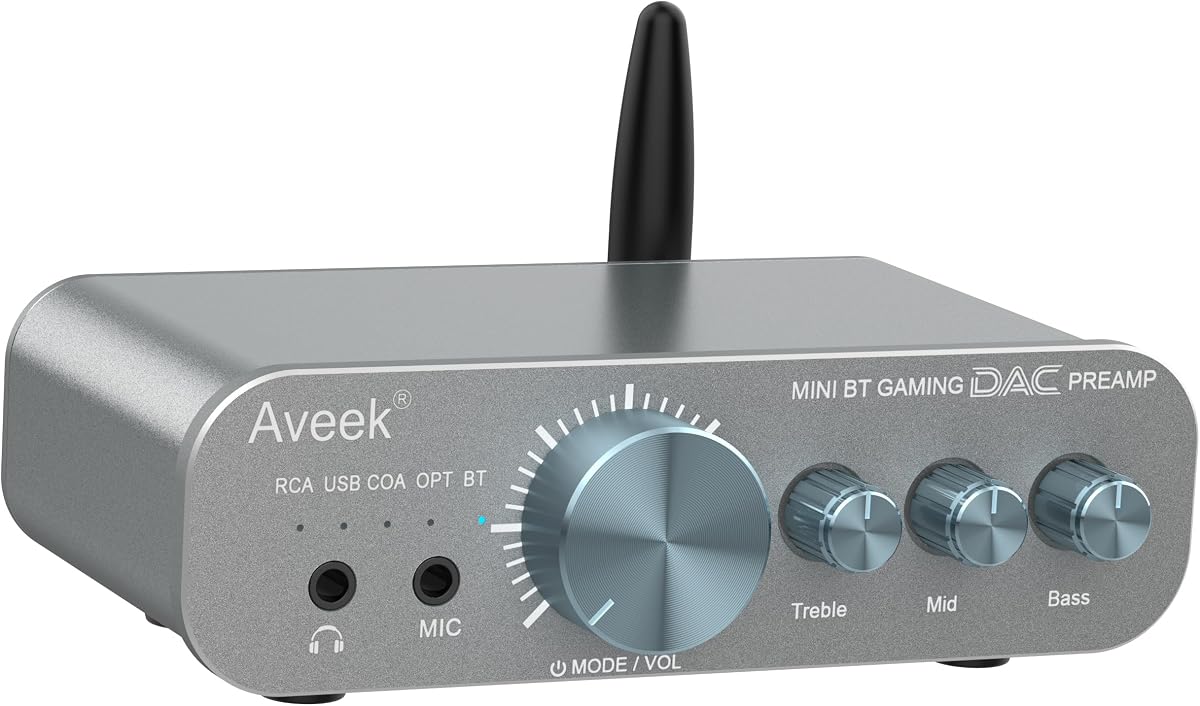
The Aveek DAC-200 combines a gaming DAC, headphone amplifier, and compact preamp in a single unit. Its 4.4 rating reflects a broad and approachable feature set. It is especially attractive for users who want to connect the PS5, a PC, a television, a phone, or traditional audio equipment without committing to one input type or one source.
We may earn a commission when you buy through this link, at no additional cost to you.
Bluetooth, USB, optical, coaxial, and RCA inputs cover both digital and analog sources. A front-panel three-band EQ provides independent bass, mid, and treble adjustment, which is more flexible than a simple volume control. The headphone stage is designed for 16Ω to 100Ω headphones, and a front microphone input supports game chat and monitoring. Audio processing is listed at 24-bit/96kHz, 113dB SNR, and THD below 0.003%.
The main limitation is output flexibility. It does not offer a balanced headphone connection, and its stated impedance range does not extend as far as the K5 Pro, K7, C3, or DX1 II. The physical EQ is convenient for general adjustments, but it cannot match the precision of a ten-band parametric system. It also lacks the dedicated surround and footstep processors featured by several gaming-specific competitors.
The DAC-200 is a compelling choice for a multi-purpose desktop system rather than a highly specialized competitive rig. Its broad input selection, straightforward controls, chat support, and preamp function make it easy to recommend to a gamer who also listens to music and watches movies. Verify that the appropriate PS5 connection and output route are available in your particular setup before installation.
Bluetooth, USB, optical, coaxial, and RCA make the DAC-200 adaptable to many source components. The rear 3.5mm output can also pass audio to compatible downstream equipment when the unit is used as a preamp.
Separate bass, mid, and treble controls let listeners adjust dialogue, music, or effects without navigating complex software. The controls are intentionally broad and approachable rather than intended for laboratory-level correction.
We may earn a commission when you buy through this link, at no additional cost to you.
The Topping DX1 II is the premium specialist in this roundup, combining an ES9039Q2M DAC, XMOS XU316 processor, fully balanced signal path, and ten-band parametric equalizer. Its 4.5 rating reflects a feature set designed for listeners who want exact control over both game audio and headphone response. It can connect by USB-C to a PC, tablet, Nintendo Switch, or PS5 for audio and power.
We may earn a commission when you buy through this link, at no additional cost to you.
Two headphone outputs are provided: 3.5mm single-ended and 4.4mm balanced. Selectable UAC 1.0 and UAC 2.0 modes support different console and computer workflows. The parametric EQ provides independent left and right control, three onboard preset slots, and a drag-and-drop web platform for importing EQ files or AutoEQ profiles. This makes the DX1 II unusually practical for matching a particular headset or making footsteps more prominent without broadly boosting everything else.
Measured performance is among the most impressive specifications in the guide. The listed noise floor is below 0.9µVrms at the 3.5mm output in low-gain mode, THD+N is below 0.00007%, dynamic range is 128dB, and channel crosstalk is listed at -140dB. Balanced output reaches 1000mW per channel at 32Ω, while high and low gain settings accommodate both sensitive in-ear monitors and demanding headphones.
The trade-off is complexity. EQ imports, UAC switching, preamp modes, optical routing, and gain selection require more understanding than a simple console adapter. Some users will never need the full capabilities, and a dedicated gaming model may be easier to configure. Even so, the DX1 II is the strongest recommendation for a buyer who wants a premium DAC/amplifier with precise correction, balanced connectivity, and a route into a broader hi-fi system.
Ten adjustable bands provide much more exact control than a conventional bass-and-treble design. Separate left and right adjustment, saved presets, and community or AutoEQ import support make it possible to tune different headphone models for gaming and music.
The four-channel balanced architecture, low-noise power supply, and 1000mW balanced output provide clean power for a wide range of headphones. Selectable gain helps prevent the amplifier from being pushed beyond a useful operating range with sensitive models.
We may earn a commission when you buy through this link, at no additional cost to you.
The SMSL PO100 PRO MQA is a compact digital interface rather than a conventional DAC with a built-in headphone amplifier. Its 4.6 rating is the second highest in the guide, reflecting strong digital performance and format flexibility. It accepts USB Type-C input and provides I2S, optical, and coaxial digital outputs, making it especially useful when another component will handle amplification.
We may earn a commission when you buy through this link, at no additional cost to you.
The XMOS XU316 design supports asynchronous transmission and PCM playback up to 32-bit/768kHz. It also handles native DSD and DOP64, while I2S output can operate at the same maximum PCM resolution. MQA playback does not require additional decoding software, although the supplied guidance recommends setting the computer volume to maximum and using a player that supports ASIO or WASAPI output. Two physical switches control UAC and I2S modes.
The significant trade-off is the absence of a headphone output. You will need a separate amplifier, DAC, active speakers, or another device with an appropriate input to hear the audio. The PS5-specific workflow uses DOP64 through optical or coaxial connections with compatible downstream equipment. Incorrectly selecting UAC or I2S mode can lead to no output or unexpected behavior, so the mode switches require attention during setup.
Choose the PO100 PRO when you want a small digital transport for a larger audio chain rather than a one-box gaming adapter. It is portable enough for a backpack and can serve a phone, console, computer, or television as a digital source. It does not offer gaming EQ, surround processing, or amplified headphone output, but its digital versatility and strong rating make it an excellent specialist for knowledgeable users.
I2S, optical, and coaxial outputs provide several ways to pass a digital signal into another converter or amplifier. This makes the PO100 PRO useful when you want the console to remain the source while another component handles conversion and output.
The compact enclosure and broad format support make the interface convenient to move between locations. Support for high-resolution PCM, native DSD, and DOP64 also provides useful flexibility for both gaming and music workflows.
We may earn a commission when you buy through this link, at no additional cost to you.
The Fosi Audio DS3 combines high-resolution DAC performance, headphone amplification, gaming effects, and dongle-sized portability. Its 3.9 rating places it near the lower half of the guide, but the underlying specifications are ambitious: an ES9039Q2M DAC, XMOS POWERED processor, native DSD512 support, and both balanced and single-ended headphone outputs.
We may earn a commission when you buy through this link, at no additional cost to you.
The built-in spatial algorithm converts 7.1-channel game audio into a virtual surround presentation, while an FPS effect highlights footsteps, reloads, and gunfire. These features are described as working without drivers on PC, PS5, or Switch. An eight-band hardware-level parametric EQ can be adjusted through a web-based panel, and eight filter options are provided. UAC 1.0 and UAC 2.0 modes support different source workflows, with volume memory available in each mode.
Measured performance is listed at SNR of at least 122dB, THD below 0.0003%, and balanced output of 220mW at 32Ω. That output is respectable for a portable device, although it is lower than several desktop amplifiers in the roundup. The 16-gram CNC-milled aluminum body and tempered-glass window are particularly appropriate for travel, but the small form provides fewer physical controls than a full desktop unit.
The DS3 is best suited to a user who values portability and wants gaming effects plus hi-fi decoding in a small package. It is less suitable for a stationary system requiring very high balanced power or extensive analog input options. Check the required connection method and control software before buying, particularly if your PS5 setup depends on a specific digital path.
Spatial processing and the dedicated FPS effect make the DS3 more gaming-focused than a conventional portable DAC. Moving the same device between a console and computer preserves access to both hi-fi and virtual surround functions.
The 4.4mm output offers a balanced option for compatible headphones, while the 3.5mm output preserves broad headset compatibility. Native DSD512 and PCM up to 32-bit/768kHz support make it suitable for high-resolution source material as well as games.
We may earn a commission when you buy through this link, at no additional cost to you.
The Sound Blaster G8 is a desktop DAC and headphone amplifier designed around source mixing and high-resolution playback. Its 4.2 rating reflects a capable but less fully documented product among the ten choices. The defining feature is dual USB-C input support, allowing two compatible USB audio sources to remain connected and be mixed or selected for different activities.
We may earn a commission when you buy through this link, at no additional cost to you.
Playback is supported natively up to 32-bit/384kHz. The custom Xamp discrete bi-amplifier drives the left and right headphone channels individually, and the listed dynamic range of 130dB offers ample headroom for both quiet environmental details and loud game effects. Sound Blaster Acoustic Engine enhancements provide additional game-focused processing, giving the unit a clear identity beyond basic conversion and amplification.
One limitation is the lack of detailed information in the supplied specifications about balanced outputs, analog line inputs, maximum headphone power, and supported microphone arrangements. That makes it harder to compare the G8 directly with products that specify output wattage by impedance and connection type. Its usefulness also depends on how you intend to mix the two USB sources and whether you want to engage the Sound Blaster software features.
The G8 is most appropriate for a gaming desk where PC or console sources may be active at different times. It is a strong alternative for users who value dual-source convenience, high-resolution playback, and established gaming processing. If precise connectivity, balanced output, or deep hardware EQ is more important, one of the more extensively specified desktop models may be easier to integrate.
Dual USB-C inputs are unusually useful in a multi-computer or console-and-PC gaming environment. Keeping both sources connected can eliminate repeated cable changes when moving between work, communication, and entertainment.
The Xamp bi-amplifier drives each channel separately, supporting precise stereo presentation and clean headphone power. The listed 130dB dynamic range is designed to preserve both subtle environmental cues and high-impact game sounds.
We may earn a commission when you buy through this link, at no additional cost to you.
The SMSL PS100 is a straightforward digital-to-analog converter for TVs, game consoles, computers, disc players, and home cinema equipment. It has a 4.2 rating and focuses on the essential task of converting digital audio into stereo RCA output. Its most relevant feature for PS5 users is HDMI ARC, which can extract compatible television audio for passage through an external amplifier or powered speakers.
We may earn a commission when you buy through this link, at no additional cost to you.
Coaxial and optical inputs support resolutions up to 192kHz, while the USB interface can accept digital audio from a computer or phone. An independent ES9023 DAC handles conversion, and the built-in power supply supports a compact, portable arrangement. Stereo left and right RCA outputs make the PS100 easy to integrate with a conventional receiver, powered speakers, or an amplifier that lacks the desired digital input.
The trade-offs are important for gaming buyers. There is no integrated headphone amplifier, surround processor, gaming equalizer, footstep enhancement, or microphone input in the supplied information. The PS100 converts audio to a stereo signal rather than acting as a complete gaming headset hub. It also requires another amplifier to drive headphones, so it is most appropriate when your existing system already includes suitable powered hardware.
Choose the PS100 for a simple, dedicated PS5-to-stereo system involving a television and external speakers. It is less appropriate for someone seeking a single gaming DAC with amplified headset output and competitive positional features. Its value lies in focused conversion, broad source compatibility, and a compact form rather than extensive gaming-specific processing.
HDMI ARC lets the converter receive audio through the television, including compatible PS5 content presented by that television. The resulting stereo RCA signal can then feed an amplifier or powered speakers.
Optical, coaxial, and USB inputs make the PS100 useful beyond gaming. It can serve as a compact bridge between several digital sources and an established analog audio system without adding unnecessary control complexity.
We may earn a commission when you buy through this link, at no additional cost to you.
The best DAC for PS5 depends on how the console reaches your audio system, what headphones or speakers you use, and whether you value gaming processing, high-resolution playback, balanced amplification, or simple operation.
Begin with the route the audio signal will take. Some converters emphasize USB-C connectivity for compatible devices, while others are designed around optical, coaxial, or HDMI ARC connections through a television. A product may advertise PS5 compatibility without offering the same input and output arrangement that your headset or speaker system requires. Confirm whether the converter provides a headphone amplifier, line-level RCA output, or both, and make sure the necessary cable and mode settings are included.
Choose the converter whose documented connection method matches your actual equipment rather than relying on the broadest specification list.
Headphone sensitivity and impedance determine how much amplifier power is useful. Low-impedance gaming headsets may respond well to a modest desktop amplifier, while high-impedance headphones generally benefit from more voltage and current. The K7 lists output up to 2100mW, the Topping DX1 II reaches 1000mW per channel into 32Ω, and the Aveek DAC-200 is designed for 16Ω to 100Ω models. Consider both impedance and sensitivity because an overly powerful output stage may be unnecessary for a sensitive pair.
Prioritize adequate clean power and selectable gain rather than selecting on headline wattage alone.
A 3.5mm single-ended connection is broadly compatible with common gaming headsets and headphones. A 4.4mm balanced connection can provide a fully differential route, but it requires a headset with matching wiring and a converter with a genuinely balanced output stage. Some products label a 4.4mm port as balanced without offering balanced line outputs, so check the complete signal path rather than focusing only on the socket shape.
Use balanced outputs when your headphones support them and the converter is designed for a true balanced architecture.
Virtual surround, HRTF positioning, footstep detection, and combat cue prioritization can make competitive cues easier to identify on a stereo headset. The Fosi C3 provides native 7.1 processing and StepSense, while the DS3 offers hardware spatial effects and an FPS mode. These features are useful when the game, headset, or console does not already provide robust spatial processing. They can also change the intended sound mix, so users who prefer a neutral presentation may want them disabled.
Choose dedicated processing for competitive clarity or turn it off when accuracy and natural mixing matter more.
Hardware volume, bass, and treble controls are simple and dependable, but broad controls cannot correct a headset's frequency response precisely. A ten-band parametric equalizer with independent channel adjustment, such as the Topping DX1 II, offers far more detailed shaping and saved profiles. Web-based control panels can make sophisticated tools approachable, although they add setup and software dependence. Decide whether you want quick manual changes or the ability to build repeatable presets for different games and headphones.
Pick basic tone controls for simplicity, or parametric EQ for precise, repeatable headphone correction.
High-resolution support matters when the source can deliver it and the rest of the chain preserves the signal. Models in this guide range from a 24-bit/192kHz digital input ceiling on the K5 Pro to PCM support up to 32-bit/768kHz on the PO100 PRO and DS3. DSD support varies as well. These figures are not direct measures of perceived gaming quality, and a converter still needs clean amplification, correct clocking, and suitable settings to realize its full potential.
Treat resolution as one part of system quality rather than the sole measure of a superior DAC.
Low noise is especially valuable for quiet game environments and for sensitive headphones. The DX1 II lists a particularly low noise floor and high dynamic range, while the K5 Pro, Aveek DAC-200, and DS3 also publish favorable distortion and SNR figures. Look for meaningful measurements taken at the output and operating mode you intend to use. Extremely low distortion is less useful if the device adds unwanted gain, instability, or poor channel balance.
Compare published measurements at similar settings and headphone impedances for the fairest judgment.
A headset connected to a DAC may lose its inline microphone if the converter only supports analog headphone audio. The K5 Pro includes a 3.5mm splitter and microphone interface, the Aveek DAC-200 has a front microphone input, and the DX1 II supports a standard 3.5mm TRRS headset microphone. If you communicate regularly, verify whether chat comes from the headset cable, a separate USB microphone, or a wireless transmitter. This is often more important than a minor difference in digital specification.
Confirm the complete microphone path before installation to avoid losing chat or changing control methods.
Plan the connection before unpacking the converter. Identify whether your PS5 audio will arrive through a compatible USB-C path, optical or coaxial output, or HDMI ARC from the television. Check the manual for the required UAC mode, input selector, and output configuration, then connect the converter to the intended headphone or line-level destination. Start with the main volume at a low level before switching the source on.
Choose the correct operating mode and set the console's audio output to the appropriate digital or analog destination. When using a virtual-surround or EQ feature, begin with modest adjustments and compare the result with the original game mix. If a product offers high and low gain, use the setting that gives comfortable volume without forcing excessive amplification. A small front-panel change to bass or treble may be more suitable than an aggressive preset.
Keep the converter ventilated, away from moisture and direct heat, and use the supplied or appropriately shielded cables. Do not insert or remove connectors while output is active, and avoid pushing the volume beyond comfortable levels. Update any required control software, save useful EQ profiles, and document the input, UAC mode, gain, and output configuration so the system can be restored quickly after a power cycle or cable change.
It depends on your existing audio path. A TV, soundbar, receiver, or compatible headset may already provide adequate conversion and amplification for your setup. A separate DAC becomes more useful when you want a wired analog headset, balanced output, higher-quality headphone amplification, specific tone controls, virtual surround processing, or integration with desktop speakers. The benefit comes from the complete signal and feature chain rather than from adding a converter by itself.
The best method depends on the converter and your display arrangement. Optical or coaxial connections can carry digital game audio through a television or compatible console output, while HDMI ARC is useful when audio is handled by the television. USB-C is attractive for devices with documented host audio support, but compatibility and UAC requirements must be confirmed. Check both ends of the signal path before buying so you do not end up with a converter that lacks the necessary input or output.
A balanced connection can offer lower noise, better channel separation, and more output capability when the converter and headset both support a fully balanced design. It does not automatically make every game sound better, and a single-ended connection remains appropriate for many common headsets. Match the output format to the headphones and use a cable designed for that connection rather than assuming the socket label alone determines performance.
Higher-resolution support can preserve available source detail and is useful for music, movies, and compatible games. Actual gameplay improvement depends on the source format, the converter's clocking and output stage, the headphones, and the game's mix. Amplifier power, low noise, clear positional cues, and a stable connection may matter more in practice. Treat resolution as one part of a complete audio chain rather than a guarantee of a competitive advantage.
An EQ can make recurring cues easier to hear, but broad boosts can make gunfire and explosions louder and mask quieter footsteps. Parametric EQ with narrow, adjustable bands gives finer control than a simple treble switch. Start with a modest change, preserve the game's intended balance, and test across several matches. Some games also offer their own accessibility settings, and using both tools carefully may be more effective than applying an aggressive preset.
That depends on the converter and headset wiring. Some units include a 3.5mm splitter or TRRS microphone input, while others only pass headphone audio and require a separate microphone. A USB or wireless headset can keep its own microphone path even when only the headphone cable passes through the DAC. Verify the included adapters and supported microphone input before purchasing, especially if voice chat is essential.
Only if your existing television, receiver, or amplifier cannot accept the console's available audio output or lacks the inputs your speakers require. A converter with RCA line outputs can bridge a digital source to powered speakers, but it does not add the amplification needed for passive speakers. The PS100, K5 Pro, and K7 are examples of products with line-level outputs for this kind of integration.
Yes, if its input selection and output stage suit both uses. Models with USB, optical, coaxial, or Bluetooth inputs can accept a console, computer, television, and phone, while balanced and single-ended outputs can serve several headphone types. The K7 is especially versatile in this respect. Keep the volume and gain appropriate for each source, and use saved EQ profiles when a headset needs different corrections for games and music.
The Fosi Audio K5 Pro is the most approachable all-around recommendation for listeners seeking multiple inputs, useful amplification, and simple tone controls. The Fosi Audio K7 stands out as the most complete desktop hub, with powerful output, extensive connectivity, balanced and single-ended connections, and a 4.7 rating. For buyers who want precise correction and a fully balanced premium path, the Topping DX1 II is the most advanced choice.
Your priority should determine which category wins. Competitive players may favor the Fosi C3's 7.1 processing and StepSense, while portable listeners may prefer the DS3. The SMSL PS100 suits a simple television and powered-speaker arrangement, and the PO100 PRO is better suited to a larger digital chain. Confirm headphone impedance, microphone needs, connection format, room space, and software requirements before making a final selection.
Ratings, firmware, control software, and market prices can change, so check the current product listing and compatibility notes at the time of purchase. Use the guide to compare the hardware and features that will remain useful in your setup, and choose the converter that offers the cleanest connection path rather than simply the longest specification list.
