
Redragon K585 Wired
4.4Editor score
42-key tactical one-handed layout
Seven onboard macro keys
Hot-swappable three-pin switch sockets
Detachable magnetic wrist rest
Five customizable RGB lighting modes
Gaming keypads can improve one-handed control, macro access, and desk setup. This guide compares ten options for features, layout, connectivity, and performance
Gaming keypads place frequently used commands, movement controls, and macro keys beneath one hand while the other remains on a mouse. A well-designed model can reduce desk clutter, improve access to complex bindings, and make competitive games more comfortable when conventional keyboard positioning feels awkward.
This guide compares ten products using their stated layouts, switch technology, connectivity, programmability, lighting, and intended gaming scenarios. It includes dedicated one-handed keypads, a premium analog option, wireless and wired designs, and one compact keyboard for readers considering a different route to a flexible control setup.
Each selection reveals what that particular design emphasizes, from simple plug-and-play operation to advanced Hall Effect actuation and analog thumbstick control. Rankings reflect the available specifications and user feedback, while product availability, configuration details, and customer experiences can change over time.
4.4Editor score

4.2Editor score

4.3Editor score
The table below compares the included products by their most important stated characteristics, including layout, switching technology, programmability, and connection method.




The Razer Tartarus V2 Left-Handed Gaming Keypad is a 4.3-rated one-handed control device built around 32 programmable keys and an eight-way directional thumbpad. It stands out for a soft-cushioned mecha-membrane switch design, extensive remapping through Razer Hypershift, and per-key lighting that can synchronize with popular games, Razer hardware, Philips Hue, and more than 30 partner brands.
We may earn a commission when you buy through this link, at no additional cost to you.
Its strongest feature is the combination of a familiar game keypad shape with a left-handed layout. The thumbpad gives console-oriented players and other users a natural directional control option without requiring every movement command to occupy a standard keyboard key. Thirty-two additional programmable keys offer enough room for abilities, communication shortcuts, media controls, and custom work flows, while Razer Hypershift can remap individual keys and combinations.
The trade-off is specialization. This model is intended for players who want their left hand on the keypad and their right hand on a mouse, but its handedness makes it less suitable for right-handed keypads or users who prefer a symmetric arrangement. The supplied specifications do not identify a wireless mode, so users seeking cable-free placement should look elsewhere. Mecha-membrane construction also differs from the sharper feel of a full mechanical switch.
This is a strong choice for left-handed PC gamers who value programmable access, comfort, and coordinated RGB lighting more than maximum compactness. It also works for creative workflows in which a dedicated bank of shortcuts can reduce repetitive keyboard navigation. For the intended audience, the combination of 32 keys, a directional thumbpad, and mature customization support makes it one of the most complete conventional gaming keypads in this guide.
The padded mecha-membrane switches are designed to provide mechanical-style feedback without the hard, sharp travel associated with many gaming keycaps. That makes the keypad suitable for long sessions while preserving clearly defined key presses.
Individual backlit keys and support for 16.8 million colors make this more than a functional input device. The lighting can coordinate with compatible games and Razer ecosystem accessories for a more unified desk presentation.
We may earn a commission when you buy through this link, at no additional cost to you.
The Redragon K585 Wired One-Handed RGB Gaming Keypad is a 4.4-rated tactical keypad with 42 keys, seven dedicated macro keys, and support for four profiles. It combines a dense one-handed layout with hot-swappable switch sockets, RGB lighting, a detachable magnetic wrist rest, and a USB pass-through port that can simplify the rest of a compact gaming desk.
We may earn a commission when you buy through this link, at no additional cost to you.
The switch compatibility is a major practical advantage. Its upgraded sockets accept almost any three-pin or five-pin mechanical switch, allowing users to tune the feel and feel of the keypad without soldering. Seven macro keys can each hold multiple commands, yielding 28 macro assignments across the four profiles. The companion software adds further control over macro sequences and lighting effects.
Its wired design is a limitation for players who want to move the keypad around freely, although the included pass-through port helps maintain a tidy setup. The 42-key tactical arrangement may also feel crowded for users accustomed to a conventional keyboard, and full software access can take more effort than a driver-free device. Even so, those are manageable inconveniences for a product that emphasizes control density and customization.
Choose the K585 Wired when you want many bindings, removable macro keys, and customizable switches in a dedicated one-handed device. It is particularly attractive for MMO and MOBA players who repeatedly trigger ability combinations, although competitive FPS users may prefer the more specialized Rapid Trigger options farther down the list.
Seven visible macro keys simplify access to longer sequences. Each can store multiple commands, while four profiles let users organize bindings for different games or tasks without reconfiguring the entire keypad each time.
Socketed switch support gives buyers more control than a fixed membrane or mechanical design. Users can choose a switch family that matches their preference for sound, travel, and resistance, provided the switch uses a compatible three-pin or five-pin format.
We may earn a commission when you buy through this link, at no additional cost to you.
The Redragon K585 PRO Wireless is a 4.2-rated one-handed RGB keypad that retains the tactical 42-key format of the wired K585 while adding Bluetooth and 2.4GHz connectivity. Its stated battery life of 15 to 20 hours of continuous play, detachable wrist rest, RGB lighting, and hot-swappable sockets make it a flexible choice for players who want freedom from a fixed cable.
We may earn a commission when you buy through this link, at no additional cost to you.
The practical benefit of wireless placement is considerable. A player can position the keypad at a different angle, move it closer for MMO sessions, or carry it between locations without managing a wired connection. Its seven macro keys still support multiple commands across four profiles, while the socketed design accepts almost any three-pin or five-pin switch. The included Red switches are stated to withstand 50 million keypresses.
As with the wired K585, the 42-key arrangement may feel dense for newcomers. Wireless operation introduces trade-offs in sustained power management and may not be the first choice for latency-sensitive competitive play. The shorter stated battery duration also means regular charging, and users who value a permanently connected gaming keypad will find the wired model more straightforward.
The K585 PRO Wireless is best for MMO, MOBA, productivity, and mixed desktop users who want the K585 layout without a permanent cable. Its combination of two wireless modes, removable wrist support, macro profiles, and replaceable switches gives it a broader role than a strict competitive keypad.
Bluetooth and 2.4GHz options let users choose between a broadly convenient connection and a dedicated wireless link. The freedom to reposition the keypad is especially useful when switching between gaming and general desktop work.
Forty-two keys preserve a high command density, while the detachable magnetic wrist rest lets users reduce the footprint when necessary. That versatility makes the device easier to integrate into different desk arrangements.
We may earn a commission when you buy through this link, at no additional cost to you.
The AZERON Cyborg II is a 4.3-rated premium gaming keypad for right-handed users, combining 30 programmable inputs with an analog Hall Effect thumbstick. It is designed to replace the left side of a keyboard while the mouse remains under the right hand, offering adjustable ergonomics, six onboard layouts, and highly granular movement configuration for FPS, MOBA, and RPG games.
We may earn a commission when you buy through this link, at no additional cost to you.
The thumbstick is the defining feature. It can support WASD-style or 360-degree analog movement in compatible games, while allowing users to customize dead zones, sensitivity, cone angles, directional zones, and analog smoothing. It also supports a mid-click function and can function as a mouse. That flexibility makes the Cyborg II appealing to players who want more than discrete key presses and conventional digital movement.
Programmability extends throughout the keypad. All 30 inputs can be assigned as keyboard inputs, controller or mouse inputs, or macros, and each button is individually connected without a connection matrix. The software supports RGB game profiles, diagonal keybinds, and analog adjustments, while six layouts can be stored directly on the device. The redesigned main board is also intended to support future software updates and modular enhancements.
This is not a universal first gaming keypad. It is optimized for right-handed players, and the stated hand-size range of 6.3 to 7.5 inches means smaller hands may find the fit less comfortable. The advanced configuration workflow may also feel excessive for basic keybind storage. Players who value analog control, extensive customization, and a premium ergonomic design will find the Cyborg II unusually capable.
The Hall Effect thumbstick reads analog movement and allows users to shape dead zones, sensitivity, cone angles, and smoothing. Those controls can make a compatible game feel more consistent than a simple digital direction pad.
Six control layouts can remain on the keypad for quick access between games or workflows. This is useful for players who switch genres regularly and do not want to rebuild their bindings each time.
We may earn a commission when you buy through this link, at no additional cost to you.
The RedThunder One Handed Gaming Keyboard is a 4.4-rated 35-key portable keypad designed for straightforward access to movement, abilities, and macros. It combines anti-ghosting across all 35 keys, a 3ms stated response time, two onboard macro-recording keys, a seven-color RGB backlight, and broad compatibility with major desktop operating systems.
We may earn a commission when you buy through this link, at no additional cost to you.
Its greatest strength is accessibility. The keypad is driver-free and plug-and-play, so users do not need to install companion software before getting started. Macro recording is performed directly through FN combinations: begin with FN+ESC, enter the desired sequence, and save it with FN+F1 or FN+F2. The compact size, portable construction, and large wrist rest also support relaxed desk placement.
The feature set is less ambitious than that of premium or competitive alternatives. Thirty-five keys offer less binding density than a 42-key tactical keypad, and the lighting system provides seven colors rather than a wider custom palette. Its stated 3ms response figure and anti-ghosting support are useful, but there is no information here about adjustable actuation, polling rate, or advanced movement options.
Choose the RedThunder when simplicity, portability, and immediate plug-and-play operation matter most. It is a practical match for casual players, students, or anyone who wants a small bank of game commands without navigating a complex configurator. Players with extensive bindings or specialized competitive requirements may prefer one of the more configurable models.
Two dedicated macro-recording controls make it possible to store and replay command sequences directly from the keypad. This keeps the core feature accessible for users who do not want to manage a separate configuration utility.
The portable form saves desk space, while the large wrist rest gives the hand a stable support point. Broad platform compatibility also makes the keypad straightforward to use across different computer systems.
We may earn a commission when you buy through this link, at no additional cost to you.
The Keychron C0 HE is a 4.2-rated 8K wired gaming keypad built around 35 programmable keys, Rapid Trigger Hall Effect magnetic switches, per-key RGB lighting, and a web-based configurator. Its stated 8K polling rate and 0.01mm actuation precision position it as a responsive choice for competitive FPS play as well as MMO and MOBA control.
We may earn a commission when you buy through this link, at no additional cost to you.
Rapid Trigger is the central benefit. Instead of relying on a fixed actuation point, the magnetic switches detect real-time key travel, allowing the key to reset as soon as it reaches a chosen point. Users can therefore adjust actuation behavior for faster repeated inputs and more precise control. The design is especially relevant to competitive titles such as Valorant and CS2, where counter-strafing and rapid movement inputs demand consistency.
The browser-based configuration utility is another strength. It removes the need to install a full desktop application, while still supporting key mapping, actuation settings, and per-key lighting. Compatibility with Windows and macOS makes the keypad suitable for multi-system setups, and its programmable keys can also control streaming software, push-to-talk, editing shortcuts, and other productivity commands.
The primary limitation is its reliance on wired connectivity, which is understandable for a performance-focused device but removes some placement freedom. Hall Effect behavior also depends on game support, and the compact 35-key layout provides less binding capacity than a tactical 42-key design. For players who value responsive inputs and a clean configuration workflow, the C0 HE remains a particularly well-rounded competitive keypad.
Hall Effect switches support adjustable actuation with 0.01mm precision and enable Rapid Trigger reset behavior. This gives competitive players a more direct relationship between physical key travel and in-game input.
The web-based configurator combines mapping, actuation adjustment, and RGB control without requiring a traditional installation process. It also supports both Windows and macOS, which suits users who move between systems.
We may earn a commission when you buy through this link, at no additional cost to you.
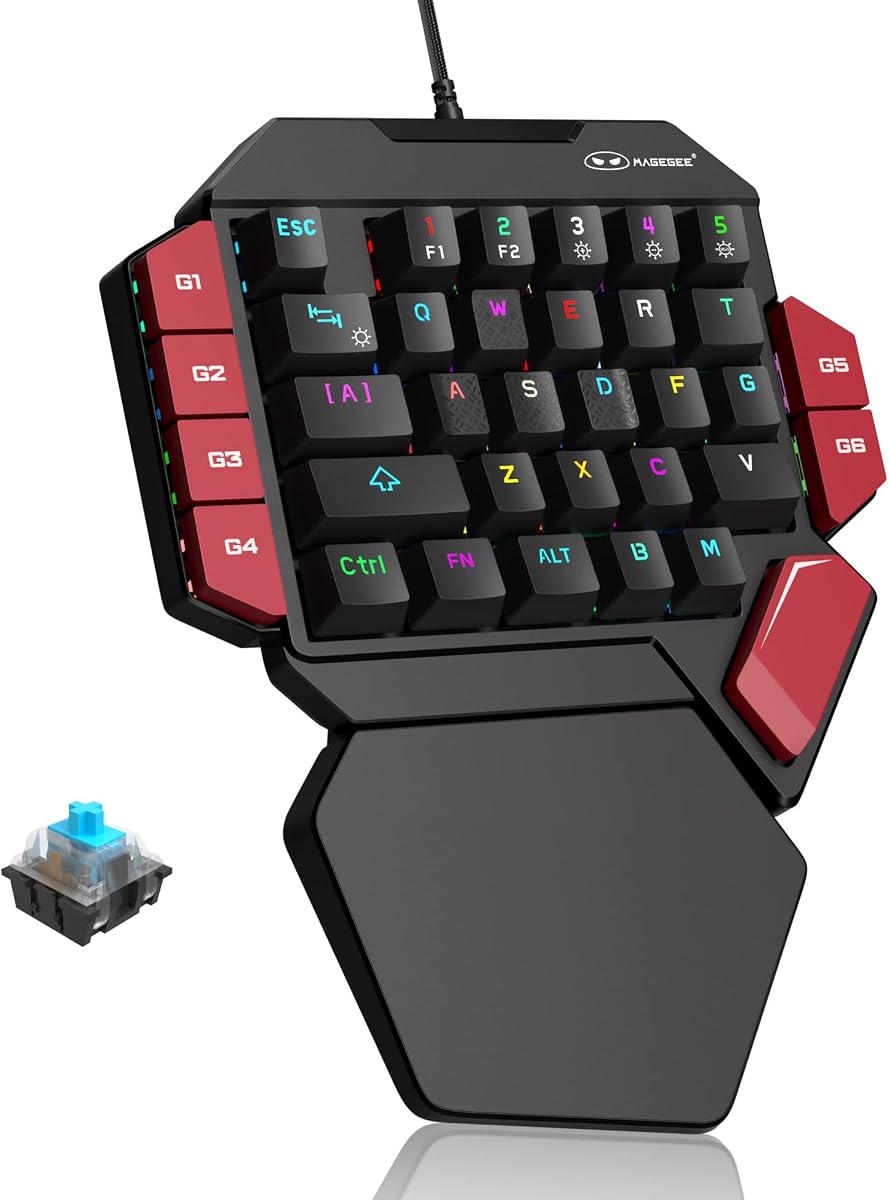
The MageGee One Handed Professional Gaming Keyboard is a 4.3-rated 35-key wired mechanical keypad with blue switches, six macro recording keys, and RGB backlighting. It focuses on a familiar mechanical feel, non-conflicting input across the complete layout, and direct macro control without requiring a driver.
We may earn a commission when you buy through this link, at no additional cost to you.
Blue switches provide a loud, crisp click and a pronounced tactile response, giving every key a clear mechanical action. Six keys can record commands directly: users start the sequence, perform the desired inputs, and press the assigned macro key again to complete the process. The keypad also supports a static RGB mode, a dynamic mode, brightness controls, color changes, and lighting-effect changes through FN combinations.
The design has a few trade-offs. Mechanical switch noise can be distracting in shared spaces, and the 35-key layout limits the number of independent commands compared with larger tactical keypads. The supplied compatibility list is broad and the USB connection is plug-and-play, which offsets some setup friction, but advanced software profiles and specialized competitive actuation features are not described.
The MageGee is a good match for gamers who want traditional mechanical feedback and dedicated macro keys without a demanding software setup. It can also serve as a compact productivity controller. Users who need a quieter mechanism, denser tactical layout, wireless freedom, or adjustable competitive triggers will find other options in this guide better aligned with those priorities.
The blue switch system produces a crisp click and strong tactile feel, helping users confirm each command through touch. The trade-off is a louder operating profile than many membrane or gaming keypad alternatives.
Six dedicated macro keys let users store frequently repeated sequences in accessible locations. Direct recording keeps the process understandable, while non-conflict behavior supports simultaneous inputs across the layout.
We may earn a commission when you buy through this link, at no additional cost to you.
The AJAZZ AK029 is a 4.5-rated wired gaming keypad with 29 keys, Hall Effect magnetic switches, an 8KHz polling rate, Rapid Trigger support, and onboard profile memory. Its ultra-compact design saves substantial desk space while concentrating movement and action commands in a minimal one-handed layout.
We may earn a commission when you buy through this link, at no additional cost to you.
The switch system provides a wide 0.1mm to 3.5mm actuation range with 0.01mm precision and an initial force of 30gf. Rapid Trigger allows keys to reset immediately on lift-off, while the absence of physical contact is stated to reduce debounce delay. An 8KHz polling rate corresponds to a stated 0.125ms response time, making the specification set especially relevant to competitive shooters and other fast input scenarios.
Customization is handled through a browser-based driver with no installation or administrator access required. Users can remap keys, adjust actuation points, customize RGB lighting through 20 preset modes, and save dedicated profiles to onboard memory. The construction combines an internal aluminum plate, gasket mount, five-layer sound dampening, and double-shot PBT keycaps, giving it a more refined physical design than a bare-budget keypad.
The main compromise is the 29-key count, which is the smallest in the list and may limit access to extensive ability sets. The wired design also prevents free placement, and the 4.5 rating reflects listed user feedback rather than a guarantee of universal compatibility. Even so, players who prioritize a very small footprint, rapid response, and onboard control will find the AK029 especially compelling.
Twenty-nine keys create one of the most compact layouts in the guide. That leaves more room for mouse movement and can benefit players who favor a high-sensitivity setup or a clean competitive desk.
Onboard memory stores dedicated profiles on the device itself. Users can change computers without losing their configured mappings, which is useful for LAN events, shared systems, and multi-platform desks.
We may earn a commission when you buy through this link, at no additional cost to you.
The Razer Tartarus V2 Mecha-Membrane Gaming Keypad is a 4.2-rated one-handed device built around 32 programmable keys and a dedicated thumbpad. It belongs to a familiar gaming keypad family and offers a conventional approach in which a compact left-hand command surface works alongside a full-size keyboard and mouse.
We may earn a commission when you buy through this link, at no additional cost to you.
The stated 32-key count provides room for movement, abilities, communication shortcuts, and custom commands without turning the device into a dense tactical grid. Its mecha-membrane construction is intended to balance a soft feel with recognizable key actuation, while the thumbpad offers another route for directional commands. The compact arrangement can also create more space for mouse movement than a full keyboard.
The supplied product information for this listing is limited to the product title, so specific claims about polling, connectivity, lighting, or software cannot be confirmed from the provided data. Compared with the better-documented left-handed Tartarus V2 entry, buyers should not assume that every feature carries over automatically. It also has fewer keys than the Redragon tactical models and no stated analog thumbstick.
This model is best for a player who recognizes the Tartarus layout and values its established Razer design. It is a sensible option for adding a compact command bank to an existing gaming setup, particularly when a 32-key arrangement feels easier to manage than a dense 42-key board. Confirm the current feature listing and platform support before purchasing if advanced configuration or wireless use is important.
Thirty-two programmable keys offer a practical middle ground between minimal thumb controls and full tactical grids. The layout can carry common actions without occupying the entire area normally reserved for a full keyboard.
The Tartarus name is associated with a recognizable gaming keypad format. Buyers who already understand this style can expect a familiar one-handed command surface designed to complement mouse movement.
We may earn a commission when you buy through this link, at no additional cost to you.
The Redragon RM104 is a 4.4-rated compact wireless keyboard with a multifunction knob, tri-mode connectivity, RGB lighting, programmable software, and a 4000mAh battery. Although it is a full keyboard rather than a dedicated one-handed gaming keypad, it offers a useful alternative for readers who want flexible macros, clean desk placement, and dedicated control hardware in a single device.
We may earn a commission when you buy through this link, at no additional cost to you.
The control knob is the distinctive feature. Rotating it adjusts volume, pressing it mutes audio, and holding it cycles RGB modes. Tri-mode connectivity through Bluetooth, 2.4GHz wireless, and USB-C allows the keyboard to work across different setups, while the stated 4000mAh battery is designed to support extended wireless use. Companion software can assign macros, remap commands, and create application-specific profiles.
Its main drawback in this comparison is format. A full keyboard cannot isolate the left hand in the same way as a 29-key, 35-key, or 42-key one-handed device, and it takes up more desk space. Its RGB controls and macro software are useful, but it does not offer the dedicated thumbpad, competitive actuation, or rapid trigger features found on the gaming keypads above.
The RM104 makes more sense for a gamer who prefers an attractive compact wireless keyboard, wants a large battery, and needs a multifunction knob for audio and lighting. It is also relevant to creators who want programmable shortcuts in a complete keyboard. For the specific goal of freeing mouse space, however, one of the dedicated one-handed keypads is the more relevant purchase.
Bluetooth, 2.4GHz, and USB-C connection options make the RM104 adaptable to PCs, Macs, and changing desk arrangements. The large stated battery reinforces its suitability for cable-free everyday use.
The knob combines volume adjustment, mute, and RGB mode control in one dedicated control. That gives quick access to frequently adjusted settings without consuming programmable keyboard keys.
We may earn a commission when you buy through this link, at no additional cost to you.
The right gaming keypad depends on how you play, which hand you use, and how much control you want over switches, macros, lighting, and movement. Consider the following factors before choosing a model.
In short, confirm handedness and comfort before considering any other feature.
In short, match key density to your binding count rather than choosing the largest layout by default.
In short, choose fixed comfortable switches for simplicity, hot sockets for tuning, or magnetic switches for rapid response.
In short, verify how macros are recorded, stored, and transferred before committing to a particular workflow.
In short, favor wired operation for consistent gaming and wireless freedom when portability matters more.
In short, verify game support and choose digital or analog movement based on your preferred control style.
In short, prioritize lighting depth only if it will improve your setup or make controls easier to identify.
In short, prioritize a layout that feels natural and leaves your mouse hand unrestricted.
Begin by installing the keypad according to its connection method and updating the relevant configuration software or browser utility when one is provided. Assign keys according to the game or application rather than filling every available position with a command. Start with movement, primary abilities, communication functions, and frequently used actions, then add longer macros after confirming that each sequence behaves as intended. Save profiles separately if you switch between games or creative applications.
For Hall Effect or analog models, calibration and actuation settings deserve particular attention. Set a comfortable dead zone, sensitivity, or cone angle, then test the result in a suitable practice environment. Rapid Trigger users should begin with a moderate reset point and adjust gradually. For fixed-switch devices, use the included software or FN shortcuts to record macros carefully, and verify each sequence before relying on it during an important session.
Keep the keypad protected from spills, heavy impact, and cable strain. Clean the keycaps and surface with a soft, lightly dampened cloth, avoiding excessive moisture around switches, USB ports, and the wrist rest. If the model uses hot-swappable sockets, power it down before changing switches and confirm that each replacement is electrically and physically compatible. Wireless models should be recharged periodically and stored within the manufacturer's recommended temperature range when they will not be used for an extended period.
A gaming keypad is better when your priority is freeing mouse space and keeping common commands under one hand. It is not automatically better for every player, because its smaller layout can limit available bindings and may require separate typing controls. A full-size keyboard remains more practical for extensive typing, document work, and a large library of shortcuts.
The main difference is command density. A 29-key model prioritizes a very small footprint, a 35-key model offers a middle-ground balance, and a 42-key model provides more room for MMO abilities, MOBA rotations, and custom macros. More keys are not automatically easier to use, since crowded layouts can take time to learn and may encourage unnecessary complexity.
Hall Effect switches are most useful for competitive players who want adjustable actuation, Rapid Trigger behavior, and very fast key reset. They are less essential for casual gaming, macros, or general productivity. If you do not need fine control over actuation, a mechanical, membrane, or mecha-membrane keypad may meet your needs more simply.
A dedicated one-handed keypad generally cannot replace a full keyboard for typing because it provides a limited set of keys and no conventional spacebar. It can replace the keyboard's gaming controls while you retain a regular keyboard for typing. The AZERON Cyborg II is unusual because it is specifically designed to replace the left-hand keyboard functions while the mouse remains on the right.
Rapid Trigger lets a magnetic key register a new press as soon as it rises above a chosen reset point rather than waiting for it to return completely. This can make repeated counter-strafing and movement inputs more responsive. It is most beneficial in games that support analog movement and should be tuned gradually to avoid unintended inputs.
Wireless keypads can suit competitive play, but the connection method and game requirements matter. A wired model provides the most direct connection path, while Bluetooth and 2.4GHz options add placement flexibility. Players who value absolute consistency may prefer wired control, whereas others may find that wireless freedom has a greater practical benefit in their setup.
Start with the commands you use most often, including movement corrections, primary abilities, and communication controls. Add longer sequences only when they save meaningful time, and test them in a noncompetitive environment first. Use separate profiles for separate games when possible, especially if the same key position represents different actions in each title.
Choose the handedness that matches how you naturally move and aim. Most one-handed keypads are operated with the left hand so the right hand can remain on the mouse. Left-handed players should look for a specifically left-handed design, while right-handed players should verify whether the model includes a directional thumbpad or analog stick that suits their preferred control method.
The Redragon K585 Wired stands out as the most balanced budget-oriented option, offering a tactical 42-key layout, seven macro keys, hot-swappable sockets, RGB lighting, and a detachable wrist rest. The Keychron C0 HE takes the lead for competitive response with 8K polling, Rapid Trigger magnetic switches, and a convenient browser-based configurator, while the AZERON Cyborg II offers the most specialized premium experience through analog movement, 30 individually mappable inputs, and onboard layouts.
Your priority should determine the winner. Choose a compact wired model for simple, reliable command banking; a tactical keypad for large ability sets and direct macro access; a magnetic-switch design for rapid competitive inputs; or an analog keypad for precise movement in supported games. Comfort and hand fit deserve equal attention because even a technically capable keypad is less useful when its layout causes tension or forces awkward key reach.
Before making a final selection, confirm the current product details, supported software, operating system compatibility, and connection requirements. User ratings and product information can evolve, so checking the latest listing and current availability can prevent surprises. The right gaming keypad should fit your hands, organize your most valuable commands, and support the way you actually play.