
MSI PRO B550M-P WIFI6E
4.7Editor score
EZ Debug LED system
Ryzen 5000 processor support
PCIe 4.0 and Gen4 M.2
Wi-Fi 6E and Bluetooth 5.2
This guide compares 10 motherboards with Debug LED features, highlighting processor support, power delivery, connectivity, and diagnostic options.
A motherboard with a Debug LED gives builders a clearer way to identify boot problems without repeatedly removing components or guessing at the cause. The indicators can reveal which stage of startup has stalled, while onboard buttons and POST codes add useful context for troubleshooting and everyday system maintenance.
This guide compares ten motherboards and motherboard diagnostic products based on their documented processor support, memory standards, expansion, networking, power delivery, cooling, and diagnostic capabilities. It includes compact and full-size ATX models for AMD and Intel systems, plus two dedicated diagnostic cards for builders who want an additional troubleshooting tool.
Each review explains the standout features, practical limitations, and ideal user for the product. The shortlist favors boards with obvious diagnostic benefits, useful connectivity, and strong platform foundations, although the most appropriate choice depends on your processor, case, memory, and upgrade plans. Prices and availability can change.
4.7Editor score
4.5Editor score

4.4Editor score
The comparison below covers eight motherboards and two dedicated motherboard diagnostic cards, with emphasis on platform support, expansion, networking, and troubleshooting functions.


The MSI PRO B550M-P WIFI6E combines an explicit EZ Debug LED system with a compact mATX design, making it an appealing option for builders who want easier startup diagnosis without moving to a full-size enthusiast board. Its 4.7 rating also places it among the strongest performers in this roundup.
We may earn a commission when you buy through this link, at no additional cost to you.
The board supports AMD Ryzen 5000, 5000 G-Series, 4000 G-Series, and 3000 Series processors through AM4. DDR4 memory is supported at speeds up to 4400+ MT/s with overclocking, while a PCIe 4.0 slot and Lightning Gen4 x4 M.2 interface provide a capable foundation for a modern gaming or productivity system.
Its practical advantage is the combination of diagnostics and everyday connectivity. The EZ Debug LED is easier for many users to interpret than a string of cryptic POST codes, and the integrated Wi-Fi 6E and Bluetooth 5.2 can reduce cable clutter in a smaller build. The trade-offs are the aging AM4 socket, the need for DDR4 rather than DDR5, and fewer expansion options than ATX boards offer.
This is a strong recommendation for an AM4 Ryzen build, especially when troubleshooting visibility matters and the system will live in a compact case. It is less suitable if you want a new AM5 platform, very large storage arrays, or extensive expansion, but within those constraints it provides a balanced and practical feature set.
The EZ Debug LED system gives each major startup stage its own indicator. This is particularly useful for first-time builders who may not know how to interpret numerical POST codes.
Wi-Fi 6E and Bluetooth 5.2 make this board convenient for compact systems where running a network cable is inconvenient, while the mATX format supports space-efficient cases.
We may earn a commission when you buy through this link, at no additional cost to you.
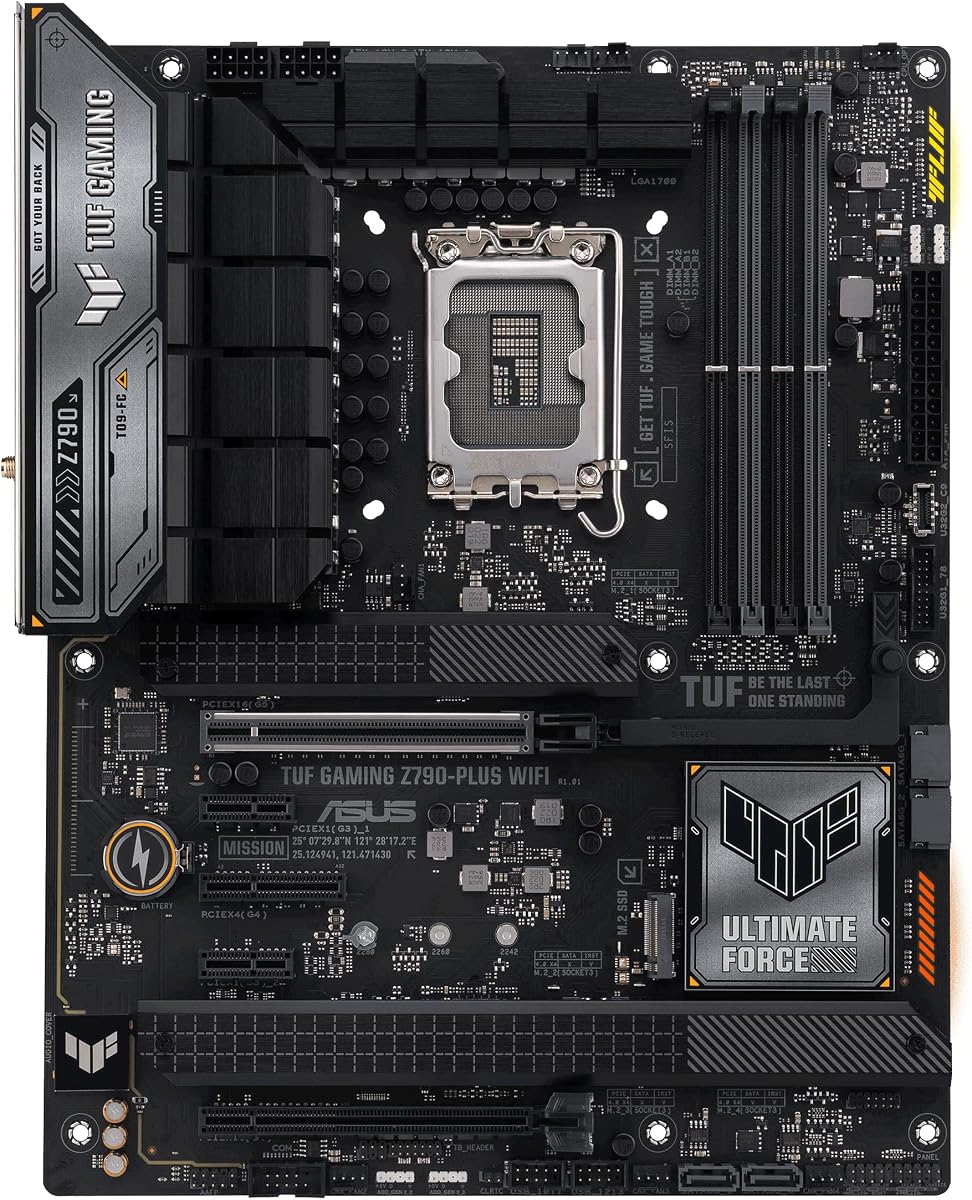
The ASUS TUF Gaming Z790-Plus WiFi is a well-rounded Intel motherboard with a 4.5 rating, a full ATX layout, and a mature collection of gaming features. It supports 12th, 13th, and 14th Gen Intel Core processors through LGA 1700 and is ready for DDR5 memory and PCIe 5.0 components.
We may earn a commission when you buy through this link, at no additional cost to you.
Storage is a major strength, with four M.2 and NVMe SSD positions available. A 16+1 DrMOS power solution, ProCool sockets, military-grade TUF components, and Digi+ VRM form a robust foundation. Cooling provisions include VRM, chipset, and M.2 heatsinks, along with hybrid fan headers and Fan Xpert 4 software.
Networking is equally considered, combining Wi-Fi 6 with an Intel I225-V 2.5Gb LAN connection, TUF LANGuard, and TurboLAN technology. The front-panel USB 3.2 Gen 2 Type-C header, USB Gen 2×2 Type-C, and Thunderbolt 4 header add useful modern connectivity. The main limitation is that LGA 1700 is an established rather than current platform, and the product information does not explicitly highlight a dedicated Q-LED diagnostic display.
Choose this board for a DDR5 Intel gaming or workstation build that needs plenty of storage, fast wired networking, and extensive cooling options. It is especially well suited to users who want a recognizable gaming ecosystem without moving to the most elaborate ROG models.
Four M.2 positions allow for extensive NVMe storage without occupying the primary PCIe graphics slot. This benefits users who want separate drives for games, applications, and working files.
The Intel I225-V 2.5Gb LAN is a meaningful upgrade over basic gigabit Ethernet for large file transfers, while Wi-Fi 6 provides a convenient wireless alternative.
We may earn a commission when you buy through this link, at no additional cost to you.
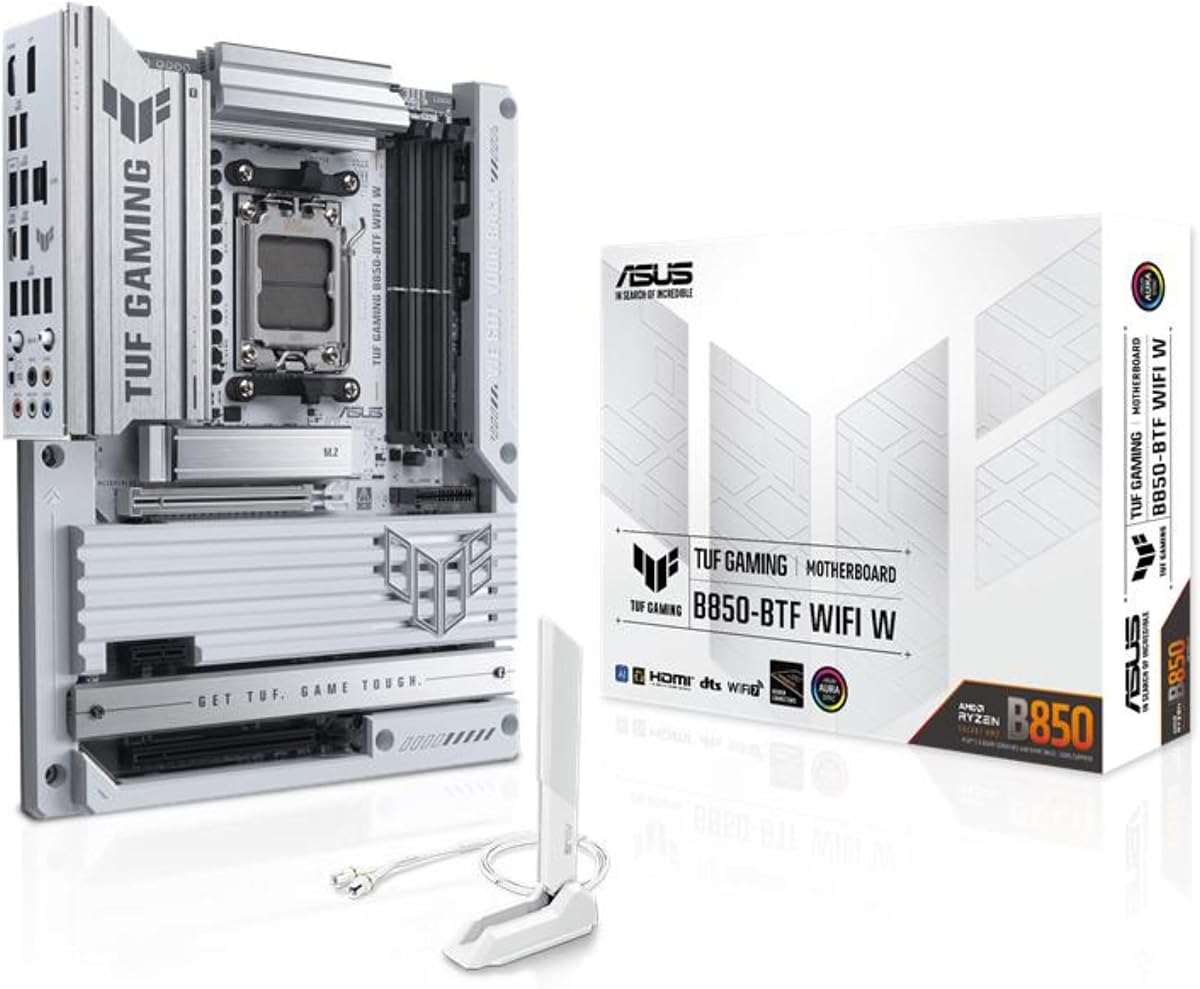
The ASUS TUF Gaming B850-BTF WiFi W pairs a modern AMD platform with a design that emphasizes tidy PC construction. Its 4.6 rating reflects a capable overall package, and the hidden-connector design distinguishes it from conventional ATX boards while keeping the full-size format.
We may earn a commission when you buy through this link, at no additional cost to you.
It supports AMD Ryzen 9000, 8000, and 7000 Series desktop processors on AM5, along with DDR5 memory and PCIe 5.0 readiness. A 14+2+1 configuration of 80A DrMOS power stages, an eight-layer PCB, 8+8-pin ProCool connectors, alloy chokes, and durable capacitors is designed to provide stable power delivery.
The graphics slot can accommodate a PCIe high-power connector and deliver up to 600 watts to the graphics card, an important consideration for demanding modern GPUs. Wi-Fi 7 and 2.5Gb LAN provide current wireless and wired networking, while three M.2 slots allow a useful but not exhaustive storage arrangement. The principal limitation is that only three M.2 positions are listed, and the supplied specifications do not explicitly name a diagnostic LED system.
This board is a compelling choice for a clean-looking AM5 build, especially for a creator or enthusiast who wants recent networking and robust power delivery. Ensure your case and graphics card are compatible with the board's high-power connection arrangement before beginning the build.
The concealed connector arrangement reduces visible wiring around the board, giving the system a cleaner appearance while making internal cable planning more orderly.
Supporting up to 600 watts through the motherboard's graphics power connection gives builders more flexibility when using a power-hungry graphics card.
We may earn a commission when you buy through this link, at no additional cost to you.
The MSI MAG X870 Tomahawk WiFi is a performance-oriented AM5 motherboard aimed at builders who value high-speed ports and networking. Its 4.3 rating is respectable, though it trails the strongest products in this guide, and the feature set is clearly aimed at modern gaming and high-bandwidth workflows.
We may earn a commission when you buy through this link, at no additional cost to you.
Ryzen 9000, 8000, and 7000 Series desktop processors are supported through AM5. The board includes DDR5 memory support, PCIe 5.0 expansion, and Gen5 M.2 storage. Its built-in USB 4 port supports transfer speeds up to 40Gbps, while a 5Gbps LAN connection offers a substantial wired networking upgrade.
Thermal design receives attention through an extended PWM heatsink and enhanced circuit design intended to help high-end processors maintain performance. Wi-Fi 7, Bluetooth 5.4, isolated Audio Boost 5 circuitry, and a high-quality audio processor round out the feature set. The supplied data does not explicitly identify the board's LED or POST-code diagnostics, so buyers should confirm the exact labeling and location before purchase.
The Tomahawk is best for a modern AMD gaming system that needs fast storage, a 5Gb network, and USB 4 connectivity. It may appeal less to builders focused on compactness or explicit onboard diagnosis, and the lower rating warrants checking recent customer feedback for any recurring concerns.
A 5Gbps connection is particularly useful when moving large project files between computers over a home network, provided the other device and network infrastructure can support the speed.
The built-in USB 4 port provides a high-bandwidth path for compatible displays, docks, enclosures, and storage devices without relying on an add-in card.
We may earn a commission when you buy through this link, at no additional cost to you.
The GIGABYTE Z390 AORUS PRO Wi-Fi is an established Intel gaming motherboard built around 8th and 9th Gen Core processors. Its 4.5 rating and mature feature set make it worth considering for an existing LGA1151 system, although it is not a logical choice for a new high-end build.
We may earn a commission when you buy through this link, at no additional cost to you.
The board uses dual-channel, non-ECC, unbuffered DDR4 across four DIMM slots and is ready for Intel Optane memory. A 12+1-phase digital VRM with DrMOS supports stable power delivery, while multi-cut heatsinks and a heat pipe form the thermal foundation. The two M.2 positions benefit from Thermal Guard protection.
Onboard Intel CNVi 802.11ac 2×2 Wi-Fi, Bluetooth 5, and Intel Gigabit LAN with cFosSpeed cover common networking needs. RGB Fusion supports addressable LEDs and RGB strips, while Smart Fan 5 uses multiple temperature sensors and hybrid fan headers. Its age is the central limitation: LGA1151 limits processor choice, and modern multi-GPU, storage, and connectivity expectations have moved well beyond this generation.
This motherboard is most relevant if you already own a compatible CPU, DDR4 memory, and case, or if a refurbished or prebuilt system uses the same platform. For a fresh build, choose a newer chipset unless the lower cost of this established board materially improves the complete system.
Choosing an established platform can help a builder reuse compatible components instead of replacing an entire working system. Verify the BIOS and processor support before making the decision.
Smart Fan 5 draws on multiple temperature sensors and hybrid fan headers, allowing the system to react to different heat sources rather than relying on one reading.
We may earn a commission when you buy through this link, at no additional cost to you.
The GIGABYTE B850 AORUS Elite WIFI7 offers a current AM5 foundation with a practical balance of features. It carries a 4.4 rating, supports the latest three major Ryzen desktop families, and includes a five-year warranty that adds some reassurance for a long-lived build.
We may earn a commission when you buy through this link, at no additional cost to you.
Four DDR5 memory slots, a 14+2+2 power design, PCIe 5.0, and three M.2 slots create a modern platform for gaming and general productivity. VRM and M.2 Thermal Guard components help manage the heat generated around power circuitry and high-speed storage, while the EZ-Latch system is intended to simplify component handling.
Wi-Fi 7 and 2.5Gb Ethernet provide flexible networking, and USB-C adds convenient peripheral connectivity. The main limitation is storage scalability relative to boards with four or five M.2 slots. As with many boards in the guide, the supplied specifications focus on platform features rather than explicitly naming a motherboard diagnostic LED, so confirm the diagnostic display in the listing image or manual.
This is a sensible recommendation for an AM5 builder who values warranty coverage, modern wireless networking, and straightforward installation features. Choose a different board if maximum internal storage capacity or explicit Q-LED diagnostics are your leading requirements.
Support for Ryzen 9000, 8000, and 7000 Series processors gives buyers a broad selection within the same AM5 ecosystem, making processor upgrades more flexible than older platforms.
Tool-free retention mechanisms can reduce the physical force needed during installation, which is useful for large graphics cards, coolers, and M.2 heatsinks.
We may earn a commission when you buy through this link, at no additional cost to you.
The GIGABYTE B650 AORUS Elite AX remains a credible AM5 option for builders who want established platform support without moving to the newest chipset. Its 4.4 rating reflects a balanced combination of power delivery, connectivity, and thermal design.
We may earn a commission when you buy through this link, at no additional cost to you.
Ryzen 9000, 8000, and 7000 Series processors are supported, and the four DIMM slots accept DDR5 with AMD EXPO and Intel XMP memory module support. Twin 14+2+1 phases use 70A power stages on an eight-layer, two-ounce copper PCB, providing a substantial foundation for mainstream and enthusiast Ryzen processors.
The thermal package includes a 6mm heat pipe, fully covered MOSFET heatsinks, an M.2 Thermal Guard, and PCIe Ultra Durable Armor. Connectivity covers PCIe 5.0, a PCIe 5.0 NVMe x4 M.2 position, front and rear USB-C, Wi-Fi 6E, and 2.5Gb Ethernet. The supplied information does not explicitly identify a diagnostic LED, and its B650 chipset and Wi-Fi 6E are no longer the newest options.
Buy this board if you want a proven AM5 foundation, broad memory profile support, and modern expansion. Look to B850 or X870 alternatives when newest chipset features, Wi-Fi 7, or more clearly documented diagnostic controls are priorities.
Support for both AMD EXPO and Intel XMP profiles makes the board more accommodating, although buyers should still confirm that their chosen memory kit is compatible.
Covered MOSFET areas and the M.2 Thermal Guard help maintain more stable temperatures around power delivery circuitry and high-speed solid-state drives.
We may earn a commission when you buy through this link, at no additional cost to you.
The Jadeshay TL631 Pro is not a motherboard but a motherboard analyzer designed to expand the troubleshooting options of compatible systems. Its 3.3 rating reflects the uncertainty associated with compact diagnostic accessories, yet the product's multi-indicator approach can still be valuable for experienced builders and repair technicians.
We may earn a commission when you buy through this link, at no additional cost to you.
The analyzer supports PCI, PCI-E, mini PCI-E, and LPC slots, allowing it to interface with a broad range of desktop and laptop motherboards, including systems from major brands. Intelligent power-module recognition is designed to identify components quickly, while multiple LED channels report the status of the power supply, motherboard, CPU, memory, graphics card, and hard disk.
The main advantage is portability and compatibility. A technician can carry one tool to diagnose several generations of equipment rather than relying on each motherboard's own display. The limitation is equally important: this is an add-on diagnostic card, not a replacement motherboard or a universal solution for every modern system. Expansion-slot compatibility must be checked before purchase.
Choose the TL631 Pro if you service varied hardware collections or want a quick visual component check. For a new gaming computer, a motherboard with its own clearly labeled debug display is usually more convenient, while the TL631 is better understood as a repair-shop accessory.
Support for PCI, PCI-E, mini PCI-E, and LPC gives the analyzer broader utility than cards limited to one connector type, particularly when maintaining older equipment.
Separate LED indicators can narrow a failure to areas such as memory, graphics, or power delivery, although the card supplements rather than replaces methodical testing.
We may earn a commission when you buy through this link, at no additional cost to you.
The TL611 Pro Debug Card combines a four-digit POST-code display with several LED indicators, offering a more granular diagnostic aid than a simple power tester. Its 3.5 rating suggests mixed experiences, so buyers should consider the motherboard and accessory together rather than expecting identical support across every platform.
We may earn a commission when you buy through this link, at no additional cost to you.
Automatic identification of power modules is designed to streamline initial diagnosis, while multiple detection channels cover items such as the power supply, CPU, and memory. The card supports PCI-E, mini PCI-E, and LPC slots, making it useful for desktop and laptop systems that expose a compatible diagnostic interface.
The numeric display is the key differentiator from simple LED testers. A POST code can reveal where initialization stopped, giving a technical builder a more specific starting point for investigation. However, interpreting the result still requires the relevant board manual or POST-code reference, and the card itself cannot identify every physical or electrical fault.
This tool makes the most sense for repair technicians, system integrators, and owners of older PCs who need a reusable diagnostic instrument. It is less convenient for a new system whose motherboard already provides onboard Q-LED or POST-code displays, but it remains a useful addition to a serious troubleshooting kit.
A four-digit display records the last initialization stage reached, which can help distinguish a CPU, memory, graphics, or firmware problem when a system never reaches the operating system.
Automatic power-module recognition reduces the number of manual checks required before moving to more involved troubleshooting, provided the connected motherboard is properly supported.
We may earn a commission when you buy through this link, at no additional cost to you.
The ASUS ROG Strix X870E-E is the most comprehensively equipped motherboard in this guide, with an 18+2+2 power solution, five M.2 slots, extensive tool-free retention, and two USB4 Type-C ports. Its 4.4 rating is solid, while the explicit Q-LED and Q-Code features make it particularly relevant to the diagnostic focus of this roundup.
We may earn a commission when you buy through this link, at no additional cost to you.
Ryzen 9000, 8000, and 7000 Series processors are supported through AM5, and DDR5 memory can benefit from AEMP. The power stages are rated at 110A per stage and use dual ProCool II connectors, alloy chokes, and durable capacitors. Thermal design includes massive heatsinks, an integrated I/O cover, high-conductivity thermal pads, and an L-shaped heat pipe.
Storage is unusually flexible, with three onboard PCIe 5.0 M.2 slots and two PCIe 4.0 positions, all assigned substantial cooling. Connectivity includes dual USB4 Type-C ports, a front-panel USB 20Gbps Type-C connector, USB 10Gbps with Power Delivery 3.0 support, a USB Wattage Watcher, numerous additional USB ports, and PCIe 5.0 SafeSlots.
For diagnosis and installation, Q-LED, Q-Code, a start button, BIOS FlashBack, a Clear CMOS button, Q-Latch, Q-Slide, Q-Release Slim, a pre-mounted I/O shield, and other conveniences reduce uncertainty during assembly and maintenance. This is the premium recommendation for an enthusiast who wants abundant connectivity, storage, power delivery, and the clearest built-in diagnostic tools.
Q-LED provides visible status indicators, while Q-Code adds numerical POST information. Together they offer both a quick visual reference and a more precise code for deeper troubleshooting.
Three PCIe 5.0 and two PCIe 4.0 M.2 positions allow a high-speed internal storage configuration without requiring add-in SATA adapters for every drive.
Q-Latch, Q-Slide, Q-Release, and Q-Release Slim can simplify the installation or removal of components, reducing the risk of disturbing tightly fitted parts during routine maintenance.
We may earn a commission when you buy through this link, at no additional cost to you.
The right motherboard depends on processor compatibility, memory type, case size, expansion needs, and the level of diagnostic detail you want. The following factors help narrow a large and frequently changing hardware category.
Begin with the processor you own or intend to buy, because the socket and chipset determine which motherboards will work at all. The shortlist includes AM4 boards for Ryzen 3000 through 5000 families, AM5 boards for Ryzen 7000 through 9000 families, and LGA 1700 boards for Intel Core 12th, 13th, and 14th Gen processors. It also includes the older LGA1151 platform used by the Z390 AORUS PRO. Check the exact CPU model, supported memory generation, and BIOS requirements rather than assuming that a socket name guarantees every feature is available.
A useful diagnostic system should be visible, labeled, and capable of showing which part of startup is failing. The MSI PRO B550M-P WIFI6E explicitly provides EZ Debug LED, while the ASUS ROG Strix X870E-E includes Q-LED and Q-Code. LEDs are approachable because they communicate status through color and position, whereas POST codes provide more specific information for experienced users. Some boards may offer useful status displays without those names appearing in a summary, so inspect the product photographs and manual for CPU, memory, VGA, and boot indicators before buying.
Motherboard memory support is not interchangeable across platforms. The MSI B550M-P and GIGABYTE Z390 AORUS PRO use DDR4, while the newer AMD AM5 and Intel Z790 boards use DDR5. The AM4 model supports DDR4 speeds up to 4400+ MT/s with overclocking, while several other boards explicitly mention four DIMM slots. The B650 AORUS Elite AX supports AMD EXPO and Intel XMP profiles. Consider the number of modules, desired capacity, memory speed, and whether your case has enough clearance for tall heat spreaders.
Count your storage drives and expansion cards before choosing a board. The ASUS TUF Z790-Plus and ASUS ROG X870E-E each provide four M.2 positions, while the ROG board goes further with five. The B850-BTF, B850 AORUS Elite, and B650 AORUS Elite provide three. Traditional PCI Express slots, SATA connectors, headers, and USB ports also influence whether the board can support additional devices, capture cards, controllers, or peripherals without requiring separate adapters.
Processor and graphics support determine how much power delivery and cooling capacity a board should have. The products range from the MSI board's more modest platform to the ROG Strix X870E-E's 18+2+2 configuration with 110A power stages. The ASUS TUF B850-BTF and GIGABYTE B850 AORUS Elite use 14+2+1 or 14+2+2 designs, respectively. Check the socket power connectors, VRM heatsinks, M.2 cooling, and case airflow. A strong phase count cannot compensate for a cramped case with poor airflow.
Networking options range from onboard AC Wi-Fi on the Z390 AORUS PRO to Wi-Fi 6E, Wi-Fi 7, 2.5Gb Ethernet, and 5Gb Ethernet. Faster wired connections are useful for large local transfers, network storage, and crowded home networks, while wireless connectivity provides placement flexibility. Confirm the router supports the advertised wireless standard and consider the placement of antennas in a metal case. If a board lacks the network hardware you need, an add-in adapter is an alternative, but onboard support generally produces a cleaner installation.
The physical size of a motherboard affects every stage of the build. The MSI PRO B550M-P WIFI6E is mATX, making it useful for smaller cases that still offer enough space for a full graphics card, cooler, and power supply. Every other motherboard in the list is ATX and requires a case with suitable mounting space. Check I/O clearance, cooler height, RAM height, M.2 heatsink positioning, and GPU length. The B850-BTF's hidden connectors can improve appearance, but they may also complicate routing in a case with limited space behind the tray.
Features such as EZ-Latch, Q-Latch, Q-Slide, Q-Release, pre-mounted I/O shields, FlashBack, Clear CMOS buttons, and start buttons can make assembly and servicing easier. They are especially valuable on dense boards with large heatsinks where removing a graphics card to access an M.2 slot would otherwise be inconvenient. These conveniences do not guarantee easier software setup, so the board's BIOS, update method, and memory compatibility should still be reviewed before assembly.
Before installing a motherboard, read the manual, identify the CPU and memory support, and inspect the board for the labels associated with its diagnostic LEDs or POST-code display. Learn where the CPU, memory, VGA, storage, and boot indicators are located. Install the processor and cooler correctly, seat memory in the recommended slots, and connect the essential front-panel and power cables before expecting the display to provide useful information.
When a system does not start, use the indicators as the beginning of a process rather than the final diagnosis. Note the illuminated label or recorded code, compare it with the board manual, and then test one component at a time. Reseat memory and expansion cards, confirm the processor is properly mounted, verify power connections, and disconnect unnecessary USB devices. An external diagnostic card can supplement the motherboard display when its slot and platform are compatible.
For long-term care, keep the motherboard away from dust, moisture, direct heat, and strong static discharge. Keep CPU and VRM cooling unobstructed, confirm M.2 heatsinks are attached when needed, and use an anti-static wrist strap or another grounded method when handling components. Update the BIOS when appropriate, monitor temperatures after changes, and investigate unusual POST behavior rather than repeatedly clearing CMOS without first documenting the symptoms.
A motherboard Debug LED identifies the general stage at which startup has stopped. Depending on the board, the indicator may correspond to the CPU, memory, graphics card, storage, or boot process. The exact colors and labels vary by manufacturer, so the board manual is the authoritative reference. A code narrows the problem but does not identify the precise failed component by itself.
They serve different purposes and can be equally useful. LEDs are fast to interpret and easy for beginners to use, while numerical POST codes can provide more specific information for experienced technicians. Some premium boards, such as the ASUS ROG Strix X870E-E in this guide, provide both Q-LED and Q-Code. The ideal choice depends on how much detail you want during troubleshooting.
No. A card such as the Jadeshay TL631 Pro or TL611 Pro must have a compatible PCI, PCI-E, mini PCI-E, or LPC interface, and the system must expose a usable diagnostic connection. Very modern or unusually compact boards may not provide the required slot. Check the motherboard manual and the card's compatibility list before purchasing either accessory.
It depends on your desk, router, and cable access. Onboard Wi-Fi 6E or Wi-Fi 7 is convenient and reduces visible wiring, while 2.5Gb or 5Gb Ethernet is valuable for large transfers and network storage. If your existing router lacks the necessary wireless support, or if your location favors a wired connection, a premium network feature may add little practical value.
An AM4 board can be sensible if you already own a compatible Ryzen processor and DDR4 memory. The MSI PRO B550M-P WIFI6E in this guide combines that established platform with EZ Debug LED diagnostics and current wireless features. For a completely new system, however, AM5 offers a longer processor upgrade path and newer connectivity, so the complete-system value should be considered rather than the board alone.
One M.2 slot is enough for a typical operating-system drive, while two or more provide room for separate game, application, and project libraries. The boards in this guide offer between three and five positions. Consider future storage plans, heat management, and whether you need PCIe 5.0 bandwidth rather than selecting solely by the number of available slots.
Check the board's supported memory generation, maximum module capacity, DIMM count, and speed profiles. The GIGABYTE B650 AORUS Elite AX supports both AMD EXPO and Intel XMP, but you still need a compatible memory kit to use those profiles. Also account for the physical height of heat spreaders and the available space between the board and CPU cooler.
The illuminated indicator suggests that startup stopped around a particular component group. Common causes include improperly seated memory, a poorly installed processor, a graphics card problem, disconnected front-panel wiring, insufficient power, or a storage issue. Confirm the exact label in the manual, check power connections, reseat components one at a time, and use a compatible POST card or another known-good part to narrow the fault.
The MSI PRO B550M-P WIFI6E is the most accessible recommendation for a compact AM4 build because it combines an explicit EZ Debug LED system with useful Wi-Fi 6E support. The ASUS TUF Gaming Z790-Plus WiFi is the balanced Intel option, offering DDR5, four M.2 slots, PCIe 5.0, and 2.5Gb networking. The ASUS ROG Strix X870E-E is the premium choice, with Q-LED, Q-Code, five M.2 positions, dual USB4 ports, and extensive power delivery.
Prioritize processor and memory compatibility first, then confirm that the diagnostic indicators are visible and clearly labeled. Consider storage, networking, power delivery, cooling, and physical fit before choosing a model. A board with a less advanced chipset may serve an upgrade perfectly, while a feature-rich premium model will not compensate for an incompatible processor or insufficient case space.
Finally, compare current product listings, recent customer feedback, warranty terms, and the latest price before purchasing. Inventory and pricing can change quickly, and firmware updates may also affect supported components. Use the links in this guide to review the current product details, and keep the motherboard manual nearby throughout assembly and troubleshooting.