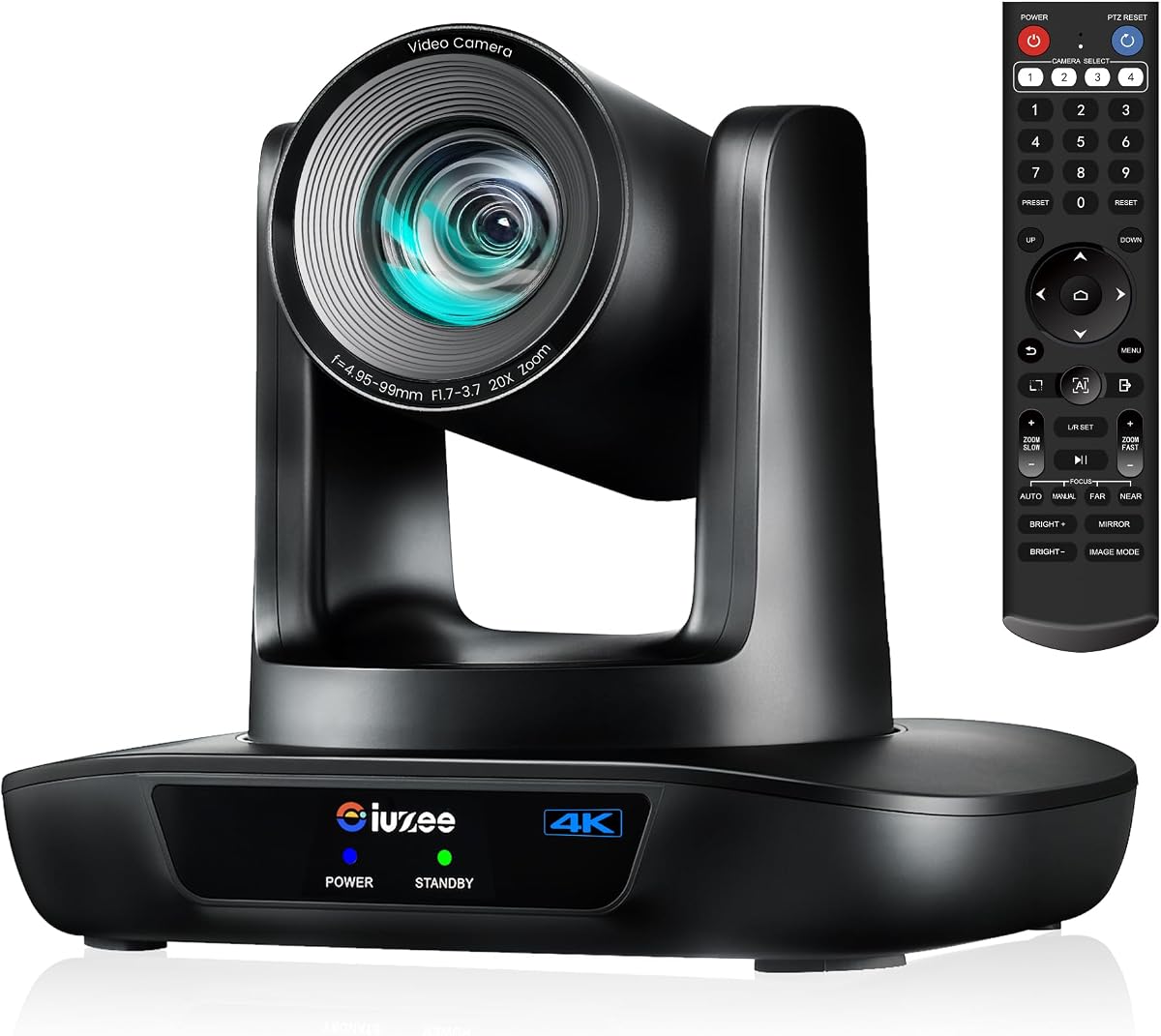
iuZee 4K AI Tracking PTZ Camera
4.7Editor score
4K at 30fps
20X optical zoom
AI presenter tracking
Three simultaneous outputs
Explore the best Ptz Camera for Live Streaming options, comparing tracking, zoom, outputs, controls, and features for professional productions.
A PTZ camera gives live producers the reach and precision of a studio camera without requiring a dedicated camera operator. The right model combines dependable autofocus, useful optical zoom, flexible connectivity, and tracking that can follow a presenter without constantly correcting the shot.
This guide compares ten PTZ cameras for live streaming across 4K or 1080p output, 10X, 20X, or 30X optical zoom, AI tracking modes, wired interfaces, network protocols, installation options, and multi-camera control. It covers standalone cameras as well as bundles with joystick controllers and PoE switches for demanding productions.
Each review identifies the features that make a particular camera useful for churches, classrooms, conferences, studios, and online events. The top picks show the strongest combinations of value, premium production capability, and multi-camera control, while product specifications and availability may change over time.
4.7Editor score

4.7Editor score

4.4Editor score
The comparison below highlights each camera's resolution, zoom range, tracking capabilities, connectivity, and most important production advantage. It is designed to make differences in workflow clear, whether the intended setup is a single USB camera, an IP production system, or a multi-camera installation.


The iuZee 4K AI Auto-Tracking PTZ Camera is a capable all-around choice for producers who want high-resolution video and extensive connectivity without moving to a full broadcast system. Its 4.7 rating reflects a strong balance of imaging features, intelligent tracking, and installation flexibility. The camera can serve churches, classrooms, conference rooms, and event spaces.
We may earn a commission when you buy through this link, at no additional cost to you.
A 1/2.8-inch 8.29-megapixel CMOS sensor supports 4K at 30fps, while the 20X optical lens covers a 63-degree wide view before zooming. AI face and figure tracking can maintain a presenter in frame, and separate Presenter and Auto Framing modes suit different movement patterns. Simultaneous USB 3.0, HDMI, and LAN outputs also allow the camera to feed streaming software, a local display, and a network workflow together.
The camera supports MJPEG, YUY2, H.264, and H.265, with RTMP, RTSP, and SRT support for network streaming. PoE can carry power and data through one cable when a compatible switch is available. The tradeoff is that this is primarily a visual camera rather than an all-in-one conferencing system, so audio needs to come from a separate source, and buyers using PoE must account for the required network hardware.
This is an excellent selection for a church, school, meeting room, or small production that wants professional movement and reliable tracking without a multi-camera bundle. It is especially suitable for OBS, YouTube, Facebook-style streaming workflows, and presentations where the operator wants the camera to follow a speaker automatically.
Face and body recognition allow the camera to follow a presenter and resume tracking after a temporary obstruction. Presenter Mode and Auto Framing Mode provide different approaches to keeping a moving subject composed.
USB 3.0, HDMI, LAN, and optional PoE make the camera useful for direct computer capture, presentation displays, and professional network production. Up to 255 presets also support repeatable camera positions.
We may earn a commission when you buy through this link, at no additional cost to you.
The Tenveo 4K NDI PTZ Camera and Controller Bundle is a strong premium option for productions that need more than a single unattended camera. It combines two 20X NDI cameras with a seven-inch LCD joystick controller, creating a more integrated workflow than a standalone PTZ model. Its 4.4 rating reflects a feature-rich kit designed for churches, schools, weddings, conferences, and live events.
We may earn a commission when you buy through this link, at no additional cost to you.
Each camera can deliver 4K through HDMI and USB 3.0, with IP and NDI output at 1080p. The controller provides a quad-screen real-time preview, making it possible to monitor up to four camera feeds, adjust variable-speed pan, tilt, and zoom, select cameras, manage presets, and control AI tracking. Human body and face recognition add presenter tracking and auto-framing, while gesture controls can toggle modes and adjust zoom.
The bundle supports RTSP, RTMP, ONVIF, GB28181, VISCA over IP, and multicast, making it relevant to NDI-centered and broader IP workflows. Its complexity is justified for a multi-camera operator but may be unnecessary for a single-room stream that can be handled with USB and presets. Audio is also not built into the cameras, so production sound requires a separate mixer or microphone system.
Choose this kit when live coverage demands multiple angles, rapid camera selection, and a physical operator who needs visual feedback. It is particularly appropriate for house-of-worship teams, event crews, and educational broadcasters that want a scalable, professional control center without assembling every component separately.
The controller's seven-inch quad-screen display lets an operator see several feeds while operating the joystick. That visibility reduces blind spots during fast-moving services, stage events, and multi-camera productions.
Two cameras, network video, PoE support, and a dedicated controller create a coherent production package. Tenveo's IP search utility can also simplify device discovery and static address assignment.
We may earn a commission when you buy through this link, at no additional cost to you.
The TONGVEO 4K NDI PTZ Camera combines 4K direct output, professional SDI, NDI, and PoE in a single housing. Its 4.5 rating makes it a compelling option for productions that want flexible signal paths and officially licensed NDI integration. It is particularly relevant to churches, broadcast studios, schools, hospitals, and weddings.
We may earn a commission when you buy through this link, at no additional cost to you.
HDMI and USB deliver 4K at 30fps, while IP and NDI streaming supports up to 1080p. The SDI connection uses locking connectors and is described as suitable for cable runs up to 300 feet, making it more useful for permanent installations than many USB-oriented PTZ cameras. AI tracking recognizes faces and bodies, includes Presenter Tracking and Auto-Framing modes, and can resume tracking when an obstructed person becomes visible again.
The included NDI license removes the ambiguity of whether NDI functionality is activated, while compatibility is listed with OBS, vMix, Streamlabs, ProPresenter, Wirecast, and Zoom. A joystick controller is not included for multi-camera work, so that expense may need to be planned separately. Tracking is limited to one person at a time and is not designed for high-speed motion.
This camera is well suited to operators who value SDI and NDI side by side without sacrificing 4K HDMI or USB output. It is a particularly practical fit for houses of worship and fixed broadcast environments that already use professional switchers or NDI production software.
SDI supports dependable long-run connections, HDMI and USB handle direct 4K workflows, and IP/NDI adds network flexibility. This range makes the camera easier to integrate into both new and existing production systems.
The included NDI license provides a straightforward path to NDI-based production software. Automatic tracking can be adjusted from the remote or browser, while PoE reduces cable clutter.
We may earn a commission when you buy through this link, at no additional cost to you.
The Tenveo Three-Camera Kit is designed for established live-production environments that need wide coverage and coordinated camera control. It includes three 4K NDI PTZ cameras, a seven-inch quad-screen joystick controller, and an eight-port full-gigabit PoE switch. The 4.3 rating reflects a specialized bundle with strong production features but greater complexity than a single-camera setup.
We may earn a commission when you buy through this link, at no additional cost to you.
Each camera provides 20X optical zoom, AI body and face tracking, presenter and auto-framing modes, and simultaneous HDMI, USB 3.0, and IP/NDI outputs. The controller displays as many as four feeds at once and provides variable-speed joystick movement, presets, AI control, and camera selection. Gesture control adds a hands-free way to change tracking modes and zoom within the stated operating conditions.
The supplied PoE switch simplifies deployment of multiple networked cameras, while Tenveo's IP search tool assists with discovery and static addressing. RTSP, RTMP, ONVIF, GB28181, VISCA over IP, and multicast support broaden compatibility. The drawback is the size of the system: three camera bodies, a controller, and a switch require more wiring, planning, and operator training than a compact single-camera rig.
This kit is a strong match for large churches, auditoriums, school productions, conferences, weddings, and broadcasters with multi-camera coverage. It suits teams that value live multiview feedback and repeatable camera control enough to manage the complexity of a complete three-camera system.
The quad-screen controller lets operators verify framing and switch attention among camera feeds without relying entirely on software. Dedicated camera selection keys help manage several angles during a live event.
The eight-port PoE switch removes the need to source that component separately. Each camera can send power and network data over a single Ethernet connection, simplifying a three-camera installation.
We may earn a commission when you buy through this link, at no additional cost to you.
The TONGVEO Conference Room PTZ Camera System prioritizes smooth motion, useful framing automation, and straightforward setup. Its 1080p at 60fps output is still highly relevant for Zoom, Teams, OBS, YouTube, and many online education or church streams. The 4.2 rating suggests a capable general-purpose camera whose main distinction is fluid 1080p performance rather than 4K resolution.
We may earn a commission when you buy through this link, at no additional cost to you.
Its 20X optical zoom allows the camera to isolate a distant speaker without relying on digital magnification. AI tracking supports single-person tracking and multi-person auto-framing, automatically adjusting pan, tilt, and zoom as subjects move. The camera travels through 350 degrees of pan and 180 degrees of tilt, and up to 255 preset positions can be recalled through the included remote.
HDMI and USB 3.0 make the camera straightforward to integrate without additional drivers. The product is listed as compatible with OBS, vMix, Zoom, Microsoft Teams, and YouTube, while the near-silent motor operation is useful in conference rooms and worship environments. The main limitation is that it does not offer the 4K direct output or broad network interface selection found among higher-ranked models.
This is a good fit for meeting rooms, classrooms, small churches, and hybrid events where 1080p60 is the preferred output format. It is particularly attractive to users who want automated framing and many presets without needing a complex IP production architecture.
The 1080p60 mode provides a smooth frame rate for speakers, demonstrations, and live performance. Quiet motorized movement also helps avoid distracting mechanical noise during meetings and services.
A large preset library allows an operator to move between wide, stage, and speaker angles quickly. The included remote makes these positions accessible without a full production controller.
We may earn a commission when you buy through this link, at no additional cost to you.
The TONGVEO AI 4K PTZ Camera is a streamlined option for meeting rooms, classrooms, and worship spaces where USB simplicity matters more than extensive broadcast connectivity. Its 4.7 rating is among the strongest in the group and reflects a camera that combines 4K clarity, AI tracking, and an approachable setup. It can function as a computer camera and a presentation camera at the same time.
We may earn a commission when you buy through this link, at no additional cost to you.
The 10X optical zoom is described as capturing speakers clearly from approximately 30 to 50 feet without digital distortion. AI human recognition can follow a pastor, teacher, or presenter and keep the person centered across a stage or classroom. USB 3.0 provides direct plug-and-play use with Zoom, Microsoft Teams, OBS, and similar services, while HDMI can feed a television, projector, or video switcher simultaneously.
Motorized pan, tilt, and zoom are designed to move smoothly and quietly, which is valuable in spaces where abrupt camera motion would be distracting. Presets allow rapid switching among speaker, audience, and presentation views. Unlike network-oriented competitors, this camera's listed simplicity centers on HDMI and USB rather than PoE, RTSP, RTMP, or NDI, so it is less suited to distributed IP production.
Choose it for offices, classrooms, training rooms, small worship environments, and webinar studios that value 4K presentation quality with minimal configuration. It is especially useful when a computer is the primary capture device and a display needs a separate HDMI feed.
The camera keeps the workflow grounded in familiar HDMI and USB connections. Users can begin streaming or conferencing without configuring an IP address or PoE switch.
AI human recognition follows a presenter and adjusts the framing as the person changes position. Quiet PTZ motion and preset recall support both automated and operator-led operation.
We may earn a commission when you buy through this link, at no additional cost to you.
The 4K 20X IP PTZ Camera offers a broad combination of image quality, reach, and connection methods. Its 4.4 rating reflects a capable camera for churches, conference rooms, and general live-production environments. The 20X optical lens and 58.7-degree field of view give operators a practical balance between wide scene coverage and detailed distant shots.
We may earn a commission when you buy through this link, at no additional cost to you.
The camera outputs 4K at 30fps through its high-resolution sensor and supports 340 degrees of pan and 120 degrees of tilt. The listed transmission distance reaches 320 feet, although the practical result will depend on the connection type and installation. USB and HDMI provide familiar direct outputs, while IP, PoE, RTSP, and RTMP options support network-oriented streaming.
H.264 and H.265 encoding is supported, and 2D/3D noise reduction is intended to improve low-light output and bandwidth efficiency. Compatibility includes Zoom, Skype, WebEx, Microsoft Teams, GoToMeeting, and BlueJeans, along with Windows and macOS systems. Some operating-system references are older, so current environment compatibility should be verified before purchase, and AI tracking is not clearly emphasized in the supplied specifications.
This camera suits venues that want 4K detail, long optical reach, and the freedom to use either a computer or an IP workflow. It is a sensible option for schools, churches, and meeting facilities that want both direct output and network streaming from one camera.
USB, HDMI, IP, and PoE provide several ways to integrate the camera. H.264 and H.265 options can help production teams select an encoding format suited to their network conditions.
A wide-angle lens and 20X zoom let an operator start wide and isolate a distant speaker. The stated 340-degree pan range reduces the need for multiple cameras in moderate-size rooms.
We may earn a commission when you buy through this link, at no additional cost to you.
The 4K HDMI 20X PTZ Camera is a versatile choice for installations that already use serial control equipment. Its 4.6 rating reflects a strong feature set spanning image quality, network streaming, AI tracking, and several PTZ control standards. It is suitable for churches, schools, hospitals, weddings, and general live-streaming environments.
We may earn a commission when you buy through this link, at no additional cost to you.
A 1/2.8-inch CMOS sensor and 20X optical zoom provide 4K detail and a 54-degree wide-angle view. The default HDMI output is 4K, or it can be configured for 1080p at 60fps. Fast, precise autofocus and 2D/3D noise reduction support clear output, while monocular human tracking centers a moving subject. As the default resolution is 4K, a compatible 4K display is needed to see the full detail.
The camera can simultaneously output HDMI, USB, and IP video, and it supports VISCA, Pelco-D, Pelco-P, ONVIF, SRT, RTSP, and RTMP. RS232 and RS485 connections allow integration with existing control systems, while the included IR remote provides direct local operation. It can be mounted on a wall, ceiling, or tripod, making it adaptable to permanent rooms or temporary event spaces.
This model is a strong fit for AV integrators, schools with control rooms, churches with existing production equipment, and technically confident operators who value protocol breadth. The serial interfaces and network options give it more installation flexibility than a basic USB webcam.
VISCA, Pelco-D, Pelco-P, RS232, and RS485 make the camera approachable for professional control environments. These options support integration with switchers, control processors, and multi-camera systems.
Operators can begin in 4K for detailed HDMI capture or select 1080p60 when the workflow or display calls for it. Simultaneous HDMI, USB, and IP outputs expand where the signal can be used.
We may earn a commission when you buy through this link, at no additional cost to you.
The Prisual 5th Gen AI Auto Tracking PTZ Camera stands out for its 30X optical zoom and broadcast-oriented connectivity. Its 4.7 rating reflects a strong combination of reach, image processing, tracking, and professional control options. It is a natural fit for large churches, auditoriums, conference halls, stages, and other venues where speakers sit far from the camera.
We may earn a commission when you buy through this link, at no additional cost to you.
Full HD at 60fps can be recorded in 1080p, 1080i, or 720p broadcast formats. The upgraded image processing is designed to maintain balanced exposure, accurate white balance, and natural color. Presenter, Zone, and Auto Frame modes support different tracking strategies, while Anti-Lost Lock can preserve the current shot or return to a preset if the subject is lost.
HDMI, 3G-SDI, USB 3.0, and LAN can operate simultaneously, and PoE simplifies installation by carrying power and data together. RS232, RS485, VISCA, VISCA over IP, Pelco-D, RTSP, RTMP, SRT, ONVIF, H.264, and H.265 support extensive production integration. Although NDI is described as a free upgrade with a valid Order ID, it is not a standard included feature, and the camera does not offer 4K output.
This camera is the top choice for large-venue operators who prioritize zoom range and professional signal paths over 4K resolution. It suits established production teams that need SDI, serial control, IP streaming, and robust tracking in one camera.
The 30X optical zoom brings distant speakers and stage details into clearer view without relying on digital magnification. Fast, stable autofocus helps preserve sharpness while framing changes.
Four simultaneous outputs cover local displays, computer capture, broadcast switchers, and network systems. The broad protocol set supports established control rooms and modern IP workflows.
We may earn a commission when you buy through this link, at no additional cost to you.
The Tenveo 20X AI PTZ Camera is a capable 1080p60 option with unusually prominent gesture controls. Its 4.3 rating reflects a broad set of automation, networking, and PTZ functions for churches, schools, conferences, concerts, and remote training. It can be used as a direct USB camera or deployed as an IP live-streaming device.
We may earn a commission when you buy through this link, at no additional cost to you.
A 1/2.8-inch CMOS sensor and 20X wide-angle optical lens produce FHD 1080p at 60fps. Dual body and face tracking supports presenter mode and auto-framing, including the ability to maintain a lock when the target is blocked. Gesture commands can toggle AI mode, enter or exit presenter mode, zoom in or out, and lock or unlock gesture control when the stated distance and positioning conditions are met.
USB 3.0, HDMI, and LAN outputs run simultaneously, with RTSP and RTMP support and optional PoE through a compatible switch. The camera pans through 350 degrees and tilts through 180 degrees. It supports 10 presets through the remote and up to 255 via RS232 or RS485, and can be installed on a desktop, monitor, wall, or ceiling. There is no built-in microphone.
This camera is a good choice for presenters who want hands-free camera control or for production teams managing several repeatable angles. It works especially well in worship and education environments where 1080p60, remote presets, and network support are more valuable than 4K resolution.
Recognized gestures can change tracking modes and adjust zoom, reducing interruptions to the operator's workflow. The controls are most suitable when the presenter faces the camera and maintains the specified distance.
Desktop, monitor, wall, and ceiling options accommodate changing spaces. Extensive preset support lets a production move rapidly between established framing positions.
We may earn a commission when you buy through this link, at no additional cost to you.
Choosing a PTZ camera means balancing image resolution, optical reach, tracking behavior, signal paths, control methods, and the scale of the production. The most important step is to match the camera to how many cameras you will operate, where they will be installed, and which software or switcher will receive their video.
Optical zoom determines how tightly a camera can isolate a distant subject without relying on digital enlargement. Most models in this guide provide 20X optical zoom, the TONGVEO 4K 10X offers a shorter 10X range, and the Prisual reaches 30X for large venues. Consider the distance from the camera to the stage, lectern, altar, classroom, or conference table, and select enough reach to frame a speaker tightly without losing image detail.
4K cameras provide more pixels for large displays, detailed close-ups, and flexible post-production crops, while 1080p60 remains smooth and efficient for live delivery. Output resolution can differ by interface: several 4K-capable models deliver 4K through HDMI or USB while limiting NDI or IP streaming to 1080p. Review the resolution and frame rate for every output you plan to use instead of assuming all ports behave identically.
AI tracking can follow a presenter, maintain a framed group, or restore a subject after an obstruction. Presenter mode is useful when one person moves across a stage, while auto-framing can suit meetings with more than one participant. The TONGVEO system specifically tracks one person and is not intended for high-speed motion, so rapid action, crowded scenes, and athletic events require especially cautious evaluation.
USB 3.0 and HDMI are the easiest options for computer capture and local presentation displays. SDI is valuable in fixed broadcast installations because it supports locking connectors and long runs, while LAN with RTSP, RTMP, SRT, ONVIF, or NDI supports IP-based production. The ideal camera provides at least one direct output for your software and one separate output for monitoring or recording.
PoE can reduce installation clutter by carrying power and data over one Ethernet cable, but it requires a compatible PoE switch or injector. USB and HDMI also have practical cable-length considerations, and an IP camera needs a stable network address and adequate bandwidth. Plan cable routes, switch capacity, firmware access, and network segmentation before mounting a camera permanently.
A local IR remote is sufficient for a single camera, while a joystick controller becomes valuable when an operator must pan, tilt, zoom, and select among several feeds quickly. Serial control through RS232 or RS485 is useful in AV systems, and VISCA or VISCA over IP support multi-camera coordination. Preset capacity also matters when a service or presentation repeatedly uses the same stage, podium, audience, and close-up angles.
These PTZ cameras are focused on video capture, and the supplied specifications explicitly note the absence of built-in microphones on multiple Tenveo models. A production should plan a separate microphone, mixer, and audio interface, or route house audio through an existing sound system. Camera movement and autofocus are important, but intelligible speech and consistent levels can determine whether a stream feels professional.
Consider the room dimensions, ceiling structure, lighting, distance, and sight lines before choosing an installation method. Wall, ceiling, tripod, desktop, and monitor mounting are supported across the list, but included brackets and screw kits may vary. Low-light performance, noise reduction, motorized noise, and reliable autofocus are especially relevant in churches, theaters, and evening events.
Start by choosing a stable mounting point with a clear view of the presenter and checking that the lens will not be blocked by lighting fixtures, screens, or decorative elements. Connect the camera through its intended interface, power it on, and update or verify its firmware and camera-management access before the event. If using IP, assign a stable address and confirm that the required RTSP, RTMP, SRT, NDI, or ONVIF workflow is enabled.
Set the output resolution and frame rate for the actual destination, then frame a wide shot before making close-up adjustments. For AI tracking, choose presenter mode for a moving individual or auto-framing for a group, allow the camera to acquire the subject in good light, and test what happens when the person is briefly blocked. Manual operators should save frequently used angles as presets and use the remote or controller to recall them consistently.
For care, keep the lens clean and avoid touching the glass, operate the camera within its specified environmental and cable requirements, and avoid abrupt external movement of the pan-tilt head. Secure cables, leave ventilation openings unobstructed, and keep the camera away from moisture and excessive heat. Before every major stream, update the software, test each output, check autofocus and tracking, confirm preset positions, and verify that separate audio is present and synchronized.
A PTZ camera can pan, tilt, and zoom remotely, allowing it to cover a much larger area than a typical fixed webcam. It can also move automatically to follow a presenter, frame different participants, or return to saved positions. This makes it especially useful for churches, classrooms, conference rooms, and live events.
Optical zoom magnifies the image using the lens and generally preserves more detail than digital zoom, which crops and enlarges the sensor image. Most options here provide 20X optical zoom, while the Prisual provides 30X for larger venues. Choose based on the physical distance between the camera and your subject.
Not always. A 1080p camera can provide a clear result, particularly when the platform, encoder, internet connection, or display does not support 4K. FourK is more useful for large screens, detailed close-ups, recording, and future editing, so the best resolution is the one your entire workflow can reliably deliver.
USB is convenient for direct computer capture, HDMI serves local displays and presentation equipment, and SDI supports robust broadcast connections over longer runs. NDI carries low-latency video and control over an IP network. Some cameras combine these outputs simultaneously, allowing one camera to feed both a computer and a production system.
A single camera can usually be operated with its included remote and a web interface. A joystick controller becomes valuable for multi-camera systems because it offers speed control, camera selection, presets, and sometimes a multiview display. The Tenveo bundles include a seven-inch quad-screen controller for this reason.
It depends on the model. The TONGVEO camera with official NDI integration is specifically noted as unsuitable for high-speed motion, and other tracking systems can also struggle when subjects move quickly or change direction abruptly. For sports, manual PTZ operation, preset recall, and a fast operator may provide more reliable framing.
Several Tenveo models explicitly have no built-in microphone, and the product data for the other cameras focuses on video rather than integrated audio. Plan to use a separate microphone or audio mixer, especially for a church service, classroom lecture, conference, or professional live production.
Most products in this guide support wall, ceiling, tripod, desktop, or monitor mounting, and several include a wall bracket and screws. Confirm the supplied mounting hardware and the camera's orientation requirements before installation. A ceiling-mounted camera also needs careful alignment so it does not point directly into bright lights.
The iuZee model is the strongest all-around value in this group, combining 4K output, 20X optical zoom, AI tracking, and simultaneous USB, HDMI, and LAN outputs. The Prisual stands apart for large venues through its 30X zoom and broadcast-ready SDI workflow, while the Tenveo premium bundle is the most complete starting point for coordinated two-camera production.
Your priorities should follow the production rather than a single specification. Choose more zoom for distant subjects, 4K for detailed recording and large displays, NDI or IP for distributed production, SDI for professional switchers, and a controller when one person must manage several cameras. Always include external audio in the budget and test tracking with the lighting and movement patterns of your actual venue.
Specifications, bundle contents, software compatibility, and availability can change, so verify the current product listing before buying. Checking the latest output resolutions, included accessories, control protocols, and support terms will help ensure that the selected camera integrates cleanly with the rest of your live-streaming setup.