
Canon PIXMA TS3720
4.0Editor score
Print copy and scan
Simple 1.5-inch LCD
Mobile printing support
A simple printer for home use should make everyday tasks easier without introducing complicated menus, difficult setup, or features you will rarely use. The most practical choices combine clear controls, dependable Wi-Fi, flexible paper handling, and the ability to print, copy, and scan from one compact device.
We compared all 10 printers in this guide by considering document quality, color output, wireless connectivity, setup, paper support, scanning features, automatic duplexing, displays, and their usefulness for common household needs. The list covers basic inkjets, more capable all-in-ones, and cartridge-free supertank models.
Each review explains who benefits most from the featured model, what it does especially well, and where its compromises may matter. Ratings reflect the supplied customer feedback, while specifications and compatibility details come from the product information; availability, bundles, and retailer terms can change over time.
4.0Editor score

4.2Editor score

4.0Editor score
As an Amazon Associate we earn from qualifying purchases.
This side-by-side comparison highlights each printer's core functions, connectivity, paper handling, and most important home-use feature, making it easier to identify the model that fits your household routine.



The Canon PIXMA TS6520 is a strong all-around choice for households that want straightforward printing without giving up modern wireless convenience. Its 4.2 rating reflects generally favorable customer feedback, while the feature set covers color documents, photos, copying, scanning, and automatic two-sided printing. The compact white design should fit comfortably into a home office, study, or shared living area.
We may earn a commission when you buy through this link, at no additional cost to you.
Automatic duplex printing is the feature that elevates this model above many entry-level alternatives. It helps reduce paper consumption when printing long reports, lesson materials, recipes, and other multipage documents. The 1.42-inch monochrome OLED provides quick access to ink status, printer conditions, and settings without turning a routine home printer into a complicated device.
Connectivity is another strength. Dual-band Wi-Fi supports both 2.4GHz and 5GHz networks, and the printer can handle mobile jobs through the Canon PRINT App, Apple AirPrint, and Mopria Print Service. Its two-cartridge hybrid ink system is described as producing sharp text and vivid color, while supported media includes borderless photos and documents up to 8.5 by 11 inches.
The main limitation is the absence of an automatic document feeder, which matters when frequently copying or scanning several pages. The compact cartridge approach may also require more attention than a supertank system. Even so, the TS6520 is an excellent fit for most home users because it combines automatic duplexing, clear status information, wireless printing, and copy-and-scan functions in a restrained package.
Automatic two-sided printing is particularly useful for school projects, household records, and long web pages. It saves paper and makes finished documents look more professional without requiring users to rotate every sheet manually.
The monochrome OLED keeps essential information visible at a glance. Seeing ink status and printer alerts directly on the device can be faster than navigating through a computer or phone application.
We may earn a commission when you buy through this link, at no additional cost to you.
The HP DeskJet 2923 targets homes that need dependable color printing for letters, recipes, to-do lists, schoolwork, and financial documents. Its 3.7 rating sits in the middle of this group, but the supplied feature information presents a sensibly equipped basic model. It includes printing, copying, scanning, mobile access, wireless connectivity, and a simple icon LCD.
We may earn a commission when you buy through this link, at no additional cost to you.
The strongest argument for this printer is its manageable learning curve. A compact control panel provides the essential functions without the larger interface found on more advanced models. Its 60-sheet input tray is adequate for regular home projects, while dual-band Wi-Fi can automatically detect and resolve connection issues, making network setup less frustrating.
Print performance is designed for routine rather than high-volume work. The stated maximum is 7.5 pages per minute in black and 5.5 pages per minute in color. HP AI helps format web pages and emails more cleanly, and the HP App allows users to print, scan, copy, or fax from a smartphone. The printer is also made with at least 70% recycled plastics and carries ENERGY STAR and EPEAT certifications.
It lacks automatic duplex printing, so multipage documents require manual paper management. The 60-sheet tray also needs more frequent refilling than larger models. Buyers who print only a few pages each week will probably find these limitations easy to accept, while frequent home-office users may prefer a model with duplexing and a larger paper capacity.
The icon LCD is designed for quick, understandable interaction. It suits users who want basic buttons and status information without navigating a large menu or touchscreen.
Color documents, recipes, school assignments, and short reports are the DeskJet 2923's natural range. The stated print speeds are practical for intermittent household printing rather than nonstop office production.
We may earn a commission when you buy through this link, at no additional cost to you.
The Canon PIXMA TS3720 is a straightforward choice for people who want basic color printing, copying, and scanning without paying attention to advanced features they may never use. Its 4.0 rating indicates a solid level of customer satisfaction, and Canon describes setup as a short process that does not require a computer.
We may earn a commission when you buy through this link, at no additional cost to you.
Dual-band Wi-Fi provides a stable connection on both 2.4GHz and 5GHz networks. Users can print from compatible phones and tablets through the Canon PRINT App, Apple AirPrint, or Mopria Print Service. Chromebook compatibility also makes it convenient for students or families managing schoolwork through a web-based or portable device.
The 1.5-inch segment LCD keeps controls understandable, and the two easy-to-replace ink cartridges simplify maintenance. Canon lists media support for envelopes, photos, high-resolution paper, banners, 5-by-5-inch square photos, and borderless photos up to 5 by 7 inches. Black print speed is approximately 7.7 images per minute, while color output reaches approximately four images per minute.
The essential compromise is explicit in the product information: this model performs single-sided printing only. That means long documents will need manual paper reversal, and automatic duplexing is unavailable. It also lacks a document feeder. For a household that mainly prints short pages, occasional photos, and forms, however, the TS3720 remains a practical, understandable option with a one-year warranty.
The printer can join a Wi-Fi network without a computer, reducing the number of steps required for a first-time setup. Its support for AirPrint, Mopria, and the Canon app also makes it accessible from several device types.
Square photos, borderless prints, envelopes, banners, and high-resolution paper broaden the model's usefulness. Buyers can also create posters through the included free web-based poster creation software.
We may earn a commission when you buy through this link, at no additional cost to you.
The Canon PIXMA TS4320 combines an approachable design with a few features that extend beyond basic home printing. It earns a 3.9 rating and includes print, copy, scan, automatic duplexing, and a compact footprint. That combination makes it particularly attractive for users who want fewer unnecessary controls but still expect modern document handling.
We may earn a commission when you buy through this link, at no additional cost to you.
The 1.42-inch monochrome OLED displays ink levels, printer status, and adjustable settings at a glance. Canon describes the printer as a budget-friendly all-in-one for home users and hybrid workers, while the two-cartridge hybrid ink system is intended to deliver sharp text and vivid colors for documents and photographs.
Automatic two-sided printing reduces paper waste and shortens the process for multipage assignments. Dual-band Wi-Fi supports both common network bands, and mobile printing is available through the Canon PRINT App, Apple AirPrint, and Mopria Print Service. The printer can handle documents and photos up to 8.5 by 11 inches, with or without borders.
Compared with the TS6520, this model offers many of the same core conveniences, but it remains a distinct entry in the guide and has a slightly lower customer rating. Its lack of an automatic document feeder makes it less attractive for scanning stacks of papers. Nevertheless, the combination of compact styling, duplexing, status display, and wireless access gives it solid value for a home.
A small footprint does not mean an overly limited device. Automatic duplexing, scanning, copying, and a useful status screen are all retained, making the TS4320 suitable for desks and multipurpose rooms.
EPEAT Silver and ENERGY STAR certifications provide a measurable sustainability consideration. These credentials may appeal to buyers who want fewer consumable cartridges and more efficient home operation.
We may earn a commission when you buy through this link, at no additional cost to you.
The HP DeskJet 2955 is designed for basic color documents and compact home spaces. It has a 3.7 rating, which is slightly below several higher-ranked models, but it provides the essential combination of printing, copying, scanning, wireless access, and a 60-sheet input tray. For occasional users, those fundamentals may be more important than specialized productivity features.
We may earn a commission when you buy through this link, at no additional cost to you.
The icon LCD provides direct control without the learning curve associated with a large touchscreen. HP AI is included to help format web pages and emails while removing content that could otherwise waste paper. The dual-band wireless system is described as detecting and resolving connection issues automatically, which supports reliable use from different parts of the home.
The HP App gives smartphone users access to printing, scanning, copying, and faxing functions. Stated speeds reach 7.5 pages per minute in black and 5.5 pages per minute in color. The printer is made with at least 70% recycled plastic and is ENERGY STAR and EPEAT certified, which adds an environmental credential to its compact design.
Automatic duplexing is not included, and the 60-sheet tray is modest compared with models designed for home offices. Users producing long documents may find the manual process inconvenient. Even so, the DeskJet 2955 serves a clear purpose: uncomplicated, wireless color printing for homes that mainly handle letters, recipes, forms, and shorter school projects.
HP AI can clean up web pages and emails before they are printed. This is useful when a browser page contains navigation, advertisements, or unrelated content that would otherwise create extra sheets.
The small design is intended to fit into a home, while recycled-plastic content and recognized energy certifications make responsible purchasing easier to assess.
We may earn a commission when you buy through this link, at no additional cost to you.
The Canon PIXMA TR7120 stands out because it combines a compact home footprint with an automatic document feeder. That addition makes it especially suitable for students, remote workers, and family administrators who regularly scan or copy multipage paperwork. Its 4.2 rating matches the Canon PIXMA TS6520 among the highest customer ratings in this roundup.
We may earn a commission when you buy through this link, at no additional cost to you.
The automatic document feeder handles multi-page scanning and copying, reducing the need to place each sheet on the flatbed. Automatic duplex printing provides the same paper-saving benefit for two-sided output. Together, these functions distinguish the TR7120 from basic models intended mainly for short documents and individual pages.
Its 1.42-inch monochrome OLED provides direct access to ink levels, status information, and settings. Dual-band Wi-Fi, Canon PRINT App support, Apple AirPrint, and Mopria Print Service cover common wireless workflows. The hybrid two-cartridge system is designed for sharp text and vivid color across documents and photographs, including supported borderless output.
The printer still relies on a two-cartridge ink configuration, so buyers who print frequently should consider how often they want to replace ink. Its media capabilities, while useful, are not designed for a specialized large-format workflow. For a home user needing document automation without a large device, however, the TR7120 delivers a particularly persuasive feature combination.
The automatic document feeder accepts multi-page sets for scanning and copying. This is valuable for paperwork, schedules, recipes, and records where repeatedly using the flatbed would be inconvenient.
Automatic duplexing and an ADF bring office-like document handling to a home-oriented design. The result is useful for hybrid workers who need more capability without moving to a large printer.
We may earn a commission when you buy through this link, at no additional cost to you.
The HP Envy 6155 is a polished home printer with a more modern interface than most basic models. Its 4.1 rating reflects positive customer feedback, while the 2.4-inch color touchscreen, 100-sheet input tray, and automatic duplex printing give it a clear advantage for users who want a more capable everyday device.
We may earn a commission when you buy through this link, at no additional cost to you.
The touchscreen provides a phone-like way to navigate settings, print photos, and manage the printer. HP's P3 technology is designed to produce documents and photos that look vibrant on the printed page, an attractive feature for family projects, invitations, school presentations, and borderless photographs. Print speeds are listed at up to 10 pages per minute in black and seven pages per minute in color.
Automatic duplexing reduces the effort involved in longer documents, and the 100-sheet tray holds more paper than the basic DeskJet models. Dual-band Wi-Fi, the HP App, and HP AI-assisted web-page formatting all support connected use. The supplied information also notes a three-month Instant Ink trial, although the service includes ongoing subscription terms after that period unless cancelled.
The main drawback is the absence of an automatic document feeder. Users with frequent multipage scanning needs may prefer the Canon TR7120 or HP OfficeJet Pro 8125. The printer is also designed to work only with cartridges containing original HP chips or circuitry. Those restrictions are important to consider before purchasing, particularly if alternative ink options matter to you.
The color touchscreen gives users a clearer view of status and settings than a small segment display. It is especially convenient when choosing photos, handling documents, or making changes without opening an application on another device.
HP P3 technology is intended to improve the relationship between on-screen color and printed output. It makes the Envy appealing for creative household projects where visual consistency matters.
We may earn a commission when you buy through this link, at no additional cost to you.
The HP OfficeJet Pro 8125 is the most productivity-focused home printer in this guide. It has a 3.9 rating and a substantial feature set aimed at people who work from home or handle business documents, reports, presentations, and flyers alongside regular household printing. Unlike the simpler all-in-ones, it includes a large 225-sheet input tray and an automatic document feeder.
We may earn a commission when you buy through this link, at no additional cost to you.
The stated print speed reaches 20 pages per minute in black and 10 pages per minute in color. Automatic duplexing reduces paper use, while the ADF supports multi-page scanning and copying. A 2.7-inch color touchscreen gives users a larger, phone-like interface for navigating these features, and dual-band Wi-Fi helps maintain a stable connection.
HP Wolf Essential Security is included to bolster network protection, which is relevant for a printer connected to a home-office network. The HP App supports mobile printing, scanning, copying, and faxing, while HP AI helps prepare web pages and emails for cleaner output. The enclosure contains more than 45% recycled plastic content.
This model is less minimalist than the Canon PIXMA options, and its larger controls and capacity may not be necessary for occasional printing. Its cartridge restrictions are also significant: original HP chips or circuitry are required, and other cartridges will be blocked. Within those limits, it is a capable choice for a household that wants a printer to perform like a compact office machine.
A 225-sheet input tray means fewer refills during reports, lesson packets, and project runs. Combined with fast stated speeds, this makes the printer better suited to sustained work than the basic inkjets in the guide.
The ADF streamlines multipage scanning, while automatic duplexing handles two-sided output. HP Wolf Essential Security adds network protection that is especially useful in a shared home-office environment.
We may earn a commission when you buy through this link, at no additional cost to you.
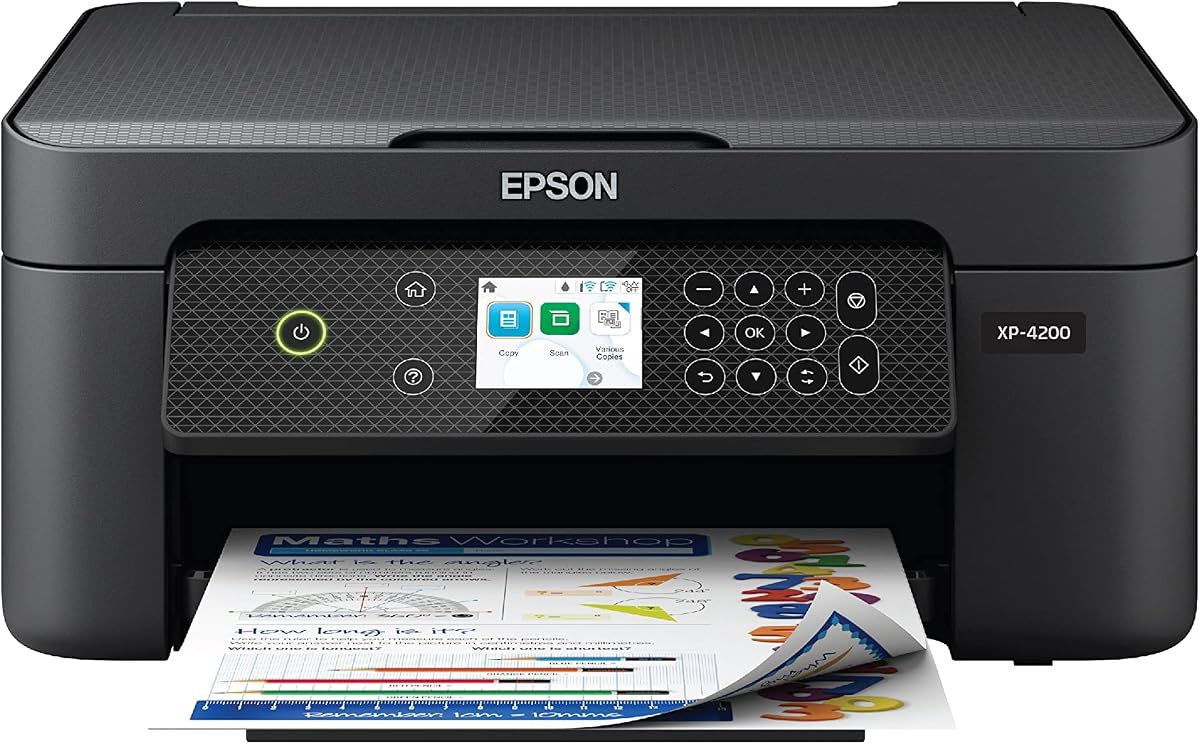
The Epson Expression Home XP-4200 is a wireless all-in-one aimed at homes that want crisp documents, colorful borderless photos, and straightforward ink maintenance. Its 3.8 rating places it in the middle of the group, but Epson's imaging technology and permanent printhead design make it an interesting choice for households that treat the printer as a creative tool as well as a document device.
We may earn a commission when you buy through this link, at no additional cost to you.
The 2.4-inch color display is larger than the simple LCDs offered by several basic models, helping with navigation through printer settings. Epson Smart Panel provides setup and operation from a smartphone or tablet, while Mopria Print Service and Mopria Scan support connected workflows from compatible devices. Alexa compatibility even allows certain printing tasks to be started by voice.
Individual ink cartridges let users replace only the color that has run out, and automatic duplex printing reduces paper waste. ScanSmart creates searchable PDFs, making the scanning function more useful for saved records. Epson's Micro Piezo Heat Free technology and permanent printhead are designed to support reliable, consistent output and long-term operation.
The printer is intended for Epson genuine cartridges, and using non-genuine ink may cause damage that the limited warranty does not cover. It also lacks an automatic document feeder, so multipage scanning remains less convenient. Nevertheless, the XP-4200 is a good match for families that value photo quality, a roomy display, flexible cartridge replacement, and connected printing.
Epson emphasizes rich color and detailed borderless photographs. That emphasis makes this model appealing for family albums, school projects, greeting cards, and other creative output that benefits from accurate-looking color.
Separate ink cartridges make it possible to replace only the color that is depleted. For users whose printing needs vary, this can be more adaptable than a fixed-color cartridge arrangement.
We may earn a commission when you buy through this link, at no additional cost to you.
The Epson EcoTank ET-2800 is the premium choice in this guide because it addresses a common weakness of compact inkjets: frequent cartridge replacement. Its 4.0 rating and refillable supertank system make it especially attractive for households that print regularly and want to reduce interruptions and cartridge waste.
We may earn a commission when you buy through this link, at no additional cost to you.
Instead of relying on numerous small cartridges, the ET-2800 uses refillable ink tanks. Epson states that one ink bottle set is equivalent to about 90 individual cartridges. The supplied information also lists capacity of up to 4,500 black pages or 7,500 color pages, depending on usage conditions, so the printer is well suited to sustained document and photo output.
It remains a wireless color all-in-one with printing, scanning, and copying. Output is described as vivid and detailed, using Epson's Micro Piezo Heat Free technology, and the stated speed reaches 10 ISO pages per minute. The black design suits a dedicated shelf, desk, or utility area where a larger-format printer is more practical than a compact model.
The supertank approach still requires users to refill the tanks when ink runs low, and Epson strongly recommends genuine ink. Non-genuine ink may cause damage that the limited warranty does not cover. Even with those considerations, the ET-2800 offers an appealing long-term proposition for high-volume home users who would rather replenish larger tanks than replace small cartridges frequently.
The refillable tank system is intended for people who print enough to encounter cartridge changes regularly. Larger ink reserves can keep the printer productive for longer between maintenance stops.
Reusable tanks help reduce the number of discarded cartridge shells. Buyers can also use Epson's included ink supply to delay their first refill, depending on the purchased package and subsequent set.
We may earn a commission when you buy through this link, at no additional cost to you.
The best home printer is not necessarily the model with the most features. Start with the documents you print, the space available, and the level of control you want, then compare connectivity, paper handling, ink design, and scanning functions.
Begin by deciding whether the printer will mostly handle text, school assignments, recipes, household records, photographs, or a mixture of each. A good general-purpose color inkjet should produce readable monochrome text and sufficiently vivid color for photos, labels, charts, and creative projects. Canon PIXMA models emphasize sharp text and vibrant color, while the Epson Expression Home XP-4200 and EcoTank ET-2800 are also described in terms of photo quality and color detail.
All-in-one models combine printing with at least one additional function, usually scanning and copying. Even if you rarely use the extra tools, having them can be useful for occasional forms, receipts, and records. The Canon PIXMA TS6520, TS3720, TS4320, and TR7120 all provide print, copy, and scan functions. The HP Envy 6155, OfficeJet Pro 8125, and Epson Expression Home XP-4200 likewise include the core home-office trio.
Automatic duplex printing creates two-sided documents without requiring you to turn and reinsert each sheet. It is particularly valuable for lengthy reports, reading materials, lesson plans, and work documents. The Canon PIXMA TS6520, TS4320, and TR7120 include automatic duplexing, as do the HP Envy 6155, OfficeJet Pro 8125, and Epson Expression Home XP-4200. The TS3720 explicitly supports single-sided printing only, and the DeskJet 2923 and 2955 do not list automatic duplexing.
An automatic document feeder saves time and effort when copying or scanning several pages. The Canon PIXMA TR7120 and HP OfficeJet Pro 8125 include one, making them strong choices for people who process paperwork regularly. Models without an ADF require lifting each sheet onto the scanner glass. That arrangement remains acceptable for occasional single-page copies but becomes less convenient as the number of pages increases.
Paper capacity determines how often the tray must be refilled. The HP OfficeJet Pro 8125 leads this group with a 225-sheet input tray, followed by the HP Envy 6155 with 100 sheets. The DeskJet 2923 and 2955 use 60-sheet trays. Several Canon models support letter-size documents, envelopes, square photos, banners, and borderless output, but borderless sizes vary, so check the individual specifications before planning a photo project.
Wireless printing is standard across this guide, and every listed model supports either 2.4GHz or 5GHz Wi-Fi through dual-band connectivity. App support varies by brand, with Canon PRINT, HP App, and Epson Smart Panel offering different levels of control. Apple AirPrint and Mopria are also important because they let compatible phones, tablets, and computers send jobs without relying on a vendor-specific application for every task.
Ink design should reflect how much you print. Standard cartridge models are familiar and simple, but frequent users may replace cartridges more often. The Epson EcoTank ET-2800 uses refillable supertank bottles and is intended for less frequent ink replacement, with a stated page capacity of up to 4,500 black pages or 7,500 color pages. Models using original-chip cartridges also require attention to manufacturer restrictions and warranty conditions.
Simple controls should make the printer easier to live with, not harder. Segment LCDs and icon displays suit users who want minimal navigation, while color touchscreens provide room for clearer menus, photo previews, and settings. The Epson XP-4200 and HP Envy 6155 use 2.4-inch color screens, the OfficeJet Pro 8125 uses a 2.7-inch touchscreen, and several Canon PIXMA models use a compact monochrome OLED. Consider shelf space, desk height, and how often the control panel will be used.
Start by unboxing the printer on a flat, stable surface and leave enough room around the vents and paper path. Remove packing material, install the supplied ink according to the manufacturer's instructions, load plain paper, and complete the setup through the vendor app or a supported mobile service. Connecting over the correct Wi-Fi band and placing the printer where the signal remains strong will make later mobile and computer jobs more dependable.
Choose the correct media type in the print settings whenever you move beyond plain paper. Use the appropriate quality setting for photos, select borderless output only when the intended paper supports it, and make sure envelopes or specialty media are loaded according to the guide. Automatic duplexing should be enabled for two-sided documents, while an automatic document feeder needs properly aligned sheets to avoid feeding errors.
For consistent results, keep the print path clean and use the printer regularly enough to prevent a long period of inactivity. Follow the manufacturer's guidance for printhead cleaning, scanner-glass cleaning, and ink storage. If lines, streaks, or alignment issues appear, run the appropriate maintenance cycle before repeatedly changing ink. Store unused cartridges or bottles according to the supplied instructions, and avoid leaving a partially used cartridge exposed where it can dry out.
The Canon PIXMA TS3720 is among the simplest choices because Canon describes a streamlined setup and allows Wi-Fi configuration without a computer. The Canon PRINT App, Apple AirPrint, and Mopria Print Service also support convenient mobile access. The right experience still depends on your device and network, so checking compatibility before purchase is sensible.
It is highly useful if you regularly print reports, lesson plans, recipes, or work documents. Automatic duplexing saves paper and avoids manually reversing sheets. If your printing is limited to short notes, forms, and occasional photos, a simpler single-sided model may still meet your needs, but duplexing is a valuable feature to prioritize when available.
Probably not if you only copy one or two pages at a time. A flatbed scanner is adequate for those tasks. An automatic document feeder becomes much more useful for multipage paperwork, study materials, and records because it reduces the need to handle each sheet individually.
A supertank printer can be preferable for high-volume homes because refillable tanks reduce the frequency of ink replacement. The Epson EcoTank ET-2800 also advertises substantial black and color page capacity. It is less relevant to light users who print only a few pages each month and prefer a conventional cartridge-based design.
Yes. Every product in the guide supports wireless and mobile printing. Canon models work with the Canon PRINT App, Apple AirPrint, and Mopria Print Service, while HP models offer the HP App and Epson models support Epson Smart Panel and Mopria services. Your phone, tablet, and printer must be connected to a compatible network.
No. Segment displays and compact OLED panels are perfectly suitable for users who primarily want direct, uncomplicated control. A color touchscreen can be more convenient for choosing photos, navigating detailed settings, and managing multifunction workflows, but it adds complexity and is not essential for ordinary documents.
Check both the maximum borderless size and the supported media types for the specific model. The Canon PIXMA TS3720 supports borderless photos up to 5 by 7 inches and also lists square-photo support, while other PIXMA models advertise broader document and photo media capabilities. Use compatible photo paper and select the proper borderless setting before printing.
No. Ratings are useful for identifying overall customer sentiment, but the right choice also depends on duplexing, paper capacity, scanning, ink handling, controls, and mobile workflow. Read the detailed feature list alongside the rating and confirm that the printer handles the documents you actually plan to print.
The Canon PIXMA TS6520 is the strongest general recommendation because it combines a useful 1.42-inch OLED, automatic duplexing, solid color and document output, and dual-band wireless connectivity without becoming difficult to operate. The Canon PIXMA TS3720 is a compelling basic alternative for users who want easy setup, mobile printing, and creative media support in a compact body.
Your priority should determine the rest of the shortlist. Choose the Canon PIXMA TR7120 for multipage scanning and copying, the HP Envy 6155 for a larger touchscreen and photo-oriented experience, or the HP OfficeJet Pro 8125 for a larger tray and home-office productivity. The Epson Expression Home XP-4200 emphasizes photography and flexible cartridge replacement, while the EcoTank ET-2800 suits frequent printers who want refillable tanks.
Before making a final decision, verify the current listing details, included accessories, ink arrangement, supported paper sizes, and cartridge rules for your region. Product configurations and retailer terms can change, and those details may affect compatibility or long-term ownership even though the core functions of each model remain as described here.

