
HP DeskJet 2923
3.7Editor score
Simple icon LCD
Compact all-in-one design
Smartphone printing support
A simple printer for seniors should make everyday tasks feel straightforward rather than technical. Clear controls, dependable wireless connectivity, easy ink replacement, and an approachable setup process matter more than advanced features, while scanning and copying can provide useful convenience from a single compact device.
We compared ten wireless color inkjet printers using the features most relevant to older adults and their households. The list covers basic home models, all-in-one printers, office-oriented options, and one portable model, with attention to display readability, mobile printing, paper handling, and document versatility.
Each pick reveals which tasks it handles best and where compromises may arise. Ratings reflect the supplied customer feedback, while specifications are based on manufacturer information. Product availability and pricing can change, so readers should verify current listings, included accessories, and compatibility before making a final purchase.
3.7Editor score

4.2Editor score

4.2Editor score
As an Amazon Associate we earn from qualifying purchases.
This side-by-side comparison highlights the display type, core functions, paper handling, and connectivity features that distinguish each model, making it easier to identify a printer suited to simple daily use.






The Canon PIXMA TS6520 combines an approachable design with features that are unusually useful for regular home printing. Its supplied rating is 4.2, and its standout qualities include a compact white body, a 1.42-inch monochrome OLED display, wireless connectivity, scanning, copying, and automatic two-sided printing.
We may earn a commission when you buy through this link, at no additional cost to you.
The OLED gives users a convenient way to check ink levels, printer status, and settings without navigating a small button-only interface. Canon supports direct printing from compatible phones and tablets through the Canon PRINT app, Apple AirPrint, and Mopria Print Service, reducing the need to move files to a computer first.
Automatic duplex printing is especially valuable for letters, reports, recipes, and other multipage documents. It helps reduce paper consumption and avoids the repetitive process of feeding single sheets twice. The printer also supports standard letter-size media, bordered and borderless photos, and a two-cartridge hybrid ink system intended to balance sharp text with vivid color.
This is a strong all-around recommendation for a senior who wants more capability than the simplest entry-level model without moving to a large office printer. It is particularly suited to users who value a readable status screen, wireless flexibility, and automatic duplexing. Those who only need occasional printing may prefer a more basic model, while those who regularly scan multi-page paper may want an automatic document feeder.
The 1.42-inch monochrome OLED is large enough to communicate key information without turning the printer into a large, complicated device. Seeing ink status and printer conditions at a glance can make routine cartridge checks and paper-job management less confusing.
Automatic two-sided printing makes long documents easier to organize and can reduce the number of sheets used. It is a meaningful convenience for senior users who regularly print letters, medical information, financial paperwork, or community materials.
We may earn a commission when you buy through this link, at no additional cost to you.
The HP DeskJet 2923 is a practical choice for basic printing needs and has a supplied rating of 3.7. It supports color documents, copying, scanning, wireless printing, and mobile functions without the larger controls or document feeder found on office-oriented models.
We may earn a commission when you buy through this link, at no additional cost to you.
Its icon LCD is intentionally uncomplicated, showing the printer's core status without introducing a large menu system. HP AI formatting helps clean up web pages and emails before printing, which can prevent extra pages caused by crowded layouts or unwanted online content.
The supplied specifications list printing speeds up to 7.5 pages per minute in black and 5.5 pages per minute in color. A 60-sheet input tray is adequate for many homes, while the compact design should be easier to position near a computer or in a smaller office.
The DeskJet 2923 makes the most sense for a senior who mainly prints letters, lists, recipes, and occasional color pages. It lacks automatic two-sided printing, so long documents require more attention. Buyers should also review the optional ink subscription terms carefully and decide whether an ink plan suits their printing habits.
The icon LCD is designed to communicate basic functions directly. For users who do not want to manage a dense touchscreen interface, this limited control set may feel more approachable and less distracting.
HP AI can remove unwanted content and format pages more efficiently. This is particularly helpful when printing articles, announcements, or emails that would otherwise be awkwardly split across several sheets.
We may earn a commission when you buy through this link, at no additional cost to you.
The HP DeskJet 2955 delivers the same fundamental feature set as the DeskJet 2923, with a supplied customer rating of 3.7. It is designed for everyday color documents such as to-do lists, letters, financial papers, and recipes rather than demanding office workloads.
We may earn a commission when you buy through this link, at no additional cost to you.
Its icon LCD offers a clear, low-complexity control panel. The printer handles color printing, copying, and scanning, while a 60-sheet input tray keeps the machine suitably compact. Dual-band Wi-Fi is intended to improve wireless reliability and automatically resolve connection issues.
HP AI helps prepare web pages and emails for cleaner output, and the HP app extends printing, scanning, and copying to a smartphone. The design uses at least 70 percent recycled plastics and carries ENERGY STAR and EPEAT certifications, which may appeal to environmentally conscious households.
This printer is best for users with light daily printing needs who prioritize familiar controls, compact size, and wireless convenience over advanced paper handling. The lack of automatic duplexing means longer jobs require manual sheet turning. As with other subscription-enabled models, the Instant Ink trial should be reviewed carefully before enrollment.
The icon-based interface keeps everyday choices visible and avoids a complex menu hierarchy. That makes the DeskJet 2955 a sensible option for users who primarily want familiar print, copy, and scan controls.
The 60-sheet tray is sufficient for many home printing routines and helps the printer remain compact. Households producing larger batches may need to refill the tray more frequently.
We may earn a commission when you buy through this link, at no additional cost to you.
The Canon PIXMA TS3720 is a basic home all-in-one with a supplied rating of 4.0. Its main appeal is a streamlined setup process, a clearly visible 1.5-inch segment LCD, and support for printing, copying, and scanning through a relatively compact design.
We may earn a commission when you buy through this link, at no additional cost to you.
Canon states that the printer can be set up in a few minutes, and wireless configuration does not require a computer. Users can connect through dual-band Wi-Fi and print from compatible mobile devices using the Canon PRINT app, Apple AirPrint, or Mopria Print Service. Chromebook support is also listed.
Two easy-to-replace ink cartridges simplify maintenance, while media support includes envelopes, photo paper, banners, 5-by-5-inch square photos, and borderless photos up to 5 by 7 inches. A one-year warranty provides a defined period of manufacturer coverage.
The important limitation is single-sided printing only. It is best for occasional letters, forms, photos, and short documents rather than lengthy reports. A senior who values an easy setup and uncomplicated display will find this model approachable, while those who routinely print multipage documents should consider an automatic duplex option.
The TS3720 can be configured over its own wireless setup process, removing the need to configure printing through a desktop computer. That convenience is useful for households where a senior primarily prints from a phone or tablet.
Beyond ordinary documents, the printer supports envelopes, square photos, borderless images, banners, and high-resolution paper. This gives it more flexibility than a basic document-only printer.
We may earn a commission when you buy through this link, at no additional cost to you.
The Canon PIXMA TS4320 is a compact wireless all-in-one with a supplied rating of 3.9. It offers an appealing middle ground between basic home printers and larger office models by including automatic two-sided printing in a relatively small footprint.
We may earn a commission when you buy through this link, at no additional cost to you.
Its two-cartridge hybrid ink system is intended to produce sharp black text and vivid color for documents and photos. The integrated scanner handles scan and copy jobs, while Canon PRINT app, Apple AirPrint, and Mopria Print Service support printing from compatible mobile devices.
Dual-band Wi-Fi provides 2.4GHz and 5GHz connectivity, and the printer can handle standard documents with or without borders. EPEAT Silver and ENERGY STAR certification add environmental credentials, while the compact design is intended to fit into home workspaces without dominating the surrounding area.
The TS4320 is a good recommendation for a senior who wants duplex printing and scanning in a compact unit but does not need a large touchscreen or automatic document feeder. It is less suitable for frequent multi-page scans, since those require placing sheets on the flatbed individually.
Automatic two-sided printing is uncommon in many entry-level all-in-ones, making the TS4320 more useful for reports and long letters. Its compact body also reduces the amount of desk space required for that feature.
Compatible with the Canon PRINT app, Apple AirPrint, and Mopria Print Service, the printer supports several familiar routes for getting content from a phone or tablet onto paper.
We may earn a commission when you buy through this link, at no additional cost to you.
The HP OfficeJet Pro 8125 is built for home offices and has a supplied rating of 3.9. Although it is more substantial than a basic home printer, its large touchscreen, automatic document feeder, fast output, and generous paper capacity can make repeated tasks easier.
We may earn a commission when you buy through this link, at no additional cost to you.
The 2.7-inch color touchscreen offers a phone-like interface that should be easier to navigate than a tiny segment display. An automatic document feeder accepts multiple pages, while the 225-sheet input tray reduces refills during larger jobs. Automatic two-sided printing is included.
Printing speeds reach up to 20 pages per minute in black and 10 pages per minute in color. The HP app provides mobile access to printing, scanning, copying, and faxing, while HP AI formats web pages and emails for cleaner layouts. HP Wolf Essential Security is also included to help protect the printer's network presence.
This model suits a senior who regularly handles records, reports, presentations, or batches of pages and wants fewer manual steps. It also functions best in a dedicated office area because its advanced hardware and larger footprint exceed those of a compact home model. The cartridge restriction should be considered before purchasing third-party supplies.
The automatic document feeder lets users place multiple pages into the machine rather than scanning each sheet separately. This is a major time saver for records, forms, and long documents.
The 2.7-inch color display provides more visible options and status information than a basic icon panel. Its familiar menu layout can make a feature-rich printer feel less intimidating.
We may earn a commission when you buy through this link, at no additional cost to you.
The HP Envy 6155 has a supplied rating of 4.1 and focuses on colorful home output, including homework, personal documents, and borderless photos. Its 2.4-inch color touchscreen adds an approachable visual interface without moving into the larger office-printer category.
We may earn a commission when you buy through this link, at no additional cost to you.
HP's P3 technology is designed to produce documents and photos that look vibrant on printed pages. The printer reaches speeds of up to 10 pages per minute in black and 7 pages per minute in color, while a 100-sheet input tray provides a practical balance of capacity and size.
Automatic two-sided printing helps with longer documents, and the HP app supports printing, scanning, copying, and faxing from a smartphone. HP AI prepares web pages and emails to reduce wasted paper. The enclosure uses at least 60 percent recycled plastic content.
The Envy 6155 is an excellent choice for a senior who values both easy controls and photo quality. It is less appropriate for someone who frequently scans long document sets because it lacks an automatic document feeder. The supplied information also notes that the printer is intended for original HP cartridges with compatible chips or circuitry.
The 2.4-inch touchscreen makes settings and status information more visible than a small monochrome panel. It offers enough guidance for everyday tasks without requiring advanced technical knowledge.
HP P3 technology is intended to reproduce vivid color across both photographs and everyday documents. Automatic duplexing adds practical value for schoolwork, newsletters, and personal paperwork.
We may earn a commission when you buy through this link, at no additional cost to you.
The Brother Work Smart 1360 has a supplied rating of 3.8 and combines several capabilities usually associated with larger printers in a compact home-office design. It supports printing, copying, scanning, automatic duplexing, a 20-sheet automatic document feeder, and a 150-sheet paper tray.
We may earn a commission when you buy through this link, at no additional cost to you.
Its 1.8-inch color display is easy to see and provides access to cloud-connected workflows. Users can print from or scan to popular services including Google Drive, Dropbox, Box, and OneDrive. The Brother Mobile Connect app adds onscreen navigation for printing, copying, scanning, and device management.
Print speeds reach up to 16 pages per minute in black and 9 pages per minute in color. Connection options include a wireless network and USB, while Page Gauge helps monitor ink use so users can respond before supplies run out.
This Brother is well suited to a senior who regularly prints reports or school materials but still wants a relatively compact device. The automatic feeder and generous tray reduce manual work, while the color display adds guidance without the complexity of a large touchscreen. Its smaller feeder still requires paper to be inserted in batches.
Direct access to widely used cloud storage services can simplify retrieving documents already stored online. The on-printer display helps users navigate cloud functions without beginning every task in a desktop application.
A 150-sheet tray, duplex printing, and a 20-sheet feeder give the Work Smart 1360 considerable capability for its size. That balance is useful in home offices where a full-size office printer would be excessive.
We may earn a commission when you buy through this link, at no additional cost to you.
The Canon PIXMA TR160 is a color wireless portable printer with a supplied rating of 4.2. It stands apart from the other selections because its priority is mobile, on-the-go printing rather than scanning, copying, or large paper handling.
We may earn a commission when you buy through this link, at no additional cost to you.
Its lightweight construction is designed to fit in a bag or backpack with room remaining. Despite its portable format, it can print documents and photos up to 8.5 by 11 inches, including square and borderless formats. A five-color hybrid ink system supports sharp black text and more detailed color output.
Users can print through the Canon PRINT app, Apple AirPrint, or Mopria Print Service, or connect a compatible device directly through wireless direct mode even without a wireless router. The 1.44-inch monochrome OLED displays ink levels, printer status, and settings.
The TR160 is best for a mobile senior, traveler, or household member who needs occasional printing away from a fixed desk. It is not the right choice for copying or scanning because those functions are absent. Users should also consider cartridge availability and the practical limitations of carrying ink and paper while traveling.
Wireless direct mode creates a connection between a compatible device and the printer without requiring a wireless router. This makes the TR160 useful in locations where conventional Wi-Fi infrastructure is unavailable.
The five-color hybrid ink system is intended to provide rich color and sharp text in a portable format. It also supports square and borderless photos, giving the printer more creative options than a basic portable model.
We may earn a commission when you buy through this link, at no additional cost to you.
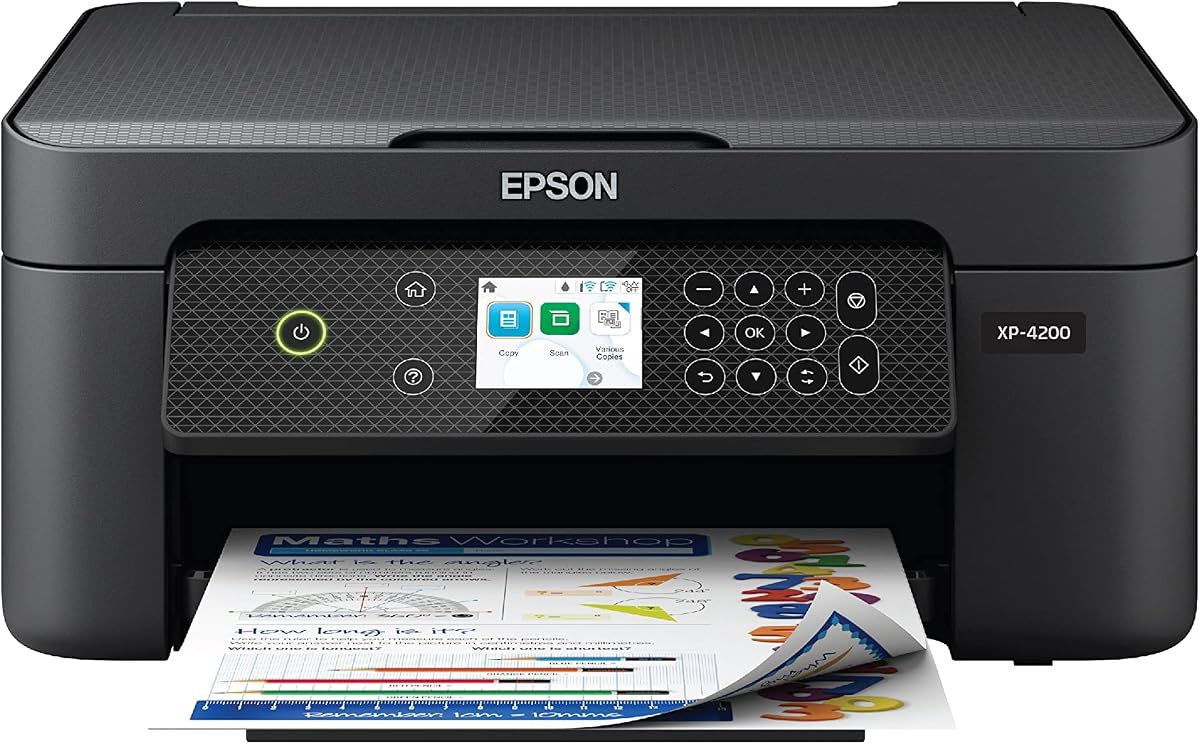
The Epson Expression Home XP-4200 has a supplied rating of 3.8 and provides a broad set of home-friendly features. A large 2.4-inch color display, wireless printing, scanning, copying, automatic duplexing, and voice-activated printing distinguish it from the simplest models.
We may earn a commission when you buy through this link, at no additional cost to you.
Epson's imaging technology is designed for crisp documents and vibrant borderless photographs. The Epson Smart Panel app supports setup, operation, printing, and scanning from compatible smartphones and tablets, while Mopria Print Service and Mopria Scan offer additional mobile routes.
The printer can create searchable PDFs through the included Epson ScanSmart software. Individual ink cartridges let users replace only the color they need, and automatic two-sided printing reduces paper use. Voice printing through Alexa may offer a hands-free way to begin selected print jobs.
This model is a strong match for a senior who is comfortable using voice assistance and wants a larger display without a large office printer. It is less compelling for users who do not use Alexa. The supplied product information also states that the printing system is designed exclusively for Epson genuine cartridges, so cartridge planning is important.
Alexa compatibility allows compatible content to be printed by voice after the printer has been connected and configured. This can reduce the need to handle a phone or computer for selected everyday tasks.
Epson ScanSmart can create searchable PDFs, turning scanned pages into files that may be easier to store and find later. This is useful for recipes, forms, correspondence, and personal records.
We may earn a commission when you buy through this link, at no additional cost to you.
The best simple printer balances readable controls, dependable setup, adequate paper handling, and easy maintenance. For seniors, ease of use should be evaluated across the entire workflow rather than by looking only at a large display or a long feature list.
A printer's control panel should make common actions understandable at a glance. The Canon PIXMA TS6520 and TR160 use monochrome OLED displays, while the Epson XP-4200, Brother Work Smart 1360, and several HP models provide larger color screens. Larger text and clearly separated icons can help users with reduced vision, although an LCD is not automatically easier than a touchscreen for every person.
Choose a display that shows the information you need without excessive scrolling. Ink status, Wi-Fi state, paper warnings, and active copy or scan functions are especially useful. A straightforward interface can outweigh advanced connectivity features for a senior who mainly prints from a computer or phone.
All ten products support wireless workflows, but the setup process still matters. Canon models describe easy wireless configuration, while HP printers emphasize dual-band Wi-Fi that can detect and resolve connection issues. Mobile options include the Canon PRINT app, Epson Smart Panel, Brother Mobile Connect, HP app, Apple AirPrint, and Mopria Print Service.
Confirm that the printer supports the devices and operating systems already used in the household. Wireless direct mode is useful when a router is unavailable, while cloud connections can help users retrieve documents stored in Dropbox, Google Drive, OneDrive, or Box.
An all-in-one printer consolidates printing, scanning, and copying in one device, reducing the number of separate machines needed. This can save desk space and make it easier to scan a document and print it immediately. It may also be more convenient for preserving important records or sharing copies of forms.
If scanning is important, compare flatbed scanning with an automatic document feeder. Flatbed scanners work well for a few pages and unusual sizes, while a feeder reduces effort when processing batches. The HP OfficeJet Pro 8125 and Brother Work Smart 1360 include feeders, whereas the portable Canon TR160 does not include scanning.
Automatic duplex printing is a valuable feature for reports, letters, recipes, and other multipage documents. It saves paper and avoids manually turning and reinserting a stack. The Canon TS6520 and TS4320, HP Envy 6155, HP OfficeJet Pro 8125, Brother Work Smart 1360, and Epson XP-4200 include automatic two-sided printing.
Paper tray capacity determines how often the printer must be refilled. A 60-sheet tray suits light use, while 100- and 150-sheet options support more frequent printing. The HP OfficeJet Pro 8125 has the largest stated tray at 225 sheets, although its larger footprint may require more room.
Simple maintenance starts with understanding the printer's cartridge arrangement. The Canon TS3720 uses two easy-to-replace cartridges, while the Epson XP-4200 allows users to replace only the ink color needed. The Canon TR160 uses a more elaborate five-color hybrid system designed for portable photo output.
Some HP models include an Instant Ink trial and mention a monthly service after the trial unless canceled. Review the program before enrolling, especially if printing is infrequent. Check cartridge availability, expected page coverage, and whether genuine supplies are required before choosing a model.
A home printer should support the paper sizes and formats you actually use. Most of the all-in-one choices handle standard documents, while the Canon TS3720 also lists envelopes, banners, square photos, high-resolution paper, and borderless photos. The Canon TS6520 supports letter-size documents and photos with or without borders.
Photo-oriented users should pay attention to borderless support and the number of ink colors. Occasional portrait and family-photo printing is possible on several models, while the portable Canon TR160 emphasizes its five-color system and wireless mobility.
A compact footprint is valuable in apartments, home offices, and rooms where a bulky machine may be inconvenient. The HP DeskJet 2923 and 2955 are expressly designed for compact home placement, and the Canon TS6520 combines a small footprint with an OLED display and automatic duplexing.
The Canon TR160 serves a different need. Its lightweight portable design lets it travel in a bag or backpack, making it useful for users who print away from home. Its print-only design and portable format make it less suitable as the central office machine.
Wireless capability introduces a small security consideration, especially when a printer is connected to a home network. The HP OfficeJet Pro 8125 includes HP Wolf Essential Security, which is intended to help protect the network from cyber threats. Other models can also benefit from a secure home network and updated printer software.
Some HP models block cartridges that do not contain original HP chips or circuitry, and the Epson XP-4200 is designed for Epson genuine cartridges. These restrictions should be weighed against cartridge availability and ownership preferences before buying.
Begin by unpacking the printer, removing any packing material, installing the supplied ink cartridges, and loading a small amount of paper. Connect it to the home network using the manufacturer's setup process, choosing the same Wi-Fi network used by the computer, tablet, or phone that will send print jobs.
Print a short test page after setup and review alignment, color, text sharpness, and duplex orientation. Learn the locations of the paper tray, output area, power control, wireless button, cancel button, and ink status display. Keeping a simple list of common tasks nearby can make day-to-day operation more comfortable.
Use the appropriate paper type and load only the recommended number of sheets. Clean the scanner glass and exterior with a soft, dry cloth, and follow the manufacturer's instructions for printhead or roller cleaning. Replace ink before the printer runs completely dry, and move the machine only after allowing it to finish or cancel an active job.
The easiest model depends on the user's comfort with computers, phones, and screens. The Canon PIXMA TS6520 is a strong all-around option because its OLED provides clear status information, while the HP DeskJet 2923 and 2955 use simpler icon panels. A larger color touchscreen may be preferable for users who are already comfortable navigating modern device interfaces.
Automatic duplex printing is useful for anyone who regularly prints multipage letters, reports, recipes, or community materials. It reduces paper use and avoids manually turning the stack. Models such as the Canon TS6520, Canon TS4320, HP Envy 6155, Epson XP-4200, Brother Work Smart 1360, and HP OfficeJet Pro 8125 include it.
Yes. The products support mobile printing through familiar services and apps, including Canon PRINT, Epson Smart Panel, Brother Mobile Connect, HP App, Apple AirPrint, and Mopria Print Service. The phone or tablet must be compatible and connected to the printer through the same network or an appropriate direct wireless connection.
A larger touchscreen can make status information and settings easier to see, but it also introduces more menus to learn. A small OLED or icon LCD may feel less complicated for basic jobs. The best choice depends on eyesight, dexterity, familiarity with smartphones, and whether advanced scanning or office functions are needed.
An all-in-one is convenient if you need to preserve paper records, copy forms, or scan documents. It may save space by replacing separate devices. If you only print occasional pages while traveling, the Canon PIXMA TR160's print-only design may be simpler and more portable.
The paper tray holds blank sheets for printing, while an automatic document feeder pulls existing pages into the scanner. A larger tray reduces refill frequency, and a feeder speeds up multi-page scanning. The HP OfficeJet Pro 8125 and Brother Work Smart 1360 combine substantial trays with automatic feeders.
Enrollment may be convenient if it matches a predictable printing habit and the subscription terms are understood. It can also be undesirable for light users or anyone who prefers to buy supplies only as needed. Read the trial length, ongoing terms, cancellation rules, and cartridge compatibility before enrolling.
Place the printer within a reasonable range of the router and confirm that the phone or computer uses the intended network. Restarting the printer and router can resolve many temporary issues. Dual-band Wi-Fi models may provide additional flexibility, and using a USB connection can help if a wireless network remains unreliable.
The Canon PIXMA TS6520 is the most balanced overall recommendation because it combines a readable OLED, automatic duplexing, wireless printing, scanning, copying, and compact construction. The HP DeskJet 2923 offers a straightforward lower-cost route for basic documents, while the Canon PIXMA TR160 stands out for users who need portable printing and direct wireless access.
Prioritize the controls and paper handling that match your normal routine. A senior printing occasional letters may prefer a compact icon panel, while a frequent home-office user may benefit more from a large touchscreen and automatic document feeder. Remember that mobile apps, cartridge arrangements, and subscription requirements can shape daily convenience as much as the printer itself.
Before purchasing, confirm the current product listing, included accessories, ink availability, app compatibility, and wireless setup requirements. Prices and promotional offers can change, so compare current retailer information rather than relying solely on an earlier product listing. A printer that is easy to set up, maintain, and use will provide more value than one loaded with features that are never needed.
