
Epson LQ-590
3.7Editor score
Reliable 24-pin printing
Compact legacy-friendly design
USB ESC/P support
Dot matrix computer printers remain useful for multipart forms, continuous-feed records, invoices, and other documents that require an impact printing method. A capable model must balance print speed, paper handling, copy support, connectivity, and expected workload rather than competing with ordinary desktop printers on page aesthetics.
This guide compares ten dot matrix printers from Epson and OKI using the supplied specifications, including pin count, characters per second, interfaces, resolution, memory, paper-feed features, and duty cycle. It covers 9-pin and 24-pin models, including machines designed for lighter office use and others intended for sustained, high-volume document production.
Each review highlights the most relevant benefits and trade-offs, while the comparison table makes the core differences easier to scan. The top selections reflect the balance of capability, rating, and documented features, although availability and prices change over time and should be checked before purchase.
3.7Editor score

4.3Editor score

4.8Editor score
As an Amazon Associate we earn from qualifying purchases.
The table below compares all ten printers by print technology, speed, connectivity, copy support, and workload considerations, making it easier to identify the right model for a specific document environment.




The Epson LQ-590II combines a 24-pin printhead with a documented maximum monochrome speed of 584 characters per second, giving it an attractive balance of speed and character quality. Its 4.3 rating also places it among the better-reviewed products in this guide. It is especially suitable for offices that need dependable impact output for multipart forms, reports, and continuous-feed paperwork.
We may earn a commission when you buy through this link, at no additional cost to you.
The primary advantage of the LQ-590II is its 24-pin mechanism. Compared with a 9-pin printer, the additional pins can create cleaner text and better control over characters, which is valuable when documents are read closely rather than merely checked for a name or number. USB connectivity simplifies connection to a modern computer, while the parallel port maintains compatibility with established systems and older equipment.
Its trade-offs are practical rather than hidden. The listed connections emphasize USB and parallel rather than wireless or network functionality, so the printer is best deployed near a workstation or connected through a host system that manages legacy printing. Dot matrix operation also produces mechanical sound and places physical demands on multipart stock, neither of which is ideal in a quiet shared office.
The Epson LQ-590II is a strong all-around recommendation for organizations that want a fast, more detailed alternative to a 9-pin workhorse. It suits buyers who value output speed, established printer emulations, and straightforward computer connectivity more than modern network features. Confirm the host system and required cable before ordering.
The 584 cps maximum speed gives the LQ-590II a useful productivity advantage over many 9-pin alternatives. Combined with 24-pin printing, it helps offices process large stacks of forms without sacrificing the clarity of standard business documents.
USB and parallel connectivity offer practical flexibility for both current and older installations. This makes the printer especially relevant where replacing an established impact printer would otherwise disrupt workflows or require an unwanted host-side conversion.
We may earn a commission when you buy through this link, at no additional cost to you.
The Epson LQ-590II NT retains the useful performance profile of the LQ-590II family, including 24-pin printing and a maximum monochrome speed of 584 cps. Its 4.2 rating reflects generally favorable user sentiment, while the parallel and serial connections distinguish it from the standard USB-equipped listing. The Energy Star designation adds another point in its favor for organizations seeking more efficient office equipment.
We may earn a commission when you buy through this link, at no additional cost to you.
This configuration is particularly interesting for facilities with serial or parallel printing infrastructure. Rather than forcing a new computer setup, it can support a stable installed base of systems designed to communicate with impact printers. The high print speed remains useful for invoices, purchase orders, shipping documents, and other repetitive paperwork that would be slow to produce on a page-oriented desktop printer.
The absence of USB in the supplied specifications is the most important limitation. Modern buyers should not assume this listing can connect directly to a current computer without a compatible interface or print server. Serial equipment can also introduce configuration complexity, particularly where cable standards, device addressing, and driver support are not standardized.
The LQ-590II NT is best for organizations with confirmed serial or parallel requirements and a working print environment. It is less convenient as an all-purpose modern-office purchase than a USB-equipped model, but it may be the better operational fit when compatibility with an existing system is the deciding factor.
Serial and parallel connections let the LQ-590II NT fit into workflows already built around these interfaces. That can be more economical and dependable than replacing several interconnected systems solely to accommodate a newer connection standard.
The Energy Star designation makes this model relevant to buyers who consider energy performance alongside productivity. Its 584 cps speed still supports demanding document runs, while monochrome impact output remains appropriate for business forms.
We may earn a commission when you buy through this link, at no additional cost to you.
The Oki Microline 320 Turbo/N stands out with a 4.7 rating, one of the strongest results among the ten products considered. It belongs to the Microline 320 family, a well-known 9-pin platform associated with continuous-form printing and demanding office paperwork. The limited catalog details make direct feature comparisons difficult, but the high rating and established product family provide a solid starting point.
We may earn a commission when you buy through this link, at no additional cost to you.
A 9-pin impact printer is most useful when the priority is producing multipart documents rather than maximizing cosmetic print quality. It can place marks through stacked forms, making it suitable for records, warehouse paperwork, point-of-sale documents, and batch printing where multiple copies must be produced in one pass.
The principal drawback is the sparse supplied specification. The listing does not provide a detailed speed, duty cycle, interface, or copy count, so buyers must verify the exact configuration and included accessories before purchase. It would also be unwise to assume that every Microline 320 variation has identical connections or paper-handling features.
This model is worth considering for organizations seeking a proven Microline platform with strong customer feedback. It is particularly attractive where multipart impact output matters more than typography. Confirming the exact speed, interfaces, tractor configuration, and copy capacity can prevent a mismatch between the listing and the installation.
The Microline 320 family is associated with practical, high-volume document production. Its 9-pin approach prioritizes efficient impact output and multipart use, making it more relevant to operational offices than to design-focused workplaces.
A 4.7 rating suggests broad satisfaction within the available customer feedback. That makes this option notable for cautious buyers, although ratings should still be considered alongside exact configuration details and compatibility requirements.
We may earn a commission when you buy through this link, at no additional cost to you.
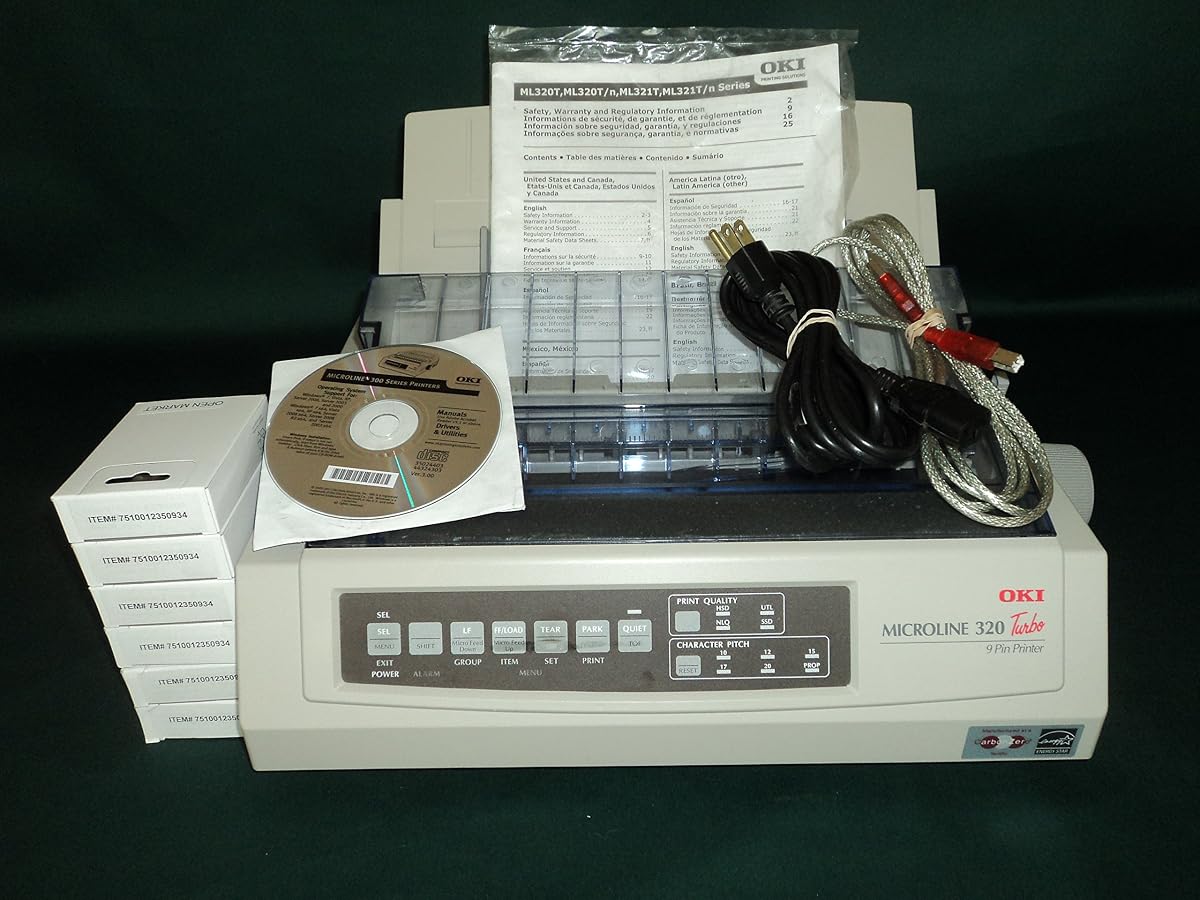
The OKI Microline 320 Turbo, model 62411601, combines a 9-pin print mechanism with a 435 cps maximum speed and a 240 by 216 dpi resolution. Its 4.5 rating supports its reputation as a capable office workhorse. A 20,000-page monthly duty cycle further indicates that it is designed for more than occasional specialty printing.
We may earn a commission when you buy through this link, at no additional cost to you.
The printer's biggest strength is a clear combination of speed, capacity, and conventional connectivity. USB provides a practical modern connection, while the parallel port supports older equipment. Its documented duty cycle is especially important for buyers comparing a 9-pin model with higher-speed 24-pin alternatives: the Microline 320 is built around sustained output rather than cosmetic quality alone.
Compared with a 24-pin model, its text may not offer the same level of fine character control. A buyer producing customer-facing correspondence with strict visual standards may favor the Epson models, while organizations producing forms, labels, logs, and internal records may find the 9-pin format entirely adequate.
This Microline 320 Turbo is a compelling general-purpose choice for offices with moderate-to-heavy printing needs and a mix of current and legacy systems. Its 435 cps speed, 64 KB of memory, and 20,000-page duty cycle provide a well-rounded foundation, while USB and parallel connections broaden deployment options.
The 20,000-page maximum duty cycle indicates suitability for regular batch work. That capacity is more meaningful than maximum speed alone because it indicates the printer is intended to handle recurring document volumes without being designed only for occasional impact output.
USB and parallel connections make the printer suitable for modern workstations and established installations. This flexibility is valuable in offices that cannot standardize every host computer and printing port at once.
We may earn a commission when you buy through this link, at no additional cost to you.
The OKI Microline 420 raises the performance bar within the 9-pin category, reaching a documented 570 cps. It also carries a 24,000-page maximum duty cycle, the highest figure explicitly stated among the OKI models in this guide. With a 4.5 rating, it offers a persuasive combination of throughput, workload capacity, and user satisfaction.
We may earn a commission when you buy through this link, at no additional cost to you.
The 420 is especially attractive for offices that generate large quantities of multipart forms and need to move quickly through them. Its 128 KB of memory and 240 by 216 dpi resolution support consistent document handling, while USB and parallel ports accommodate both newer and older systems. The Energy Star designation also signals attention to operating efficiency.
Its 9-pin mechanism remains the main consideration. Although adequate for forms, internal records, and warehouse documentation, it does not provide the finer character shaping associated with a 24-pin mechanism. There is also no wireless or network interface in the supplied details, so remote placement would require a compatible print server or host solution.
The Microline 420 is a strong recommendation for buyers prioritizing speed and sustained workload capacity within a proven 9-pin platform. It is well suited to operations processing repetitive continuous-form documents, especially where a USB and parallel connection plan is already in place.
At up to 570 cps, the Microline 420 offers substantially greater throughput than a 435 cps Microline 320. This makes it an attractive choice for large document runs where production time directly affects office efficiency.
The 24,000-page duty cycle gives the 420 additional headroom for recurring printing. Organizations with several departments sharing one impact printer can benefit from a model designed for sustained operation.
We may earn a commission when you buy through this link, at no additional cost to you.
This OKI Microline 320 Turbo, model 91907101, earns a perfect 5.0 rating and stands out for its combination of a 435 cps 9-pin mechanism with USB, serial, and parallel connectivity. Its 64 KB memory, 240 by 216 dpi resolution, and 20,000-page maximum duty cycle make it a credible choice for regular office document production.
We may earn a commission when you buy through this link, at no additional cost to you.
Interface flexibility is the defining benefit. USB suits direct workstation use, parallel supports established computer installations, and serial provides another path for compatible legacy systems. That choice can simplify a transition because the same printer family may fit into more than one environment without changing the core device.
The trade-off is that this remains a 9-pin printer, and its output is therefore optimized for practical forms rather than the polished detail of a 24-pin model. The 435 cps speed is solid but lower than the Microline 420's documented 570 cps. Buyers producing thousands of pages daily may therefore prefer the 420 for throughput.
This configuration is an excellent match for organizations that value broad connectivity and have a specific need for serial support. Its perfect rating is encouraging, though the small volume of available feedback and the age of the platform still warrant checking current driver, cable, and consumable availability before committing.
USB, serial, and parallel ports create unusually broad deployment flexibility. The printer can serve a modern workstation or fit into a compatible established system, reducing the need for separate hardware models.
A 435 cps print speed and 20,000-page duty cycle provide a practical production baseline. These specifications make the model suitable for recurring forms and internal documents rather than occasional novelty printing.
We may earn a commission when you buy through this link, at no additional cost to you.
The Epson LQ-2090II delivers 24-pin monochrome impact printing at up to 550 cps. Its Energy Star designation and 3.7 rating position it as a practical office model with attractive character quality and respectable throughput. The listed parallel port is the main detail to verify before purchase, especially for buyers moving from a newer computer environment.
We may earn a commission when you buy through this link, at no additional cost to you.
Compared with 9-pin models, the 24-pin printhead can produce more controlled and legible characters. That difference is useful for reports, invoices, and multipart forms where readability matters. A 550 cps maximum speed also places it close to the Epson LQ-590II's 584 cps while retaining a focus on established parallel-connected systems.
Its 3.7 rating is lower than those of the OKI models and the other Epson LQ-590II listing. That does not invalidate the product, but it makes exact configuration, warranty, and support details particularly important. Only a parallel port appears in the supplied specifications, so USB connectivity should not be assumed.
The LQ-2090II is a sensible option for users who want better character control than a 9-pin workhorse and work with compatible parallel systems. It is especially relevant to an existing office infrastructure where the printer will replace a similar model rather than introduce a new connection method.
The 24-pin mechanism is a meaningful advantage for documents requiring controlled text detail. It offers a stronger presentation when a printout must be read by customers, clients, or multiple people handling copies.
A maximum speed of 550 cps supports substantial batch output, while the Energy Star designation addresses efficiency concerns. Together, these traits make the printer relevant to offices balancing document quality with routine productivity.
We may earn a commission when you buy through this link, at no additional cost to you.
The OKI Microline 320 Turbo listing provides the most detailed feature description in the group. It produces up to 435 characters per second in SuperSpeed Draft mode, feeds paper at five inches per second, and can create an original plus as many as five interleaf or carbonless copies. Its 4.2 rating reflects a generally positive reception.
We may earn a commission when you buy through this link, at no additional cost to you.
The six-part copy support is especially important for operations producing multipart records without separate printing passes. Zero-tear and auto-park technology is designed to improve paper positioning and reduce waste, while the rear push standard tractor handles continuous forms. Epson, IBM, ANSI, and OKI emulations add flexibility for established host environments.
The standard 9-pin mechanism remains less refined than a 24-pin alternative, and the 435 cps speed is below the Microline 420's documented output. The tractor and paper path also require correct setup, which can be a learning curve for new users. However, those trade-offs are directly connected to the machine's strength in multipart operational printing.
This is a strong choice for warehouses, accounting offices, logistics teams, and other environments that need reliable multipart documents. Its combination of six-part copying, fast paper feed, recognized emulations, and standard USB and parallel connectivity makes the specification set unusually complete for a legacy impact printer.
The ability to produce an original plus up to five interleaf or carbonless copies is the standout feature. This reduces handling time and paper consumption in workflows where multi-part forms must remain aligned.
Zero-tear and auto-park technology support more controlled feed and positioning. The five-inch-per-second rear tractor feed also helps maintain throughput when moving large quantities of continuous paper.
We may earn a commission when you buy through this link, at no additional cost to you.
The Oki Microline 620 combines the highest rating in the guide, 4.8, with a clear emphasis on high-volume versatility and reliable performance. Its stated strengths include precise, sharp printing and simplified media loading, all of which align with the needs of a busy impact-printing environment. The model appears positioned for buyers who regard document output as a core operational function.
We may earn a commission when you buy through this link, at no additional cost to you.
Simplified media loading is especially valuable when a printer handles frequent changes in forms or paper types. An operator who can load stock with less difficulty is more likely to maintain an efficient workflow and avoid time lost to alignment and setup. Precise output also matters for records that need to remain legible after being read, sorted, filed, or distributed.
The supplied information is less detailed than that for the Microline 320 and 420 models, so buyers should verify paper width, speed, duty cycle, interfaces, and copy capacity. It is also a premium-oriented purchase rather than a casual desktop solution. The strongest reason to choose it should be sustained operational performance, not simply the desire to own a larger printer.
The Microline 620 is a compelling premium recommendation for organizations producing substantial volumes of forms and business records. Its high rating, media-loading emphasis, and sharp-output positioning make it particularly attractive to buyers who want dependable performance and efficient operation in a shared production environment.
Simplified media loading supports productivity when forms or paper configurations change regularly. This is a practical advantage in departments that print several document types through the same impact printer.
The stated focus on sharp, precise output serves workflows where documents must remain clear through handling and filing. Combined with high-volume versatility, it makes the Microline 620 relevant to production-oriented offices.
We may earn a commission when you buy through this link, at no additional cost to you.
The Epson LQ-590 offers a straightforward route into 24-pin impact printing. It supports USB ESC/P and IBM PPDS, giving it useful command-language compatibility for both modern and established systems. Its 3.7 rating is the lower end of this group, so buyers should interpret the listing as a budget-focused option rather than the strongest customer-rated choice.
We may earn a commission when you buy through this link, at no additional cost to you.
The 24-pin printhead is the main technical benefit. It provides finer control over characters than a basic 9-pin model and is well suited to invoices, reports, and multipart forms that need to remain readable. USB ESC/P support simplifies connection to a compatible computer, while IBM PPDS can be valuable in offices with older command-language infrastructure.
The sparse listing information is the largest uncertainty. No maximum speed, duty cycle, copy count, or paper-loading details are provided, making direct comparison with the LQ-590II and LQ-2090II difficult. Buyers should also check the current condition of the supply, warranty, included cables, and locally available support before treating it as a complete solution.
For a cost-conscious buyer seeking 24-pin output and established command-language compatibility, the LQ-590 can be a practical selection. It is best suited to a known compatible environment rather than a first-time purchase without verification. Its lower rating warrants more attention to configuration and support details than the higher-rated models.
A 24-pin mechanism offers a meaningful upgrade over basic 9-pin output for detailed forms. The LQ-590 makes that capability available within a budget-oriented product category for compatible office systems.
USB ESC/P and IBM PPDS allow the printer to fit established command-language workflows. This is useful for offices that depend on older software and output templates rather than modern document workflows alone.
We may earn a commission when you buy through this link, at no additional cost to you.
The right dot matrix computer printer depends on the forms being printed, the number of copies required, the host system, and the expected monthly volume. Comparing print quality, speed, interfaces, and paper handling prevents an unsuitable purchase.
A 9-pin printer is generally suited to forms, labels, warehouse records, and internal documents where fast, reliable multipart output matters more than refined typography. A 24-pin printer uses more pins to control character shape more precisely, making it the better choice for invoices, reports, and documents that are read closely. The Epson LQ-590, LQ-590II, LQ-590II NT, and LQ-2090II in this guide use 24-pin mechanisms, while the OKI Microline models use 9-pin technology.
Choose based on output purpose, not merely the number shown in the product title. In general, favor 9-pin for throughput and multipart productivity, and 24-pin when character clarity carries greater importance.
Print speed is commonly expressed in characters per second, or cps. The Epson LQ-590II and LQ-590II NT are listed at 584 cps, the Epson LQ-2090II at 550 cps, the OKI Microline 420 at 570 cps, and several Microline 320 versions at 435 cps. Higher speeds can shorten large document runs, but actual production time also depends on paper handling, copies, and the quality mode selected.
Match the published speed to your daily workload. For regular batch processing, a higher-rate model can reduce waiting; for occasional forms, speed may matter less than reliability and compatibility.
Impact printing is valuable because it can mark several sheets or carbonless layers in one pass. The detailed OKI Microline 320 Turbo listing states support for an original plus up to five interleaf or carbonless copies. This feature is critical for shipping records, purchase orders, medical intake forms, and other documents that must be distributed immediately.
Confirm the required number of copies and the thickness of the forms before ordering. A printer that supports fewer layers than the workflow requires can create major bottlenecks.
USB is the most straightforward connection for a current workstation, while parallel and serial remain important in established systems. The LQ-590II and standard OKI Microline 320 Turbo support USB and parallel. The LQ-590II NT adds serial and parallel, while the model 91907101 Microline 320 Turbo offers USB, serial, and parallel.
Match the interface to the host and provide the correct cable. Do not assume a shared platform guarantees identical ports, and consider a compatible print server when direct USB placement is impractical.
Dot matrix printers may support continuous tractor-feed forms, cut sheets, multipart carbonless sets, and other specialized media. The Microline 320 listing documents rear push standard tractor feeding, zero-tear and auto-park technology, and a five-inch-per-second feed rate. The Microline 620 emphasizes simplified media loading, which may be valuable where several paper types are used.
Check the exact paper path, supported widths, tractor arrangement, and loading process. A printer cannot deliver its potential throughput if media setup is awkward or incompatible with the forms in use.
Duty cycle indicates the monthly volume a printer is designed to handle. The Microline 320 is listed at up to 20,000 pages, while the Microline 420 reaches up to 24,000 pages. These figures help distinguish production-oriented machines from units intended for occasional specialty work.
Choose a duty cycle above the normal monthly volume, with room for peaks. For a shared department printer or a facility that runs weekly batches, a larger documented duty cycle offers more operational confidence.
Command-language and emulation support can matter more than a minor difference in speed. The Epson LQ-590 lists USB ESC/P and IBM PPDS, while the detailed Microline 320 specification names Epson, IBM, ANSI, and OKI emulations. These details matter when output comes from established business software, accounting systems, or custom reporting tools.
Confirm operating-system support, current driver availability, and required emulation before buying. Compatibility avoids the recurring cost and frustration of reformatting documents or replacing established software.
The machine itself is only part of the decision. Continuous-form paper, multipart stock, ribbon supplies, maintenance routines, cables, and operator training can all affect the practical cost and usability of an impact printer. A model with straightforward media loading and broad interface support may reduce friction even if it is not the fastest listed model.
Think about who will operate the printer, how often media changes occur, and where it will be placed. The most suitable model is the one that produces the required documents reliably with the least disruption to the workflow.
Begin by confirming compatibility with the host computer, selected command language, printer emulation, and available interface. Install the appropriate driver or configure the connection before loading a full production batch. Test with a short document and verify page alignment, margins, density, line spacing, and the first few lines of text before committing to a large run.
Load the appropriate paper straight and securely, aligning tractor holes or guides according to the printer's manual. For multipart forms, confirm that every copy sheet is seated correctly. Start at a low tear-off or draft setting when appropriate, and avoid pulling forms away from the platen while the printhead is moving. Keep the paper path free from dust and obstructions.
Use the printer's approved ribbon and follow the recommended printhead and platen replacement schedule. Do not operate the machine continuously beyond its documented duty cycle, and give the mechanism time to cool if it becomes unusually hot. For shared equipment, post a short loading guide, keep spare forms organized, and schedule cleaning and preventive maintenance before high-volume seasonal runs.
Dot matrix printers are used for documents that benefit from impact printing, especially multipart forms, continuous-feed records, invoices, labels, and warehouse paperwork. The printhead physically strikes an inked ribbon against the paper, allowing several sheets or carbonless copies to be marked in one pass. They remain valuable when multipart output matters more than photographic quality or silent operation.
A 24-pin model generally provides cleaner and more precisely controlled characters because it uses more printhead pins. A 9-pin model is often preferred for fast, high-volume multipart forms where lower cost and straightforward operation are more important. The better choice depends on the document, required copy count, expected volume, and the quality of the final output.
Yes, that is one of the main advantages of impact printing. Compatible multipart forms or carbonless sets can be printed together, provided the paper and ink are suitable. The detailed OKI Microline 320 Turbo listing states support for an original plus up to five interleaf or carbonless copies. Always check the required number of parts and the printer's maximum paper thickness.
Characters per second, commonly abbreviated cps, measures the printer's maximum text output speed under a specified quality mode. It helps indicate how quickly long documents can be produced. Actual job time can vary with print density, line spacing, paper movement, copy count, computer processing, and any pauses between pages.
Yes, particularly in offices that still operate established computer systems, manufacturing equipment, or legacy software. Several Epson and OKI models include parallel ports, and some also support serial connections. For newer computers, USB or a compatible print server may be more convenient, so the host system and required driver should be checked before purchase.
A monthly duty cycle is the maximum page volume a manufacturer designs a printer to handle in a month. It is useful for comparing sustained production capability, but it is not a recommendation to operate at that limit every month. Buyers should choose a duty cycle comfortably above their normal volume and allow additional capacity for seasonal peaks.
The Epson LQ-590II uses 24-pin technology, reaches a listed 584 cps, and provides USB and parallel connectivity, making it suitable when character detail and fast output are priorities. The OKI Microline 420 uses 9-pin technology, reaches 570 cps, and has a 24,000-page duty cycle, making it well suited to high-volume multipart forms. Compatibility with the host and required paper workflow should guide the final choice.
Yes. Routine care includes using an approved ribbon, keeping the paper path clean, checking tractor alignment, and following the manufacturer's replacement schedule for the printhead, platen, and other wear parts. Operators should also avoid pulling paper away from the platen during an active print cycle. Preventive maintenance is especially important for high-volume operations.
The Epson LQ-590II is the strongest all-around selection in this guide because it combines 584 cps output, 24-pin character control, and both USB and parallel connectivity. The Epson LQ-590 provides a budget-oriented route to 24-pin output, while the Oki Microline 620 is the premium option for buyers prioritizing high-volume versatility, sharp output, and simplified media loading.
For multipart-heavy work, pay close attention to copy count, tractor feeding, and paper thickness rather than focusing only on print speed. The OKI Microline 320 family is particularly compelling for continuous-form documents, while the Microline 420 offers a higher documented duty cycle. For cleaner text, compare Epson's 24-pin models and verify which interface your computer system can use.
Ratings and specifications provide a strong starting point, but availability, included accessories, warranty terms, and prices can change. Review the current listing and confirm driver, paper, ribbon, and cable requirements before buying, especially when replacing an established printer in a critical business workflow.


