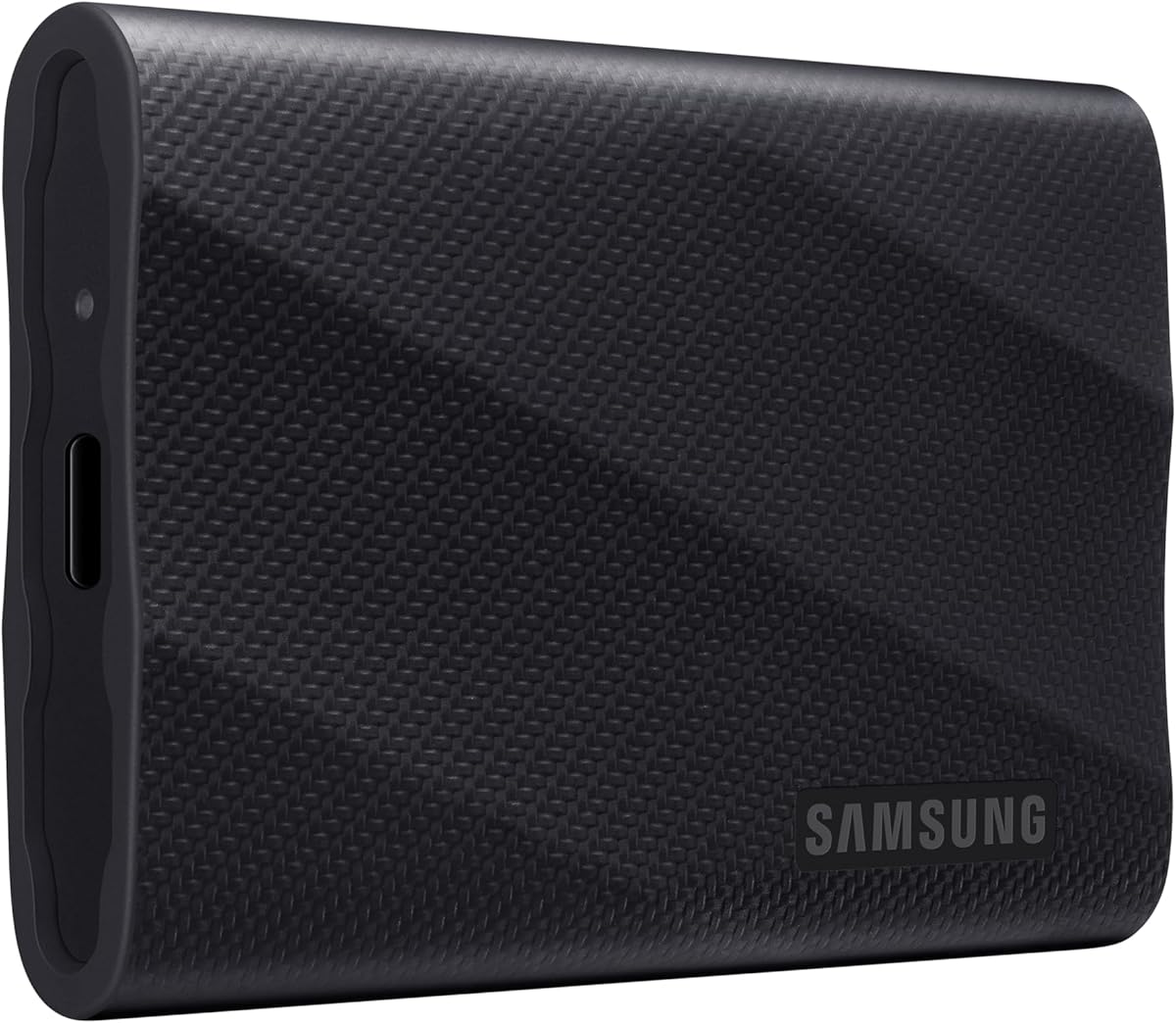
Samsung T9 Portable SSD 1TB
4.6Editor score
Up to 2,000MB/s transfer speeds
Advanced dynamic thermal guard
Sustained performance for creators
Magician drive-management software
Our External SSD for MacBook Air guide compares ten portable drives for speed, capacity, durability, encryption, compatibility, and everyday MacBook use.
An external SSD can give a MacBook Air more room for large projects, faster transfers, and a dependable backup without replacing its internal drive. The right model should match the ports, storage needs, and workflow of the owner, whether that means moving photo libraries, editing video, or keeping important files portable.
We compared ten portable SSDs using their published specifications, stated interface standards, capacity, physical design, compatibility, security features, and suitability for MacBook Air users. The comparison includes USB 3.2 Gen 2 and 3.2 Gen 2×2 drives, older USB 3.1 models, and options with or without encryption.
Each pick reveals what that particular drive is best suited to, from compact everyday storage to high-speed creative work. Product ratings and technical claims come from the supplied listings, while prices change frequently, so readers should confirm current availability and cost before purchasing.
4.6Editor score

4.7Editor score
4.5Editor score
The table below compares all ten portable SSDs by their listed speed, interface, capacity, portability, and protection features. These specifications help illustrate which drives fit routine backups, high-bandwidth creative work, compact travel setups, or older MacBook configurations.




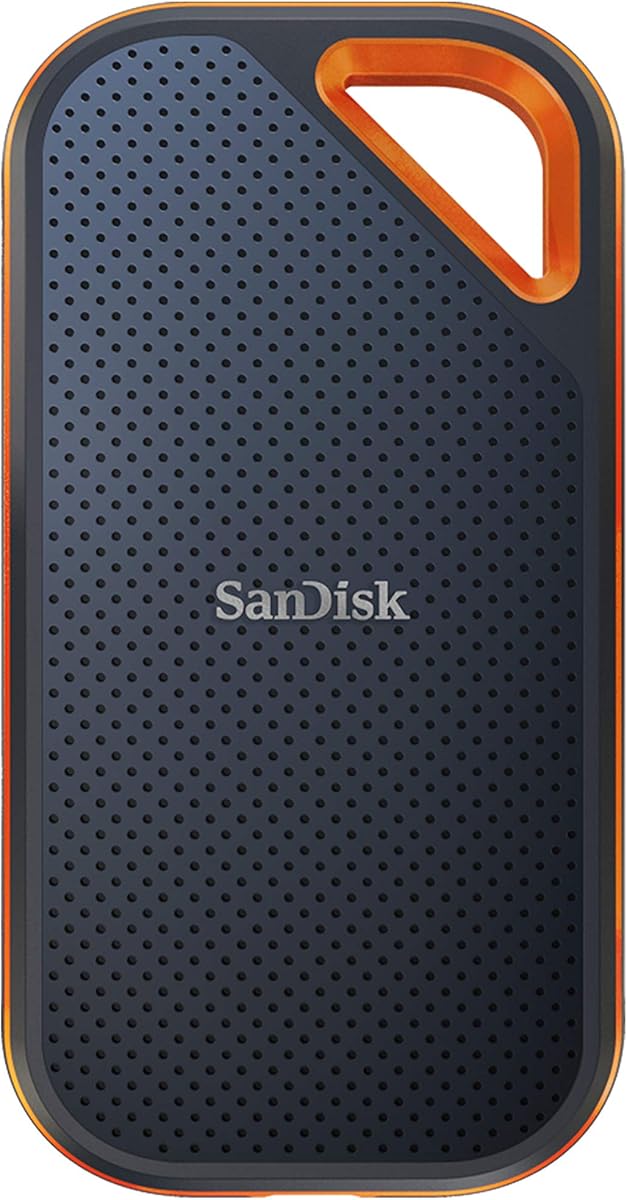

The SanDisk Extreme Portable SSD 2TB combines useful capacity with a well-balanced feature set for MacBook Air owners. It carries a 4.6 rating, and its published performance of up to 1,050MB/s read and 1,000MB/s write gives it enough throughput for large media libraries, project backups, and routine transfers from an internal MacBook SSD. The generous 2TB capacity also reduces the need to move large working sets back and forth.
We may earn a commission when you buy through this link, at no additional cost to you.
Its USB 3.2 Gen 2 interface is well suited to modern MacBook Air models, while the stated performance depends on the host device and other conditions. The updated listing identifies IP65 water and dust resistance, three-meter drop protection, a carabiner loop, and password protection using 256-bit AES hardware encryption. Together, these features make it more appropriate for travel and sensitive files than a basic bare drive.
The main compromise is that this model is not a USB 3.2 Gen 2×2 option. A compatible MacBook and a drive that advertise up to 2,000MB/s can offer more headroom for intensive workflows, particularly when the internal drive or source media is fast enough to sustain those rates. This drive also requires users to configure its password protection if they want the encryption benefit.
It is a strong recommendation for someone seeking a single external drive that handles capacity, durability, security, and everyday transfer speed without an unusually specialized design. Photographers, video editors, and MacBook Air users who regularly carry files will appreciate the balance. The SanDisk Extreme Portable SSD 2TB is an especially versatile option when one drive must perform several jobs.
A 2TB capacity leaves room for high-resolution photographs, exported video, application assets, and multiple generations of backups. For a MacBook Air with limited internal storage, that extra room can be more valuable than a small increase in headline transfer speed.
IP65 resistance, three-meter drop protection, and 256-bit AES hardware encryption add practical safeguards. The carabiner loop also makes it easier to keep the drive attached to a bag or belt loop while moving between locations.
We may earn a commission when you buy through this link, at no additional cost to you.
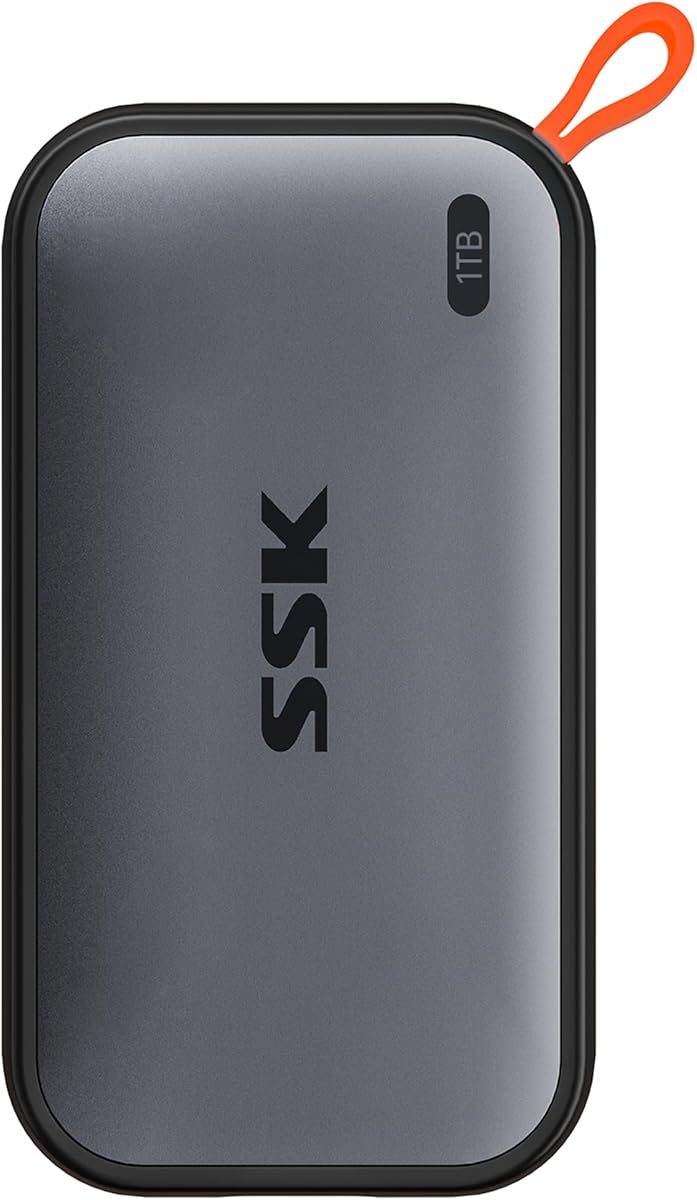
The SSK Portable SSD 1TB is a compact option for MacBook Air users who want fast transfers without a bulky drive. It has a 4.5 rating and publishes read speeds up to 1,050MB/s and write speeds up to 1,000MB/s. Its small footprint and 36.6-gram weight are especially helpful for users who carry a laptop and accessories between school, office, or shooting locations.
We may earn a commission when you buy through this link, at no additional cost to you.
The included USB-C and USB-A cables broaden its usefulness across modern and older devices. Its listing also highlights S.M.A.R.T. health diagnostics, adaptive TRIM, an activity LED, and an aluminum alloy case designed to dissipate heat. For iPhone workflows, the drive supports 4K60Hz ProRes HDR capture, which is a notable feature for creators building a mobile production setup.
SSK allocates 25% of currently available capacity to SLC caching, so sustained transfer behavior can change once that cache is consumed. The drive also lacks the listed hardware encryption found in several competing products. Those omissions matter most for users storing confidential business material or repeatedly moving very large files without breaks.
The SSK is best recommended for mobile creators, students, and everyday users who value small size, flexible cable support, and a useful set of monitoring features. It works particularly well as a general-purpose companion to a MacBook Air. Those wanting stronger security or a larger capacity may prefer a different model, but this drive covers the essentials with an appealingly portable design.
Support for 4K60Hz ProRes HDR capture and the supplied USB-C and USB-A cables make the SSK adaptable across Mac, mobile, and camera-related tasks. Its light body reduces the burden of carrying a separate drive during mobile production.
The aluminum alloy housing is intended to manage heat during transfers. S.M.A.R.T. diagnostics and adaptive TRIM offer visibility and support more consistent block management, although the cache limit can affect sustained write behavior.
We may earn a commission when you buy through this link, at no additional cost to you.
The Samsung T7 Portable SSD 1TB stands out as the most balanced recommendation in this guide. It holds a 4.7 rating, the highest among the supplied products, and combines a compact aluminum body with speeds of up to 1,050MB/s read and 1,000MB/s write. Those characteristics make it an uncomplicated extension of a MacBook Air's storage for general work, photography, and video.
We may earn a commission when you buy through this link, at no additional cost to you.
The unibody aluminum enclosure provides a premium feel and is backed by stated shock resistance with fall protection up to six feet. Samsung highlights broad compatibility with computers, cameras, and mobile devices, including support for iPhone 15 ProRes 4K at 60fps. That makes the T7 relevant not only as a Mac backup drive but also as a bridge for media workflows that move files between devices.
Compared with the Samsung T9 and SanDisk Extreme PRO, the T7 does not offer the newest 3.2 Gen 2×2 interface or the potential for 2,000MB/s transfers. Its 1TB capacity is also modest compared with the 2TB options in the comparison. For most MacBook Air users, however, the faster interface would not be useful unless the host, files, and workflow consistently benefit from the extra bandwidth.
Choose the T7 when you want a broadly compatible, durable, highly rated drive with dependable performance and minimal fuss. It is an excellent first external SSD for a MacBook Air because it balances speed, portability, durability, and creative-device support. Among the listed choices, it offers the strongest all-around case without centering on a single specialized feature.
The aluminum unibody and six-foot fall protection make the T7 appropriate for frequent transport. Its compact dimensions allow it to sit in a laptop sleeve or tech pouch without taking up much room.
Compatibility with computers, cameras, and mobile devices broadens the T7 beyond routine file storage. Listed iPhone 15 ProRes support is especially useful for creators who want to offload high-quality mobile footage.
We may earn a commission when you buy through this link, at no additional cost to you.
The Lexar ES3 Portable SSD 1TB is designed for users who prioritize a slim profile over maximum interface speed. Its 4.4 rating is the lowest in the group, but the published specifications remain practical: up to 1,050MB/s read and 1,000MB/s write over USB 3.2 Gen 2. Performance will be lower on systems that do not support that interface standard.
We may earn a commission when you buy through this link, at no additional cost to you.
At 10.5mm thick and 42 grams, the drive is easy to carry and smaller than many conventional portable SSDs. It includes a Type-C cable and supports laptops, cameras, Android devices, gaming consoles, and the iPhone 17 series. The listing also includes Lexar DataShield 256-bit AES encryption software for users who need file protection.
Compatibility is not universal. The product information specifically notes that MagSafe is unavailable on this version and that iPhone 14 and older models are not supported. Users who depend on those devices should look elsewhere, while MacBook Air owners with a current USB-C setup can use the drive more directly.
This Lexar is a good recommendation for everyday storage, travel, and users who want a drive that disappears into a pocket. It is less compelling for professionals who require the newest iPhone support, MagSafe, 2TB capacity, or a faster 3.2 Gen 2×2 interface. Within that narrower brief, it delivers a clean, compact, and well-specified portable SSD.
The 10.5mm-thick, 42-gram enclosure keeps the drive easy to carry in a pocket or small laptop bag. This is useful for Mac users who want backup capacity available without adding a bulky accessory.
DataShield provides 256-bit AES encryption for private files, but compatibility is not universal. The listing excludes older iPhones and notes that this version does not offer MagSafe.
We may earn a commission when you buy through this link, at no additional cost to you.
The Samsung T9 Portable SSD 1TB is the premium choice for MacBook Air users who need more throughput than a standard USB 3.2 Gen 2 drive can provide. It has a 4.6 rating and advertises sustained read and write speeds of up to 2,000MB/s through USB 3.2 Gen 2×2. That extra bandwidth is most meaningful for large media libraries, high-resolution footage, and other demanding creative tasks.
We may earn a commission when you buy through this link, at no additional cost to you.
Samsung specifically emphasizes sustained performance rather than only short burst transfers. The drive's dynamic thermal guard is designed to control heat during extended use, which is important because fast portable SSDs generate more heat than slower models. Magician Software adds firmware updates, encryption options, and continual drive-health monitoring, giving owners a more complete management toolset.
The T9 supports a broad range of devices and can record Ultra High Resolution 4K60 video directly from compatible cameras and mobile hardware. Its listed iPhone 15 ProRes 4K support is another strong feature for creators. However, the advertised top speed cannot be reached unless the MacBook, cable, host interface, source drive, and file workload all support the required connection standard.
Choose the T9 when your workflow regularly moves very large files and the MacBook Air has the right interface. It offers more headroom than the standard 1,050MB/s options and strong thermal engineering. For simpler document storage or occasional backups, that premium capability may be unnecessary, but for a high-output creative setup, the T9 is the most ambitious option in this roundup.
The 3.2 Gen 2×2 interface and stated speeds of up to 2,000MB/s can reduce waiting time when moving large camera files, editing caches, or project archives. Real-world results still depend on the complete connection chain.
The dynamic thermal guard addresses one of the main challenges of high-speed portable storage. Magician Software supplements the hardware with firmware updates, encryption, and health monitoring for ongoing administration.
We may earn a commission when you buy through this link, at no additional cost to you.
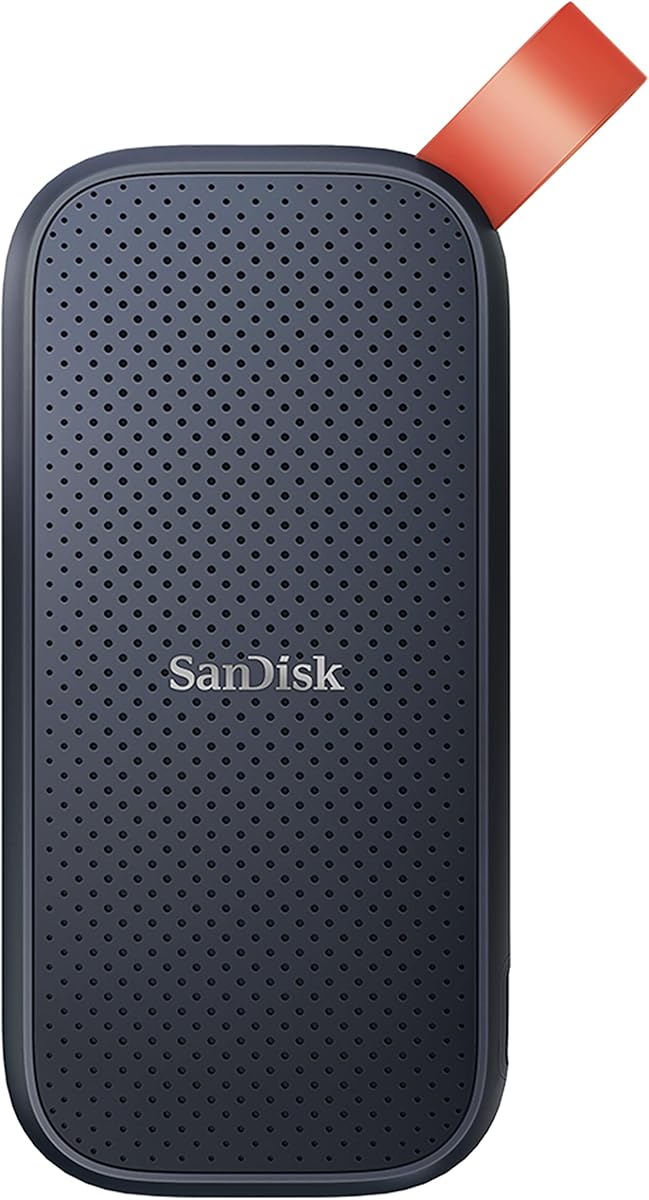
The SanDisk Portable SSD 1TB is a straightforward option for expanding a MacBook Air's storage. It has a 4.5 rating and lists read speeds of up to 800MB/s, placing it below the newest drives but above the older USB 3.1 model in this comparison. It is most appropriate for document libraries, routine backups, and moving files between computers.
We may earn a commission when you buy through this link, at no additional cost to you.
The old model designation is important when comparing it with the updated SanDisk Extreme line. Its listed durability includes two-meter drop protection, while a rubber hook provides a way to attach the drive to a belt loop or backpack. These are simple but useful travel features, and the compact form makes the drive easy to carry as a secondary storage device.
The principal limitation is performance. A compatible USB 3.2 Gen 2 drive can publish read speeds up to 1,050MB/s, while 3.2 Gen 2×2 options reach as high as 2,000MB/s. Users who regularly move multi-gigabyte video files may find the newer models better suited to that workload, especially when the source media is similarly fast.
This drive is recommended for MacBook Air users who need a no-frills portable drive with established SanDisk portability features. It handles everyday file management well and avoids the complexity of a hub or specialized mobile accessory. Buyers seeking maximum transfer speed, hardware encryption, or a newer chassis should look elsewhere, but for general use it remains a sensible storage expansion.
The drive gives a MacBook Air additional room for documents, downloads, and general media without complicated setup. Its straightforward design is aimed at users who primarily need dependable portable capacity.
Two-meter drop protection and the attached rubber hook support use during travel. The protection rating is lower than the updated Extreme model's three-meter claim, so the product is better suited to ordinary handling than severe conditions.
We may earn a commission when you buy through this link, at no additional cost to you.
The Lexar ES3 External SSD 2TB combines a generous capacity with transfer speeds of up to 1,050MB/s read and 1,000MB/s write. Its 4.5 rating and USB-C design make it a natural extension for a MacBook Air used for photography, video, and general backup. The 2TB capacity is especially helpful when a working collection is too large to remain entirely on the internal drive.
We may earn a commission when you buy through this link, at no additional cost to you.
Thermals receive specific attention in the product information. Double-layer graphite sheets are intended to conduct heat away from the drive and support cooler, more consistent transfers. The enclosure is also described as drop-resistant up to two meters, providing a reasonable level of protection for daily office and travel use. A 2-in-1 USB-C/USB-A cable broadens connection options.
The listing does not mention encryption, so the drive may be less attractive for confidential business documents or sensitive client material. It also uses the familiar USB 3.2 Gen 2 performance tier rather than the 3.2 Gen 2×2 interface found in the premium models. The thermal design helps, but those two omissions narrow its appeal for specialized professional users.
This is a strong recommendation for MacBook Air owners who prioritize capacity over cutting-edge speed or built-in privacy. It can hold extensive archives, current project files, and multiple backup sets in a single portable package. For high-throughput editing, a 3.2 Gen 2×2 model may be preferable, but this Lexar delivers a more practical balance of room, speed, cooling, and everyday durability.
Two terabytes provides useful space for completed projects, source footage, photographs, and secondary backups. It can reduce the need to keep every file within a MacBook Air's internal storage.
Double-layer graphite sheets are designed to spread heat through the enclosure. The approach helps the drive maintain performance during demanding transfers while retaining a compact USB-C form.
We may earn a commission when you buy through this link, at no additional cost to you.
The Lexar Go Portable SSD 1TB differentiates itself with an ultracompact drive and a separate hub containing four USB Type-C ports. It carries a 4.5 rating and publishes transfer speeds of up to 1,050MB/s read and 1,000MB/s write. That combination makes it more than a basic storage device for creators who want a compact way to organize a temporary workstation.
We may earn a commission when you buy through this link, at no additional cost to you.
The drive supports Apple ProRes footage, while the included adapters, cables, and hub allow peripherals to be connected through a compact setup. Its direct Type-C connector is designed for a wireless, plug-and-play experience, although the instructions emphasize pressing it firmly so the drive is fully inserted. This is a specialized design rather than a conventional cable-first portable SSD.
The integrated hub may be unnecessary for a MacBook Air that already includes multiple USB-C ports. It also increases the number of parts a user must carry, and the drive's 1TB capacity may be tight for large camera projects. The product information does not list a formal drop rating or encryption, so those protections should not be assumed.
Choose the Lexar Go when portability and a built-in hub are central to the creative setup. It is particularly useful for a compact mobile editing station where fewer accessories are desirable. Users who only need straightforward backups can find a simpler option, but for a ProRes-oriented kit, the hub adds meaningful flexibility that ordinary external SSDs do not provide.
The four-port hub allows a user to connect accessories without carrying a separate multiport adapter. That can simplify temporary edit, backup, or media-review setups assembled around a MacBook Air.
Support for Apple ProRes footage aligns the product with high-quality mobile video workflows. The included adapters and cables provide flexibility, while the compact connector helps keep the physical kit small.
We may earn a commission when you buy through this link, at no additional cost to you.
The SanDisk Extreme PRO Portable SSD 1TB combines high throughput with unusually strong physical protection. It has a 4.5 rating and lists up to 2,000MB/s read and write speeds. The forged aluminum chassis serves as a heatsink, an important design detail for a drive intended to sustain demanding transfers rather than only move occasional files.
We may earn a commission when you buy through this link, at no additional cost to you.
Its stated IP65 water and dust resistance and three-meter drop protection make it well suited to mobile work. A carabiner loop provides a convenient way to secure the drive, while 256-bit AES hardware encryption helps protect private material. SanDisk Memory Zone adds file management and automatic space-freeing features for supported devices.
Because this is an old model designation, shoppers should compare it carefully with current alternatives and confirm that its port and cable arrangement matches the intended MacBook setup. The 2,000MB/s figure also requires compatible host hardware; otherwise, the actual result will be limited by the available interface. The 1TB capacity is modest for a professional high-speed drive.
This model is recommended for users who need a rugged, secure, high-speed drive and already have compatible hardware. It is a strong option for field editors and photographers who regularly move large files in environments where ordinary storage might be exposed to dust, moisture, or drops. Buyers shopping today should still verify the model details because the listing explicitly identifies it as an older version.
The forged aluminum body acts as a heatsink, helping move heat away from the storage during high-bandwidth transfers. That focus on sustained performance makes it relevant to demanding creative workflows.
Hardware-based 256-bit AES encryption, an IP65 rating, and three-meter drop protection address both information security and physical durability. These are meaningful advantages for data carried between locations.
We may earn a commission when you buy through this link, at no additional cost to you.
The SanDisk Extreme Portable SSD 2TB has the highest rating in the supplied data at 4.8, despite being one of the slower models. Its up-to-550MB/s read speed and USB 3.1 interface place it in a different performance class from the 1,050MB/s and 2,000MB/s alternatives. It remains a viable option for backups, archives, and general storage.
We may earn a commission when you buy through this link, at no additional cost to you.
The listing explicitly identifies support for PC and Mac users, and the drive's compact, pocket-sized body is convenient for travel. Its solid-state core is rated for shock resistance up to 1500G and vibration resistance of 5g RMS from 10 to 2000Hz. It also carries an IP55 water- and dust-resistance rating, along with a three-year limited manufacturer warranty.
The older interface is the decisive limitation. Large video files and extensive photo libraries will move much more quickly on a USB 3.2 Gen 2 or Gen 2×2 drive, and modern MacBook Air systems can handle those faster standards. The product information also notes that performance varies with capacity, host device, operating system, and application, so users should not assume the headline rate applies to every task.
This model is recommended for MacBook Air owners who prioritize capacity, a high customer-rating figure, broad PC and Mac support, and rugged construction more than speed. It can work well as a secondary archive or backup drive. For active editing or frequent transfer of very large files, a newer interface is the more practical choice.
A 4.8 rating and 2TB capacity make this a strong archival option. It is particularly useful for MacBook Air users who need to keep large collections of completed files within a small, pocketable enclosure.
Shock and vibration resistance support use in bags and transit conditions. The IP55 rating offers some protection from dust and water, but it is below the newer Extreme model's stated IP65 specification.
We may earn a commission when you buy through this link, at no additional cost to you.
The right external SSD depends on port capability, file volume, transfer frequency, portability, and security needs. Comparing the interface and sustained performance is especially important because headline speeds describe a drive's potential under ideal conditions rather than every real-world task.
Start by checking the external storage support of the specific MacBook Air model. Newer USB-C ports can support faster standards, but the drive's rating still depends on the host, cable, and connected source drive. A USB 3.2 Gen 2 drive listed at up to 1,050MB/s is a versatile option, while a 3.2 Gen 2×2 model may reach up to 2,000MB/s when every part of the connection supports it.
Choose a drive and cable that match the ports available on your MacBook Air. USB-C is the most natural choice, and some listings include USB-A adapters or alternate cables for broader compatibility. Also consider the source: transfers from a slower internal drive or memory card will not become faster merely because the external SSD has a higher maximum rating.
Published read and write figures are useful for comparing capabilities, but sustained results can differ. SSDs may use temporary high-speed caching, and larger transfers can reduce performance after the cache fills. For repeated large-file work, thermal design and a manufacturer's claim about sustained speeds can matter more than the largest number printed on the box.
Prioritize a speed tier appropriate to the workload. Up to 550MB/s can handle routine backups, while up to 1,050MB/s is better for active media libraries. The 2,000MB/s class is most useful for high-output creative workflows and compatible MacBook hardware rather than ordinary document storage.
Capacity should reflect both current working files and reasonable future growth. A 1TB drive may be enough for a student or a photographer who offloads regularly, but video editors and users keeping multiple backups may need 2TB or more. Check the available space on the MacBook before formatting a new drive, and avoid keeping an active project on storage that is already nearly full.
One terabyte is a flexible starting point, while two terabytes reduces the frequency of moving archived material. Larger capacities can also help users maintain multiple versions of a project. A sensible choice leaves free space for operating-system needs, caches, and future files rather than filling the drive to its final capacity.
A portable SSD should be easy to carry and suitable for the conditions it will encounter. Lightweight aluminum designs and integrated attachment loops help with travel, while IP ratings and drop specifications provide evidence of environmental resistance. No rating eliminates the need for careful handling, and a drive should be kept dry and clean when its protection rating requires it.
For daily commuting, a compact drive with a modest drop rating may be enough. Frequent field work favors an IP65-rated model with stronger drop protection, such as the updated SanDisk Extreme. The largest capacity is not necessarily the most convenient, so balance portability against the space you actually need.
Encryption matters when a portable drive contains client work, personal records, business documents, or unreleased creative material. Hardware-based 256-bit AES encryption can protect files if the drive is lost or stolen, but it must be configured correctly. Password-protected drive software and device support vary, so read the requirements before moving critical data.
Prioritize drives with clearly described encryption and a dependable management interface. Keep passwords in a secure password manager, and confirm that you can unlock the drive after a Mac restart or on a replacement computer. If encryption is not listed, do not assume the drive's read-only or password features provide equivalent file-level protection.
Fast portable SSDs create heat, particularly during sustained writes. A metal enclosure can help dissipate that heat, and dedicated thermal solutions may preserve performance during long transfers. Reviews or listings that mention sustained performance, cooling, or heat-spreading materials are useful signals for demanding users. Stable performance is often more valuable than a very high burst figure.
Give the drive space for ventilation and avoid enclosing it in a tight pocket during a large transfer. Back up important data and monitor drive health where the supplied software supports it. Thermal care and sensible file handling help a portable SSD remain dependable across years of regular use.
A drive intended only for a MacBook Air needs little beyond a compatible USB-C connection. Mobile creators should also check camera and iPhone support, including the exact ProRes mode and device generation. Some newer drives are deliberately incompatible with older phones, and MagSafe support can vary by version even within the same product family.
Look for included adapters and cables when you expect to work across Mac, PC, tablet, phone, or gaming systems. For a compact shooting kit, an integrated hub can reduce the number of accessories. For a fixed editing desk, a conventional drive and a separate high-quality hub may be easier to manage and replace independently.
Management software can simplify firmware updates, encryption, health monitoring, and storage management. Samsung Magician, Lexar DataShield, and SanDisk Memory Zone serve different purposes, so check whether the functions you need are included and supported on macOS. Useful health information is valuable, but it should complement regular backups rather than replace them.
A good portable drive also benefits from manufacturer support and a clear warranty. Review the listed warranty period and support resources, especially for a higher-capacity drive intended for years of use. Keep the original packaging or model information available if support or replacement becomes necessary.
Before transferring important files, connect the drive to the MacBook Air with a compatible cable, open Disk Utility, and use the appropriate erase function to format it with a filesystem and partition scheme suitable for your needs. APFS is a natural choice for a Mac-focused drive, while exFAT offers broader cross-platform use when a Mac will regularly exchange files with Windows systems. Confirm that formatting will erase the drive's contents.
Create backups rather than treating the external SSD as the only copy of important material. For active projects, maintain working files on the internal drive and copy them to the external drive regularly. A structured folder system, an automatic backup application, or a simple date-based naming convention can prevent mistakes. Before unplugging, use the Mac's eject command and wait for the activity indicator to stop.
Protect the drive by keeping it dry, avoiding pressure on the connector, and giving a hot drive room to cool. Use a protective pouch for transport, inspect cables for bent connectors, and avoid sudden removal during a transfer. Periodically check available space, update management software when appropriate, and verify that important files can be restored from every backup.
Many MacBook Air models have at least two USB-C ports, so an external SSD can usually be connected while another accessory remains attached. The exact port arrangement varies by model, and some configurations support only one data connection at a time for certain accessories. A compact USB-C hub can help when more ports are needed.
A faster external SSD improves the speed of storage operations involving that drive, such as opening large project files or transferring media. It cannot accelerate applications that use only the MacBook's internal drive. Real results also depend on the MacBook interface, cable, source device, file size, and whether the workload is sustained.
APFS is a strong choice for a drive used primarily with Macs because it aligns closely with macOS storage behavior. ExFAT is more convenient when the same drive must be used with macOS and Windows systems. The best format depends on compatibility needs as much as speed, and drives are erased during formatting.
Only if the drive has encryption configured and the protection credentials cannot be bypassed easily. Drives with 256-bit AES hardware encryption can protect stored data when the device is lost or stolen, provided the password is strong and stored securely. Encryption does not protect files from damage, accidental deletion, or ransomware while the drive is connected.
Yes, but the drive will operate according to the slower connection that both devices support. A USB 3.2 Gen 2 drive can generally deliver its full listed performance on a compatible host, while a Gen 2×2 drive needs matching host and cable support to approach its maximum speed. The source drive can also become the limiting factor.
The requirement depends on resolution, codec, project length, and how many proxies or backups you retain. A 1TB drive may suffice for smaller or regularly offloaded projects, while 2TB provides more room for source media, caches, exports, and multiple versions. Active editing generally benefits from keeping the fastest media on the internal drive and using the external SSD for transfer and archive.
Some models support direct recording, including specific Apple ProRes modes on compatible iPhone generations. Support is not universal: one Lexar ES3 listing excludes iPhone 14 and older models, while other drives list particular camera and phone requirements. Check the exact device, connector, recording format, and recommended cable before relying on direct recording.
Yes. An external SSD can expand storage and provide a convenient backup target, but it can still fail, be lost, or suffer user error. Maintain at least two copies of irreplaceable files, ideally with one copy kept in a separate location. Test that important backups can be restored rather than assuming every copy is valid.
The Samsung T7 1TB is the most balanced overall recommendation because it combines a strong rating, durable metal construction, up to 1,050MB/s performance, and broad device support. The Samsung T9 1TB is the premium option for compatible MacBook Air systems that can use its 3.2 Gen 2×2 interface, while the SSK 1TB stands out as a compact, value-focused drive with useful cable and mobile-workflow features.
Prioritize interface compatibility, sustained speed, and capacity according to the files you actually use. A 2TB standard Gen 2 drive may serve a creative archive better than a faster 1TB option, while a small aluminum drive is often more convenient for daily backups. Security features and encryption deserve equal attention whenever the drive leaves the desk or contains sensitive material.
Prices and product availability can change, and listings for older models may differ from newer versions with similar names. Before purchasing, verify the exact model, capacity, interface, included accessories, encryption support, and Mac compatibility. Use the current listing details to make the final decision and ensure the selected drive is backed by more than one copy of your important files.