
dbx 286SV
4.5Editor score
Four integrated signal processors
XLR and quarter-inch inputs
Insert loop-out connection
Detailed status LEDs
Our expert guide compares the best channel strips for recording, covering preamps, EQ, compression, connectivity, workflow, and value for modern home and
Channel strips for recording combine several essential signal-processing tools in one hardware unit. A useful model may include a microphone preamp, equalizer, compressor, routing, and metering, reducing the need for separate components while giving each recording channel a consistent foundation.
We compared the supplied options by examining their amplifier architecture, input flexibility, equalization, dynamics control, monitoring features, rack format, and practical workflow. The list includes traditional rack channel strips, compact mixers, premium all-analog designs, and one dedicated DAW controller for readers with different recording setups.
Each selection highlights a distinct reason to consider it, from the dbx 286SV’s broad feature set to the Neve 1073SPX-D’s integrated USB and ADAT connectivity. Ratings and specifications reflect the available product information, while prices and availability can change, so confirm current details before purchasing.
4.5Editor score

4.7Editor score

5.0Editor score
This side-by-side comparison covers the major signal paths and workflow features of all ten products, making it easier to identify the right tool for rack-based recording, compact mixing, premium analog processing, DAW control, or modern computer connectivity.




The dbx 286SV ranks first because it packs an unusually complete set of recording functions into a single 1U channel strip. Its 4.5 rating reflects a well-established product with a clear identity: a floating balanced XLR microphone input, a quarter-inch TRS line input, a processor chain, and status LEDs that make it easy to see what the unit is doing.
We may earn a commission when you buy through this link, at no additional cost to you.
Its main advantage is the combination of compression, de-essing, enhancement, and expansion or gating. Each processor addresses a common recording problem: controlling changing levels, taming harsh high frequencies, adding definition, or reducing unwanted low-level noise. The insert jack also allows additional outboard processing between the preamp and the internal processor section, which gives the strip more flexibility than its basic rack format might initially suggest.
The trade-offs are mostly related to workflow rather than functionality. It is a traditional 1U rack device, so it requires suitable studio hardware and does not connect directly to a computer based on the supplied specifications. Its 120V and 100V operating options reflect the power configuration stated in the listing, so users should verify compatibility and consult the included manual before installation.
This is an attractive choice for home studios, project rooms, and educational facilities that want many useful functions in one channel without building a complicated signal chain. For a straightforward microphone, instrument, or mixdown channel, the dbx 286SV offers an unusually complete combination of processing, routing, and visual feedback.
Compression controls dynamic range, the de-esser focuses on harsh high frequencies, the enhancer adjusts tonal definition, and the expander or gate reduces unwanted low-level material. Combining these stages can produce a more controlled source before it reaches the rest of the session.
The insert loop-out is valuable when a channel needs an external equalizer, special compressor, or other processor. It also allows the internal processing to remain available while a dedicated outboard unit handles a more specialized task.
We may earn a commission when you buy through this link, at no additional cost to you.
The PreSonus STUDIOCHANNEL is a one-rack-space analog channel strip centered on a high-voltage Class A 12AX7 vacuum-tube microphone and instrument preamplifier. Its 4.1 rating makes it a solid option for engineers who want tube-flavored gain staging alongside a conventional EQ and compressor, particularly in projects where a single source needs a distinctively colored channel.
We may earn a commission when you buy through this link, at no additional cost to you.
The preamp section offers separate gain and tube-drive controls, along with a high-pass filter, a minus-20 dB pad, phantom power, and polarity reversal. That combination provides useful ways to shape the input stage without immediately reaching for another processor. The equalizer has three bands, including a variable-Q parametric middle section and peak or shelving choices on the low and high bands.
A variable VCA compressor includes automatic attack and release behavior and a choice of soft or hard knee. These are useful musical starting points, although the fixed 4.1 rating suggests the overall experience may be less universally polished or convenient than the most highly rated alternatives. As an analog 1U unit, it is designed for a rack-based workflow rather than direct computer recording.
Choose the STUDIOCHANNEL for vocals, guitars, basses, or room microphones where the ability to add harmonic density through tube drive matters. It is especially compelling for engineers who want a recognizable preamp, flexible EQ, and compressor in a durable steel chassis, provided they already have the conversion, monitoring, and capture infrastructure needed around it.
The independent tube-drive control gives the engineer a way to move from clean amplification toward a warmer, more saturated response. It can serve as a tonal alternative to conventional gain staging when a source benefits from additional harmonic content.
The three-band equalizer offers more targeted shaping than a simple fixed-tone mixer channel, while the compressor’s automatic timing and selectable knee styles provide convenient starting points for vocals, drums, and instruments.
We may earn a commission when you buy through this link, at no additional cost to you.
The Solid State Logic Super 9000 is a premium analog channel strip built around two different microphone preamp approaches. Its 5 rating and elaborate feature set position it as a high-end option for engineers who want to choose or deliberately alternate between the SuperAnalogue 9000 and VHD paths. The input flip can also move the VHD preamp into the line input path for saturation and distortion processing during mixdown.
We may earn a commission when you buy through this link, at no additional cost to you.
A high-performance THAT 2181A VCA compressor provides dynamics control, while the four-band equalizer includes fully parametric midbands for detailed problem solving. One particularly useful studio feature is the ability to sidechain two Super 9000 compressors so they operate as a stereo pair, allowing shared control across a linked pair of channels.
Its considerable cost and specialized architecture make it less approachable for a beginner or a small project room. The supplied information does not list USB, ADAT, or other digital connections, so users should assume it requires external conversion and a traditional studio routing setup. The added flexibility also demands more deliberate operation than a simple mixer channel.
The Super 9000 is best suited to a serious analog recording room where two preamp flavors, precise EQ, and linked compression justify the investment. For engineers building a high-end console-style signal chain, it offers considerably more selection and routing flexibility than the simpler strips in this guide.
Rather than forcing a single amplifier identity, the strip lets the user select between SuperAnalogue and VHD circuitry. That choice can help a vocalist, guitar, or drum source sit more naturally within a larger mix without relying on separate preamp boxes.
Fully parametric midbands allow narrow corrections or more dramatic tonal shaping, while sidechain linking turns two channels into a coordinated stereo dynamics tool. Together, these features suit experienced engineers constructing a console-style recording workflow.
We may earn a commission when you buy through this link, at no additional cost to you.
The SSL SiX earns the Editor’s Choice distinction because it combines a strong 4.7 rating with the most focused set of recording-oriented controls in the guide. It offers 48V phantom power, a switched 12 dB-per-octave high-pass filter at 75 Hz, and equalization that can move from a shelf to a bell curve, giving engineers the main controls needed for many common sources.
We may earn a commission when you buy through this link, at no additional cost to you.
Its single-knob compressor with a variable threshold is intentionally straightforward. Rather than presenting a dense bank of parameters, it delivers an approachable dynamics stage that can be adjusted quickly. The front-panel TRS line input and one-megaohm Hi-Z switch are particularly useful for guitars, basses, and other instrument sources, reducing the need to search for a rear-panel instrument input.
The limitation is breadth. Unlike the dbx 286SV or SSL Super 9000, the SiX does not advertise multiple specialized processors or dual preamp paths. Digital connectivity is also absent from the supplied specifications, so it should be evaluated as a recording channel rather than an all-in-one computer interface.
For musicians who want quick access to essential tools in a clean and capable format, the SiX is an excellent middle ground. It is particularly compelling for project studios, vocal booths, drum rooms, and guitar-focused home setups where a straightforward preamp, filter, EQ, compressor, and instrument input cover the most important daily needs.
A front-panel TRS input with a one-megaohm Hi-Z switch makes it easy to connect an instrument directly. The dedicated switch avoids the setup ambiguity that can arise when electric guitars are fed through an input intended for line-level sources.
The single-knob compressor and switchable high-pass filter keep common decisions within easy reach. The equalizer’s shelf-to-bell option adds tonal flexibility without turning the faceplate into a dense control surface.
We may earn a commission when you buy through this link, at no additional cost to you.
The ART Pro Channel III is a mono tube channel strip that combines a switchable-impedance microphone preamp, selectable compressor voicings, and four-band semi-parametric equalization. Although the specification set is appealing, its 2 rating is the lowest numerical score among the rated hardware, so prospective buyers should approach it more cautiously.
We may earn a commission when you buy through this link, at no additional cost to you.
Its most interesting feature is the choice between opto and FET compression. Optical compression generally offers a smoother, more gradual response, while FET designs can react more quickly and sharply. Having both in one strip allows the user to change the behavior of the dynamics stage without replacing the entire unit. Switchable microphone impedance provides another degree of interaction between the source and preamp.
The low rating could reflect concerns beyond the supplied specifications, which are limited to four main feature bullets. Because the available information does not describe the complete control layout, connectivity, or operational experience, it would be inappropriate to claim the strip performs flawlessly. Prospective owners should inspect the current listing, manual, and user feedback closely.
The ART Pro Channel III may still make sense for an experimenter who values multiple compression circuits and impedance choices. Its tube topology and semi-parametric EQ are potentially attractive, but the weak rating and limited published detail place it behind the more confidently characterized options for a primary recording channel.
Opto and FET modes offer meaningfully different dynamic behavior rather than serving as alternate names for the same circuit. The choice can help shape how tightly a vocal or instrument is controlled and how its transients are presented.
Switchable microphone impedance gives the operator another way to influence how a particular microphone behaves with the preamp. That can be useful when comparing source capture approaches, although careful gain staging remains essential.
We may earn a commission when you buy through this link, at no additional cost to you.
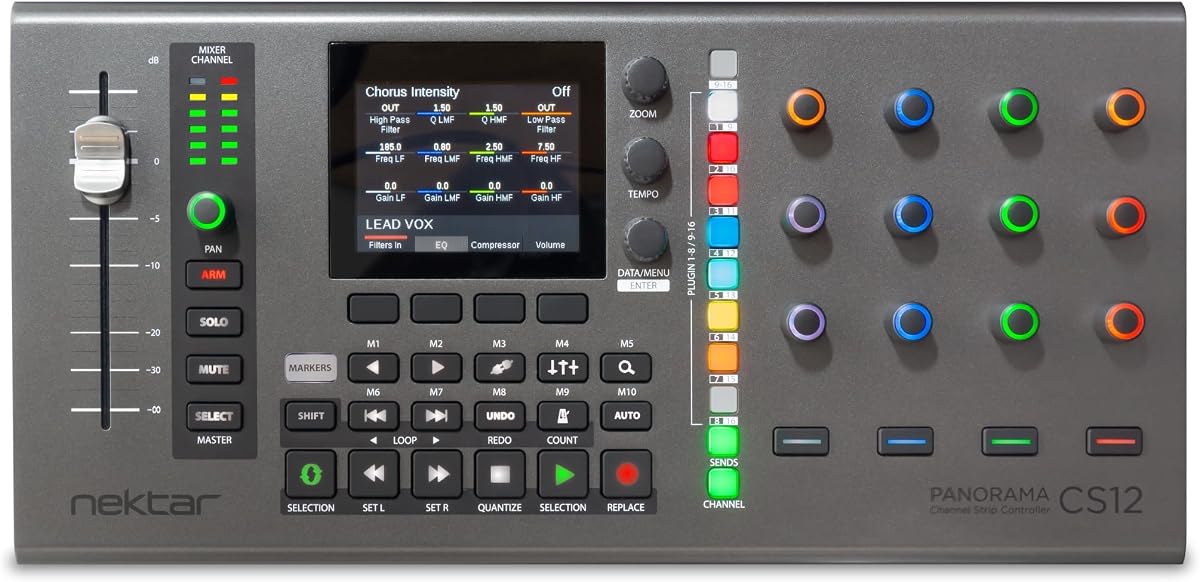
The Nektar Panorama CS12 is not an analog processor or audio interface. It is a dedicated channel strip plug-in controller with DAW integration, a motorized fader, a 3.5-inch TFT display, rotary encoders, and transport buttons. Its 3.9 rating reflects a practical control solution for musicians who want more direct interaction with software mixing parameters.
We may earn a commission when you buy through this link, at no additional cost to you.
The motorized fader communicates the position of the selected software parameter, while the screen can provide visual context for the active plug-in or channel. Rotary encoders offer additional continuous control, and the transport buttons make common playback tasks more accessible. Together, these features can reduce the need to hunt through on-screen controls during mixing.
Because the CS12 does not itself contain a microphone preamp, equalizer, compressor, or audio converter, it should not be compared with a traditional hardware channel strip on processing capability. Its value comes entirely from workflow integration. Compatibility, plug-in assignment, and software setup will determine how much benefit the user experiences.
Choose the Panorama CS12 when a DAW-based production workflow needs a more tactile control surface. It is particularly relevant for producers who spend long sessions refining dynamics and EQ and want a fader and display that provide immediate feedback without removing their hands from the keyboard.
The motorized fader translates a physical position into the selected software parameter, providing visual and tactile feedback. This is useful for fine adjustments that can be difficult to perform with a mouse alone.
The 3.5-inch TFT display can present information about the selected control or plug-in. That visual feedback helps the user stay oriented while moving among the channel-strip functions provided by the DAW.
We may earn a commission when you buy through this link, at no additional cost to you.
The Yamaha MG10XU is a compact 10-input stereo mixer that combines a straightforward analog mixing surface with USB connectivity and SPX digital effects. Its 4.6 rating is among the strongest in the guide, and its integrated design makes it especially relevant for small studios, rehearsal rooms, podcasting, and live recording where a full rack of processors would be unnecessary.
We may earn a commission when you buy through this link, at no additional cost to you.
Each mixer channel provides discrete Class A D PRE amplification, three-band equalization, a high-pass filter, and a one-knob compressor. These tools cover the most common decisions involved in shaping a source. The stated equivalent input noise of 128 dBu and residual output noise of 102 dBu also give buyers concrete technical figures to consider when evaluating the analog signal path.
Its limitations come from being a small-format mixer rather than a modular studio rack strip. It cannot be expanded into a larger collection of specialized preamps or processors, and the built-in effects are intended for convenient mixing rather than comprehensive outboard processing. Its physical dimensions are listed as approximately 9.6 by 2.8 by 11.6 inches, which is manageable but not a one-rack-space device.
The MG10XU is a strong recommendation for a bedroom studio, classroom, content-creation setup, or compact ensemble recording session. It gives a new operator several familiar channel-strip functions in one box, while USB support helps move the resulting stereo mix into a computer for editing and publishing.
The built-in USB connection and stereo mixer simplify the path from live capture to computer editing. It is a practical approach for projects that do not need multichannel digital conversion but still want recordings transferred for later work.
High-pass filters, three-band EQ, and one-knob compressors make the channel layout approachable. The same controls can support cleaner vocals, tighter drums, and more focused instrument balance without requiring separate desktop units.
We may earn a commission when you buy through this link, at no additional cost to you.
The SSL Revival 4000 is described as an all-analogue microphone channel strip inspired by the iconic SSL 4000 Series and housed in a compact 1U format. The concept is immediately clear, but the supplied rating of 1 and the limited feature summary make this the product with the largest amount of uncertainty in the guide.
We may earn a commission when you buy through this link, at no additional cost to you.
An SSL-inspired design carries appeal for engineers who value the visual and sonic identity of a classic large-format console channel. The all-analogue path may be attractive to users who want to avoid software processing for foundational capture and equalization. The compact 1U format also makes it more manageable than a full console section.
However, the listing provides only a broad description and does not enumerate the preamp controls, equalizer bands, compressor controls, input formats, output routing, or metering. It would be irresponsible to invent those details or infer a full feature set from the 4000 Series name. The 1 rating should prompt buyers to check the current product page, documentation, warranty terms, and recent customer feedback before committing.
The Revival 4000 is best approached as a premium design with a specific classic-console identity rather than as a fully documented recommendation. It may suit an engineer building a compact analog rack, but a buyer who needs clear specifications and a well-established performance record should give it additional scrutiny.
The design is explicitly based on the SSL 4000 Series, giving the product a recognizable identity within professional recording. For users attracted to traditional console workflows, that lineage is a central part of its appeal.
The all-analogue description suggests a hardware signal path centered on physical recording equipment. Buyers should confirm the complete input, output, and control specification before integrating it into a session.
We may earn a commission when you buy through this link, at no additional cost to you.
The Universal Audio LA-610 Mk II is a premium tube channel strip built around a vacuum-tube microphone, instrument, or line preamp with an optical compressor. It has a 5 rating and represents one of the most traditional approaches in the guide: a hardware recording chain intended to shape the source directly before the signal enters the wider studio system.
We may earn a commission when you buy through this link, at no additional cost to you.
Tube amplification and optical compression are central to its identity. The preamp can add harmonic texture as the signal is amplified, while the optical compressor offers a smooth dynamics behavior suited to vocals, instruments, and buses. Supporting microphone, instrument, and line sources makes it adaptable across common recording tasks.
The significant compromise is cost. This is a premium acquisition for users who already have a suitable converter, monitoring path, and rack infrastructure. No digital interface functionality is identified in the supplied data, so it should not be purchased on the assumption that it can replace an audio interface or handle multichannel computer recording.
The LA-610 Mk II is a compelling centerpiece for a high-end analog room or a premium vocal chain. Its perfect rating and classic tube format suit an engineer who values a dedicated hardware sound and wants to combine preamp coloration with smooth optical level control.
The vacuum-tube preamp changes the character of the source before later processing. It can provide the harmonic density and perceived warmth that many engineers seek when refining vocals, string instruments, guitars, and close-miked drums.
The optical compressor gives the channel a gentler alternative to aggressive feedback-style dynamics. That makes it a natural fit for smoothing performance peaks without demanding constant threshold and attack adjustments.
We may earn a commission when you buy through this link, at no additional cost to you.
The Neve 1073SPX-D is the most connectivity-focused option in the guide. It combines a Class A preamp and equalizer channel strip with a USB audio interface, 24-bit/192kHz conversion, insert send and return, a headphone amplifier, and ADAT input and output. No numerical rating was supplied, so its evaluation here rests on the documented functions rather than a customer score.
We may earn a commission when you buy through this link, at no additional cost to you.
The USB connection makes the unit relevant to a modern project studio where a hardware channel strip should feed directly into a computer. ADAT I/O provides a path for expanding the recording system with additional converters. Insert send and return adds outboard processing opportunities, while the headphone amplifier offers a convenient personal monitoring solution.
Its high-resolution specification and classic Neve design place it in the premium category, but those features do not eliminate the need for a complete studio. Channel count, software compatibility, operating system support, included accessories, and the exact routing of every input and output should be verified before installation. The supplied information does not provide those details.
This model is a strong fit for a recording engineer who wants a recognizable channel-strip voice while avoiding a separate interface for the main microphone path. It is particularly useful for a hybrid studio combining computer-based production with hardware inserts and high-resolution conversion.
USB connectivity removes the need for a separate basic interface on the primary path. The channel strip can therefore function as both the front-end and the computer-facing converter in a more compact studio.
ADAT input and output provide an established way to connect additional conversion equipment. In a suitable room, that can expand the available recording channels while retaining the central preamp and processing workflow.
We may earn a commission when you buy through this link, at no additional cost to you.
The right channel strip depends on your source material, recording format, room, and level of control. Compare the signal path, processors, connectivity, physical format, and monitoring workflow instead of judging only by the number of features.
Begin with the sources you expect to record. Microphone users need a suitable XLR or equivalent microphone input, while guitarists and bassists may benefit from a Hi-Z instrument input. Keyboardists, playback devices, and line-level sources generally require a clean line input. A strip that accepts microphones, instruments, and line signals offers more flexibility, but only if every connection is easy to identify and the controls are arranged logically.
Choose inputs that match your workflow and confirm the electrical behavior of the instrument path. Hi-Z labeling, impedance settings, pad controls, and balanced or unbalanced compatibility can materially affect tone and usability.
The preamp is the foundation of the channel, so its architecture deserves careful attention. Solid-state designs can provide clarity, consistency, and practical headroom, while tube circuits may add harmonic texture and a more pronounced sense of saturation. Some premium strips provide two preamp paths, allowing the engineer to compare amplifier characters or deliberately use different coloration for different sources.
Look beyond the label and consider gain range, low-noise behavior, available drive controls, phantom power, polarity, and input padding. A beautiful preamp is only as useful as its gain structure and routing flexibility.
A useful equalizer should make corrective and creative changes quickly and repeatably. Basic three-band designs provide broad tonal control, while semi-parametric and fully parametric circuits add dedicated midrange bands for solving narrow problems. Shelf and bell switches can alter how a high or low band behaves, and the availability of a high-pass filter can prevent rumble and proximity effect from consuming useful headroom.
Match the EQ depth to your needs. Beginners may benefit from a simple layout, while experienced engineers often prefer more precise controls and the ability to sweep frequencies or choose Q values.
Compression can make a recording more consistent, but the sonic character matters as much as the amount of gain reduction. Optical, FET, VCA, and variable-ratio designs behave differently around transients and sustained levels. Some channel strips offer a single compressor control for quick operation; others expose threshold, attack, release, ratio, knee, and makeup options for detailed work.
Decide whether convenience or control matters more. A one-knob compressor is easier to use during a fast session, while a fully adjustable unit is better for building a repeatable mix and matching multiple sources.
A traditional rack strip usually ends its responsibility at an analog output, leaving the user to connect a converter or interface. Modern alternatives may include USB, ADAT, or other digital connections, while software controllers offer no audio path at all. Clarify whether you need analog processing only, direct computer recording, multichannel expansion, or simply tactile DAW control.
Check software compatibility and required drivers before choosing a digital model. A USB connection by itself does not guarantee every DAW, operating system, sample rate, or channel-count requirement, so read the current documentation rather than assuming interoperability.
Rack-mountable strips save desk space and make it easier to build a repeatable signal chain. A one-rack-space design is especially useful in furniture-mounted racks, but ventilation, cable routing, and access to controls still need consideration. Compact mixers and desktop controllers offer a different kind of convenience by remaining close to the performer or editing position.
Measure the available space and verify the unit’s dimensions before ordering. A device can have a small physical footprint but still require rear clearance for connections or side clearance for ventilation.
Clear feedback reduces the chance of clipping, excessive noise reduction, or misconfigured routing. Status LEDs are especially valuable on a channel strip with several processors because they can show when compression, gating, or another function is active. Insert points and loop-outs allow external processing, while dedicated outputs and monitor paths determine how easily the strip integrates into a larger console or interface.
Look for a layout that presents the most important information without requiring you to memorize button combinations. A slightly less feature-dense unit can be more effective if its meters and routing are immediately understandable.
A channel strip is a long-term studio investment, so consider the support and replacement context as well as the initial purchase. A recognized brand can provide clearer documentation and a more established service network, while a less conventional product may demand more research before integration. The difference between a basic mixer channel and a premium analog strip should be weighed against the musical role it will play.
Prioritize dependable gain staging and a workflow you will use over a long list of rarely touched controls. The most capable unit is not necessarily the most valuable choice if it does not match the signals or room you actually use.
Begin by confirming that the strip is properly grounded, installed securely, and compatible with the local power supply. Read the supplied manual before applying power, particularly for products with multiple voltage options. Connect sources and monitoring equipment, then set the preamp gain with the channel muted before introducing signal. Starting with the EQ and compressor in a neutral position makes it easier to identify unwanted noise or distortion.
Set the recording level so peaks remain below clipping while retaining sufficient headroom. Bring the level into the green region, listen for distortion, and adjust gain rather than relying on a heavy compressor to repair an overloaded recording. Use the high-pass filter to remove rumble, make narrow EQ corrections by ear and measurement, and adjust compression gradually. Bypass controls are valuable for comparing the processed and unprocessed source.
Care for the unit by keeping controls and ventilation openings free of dust, avoiding moisture and unstable power connections, and securing rack screws properly. For tube-based models, follow the manual’s warm-up and power-down guidance. Save a clear patch or settings notes for each source, and periodically check the output, insert routing, phantom power, and signal chain so a changed connection does not silently alter a recording.
A channel strip combines several parts of a recording signal chain in one unit. Depending on the model, it may include a microphone or instrument preamp, equalizer, compressor, gate, routing, and metering. Some designs are analog rack units, while others connect to a computer or control software directly.
It depends on the recording environment and the desired workflow. A channel strip is convenient because the processors are coordinated in one package, while separate units provide more routing freedom and the ability to mix signal chains. A high-end channel strip may also offer a particular preamp and compressor character that would be expensive to duplicate separately.
Yes, but only if the strip has a compatible analog or digital output. Traditional rack strips usually feed an external interface, while the Neve 1073SPX-D includes USB and ADAT connectivity. The Nektar Panorama CS12 does not process audio; it controls supported plug-ins inside a DAW rather than sending a separate analog signal.
A Hi-Z input is strongly preferable for direct electric guitar recording because it better matches the impedance of a guitar pickup. The SSL SiX includes a front-panel TRS input with a one-megaohm Hi-Z switch, while the dbx 286SV offers instrument-capable quarter-inch TRS connectivity. Always use an instrument cable and confirm the input is set correctly before recording.
Not necessarily, but it is a useful starting point for many sources. A high-pass filter can remove handling noise, rumble, and unnecessary low-frequency energy, although cutting too much can make a source thin or unnatural. Start with the manufacturer’s recommended frequency, listen critically, and bypass it when the source needs that low-end weight.
Use enough gain to bring the source to a healthy recording level while leaving peak headroom. Watch the meter during the loudest performance and ensure the signal is not clipping or distorting. After setting the preamp, make tonal and dynamic changes with the EQ and compressor rather than adding more input gain.
Neither type is universally better. Solid-state designs often emphasize clarity, consistency, and low noise, while tube circuits may add harmonic texture and a more pronounced saturation character. The best choice depends on the source, the mixing style, the rest of the signal chain, and how much character the engineer wants to add.
Not necessarily. A compact mixer such as the Yamaha MG10XU or a quality software-based channel strip can cover many home-recording needs. Hardware becomes more compelling when its preamp, dynamics character, routing, or tactile controls solve a specific problem that software and the existing interface do not already provide.
The SSL SiX stands out as the most focused all-around choice, offering strong user feedback, a compact workflow, essential filtering, flexible EQ, straightforward compression, and a useful Hi-Z input. The dbx 286SV provides the broadest processing package in a conventional rack strip, while the Universal Audio LA-610 Mk II delivers a premium combination of tube amplification and optical compression.
Prioritize the recording path that matches your actual sources and room. A simple, well-understood strip can outperform a feature-heavy model, while a premium unit becomes more defensible when its preamp character, routing, or analog processing supports a specific production goal. Consider computer connectivity carefully, especially when comparing a traditional rack strip with the Neve 1073SPX-D or the DAW-focused Nektar controller.
Before purchasing, verify the current specification, compatibility, warranty, and availability directly on the product page. Product ratings and features can evolve, and prices change over time. Comparing the present listing against the needs of your microphones, instruments, converter, DAW, and monitoring setup will lead to the most dependable channel-strip choice.